arrow-left

All pages
gitbookPowered by GitBook
1 of 27

Loading...

Loading...

Loading...

Loading...

Loading...

Loading...

Loading...

Loading...

Loading...

Loading...

Loading...

Loading...

Loading...

Loading...

Loading...

Loading...

Loading...

Loading...

Loading...

Loading...

Loading...

Loading...

Loading...

Loading...

Loading...

Loading...

Loading...

Strings Continued

hashtag
Working with Strings

Let’s look at some of the ways Python lets you write, print, and access strings in your code.

String Literals

Typing string values in Python code is fairly straightforward: they begin and end with a single quote. But then how can you use a quote inside a string? Typing 'That is Alice's cat.' won’t work, because Python thinks the string ends after Alice, and the rest (s cat.') is invalid Python code. Fortunately, there are multiple ways to type strings.

Double Quotes

Strings can begin and end with double quotes, just as they do with single quotes. One benefit of using double quotes is that the string can have a single quote character in it. Enter the following into the interactive shell:

>>> spam = "That is Alice's cat."

Since the string begins with a double quote, Python knows that the single quote is part of the string and not marking the end of the string. However, if you need to use both single quotes and double quotes in the string, you’ll need to use escape characters.

Escape Characters

An escape character lets you use characters that are otherwise impossible to put into a string. An escape character consists of a backslash (\) followed by the character you want to add to the string. (Despite consisting of two characters, it is commonly referred to as a singular escape character.) For example, the escape character for a single quote is \'. You can use this inside a string that begins and ends with single quotes. To see how escape characters work, enter the following into the interactive shell:

>>> spam = 'Say hi to Bob\'s mother.'

Python knows that since the single quote in Bob\'s has a backslash, it is not a single quote meant to end the string value. The escape characters \' and \" let you put single quotes and double quotes inside your strings, respectively.

lists the escape characters you can use.

Table 6-1: Escape Characters

Enter the following into the interactive shell:

>>> print("Hello there!\nHow are you?\nI\'m doing fine.") Hello there! How are you? I'm doing fine.

Raw Strings

You can place an r before the beginning quotation mark of a string to make it a raw string. A raw string completely ignores all escape characters and prints any backslash that appears in the string. For example, enter the following into the interactive shell:

>>> print(r'That is Carol\'s cat.') That is Carol\'s cat.

Because this is a raw string, Python considers the backslash as part of the string and not as the start of an escape character. Raw strings are helpful if you are typing string values that contain many backslashes, such as the strings used for Windows file paths like r'C:\Users\Al\Desktop' or regular expressions described in the next chapter.

Multiline Strings with Triple Quotes

While you can use the \n escape character to put a newline into a string, it is often easier to use multiline strings. A multiline string in Python begins and ends with either three single quotes or three double quotes. Any quotes, tabs, or newlines in between the “triple quotes” are considered part of the string. Python’s indentation rules for blocks do not apply to lines inside a multiline string.

Open the file editor and write the following:

print('''Dear Alice, Eve's cat has been arrested for catnapping, cat burglary, and extortion. Sincerely, Bob''')

Save this program as catnapping.py and run it. The output will look like this:

Dear Alice, Eve's cat has been arrested for catnapping, cat burglary, and extortion. Sincerely, Bob

Notice that the single quote character in Eve's does not need to be escaped. Escaping single and double quotes is optional in multiline strings. The following print() call would print identical text but doesn’t use a multiline string:

print('Dear Alice,\n\nEve\'s cat has been arrested for catnapping, cat burglary, and extortion.\n\nSincerely,\nBob')

Multiline Comments

While the hash character (#) marks the beginning of a comment for the rest of the line, a multiline string is often used for comments that span multiple lines. The following is perfectly valid Python code:

"""This is a test Python program. Written by Al Sweigart al@inventwithpython.com This program was designed for Python 3, not Python 2. """ def spam(): """This is a multiline comment to help explain what the spam() function does.""" print('Hello!')

Indexing and Slicing Strings

Strings use indexes and slices the same way lists do. You can think of the string 'Hello, world!' as a list and each character in the string as an item with a corresponding index.

' H e l l o , w o r l d ! ' 0 1 2 3 4 5 6 7 8 9 10 11 12

The space and exclamation point are included in the character count, so 'Hello, world!' is 13 characters long, from H at index 0 to ! at index 12.

Enter the following into the interactive shell:

>>> spam = 'Hello, world!' >>> spam[0] 'H' >>> spam[4] 'o' >>> spam[-1] '!' >>> spam[0:5] 'Hello' >>> spam[:5] 'Hello' >>> spam[7:] 'world!'

If you specify an index, you’ll get the character at that position in the string. If you specify a range from one index to another, the starting index is included and the ending index is not. That’s why, if spam is 'Hello, world!', spam[0:5] is 'Hello'. The substring you get from spam[0:5] will include everything from spam[0] to spam[4], leaving out the comma at index 5 and the space at index 6. This is similar to how range(5) will cause a for loop to iterate up to, but not including, 5.

Note that slicing a string does not modify the original string. You can capture a slice from one variable in a separate variable. Try entering the following into the interactive shell:

>>> spam = 'Hello, world!' >>> fizz = spam[0:5] >>> fizz 'Hello'

By slicing and storing the resulting substring in another variable, you can have both the whole string and the substring handy for quick, easy access.

The in and not in Operators with Strings

The in and not in operators can be used with strings just like with list values. An expression with two strings joined using in or not in will evaluate to a Boolean True or False. Enter the following into the interactive shell:

>>> 'Hello' in 'Hello, World' True >>> 'Hello' in 'Hello' True >>> 'HELLO' in 'Hello, World' False >>> '' in 'spam' True >>> 'cats' not in 'cats and dogs' False

These expressions test whether the first string (the exact string, case-sensitive) can be found within the second string.

hashtag
Putting Strings Inside Other Strings

Putting strings inside other strings is a common operation in programming. So far, we’ve been using the + operator and string concatenation to do this:

>>> name = 'Al' >>> age = 4000 >>> 'Hello, my name is ' + name + '. I am ' + str(age) + ' years old.' 'Hello, my name is Al. I am 4000 years old.'

However, this requires a lot of tedious typing. A simpler approach is to use string interpolation, in which the %s operator inside the string acts as a marker to be replaced by values following the string. One benefit of string interpolation is that str() doesn’t have to be called to convert values to strings. Enter the following into the interactive shell:

>>> name = 'Al' >>> age = 4000 >>> 'My name is %s. I am %s years old.' % (name, age) 'My name is Al. I am 4000 years old.'

Python 3.6 introduced f-strings, which is similar to string interpolation except that braces are used instead of %s, with the expressions placed directly inside the braces. Like raw strings, f-strings have an f prefix before the starting quotation mark. Enter the following into the interactive shell:

>>> name = 'Al' >>> age = 4000 >>> f'My name is {name}. Next year I will be {age + 1}.' 'My name is Al. Next year I will be 4001.'

Remember to include the f prefix; otherwise, the braces and their contents will be a part of the string value:

>>> 'My name is {name}. Next year I will be {age + 1}.' 'My name is {name}. Next year I will be {age + 1}.'

hashtag
Useful String Methods

Several string methods analyze strings or create transformed string values. This section describes the methods you’ll be using most often.

The upper(), lower(), isupper(), and islower() Methods

The upper() and lower() string methods return a new string where all the letters in the original string have been converted to uppercase or lowercase, respectively. Nonletter characters in the string remain unchanged. Enter the following into the interactive shell:

>>> spam = 'Hello, world!' >>> spam = spam.upper() >>> spam 'HELLO, WORLD!' >>> spam = spam.lower() >>> spam 'hello, world!'

Note that these methods do not change the string itself but return new string values. If you want to change the original string, you have to call upper() or lower() on the string and then assign the new string to the variable where the original was stored. This is why you must use spam = spam.upper() to change the string in spam instead of simply spam.upper(). (This is just like if a variable eggs contains the value 10. Writing eggs + 3 does not change the value of eggs, but eggs = eggs + 3 does.)

The upper() and lower() methods are helpful if you need to make a case-insensitive comparison. For example, the strings 'great' and 'GREat' are not equal to each other. But in the following small program, it does not matter whether the user types Great, GREAT, or grEAT, because the string is first converted to lowercase.

print('How are you?') feeling = input() if feeling.lower() == 'great': print('I feel great too.') else: print('I hope the rest of your day is good.')

When you run this program, the question is displayed, and entering a variation on great, such as GREat, will still give the output I feel great too. Adding code to your program to handle variations or mistakes in user input, such as inconsistent capitalization, will make your programs easier to use and less likely to fail.

How are you? GREat I feel great too.

You can view the execution of this program at . The isupper() and islower() methods will return a Boolean True value if the string has at least one letter and all the letters are uppercase or lowercase, respectively. Otherwise, the method returns False. Enter the following into the interactive shell, and notice what each method call returns:

>>> spam = 'Hello, world!' >>> spam.islower() False >>> spam.isupper() False >>> 'HELLO'.isupper() True >>> 'abc12345'.islower() True >>> '12345'.islower() False >>> '12345'.isupper() False

Since the upper() and lower() string methods themselves return strings, you can call string methods on those returned string values as well. Expressions that do this will look like a chain of method calls. Enter the following into the interactive shell:

>>> 'Hello'.upper() 'HELLO' >>> 'Hello'.upper().lower() 'hello' >>> 'Hello'.upper().lower().upper() 'HELLO' >>> 'HELLO'.lower() 'hello' >>> 'HELLO'.lower().islower() True

The isX() Methods

Along with islower() and isupper(), there are several other string methods that have names beginning with the word is. These methods return a Boolean value that describes the nature of the string. Here are some common isX string methods:

isalpha() Returns True if the string consists only of letters and isn’t blank

isalnum() Returns True if the string consists only of letters and numbers and is not blank

isdecimal() Returns True if the string consists only of numeric characters and is not blank

isspace() Returns True if the string consists only of spaces, tabs, and newlines and is not blank

istitle() Returns True if the string consists only of words that begin with an uppercase letter followed by only lowercase letters

Enter the following into the interactive shell:

>>> 'hello'.isalpha() True >>> 'hello123'.isalpha() False >>> 'hello123'.isalnum() True >>> 'hello'.isalnum() True >>> '123'.isdecimal() True >>> ' '.isspace() True >>> 'This Is Title Case'.istitle() True >>> 'This Is Title Case 123'.istitle() True >>> 'This Is not Title Case'.istitle() False >>> 'This Is NOT Title Case Either'.istitle() False

The isX() string methods are helpful when you need to validate user input. For example, the following program repeatedly asks users for their age and a password until they provide valid input. Open a new file editor window and enter this program, saving it as validateInput.py:

while True: print('Enter your age:') age = input() if age.isdecimal(): break print('Please enter a number for your age.') while True: print('Select a new password (letters and numbers only):') password = input() if password.isalnum(): break print('Passwords can only have letters and numbers.')

In the first while loop, we ask the user for their age and store their input in age. If age is a valid (decimal) value, we break out of this first while loop and move on to the second, which asks for a password. Otherwise, we inform the user that they need to enter a number and again ask them to enter their age. In the second while loop, we ask for a password, store the user’s input in password, and break out of the loop if the input was alpha­numeric. If it wasn’t, we’re not satisfied, so we tell the user the password needs to be alphanumeric and again ask them to enter a password.

When run, the program’s output looks like this:

Enter your age: forty two Please enter a number for your age. Enter your age: 42 Select a new password (letters and numbers only): secr3t! Passwords can only have letters and numbers. Select a new password (letters and numbers only): secr3t

You can view the execution of this program at . Calling isdecimal() and isalnum() on variables, we’re able to test whether the values stored in those variables are decimal or not, alphanumeric or not. Here, these tests help us reject the input forty two but accept 42, and reject secr3t! but accept secr3t.

The startswith() and endswith() Methods

The startswith() and endswith() methods return True if the string value they are called on begins or ends (respectively) with the string passed to the method; otherwise, they return False. Enter the following into the interactive shell:

>>> 'Hello, world!'.startswith('Hello') True >>> 'Hello, world!'.endswith('world!') True >>> 'abc123'.startswith('abcdef') False >>> 'abc123'.endswith('12') False >>> 'Hello, world!'.startswith('Hello, world!') True >>> 'Hello, world!'.endswith('Hello, world!') True

These methods are useful alternatives to the == equals operator if you need to check only whether the first or last part of the string, rather than the whole thing, is equal to another string.

The join() and split() Methods

The join() method is useful when you have a list of strings that need to be joined together into a single string value. The join() method is called on a string, gets passed a list of strings, and returns a string. The returned string is the concatenation of each string in the passed-in list. For example, enter the following into the interactive shell:

>>> ', '.join(['cats', 'rats', 'bats']) 'cats, rats, bats' >>> ' '.join(['My', 'name', 'is', 'Simon']) 'My name is Simon' >>> 'ABC'.join(['My', 'name', 'is', 'Simon']) 'MyABCnameABCisABCSimon'

Notice that the string join() calls on is inserted between each string of the list argument. For example, when join(['cats', 'rats', 'bats']) is called on the ', ' string, the returned string is 'cats, rats, bats'.

Remember that join() is called on a string value and is passed a list value. (It’s easy to accidentally call it the other way around.) The split() method does the opposite: It’s called on a string value and returns a list of strings. Enter the following into the interactive shell:

>>> 'My name is Simon'.split() ['My', 'name', 'is', 'Simon']

By default, the string 'My name is Simon' is split wherever whitespace characters such as the space, tab, or newline characters are found. These whitespace characters are not included in the strings in the returned list. You can pass a delimiter string to the split() method to specify a different string to split upon. For example, enter the following into the interactive shell:

>>> 'MyABCnameABCisABCSimon'.split('ABC') ['My', 'name', 'is', 'Simon'] >>> 'My name is Simon'.split('m') ['My na', 'e is Si', 'on']

A common use of split() is to split a multiline string along the newline characters. Enter the following into the interactive shell:

>>> spam = '''Dear Alice, How have you been? I am fine. There is a container in the fridge that is labeled "Milk Experiment." Please do not drink it. Sincerely, Bob''' >>> spam.split('\n') ['Dear Alice,', 'How have you been? I am fine.', 'There is a container in the fridge', 'that is labeled "Milk Experiment."', '', 'Please do not drink it.', 'Sincerely,', 'Bob']

Passing split() the argument '\n' lets us split the multiline string stored in spam along the newlines and return a list in which each item corresponds to one line of the string.

Splitting Strings with the partition() Method

The partition() string method can split a string into the text before and after a separator string. This method searches the string it is called on for the separator string it is passed, and returns a tuple of three substrings for the “before,” “separator,” and “after” substrings. Enter the following into the interactive shell:

>>> 'Hello, world!'.partition('w') ('Hello, ', 'w', 'orld!') >>> 'Hello, world!'.partition('world') ('Hello, ', 'world', '!')

If the separator string you pass to partition() occurs multiple times in the string that partition() calls on, the method splits the string only on the first occurrence:

>>> 'Hello, world!'.partition('o') ('Hell', 'o', ', world!')

If the separator string can’t be found, the first string returned in the tuple will be the entire string, and the other two strings will be empty:

>>> 'Hello, world!'.partition('XYZ') ('Hello, world!', '', '')

You can use the multiple assignment trick to assign the three returned strings to three variables:

>>> before, sep, after = 'Hello, world!'.partition(' ') >>> before 'Hello,' >>> after 'world!'

The partition() method is useful for splitting a string whenever you need the parts before, including, and after a particular separator string.

Justifying Text with the rjust(), ljust(), and center() Methods

The rjust() and ljust() string methods return a padded version of the string they are called on, with spaces inserted to justify the text. The first argument to both methods is an integer length for the justified string. Enter the following into the interactive shell:

>>> 'Hello'.rjust(10) ' Hello' >>> 'Hello'.rjust(20) ' Hello' >>> 'Hello, World'.rjust(20) ' Hello, World' >>> 'Hello'.ljust(10) 'Hello '

'Hello'.rjust(10) says that we want to right-justify 'Hello' in a string of total length 10. 'Hello' is five characters, so five spaces will be added to its left, giving us a string of 10 characters with 'Hello' justified right.

An optional second argument to rjust() and ljust() will specify a fill character other than a space character. Enter the following into the interactive shell:

>>> 'Hello'.rjust(20, '*') '***************Hello' >>> 'Hello'.ljust(20, '-') 'Hello---------------'

The center() string method works like ljust() and rjust() but centers the text rather than justifying it to the left or right. Enter the following into the interactive shell:

>>> 'Hello'.center(20) ' Hello ' >>> 'Hello'.center(20, '=') '=======Hello========'

These methods are especially useful when you need to print tabular data that has correct spacing. Open a new file editor window and enter the following code, saving it as picnicTable.py:

def printPicnic(itemsDict, leftWidth, rightWidth): print('PICNIC ITEMS'.center(leftWidth + rightWidth, '-')) for k, v in itemsDict.items(): print(k.ljust(leftWidth, '.') + str(v).rjust(rightWidth)) picnicItems = {'sandwiches': 4, 'apples': 12, 'cups': 4, 'cookies': 8000} printPicnic(picnicItems, 12, 5) printPicnic(picnicItems, 20, 6)

You can view the execution of this program at . In this program, we define a printPicnic() method that will take in a dictionary of information and use center(), ljust(), and rjust() to display that information in a neatly aligned table-like format.

The dictionary that we’ll pass to printPicnic() is picnicItems. In picnicItems, we have 4 sandwiches, 12 apples, 4 cups, and 8,000 cookies. We want to organize this information into two columns, with the name of the item on the left and the quantity on the right.

To do this, we decide how wide we want the left and right columns to be. Along with our dictionary, we’ll pass these values to printPicnic().

The printPicnic() function takes in a dictionary, a leftWidth for the left column of a table, and a rightWidth for the right column. It prints a title, PICNIC ITEMS, centered above the table. Then, it loops through the dictionary, printing each key-value pair on a line with the key justified left and padded by periods, and the value justified right and padded by spaces.

After defining printPicnic(), we define the dictionary picnicItems and call printPicnic() twice, passing it different widths for the left and right table columns.

When you run this program, the picnic items are displayed twice. The first time the left column is 12 characters wide, and the right column is 5 characters wide. The second time they are 20 and 6 characters wide, respectively.

---PICNIC ITEMS-- sandwiches.. 4 apples...... 12 cups........ 4 cookies..... 8000 -------PICNIC ITEMS------- sandwiches.......... 4 apples.............. 12 cups................ 4 cookies............. 8000

Using rjust(), ljust(), and center() lets you ensure that strings are neatly aligned, even if you aren’t sure how many characters long your strings are.

Removing Whitespace with the strip(), rstrip(), and lstrip() Methods

Sometimes you may want to strip off whitespace characters (space, tab, and newline) from the left side, right side, or both sides of a string. The strip() string method will return a new string without any whitespace characters at the beginning or end. The lstrip() and rstrip() methods will remove whitespace characters from the left and right ends, respectively. Enter the following into the interactive shell:

>>> spam = ' Hello, World ' >>> spam.strip() 'Hello, World' >>> spam.lstrip() 'Hello, World ' >>> spam.rstrip() ' Hello, World'

Optionally, a string argument will specify which characters on the ends should be stripped. Enter the following into the interactive shell:

>>> spam = 'SpamSpamBaconSpamEggsSpamSpam' >>> spam.strip('ampS') 'BaconSpamEggs'

Passing strip() the argument 'ampS' will tell it to strip occurrences of a, m, p, and capital S from the ends of the string stored in spam. The order of the characters in the string passed to strip() does not matter: strip('ampS') will do the same thing as strip('mapS') or strip('Spam').

hashtag
Numeric Values of Characters with the ord() and chr() Functions

Computers store information as bytes—strings of binary numbers, which means we need to be able to convert text to numbers. Because of this, every text character has a corresponding numeric value called a Unicode code point. For example, the numeric code point is 65 for 'A', 52 for '4', and 33 for '!'. You can use the ord() function to get the code point of a one-character string, and the chr() function to get the one-character string of an integer code point. Enter the following into the interactive shell:

>>> ord('A') 65 >>> ord('4') 52 >>> ord('!') 33 >>> chr(65) 'A'

These functions are useful when you need to do an ordering or mathematical operation on characters:

>>> ord('B') 66 >>> ord('A') < ord('B') True >>> chr(ord('A')) 'A' >>> chr(ord('A') + 1) 'B'

There is more to Unicode and code points, but those details are beyond the scope of this book. If you’d like to know more, I recommend watching Ned Batchelder’s 2012 PyCon talk, “Pragmatic Unicode, or, How Do I Stop the Pain?” at .

hashtag
Copying and Pasting Strings with the pyperclip Module

The pyperclip module has copy() and paste() functions that can send text to and receive text from your computer’s clipboard. Sending the output of your program to the clipboard will make it easy to paste it into an email, word processor, or some other software.

RUNNING PYTHON SCRIPTS OUTSIDE OF MU

So far, you’ve been running your Python scripts using the interactive shell and file editor in Mu. However, you won’t want to go through the inconvenience of opening Mu and the Python script each time you want to run a script. Fortunately, there are shortcuts you can set up to make running Python scripts easier. The steps are slightly different for Windows, macOS, and Linux, but each is described in . Turn to to learn how to run your Python scripts conveniently and be able to pass command line arguments to them. (You will not be able to pass command line arguments to your programs using Mu.)

The pyperclip module does not come with Python. To install it, follow the directions for installing third-party modules in . After installing pyperclip, enter the following into the interactive shell:

>>> import pyperclip >>> pyperclip.copy('Hello, world!') >>> pyperclip.paste() 'Hello, world!'

Of course, if something outside of your program changes the clipboard contents, the paste() function will return it. For example, if I copied this sentence to the clipboard and then called paste(), it would look like this:

>>> pyperclip.paste() 'For example, if I copied this sentence to the clipboard and then called paste(), it would look like this:'

hashtag
Project: Multi-Clipboard Automatic Messages

If you’ve responded to a large number of emails with similar phrasing, you’ve probably had to do a lot of repetitive typing. Maybe you keep a text document with these phrases so you can easily copy and paste them using the clipboard. But your clipboard can only store one message at a time, which isn’t very convenient. Let’s make this process a bit easier with a program that stores multiple phrases.

Step 1: Program Design and Data Structures

You want to be able to run this program with a command line argument that is a short key phrase—for instance, agree or busy. The message associated with that key phrase will be copied to the clipboard so that the user can paste it into an email. This way, the user can have long, detailed messages without having to retype them.

THE CHAPTER PROJECTS

This is the first “chapter project” of the book. From here on, each chapter will have projects that demonstrate the concepts covered in the chapter. The projects are written in a style that takes you from a blank file editor window to a full, working program. Just like with the interactive shell examples, don’t only read the project sections—follow along on your computer!

Open a new file editor window and save the program as mclip.py. You need to start the program with a #! (shebang) line (see ) and should also write a comment that briefly describes the program. Since you want to associate each piece of text with its key phrase, you can store these as strings in a dictionary. The dictionary will be the data structure that organizes your key phrases and text. Make your program look like the following:

#! python3 # mclip.py - A multi-clipboard program. TEXT = {'agree': """Yes, I agree. That sounds fine to me.""", 'busy': """Sorry, can we do this later this week or next week?""", 'upsell': """Would you consider making this a monthly donation?"""}

Step 2: Handle Command Line Arguments

The command line arguments will be stored in the variable sys.argv. (See for more information on how to use command line arguments in your programs.) The first item in the sys.argv list should always be a string containing the program’s filename ('mclip.py'), and the second item should be the first command line argument. For this program, this argument is the key phrase of the message you want. Since the command line argument is mandatory, you display a usage message to the user if they forget to add it (that is, if the sys.argv list has fewer than two values in it). Make your program look like the following:

#! python3 # mclip.py - A multi-clipboard program. TEXT = {'agree': """Yes, I agree. That sounds fine to me.""", 'busy': """Sorry, can we do this later this week or next week?""", 'upsell': """Would you consider making this a monthly donation?"""} import sys if len(sys.argv) < 2: print('Usage: python mclip.py [keyphrase] - copy phrase text') sys.exit() keyphrase = sys.argv[1] # first command line arg is the keyphrase

Step 3: Copy the Right Phrase

Now that the key phrase is stored as a string in the variable keyphrase, you need to see whether it exists in the TEXT dictionary as a key. If so, you want to copy the key’s value to the clipboard using pyperclip.copy(). (Since you’re using the pyperclip module, you need to import it.) Note that you don’t actually need the keyphrase variable; you could just use sys.argv[1] everywhere keyphrase is used in this program. But a variable named keyphrase is much more readable than something cryptic like sys.argv[1].

Make your program look like the following:

#! python3 # mclip.py - A multi-clipboard program. TEXT = {'agree': """Yes, I agree. That sounds fine to me.""", 'busy': """Sorry, can we do this later this week or next week?""", 'upsell': """Would you consider making this a monthly donation?"""} import sys, pyperclip if len(sys.argv) < 2: print('Usage: py mclip.py [keyphrase] - copy phrase text') sys.exit() keyphrase = sys.argv[1] # first command line arg is the keyphrase if keyphrase in TEXT: pyperclip.copy(TEXT[keyphrase]) print('Text for ' + keyphrase + ' copied to clipboard.') else: print('There is no text for ' + keyphrase)

This new code looks in the TEXT dictionary for the key phrase. If the key phrase is a key in the dictionary, we get the value corresponding to that key, copy it to the clipboard, and print a message saying that we copied the value. Otherwise, we print a message saying there’s no key phrase with that name.

That’s the complete script. Using the instructions in for launching command line programs easily, you now have a fast way to copy messages to the clipboard. You will have to modify the TEXT dictionary value in the source whenever you want to update the program with a new message.

On Windows, you can create a batch file to run this program with the WIN-R Run window. (For more about batch files, see .) Enter the following into the file editor and save the file as mclip.bat in the C:\Windows folder:

@py.exe C:\path_to_file\mclip.py %* @pause

With this batch file created, running the multi-clipboard program on Windows is just a matter of pressing WIN-R and typing mclip key phrase.

hashtag
Project: Adding Bullets to Wiki Markup

When editing a Wikipedia article, you can create a bulleted list by putting each list item on its own line and placing a star in front. But say you have a really large list that you want to add bullet points to. You could just type those stars at the beginning of each line, one by one. Or you could automate this task with a short Python script.

The bulletPointAdder.py script will get the text from the clipboard, add a star and space to the beginning of each line, and then paste this new text to the clipboard. For example, if I copied the following text (for the Wikipedia article “List of Lists of Lists”) to the clipboard:

Lists of animals Lists of aquarium life Lists of biologists by author abbreviation Lists of cultivars

and then ran the bulletPointAdder.py program, the clipboard would then contain the following:

* Lists of animals * Lists of aquarium life * Lists of biologists by author abbreviation * Lists of cultivars

This star-prefixed text is ready to be pasted into a Wikipedia article as a bulleted list.

Step 1: Copy and Paste from the Clipboard

You want the bulletPointAdder.py program to do the following:

  1. Paste text from the clipboard.

  2. Do something to it.

  3. Copy the new text to the clipboard.

That second step is a little tricky, but steps 1 and 3 are pretty straightforward: they just involve the pyperclip.copy() and pyperclip.paste() functions. For now, let’s just write the part of the program that covers steps 1 and 3. Enter the following, saving the program as bulletPointAdder.py:

#! python3 # bulletPointAdder.py - Adds Wikipedia bullet points to the start # of each line of text on the clipboard. import pyperclip text = pyperclip.paste() # TODO: Separate lines and add stars. pyperclip.copy(text)

The TODO comment is a reminder that you should complete this part of the program eventually. The next step is to actually implement that piece of the program.

Step 2: Separate the Lines of Text and Add the Star

The call to pyperclip.paste() returns all the text on the clipboard as one big string. If we used the “List of Lists of Lists” example, the string stored in text would look like this:

'Lists of animals\nLists of aquarium life\nLists of biologists by author abbreviation\nLists of cultivars'

The \n newline characters in this string cause it to be displayed with multiple lines when it is printed or pasted from the clipboard. There are many “lines” in this one string value. You want to add a star to the start of each of these lines.

You could write code that searches for each \n newline character in the string and then adds the star just after that. But it would be easier to use the split() method to return a list of strings, one for each line in the original string, and then add the star to the front of each string in the list.

Make your program look like the following:

#! python3 # bulletPointAdder.py - Adds Wikipedia bullet points to the start # of each line of text on the clipboard. import pyperclip text = pyperclip.paste() # Separate lines and add stars. lines = text.split('\n') for i in range(len(lines)): # loop through all indexes in the "lines" list lines[i] = '* ' + lines[i] # add star to each string in "lines" list pyperclip.copy(text)

We split the text along its newlines to get a list in which each item is one line of the text. We store the list in lines and then loop through the items in lines. For each line, we add a star and a space to the start of the line. Now each string in lines begins with a star.

Step 3: Join the Modified Lines

The lines list now contains modified lines that start with stars. But pyperclip.copy() is expecting a single string value, however, not a list of string values. To make this single string value, pass lines into the join() method to get a single string joined from the list’s strings. Make your program look like the following:

#! python3 # bulletPointAdder.py - Adds Wikipedia bullet points to the start # of each line of text on the clipboard. import pyperclip text = pyperclip.paste() # Separate lines and add stars. lines = text.split('\n') for i in range(len(lines)): # loop through all indexes for "lines" list lines[i] = '* ' + lines[i] # add star to each string in "lines" list text = '\n'.join(lines) pyperclip.copy(text)

When this program is run, it replaces the text on the clipboard with text that has stars at the start of each line. Now the program is complete, and you can try running it with text copied to the clipboard.

Even if you don’t need to automate this specific task, you might want to automate some other kind of text manipulation, such as removing trailing spaces from the end of lines or converting text to uppercase or lowercase. Whatever your needs, you can use the clipboard for input and output.

hashtag
A Short Progam: Pig Latin

Pig Latin is a silly made-up language that alters English words. If a word begins with a vowel, the word yay is added to the end of it. If a word begins with a consonant or consonant cluster (like ch or gr), that consonant or cluster is moved to the end of the word followed by ay.

Let’s write a Pig Latin program that will output something like this:

Enter the English message to translate into Pig Latin: My name is AL SWEIGART and I am 4,000 years old. Ymay amenay isyay ALYAY EIGARTSWAY andyay Iyay amyay 4,000 yearsyay oldyay.

This program works by altering a string using the methods introduced in this chapter. Type the following source code into the file editor, and save the file as pigLat.py:

# English to Pig Latin print('Enter the English message to translate into Pig Latin:') message = input() VOWELS = ('a', 'e', 'i', 'o', 'u', 'y') pigLatin = [] # A list of the words in Pig Latin. for word in message.split(): # Separate the non-letters at the start of this word: prefixNonLetters = '' while len(word) > 0 and not word[0].isalpha(): prefixNonLetters += word[0] word = word[1:] if len(word) == 0: pigLatin.append(prefixNonLetters) continue # Separate the non-letters at the end of this word: suffixNonLetters = '' while not word[-1].isalpha(): suffixNonLetters += word[-1] word = word[:-1] # Remember if the word was in uppercase or title case. wasUpper = word.isupper() wasTitle = word.istitle() word = word.lower() # Make the word lowercase for translation. # Separate the consonants at the start of this word: prefixConsonants = '' while len(word) > 0 and not word[0] in VOWELS: prefixConsonants += word[0] word = word[1:] # Add the Pig Latin ending to the word: if prefixConsonants != '': word += prefixConsonants + 'ay' else: word += 'yay' # Set the word back to uppercase or title case: if wasUpper: word = word.upper() if wasTitle: word = word.title() # Add the non-letters back to the start or end of the word. pigLatin.append(prefixNonLetters + word + suffixNonLetters) # Join all the words back together into a single string: print(' '.join(pigLatin))

Let’s look at this code line by line, starting at the top:

# English to Pig Latin print('Enter the English message to translate into Pig Latin:') message = input() VOWELS = ('a', 'e', 'i', 'o', 'u', 'y')

First, we ask the user to enter the English text to translate into Pig Latin. Also, we create a constant that holds every lowercase vowel letter (and y) as a tuple of strings. This will be used later in our program.

Next, we’re going to create the pigLatin variable to store the words as we translate them into Pig Latin:

pigLatin = [] # A list of the words in Pig Latin. for word in message.split(): # Separate the non-letters at the start of this word: prefixNonLetters = '' while len(word) > 0 and not word[0].isalpha(): prefixNonLetters += word[0] word = word[1:] if len(word) == 0: pigLatin.append(prefixNonLetters) continue

We need each word to be its own string, so we call message.split() to get a list of the words as separate strings. The string 'My name is AL SWEIGART and I am 4,000 years old.' would cause split() to return ['My', 'name', 'is', 'AL', 'SWEIGART', 'and', 'I', 'am', '4,000', 'years', 'old.'].

We need to remove any non-letters from the start and end of each word so that strings like 'old.' translate to 'oldyay.' instead of 'old.yay'. We’ll save these non-letters to a variable named prefixNonLetters.

# Separate the non-letters at the end of this word: suffixNonLetters = '' while not word[-1].isalpha(): suffixNonLetters += word[-1] word = word[:-1]

A loop that calls isalpha() on the first character in the word will determine if we should remove a character from a word and concatenate it to the end of prefixNonLetters. If the entire word is made of non-letter characters, like '4,000', we can simply append it to the pigLatin list and continue to the next word to translate. We also need to save the non-letters at the end of the word string. This code is similar to the previous loop.

Next, we’ll make sure the program remembers if the word was in uppercase or title case so we can restore it after translating the word to Pig Latin:

# Remember if the word was in uppercase or title case. wasUpper = word.isupper() wasTitle = word.istitle() word = word.lower() # Make the word lowercase for translation.

For the rest of the code in the for loop, we’ll work on a lowercase version of word.

To convert a word like sweigart to eigart-sway, we need to remove all of the consonants from the beginning of word:

# Separate the consonants at the start of this word: prefixConsonants = '' while len(word) > 0 and not word[0] in VOWELS: prefixConsonants += word[0] word = word[1:]

We use a loop similar to the loop that removed the non-letters from the start of word, except now we are pulling off consonants and storing them to a variable named prefixConsonants.

If there were any consonants at the start of the word, they are now in prefixConsonants and we should concatenate that variable and the string 'ay' to the end of word. Otherwise, we can assume word begins with a vowel and we only need to concatenate 'yay':

# Add the Pig Latin ending to the word: if prefixConsonants != '': word += prefixConsonants + 'ay' else: word += 'yay'

Recall that we set word to its lowercase version with word = word.lower(). If word was originally in uppercase or title case, this code will convert word back to its original case:

# Set the word back to uppercase or title case: if wasUpper: word = word.upper() if wasTitle: word = word.title()

At the end of the for loop, we append the word, along with any non-letter prefix or suffix it originally had, to the pigLatin list:

# Add the non-letters back to the start or end of the word. pigLatin.append(prefixNonLetters + word + suffixNonLetters) # Join all the words back together into a single string: print(' '.join(pigLatin))

After this loop finishes, we combine the list of strings into a single string by calling the join() method. This single string is passed to print() to display our Pig Latin on the screen.

You can find other short, text-based Python programs like this one at .

hashtag
Summary

Text is a common form of data, and Python comes with many helpful string methods to process the text stored in string values. You will make use of indexing, slicing, and string methods in almost every Python program you write.

The programs you are writing now don’t seem too sophisticated—they don’t have graphical user interfaces with images and colorful text. So far, you’re displaying text with print() and letting the user enter text with input(). However, the user can quickly enter large amounts of text through the clipboard. This ability provides a useful avenue for writing programs that manipulate massive amounts of text. These text-based programs might not have flashy windows or graphics, but they can get a lot of useful work done quickly.

Another way to manipulate large amounts of text is reading and writing files directly off the hard drive. You’ll learn how to do this with Python in .

That just about covers all the basic concepts of Python programming! You’ll continue to learn new concepts throughout the rest of this book, but you now know enough to start writing some useful programs that can automate tasks. If you’d like to see a collection of short, simple Python programs built from the basic concepts you’ve learned so far, check out . Try copying the source code for each program by hand, and then make modifications to see how they affect the behavior of the program. Once you have an understanding of how the program works, try re-creating the program yourself from scratch. You don’t need to re-create the source code exactly; just focus on what the program does rather than how it does it.

You might not think you have enough Python knowledge to do things such as download web pages, update spreadsheets, or send text messages, but that’s where Python modules come in! These modules, written by other programmers, provide functions that make it easy for you to do all these things. So let’s learn how to write real programs to do useful automated tasks.

hashtag
Practice Questions

. What are escape characters?

. What do the \n and \t escape characters represent?

. How can you put a \ backslash character in a string?

. The string value "Howl's Moving Castle" is a valid string. Why isn’t it a problem that the single quote character in the word Howl's isn’t escaped?

. If you don’t want to put \n in your string, how can you write a string with newlines in it?

. What do the following expressions evaluate to?

  • 'Hello, world!'[1]

  • 'Hello, world!'[0:5]

  • 'Hello, world!'[:5]

. What do the following expressions evaluate to?

  • 'Hello'.upper()

  • 'Hello'.upper().isupper()

  • 'Hello'.upper().lower()

. What do the following expressions evaluate to?

  • 'Remember, remember, the fifth of November.'.split()

  • '-'.join('There can be only one.'.split())

. What string methods can you use to right-justify, left-justify, and center a string?

. How can you trim whitespace characters from the beginning or end of a string?

hashtag
Practice Projects

For practice, write programs that do the following.

Table Printer

Write a function named printTable() that takes a list of lists of strings and displays it in a well-organized table with each column right-justified. Assume that all the inner lists will contain the same number of strings. For example, the value could look like this:

tableData = [['apples', 'oranges', 'cherries', 'banana'], ['Alice', 'Bob', 'Carol', 'David'], ['dogs', 'cats', 'moose', 'goose']]

Your printTable() function would print the following:

apples Alice dogs oranges Bob cats cherries Carol moose banana David goose

Hint: your code will first have to find the longest string in each of the inner lists so that the whole column can be wide enough to fit all the strings. You can store the maximum width of each column as a list of integers. The printTable() function can begin with colWidths = [0] * len(tableData), which will create a list containing the same number of 0 values as the number of inner lists in tableData. That way, colWidths[0] can store the width of the longest string in tableData[0], colWidths[1] can store the width of the longest string in tableData[1], and so on. You can then find the largest value in the colWidths list to find out what integer width to pass to the rjust() string method.

Zombie Dice Bots

Programming games are a game genre where instead of playing a game directly, players write bot programs to play the game autonomously. I’ve created a Zombie Dice simulator, which allows programmers to practice their skills while making game-playing AIs. Zombie Dice bots can be simple or incredibly complex, and are great for a class exercise or an individual programming challenge.

Zombie Dice is a quick, fun dice game from Steve Jackson Games. The players are zombies trying to eat as many human brains as possible without getting shot three times. There is a cup of 13 dice with brains, footsteps, and shotgun icons on their faces. The dice icons are colored, and each color has a different likelihood of each event occurring. Every die has two sides with footsteps, but dice with green icons have more sides with brains, red-icon dice have more shotguns, and yellow-icon dice have an even split of brains and shotguns. Do the following on each player’s turn:

  1. Place all 13 dice in the cup. The player randomly draws three dice from the cup and then rolls them. Players always roll exactly three dice.

  2. They set aside and count up any brains (humans whose brains were eaten) and shotguns (humans who fought back). Accumulating three shotguns automatically ends a player’s turn with zero points (regardless of how many brains they had). If they have between zero and two shotguns, they may continue rolling if they want. They may also choose to end their turn and collect one point per brain.

  3. If the player decides to keep rolling, they must reroll all dice with footsteps. Remember that the player must always roll three dice; they must draw more dice out of the cup if they have fewer than three footsteps to roll. A player may keep rolling dice until either they get three shotguns—losing everything—or all 13 dice have been rolled. A player may not reroll only one or two dice, and may not stop mid-reroll.

Zombie Dice has a push-your-luck game mechanic: the more you reroll the dice, the more brains you can get, but the more likely you’ll eventually accrue three shotguns and lose everything. Once a player reaches 13 points, the rest of the players get one more turn (to potentially catch up) and the game ends. The player with the most points wins. You can find the complete rules at .

Install the zombiedice module with pip by following the instructions in . You can run a demo of the simulator with some pre-made bots by running the following in the interactive shell:

>>> import zombiedice >>> zombiedice.demo() Zombie Dice Visualization is running. Open your browser to http:// localhost:51810 to view it. Press Ctrl-C to quit.

The program launches your web browser, which will look like .

Figure 6-1: The web GUI for the Zombie Dice simulator

You’ll create bots by writing a class with a turn() method, which is called by the simulator when it’s your bot’s turn to roll the dice. Classes are beyond the scope of this book, so the class code is already set up for you in the myzombie.py program, which is in the downloadable ZIP file for this book at . Writing a method is essentially the same as writing a function, and you can use the turn() code in the myZombie.py program as a template. Inside this turn() method, you’ll call the zombiedice.roll() function as often as you want your bot to roll the dice.

import zombiedice class MyZombie: def __init__(self, name): # All zombies must have a name: self.name = name def turn(self, gameState): # gameState is a dict with info about the current state of the game. # You can choose to ignore it in your code. diceRollResults = zombiedice.roll() # first roll # roll() returns a dictionary with keys 'brains', 'shotgun', and # 'footsteps' with how many rolls of each type there were. # The 'rolls' key is a list of (color, icon) tuples with the # exact roll result information. # Example of a roll() return value: # {'brains': 1, 'footsteps': 1, 'shotgun': 1, # 'rolls': [('yellow', 'brains'), ('red', 'footsteps'), # ('green', 'shotgun')]} # REPLACE THIS ZOMBIE CODE WITH YOUR OWN: brains = 0 while diceRollResults is not None: brains += diceRollResults['brains'] if brains < 2: diceRollResults = zombiedice.roll() # roll again else: break zombies = ( zombiedice.examples.RandomCoinFlipZombie(name='Random'), zombiedice.examples.RollsUntilInTheLeadZombie(name='Until Leading'), zombiedice.examples.MinNumShotgunsThenStopsZombie(name='Stop at 2 Shotguns', minShotguns=2), zombiedice.examples.MinNumShotgunsThenStopsZombie(name='Stop at 1 Shotgun', minShotguns=1), MyZombie(name='My Zombie Bot'), # Add any other zombie players here. ) # Uncomment one of the following lines to run in CLI or Web GUI mode: #zombiedice.runTournament(zombies=zombies, numGames=1000) zombiedice.runWebGui(zombies=zombies, numGames=1000)

The turn() method takes two parameters: self and gameState. You can ignore these in your first few zombie bots and consult the online documentation for details later if you want to learn more. The turn() method should call zombiedice.roll() at least once for the initial roll. Then, depending on the strategy the bot uses, it can call zombiedice.roll() again as many times as it wants. In myZombie.py, the turn() method calls zombiedice.roll() twice, which means the zombie bot will always roll its dice two times per turn regardless of the results of the roll.

The return value of zombiedice.roll() tells your code the results of the dice roll. It is a dictionary with four keys. Three of the keys, 'shotgun', 'brains', and 'footsteps', have integer values of how many dice came up with those icons. The fourth 'rolls' key has a value that is a list of tuples for each die roll. The tuples contain two strings: the color of the die at index 0 and the icon rolled at index 1. Look at the code comments in the turn() method’s definition for an example. If the bot has already rolled three shotguns, then zombiedice.roll() will return None.

Try writing some of your own bots to play Zombie Dice and see how they compare against the other bots. Specifically, try to create the following bots:

  • A bot that, after the first roll, randomly decides if it will continue or stop

  • A bot that stops rolling after it has rolled two brains

  • A bot that stops rolling after it has rolled two shotguns

Run these bots through the simulator and see how they compare to each other. You can also examine the code of some premade bots at . If you find yourself playing this game in the real world, you’ll have the benefit of thousands of simulated games telling you that one of the best strategies is to simply stop once you’ve rolled two shotguns. But you could always try pressing your luck . . .

'Hello, world!'[3:]
  • When someone reaches 13 brains, the rest of the players finish out the round. The person with the most brains wins. If there’s a tie, the tied players play one last tiebreaker round.

  • A bot that initially decides it’ll roll the dice one to four times, but will stop early if it rolls two shotguns
  • A bot that stops rolling after it has rolled more shotguns than brains

  • Escape character

    Prints as

    \'

    Single quote

    \"

    Double quote

    \t

    Tab

    \n

    Newline (line break)

    \\

    Backslash

    Table 6-1arrow-up-right
    https://autbor.com/convertlowercase/arrow-up-right
    https://autbor.com/validateinput/arrow-up-right
    https://autbor.com/picnictable/arrow-up-right
    https://youtu.be/sgHbC6udIqcarrow-up-right
    Appendix Barrow-up-right
    Appendix Barrow-up-right
    Appendix Aarrow-up-right
    Appendix Barrow-up-right
    Appendix Barrow-up-right
    Appendix Barrow-up-right
    Appendix Barrow-up-right
    https://github.com/asweigart/pythonstdiogames/arrow-up-right
    Chapter 9arrow-up-right
    https://github.com/asweigart/pythonstdiogames/arrow-up-right
    1arrow-up-right
    2arrow-up-right
    3arrow-up-right
    4arrow-up-right
    5arrow-up-right
    6arrow-up-right
    7arrow-up-right
    8arrow-up-right
    9arrow-up-right
    10arrow-up-right
    https://github.com/asweigart/zombiedice/arrow-up-right
    Appendix Aarrow-up-right
    Figure 6-1arrow-up-right
    https://nostarch.com/automatestuff2/arrow-up-right
    https://github.com/asweigart/zombiedice/arrow-up-right

    Functions

    hashtag
    5. Functions

    Human beings are quite limited in their ability hold distinct pieces of information in their working memoriesarrow-up-right. Research suggests that for most people the number of unrelated chunksarrow-up-right is about seven. Computers, by contrast, have no difficulty managing thousands of separate pieces of information without ever forgetting them or getting them confused.

    Note

    See The Magical Number Seven, Plus or Minus Twoarrow-up-right for more about this facinating topic.

    To make it possible for human beings (programmers) to write complex programs that can span thousands of lines of code, programming languages have features that allow programmers to use the power of to give names to a sequence of instructions and then to use the new names without having to consider the details of the instructions to which they refer.

    This chapter discusses , one of Python’s language features that support this kind of abstraction.

    hashtag
    5.1. Function definition and use

    In the context of programming, a is a named sequence of statements that performs a desired operation. This operation is specified in a function definition. In Python, the syntax for a function definition is:

    You can make up any names you want for the functions you create, except that you can’t use a name that is a Python keyword. The list of parameters specifies what information, if any, you have to provide in order to use the new function.

    There can be any number of statements inside the function, but they have to be indented from the def.

    Function definitions are compound statements, similar to the branching and looping statements we saw in the chapter, which means they have the following parts:

    1. A header, which begins with a keyword and ends with a colon.

    2. A body consisting of one or more Python statements, each indented the same amount (4 spaces is the Python standard ) from the header.

    In a function definition, the keyword in the header is def, which is followed by the name of the function and a list of enclosed in parentheses. The parameter list may be empty, or it may contain any number of parameters. In either case, the parentheses are required.

    hashtag
    5.2. Building on what you learned in high school Algebra

    Back in high school Algebera class you were introduced to mathematical functions. Perhaps you were shown a diagram of a “function machine” that looked something like this:

    The idea behind this diagram is that a function is like a machine that takes an input, x, and transforms it into an output, f(x). The light yellow box f is an abstraction of the process used to do the transformation from x to f(x).

    Functions in Python can be thought of much the same way, and the similarity with functions from Algebra may help you understand them.

    The following is an example:

    f(x) = 3x 2 - 2x + 5

    Here is the same function in Python:

    Defining a new function does not make the function run. To do that we need a function call. Function calls contain the name of the function being executed followed by a list of values, called arguments, which are assigned to the parameters in the function definition.

    Here is our function f being called with several different arguments:

    The function definition must first be entered into the Python shell before it can be called:

    Function calls involve an implicit assignment of the argument to the parameter

    The relationship between the parameter and the argument in the definition and calling of a function is that of an implicit assignment. It is as if we had executed the assignment statements x = 3, x = 0, x = 1, x = -1, and x = 5 respectively before making the function calls to f in the preceding example.

    hashtag
    5.3. The return statement

    The causes a function to immediately stop executing statements in the function body and to send back (or return) the value after the keyword return to the calling statement.

    A return statement with no value after it still returns a value, of a type we haven’t seen before:

    None is the sole value of Python’s NoneType. We will use it frequently later on to represent an unknown or unassigned value. For now you need to be aware that it is the value that is returned by a return statement without an argument.

    All Python function calls return a value. If a function call finishes executing the statements in its body without hitting a return statement, a None value is returned from the function.

    Since do_nothing_useful does not have a return statement with a value, it returns a None value, which is assigned to result. None values don’t display in the Python shell unless they are explicited printed.

    Any statements in the body of a function after a return statement is encountered will never be executed and are referred to as .

    hashtag
    5.4. Flow of execution

    In order to ensure that a function is defined before its first use, you have to know the order in which statements are executed, which is called the .

    Execution always begins at the first statement of the program. Statements are executed one at a time, in order from top to bottom.

    Function definitions do not alter the flow of execution of the program, but remember that statements inside the function are not executed until the function is called.

    Function calls are like a detour in the flow of execution. Instead of going to the next statement, the flow jumps to the first line of the called function, executes all the statements there, and then comes back to pick up where it left off.

    That sounds simple enough, until you remember that one function can call another. While in the middle of one function, the program might have to execute the statements in another function. But while executing that new function, the program might have to execute yet another function!

    Fortunately, Python is adept at keeping track of where it is, so each time a function completes, the program picks up where it left off in the function that called it. When it gets to the end of the program, it terminates.

    What’s the moral of this sordid tale? When you read a program, don’t just read from top to bottom. Instead, follow the flow of execution. Look at this program:

    The output of this program is:

    Follow the flow of execution and see if you can understand why it does that.

    hashtag
    5.5. Encapsulation and generalization

    Encapsulation is the process of wrapping a piece of code in a function, allowing you to take advantage of all the things functions are good for.

    Generalization means taking something specific, such as counting the number of digits in a given positive integer, and making it more general, such as counting the number of digits of any integer.

    To see how this process works, let’s start with a program that counts the number of digits in the number 4203:

    Apply what you learned in to this until you feel confident you understand how it works. This program demonstrates an important pattern of computation called a counter. The variable count is initialized to 0 and then incremented each time the loop body is executed. When the loop exits, count contains the result — the total number of times the loop body was executed, which is the same as the number of digits.

    The first step in encapsulating this logic is to wrap it in a function:

    Running this program will give us the same result as before, but this time we are calling a function. It may seem like we have gained nothing from doing this, since our program is longer than before and does the same thing, but the next step reveals something powerful:

    By parameterizing the value, we can now use our logic to count the digits of any positive integer. A call to print(num_digits(710)) will print 3. A call to print(num_digits(1345109)) will print 7, and so forth.

    This function also contains bugs. If we call num_digits(0), it will return a 0, when it should return a 1. If we call num_digits(-23), the program goes into an infinite loop. You will be asked to fix both of these bugs as an exercise.

    hashtag
    5.6. Composition

    Just as with mathematical functions, Python functions can be composed, meaning that you use the result of one function as the input to another.

    We can also use a variable as an argument:

    Notice something very important here. The name of the variable we pass as an argument (val) has nothing to do with the name of the parameter (x). Again, it is as if x = val is executed when f(val) is called. It doesn’t matter what the value was named in the caller, inside f and g its name is x.

    hashtag
    5.7. Functions are data too

    The functions you define in Python are a type of data.

    Function values can be elements of a list. Assume f, g, and h have been defined as in the section above.

    As usual, you should trace the execution of this example until you feel confident you understand how it works.

    hashtag
    5.8. List parameters

    Passing a list as an argument actually passes a reference to the list, not a copy of the list. Since lists are mutable changes made to the parameter change the argument as well. For example, the function below takes a list as an argument and multiplies each element in the list by 2:

    To test this function, we will put it in a file named pure_v_modify.py, and import it into our Python shell, were we can experiment with it:

    Note

    The file containing the imported code must have a .py , which is not written in the import statement.

    The parameter a_list and the variable things are aliases for the same object. The state diagram looks like this:

    Since the list object is shared by two frames, we drew it between them.

    If a function modifies a list parameter, the caller sees the change.

    hashtag
    5.9. Pure functions and modifiers

    Functions which take lists as arguments and change them during execution are called modifiers and the changes they make are called side effects.

    A pure function does not produce side effects. It communicates with the calling program only through parameters, which it does not modify, and a return value. Here is double_stuff_v2 written as a pure function:

    This version of double_stuff does not change its arguments:

    To use the pure function version of double_stuff to modify things, you would assign the return value back to things:

    hashtag
    5.10. Which is better?

    Anything that can be done with modifiers can also be done with pure functions. In fact, some programming languages only allow pure functions. There is some evidence that programs that use pure functions are faster to develop and less error-prone than programs that use modifiers. Nevertheless, modifiers are convenient at times, and in some cases, functional programs are less efficient.

    In general, we recommend that you write pure functions whenever it is reasonable to do so and resort to modifiers only if there is a compelling advantage. This approach might be called a functional programming style.

    hashtag
    5.11. Polymorphism and duck typing

    The ability to call the same function with different types of data is called . In Python, implementing polymorphism is easy, because Python functions handle types through . Basically, this means that as long as all the operations on a function parameter are valid, the function will handle the function call without complaint. The following simple example illustrates the concept:

    Since * is defined for integers, strings, lists, floats, and tuples, calling our double function with any of these types as an argument is not a problem. * is not defined for the NoneType, however, so sending the double function a None value results in a run time error.

    hashtag
    5.12. Two-dimensional tables

    A two-dimensional table is a table where you read the value at the intersection of a row and a column. A multiplication table is a good example. Let’s say you want to print a multiplication table for the values from 1 to 6.

    A good way to start is to write a loop that prints the multiples of 2, all on one line:

    Here we’ve used the range function, but made it start its sequence at 1. As the loop executes, the value of i changes from 1 to 6. When all the elements of the range have been assigned to i, the loop terminates. Each time through the loop, it displays the value of 2 * i, followed by three spaces.

    Again, the extra end=" " argument in the print function suppresses the newline, and uses three spaces instead. After the loop completes, the call to print at line 3 finishes the current line, and starts a new line.

    The output of the program is:

    So far, so good. The next step is to encapulate and generalize.

    hashtag
    5.13. More encapsulation

    This function encapsulates the previous loop and generalizes it to print multiples of n:

    To encapsulate, all we had to do was add the first line, which declares the name of the function and the parameter list. To generalize, all we had to do was replace the value 2 with the parameter n.

    If we call this function with the argument 2, we get the same output as before. With the argument 3, the output is:

    With the argument 4, the output is:

    By now you can probably guess how to print a multiplication table — by calling print_multiples repeatedly with different arguments. In fact, we can use another loop:

    Notice how similar this loop is to the one inside print_multiples. All we did was replace the print function with a function call.

    The output of this program is a multiplication table:

    hashtag
    5.14. Still more encapsulation

    To demonstrate encapsulation again, let’s take the code from the last section and wrap it up in a function:

    This process is a common development plan. We develop code by writing lines of code outside any function, or typing them in to the interpreter. When we get the code working, we extract it and wrap it up in a function.

    This development plan is particularly useful if you don’t know how to divide the program into functions when you start writing. This approach lets you design as you go along.

    hashtag
    5.15. Local variables

    You might be wondering how we can use the same variable, i, in both print_multiples and print_mult_table. Doesn’t it cause problems when one of the functions changes the value of the variable?

    The answer is no, because the i in print_multiples and the i in print_mult_table are not the same variable.

    Variables created inside a function definition are local; you can’t access a local variable from outside its home function. That means you are free to have multiple variables with the same name as long as they are not in the same function.

    Python examines all the statements in a function — if any of them assign a value to a variable, that is the clue that Python uses to make the variable a local variable.

    The stack diagram for this program shows that the two variables named i are not the same variable. They can refer to different values, and changing one does not affect the other.

    The value of i in print_mult_table goes from 1 to 6. In the diagram it happens to be 3. The next time through the loop it will be 4. Each time through the loop, print_mult_table calls print_multiples with the current value of i as an argument. That value gets assigned to the parameter n.

    Inside print_multiples, the value of i goes from 1 to 6. In the diagram, it happens to be 2. Changing this variable has no effect on the value of i in print_mult_table.

    It is common and perfectly legal to have different local variables with the same name. In particular, names like i and j are used frequently as loop variables. If you avoid using them in one function just because you used them somewhere else, you will probably make the program harder to read.

    hashtag
    5.16. Recursive data structures

    All of the Python data types we have seen can be grouped inside lists and tuples in a variety of ways. Lists and tuples can also be nested, providing myriad possibilities for organizing data. The organization of data for the purpose of making it easier to use is called a .

    It’s election time and we are helping to compute the votes as they come in. Votes arriving from individual wards, precincts, municipalities, counties, and states are sometimes reported as a sum total of votes and sometimes as a list of subtotals of votes. After considering how best to store the tallies, we decide to use a nested number list, which we define as follows:

    A nested number list is a list whose elements are either:

    1. numbers

    2. nested number lists

    Notice that the term, nested number list is used in its own definition. like this are quite common in mathematics and computer science. They provide a concise and powerful way to describe that are partially composed of smaller and simpler instances of themselves. The definition is not circular, since at some point we will reach a list that does not have any lists as elements.

    Now suppose our job is to write a function that will sum all of the values in a nested number list. Python has a built-in function which finds the sum of a sequence of numbers:

    For our nested number list, however, sum will not work:

    The problem is that the third element of this list, [11, 13], is itself a list, which can not be added to 1, 2, and 8.

    hashtag
    5.17. Recursion

    To sum all the numbers in our recursive nested number list we need to traverse the list, visiting each of the elements within its nested structure, adding any numeric elements to our sum, and repeating this process with any elements which are lists.

    Modern programming languages generally support , which means that functions can call themselves within their definitions. Thanks to recursion, the Python code needed to sum the values of a nested number list is surprisingly short:

    The body of recursive_sum consists mainly of a for loop that traverses nested_num_list. If element is a numerical value (the else branch), it is simply added to the_sum. If element is a list, then recursive_sum is called again, with the element as an argument. The statement inside the function definition in which the function calls itself is known as the .

    Recursion is truly one of the most beautiful and elegant tools in computer science.

    A slightly more complicated problem is finding the largest value in our nested number list:

    Doctests are included to provide examples of recursive_max at work.

    The added twist to this problem is finding a numerical value for initializing largest. We can’t just use nested_num_list[0], since that my be either a number or a list. To solve this problem we use a while loop that assigns largest to the first numerical value no matter how deeply it is nested.

    The two examples above each have a base case which does not lead to a recursive call: the case where the element is a number and not a list. Without a base case, you have infinite recursion, and your program will not work. Python stops after reaching a maximum recursion depth and returns a runtime error.

    Write the following in a file named infinite_recursion.py:

    At the unix command prompt in the same directory in which you saved your program, type the following:

    After watching the messages flash by, you will be presented with the end of a long traceback that ends in with the following:

    We would certainly never want something like this to happen to a user of one of our programs, so before finishing the recursion discussion, let’s see how errors like this are handled in Python.

    hashtag
    5.18. Exceptions

    Whenever a runtime error occurs, it creates an exception. The program stops running at this point and Python prints out the traceback, which ends with the exception that occured.

    For example, dividing by zero creates an exception:

    So does accessing a nonexistent list item:

    Or trying to make an item assignment on a tuple:

    In each case, the error message on the last line has two parts: the type of error before the colon, and specifics about the error after the colon.

    Sometimes we want to execute an operation that might cause an exception, but we don’t want the program to stop. We can handle the exception using the try and except statements.

    For example, we might prompt the user for the name of a file and then try to open it. If the file doesn’t exist, we don’t want the program to crash; we want to handle the exception:

    The try statement executes the statements in the first block. If no exceptions occur, it ignores the except statement. If any exception occurs, it executes the statements in the except branch and then continues.

    We can encapsulate this capability in a function: exists takes a filename and returns true if the file exists, false if it doesn’t:

    You can use multiple except blocks to handle different kinds of exceptions (see the lesson from Python creator Guido van Rossum’s for a more complete discussion of exceptions).

    If your program detects an error condition, you can make it raise an exception. Here is an example that gets input from the user and checks that the number is non-negative.

    The raise statement takes two arguments: the exception type, and specific information about the error. ValueError is the built-in exception which most closely matches the kind of error we want to raise. The complete listing of built-in exceptions is found in the section of the , again by Python’s creator, Guido van Rossum.

    If the function that called get_age handles the error, then the program can continue; otherwise, Python prints the traceback and exits:

    The error message includes the exception type and the additional information you provided.

    Using exception handling, we can now modify infinite_recursion.py so that it stops when it reaches the maximum recursion depth allowed:

    Run this version and observe the results.

    hashtag
    5.19. Tail recursion

    When the only thing returned from a function is a recursive call, it is refered to as tail recursion.

    Here is a version of the countdown function from chapter 6 written using tail recursion:

    Any computation that can be made using iteration can also be made using recursion. Here is a version of find_max written using tail recursion:

    Tail recursion is considered a bad practice in Python, since the Python compiler does not handle optimization for tail recursive calls. The recursive solution in cases like this use more system resources than the equivalent iterative solution.

    hashtag
    5.20. Recursive mathematical functions

    Several well known mathematical functions are defined recursively. , for example, is given the special operator, !, and is defined by:

    We can easily code this into Python:

    Another well know recursive relation in mathematics is the , which is defined by:

    This can also be written easily in Python:

    Calling factorial(1000) will exceed the maximum recursion depth. And try running fibonacci(35) and see how long it takes to complete (be patient, it will complete).

    You will be asked to write an iterative version of factorial as an exercise, and we will see a better way to handle fibonacci in the next chapter.

    hashtag
    5.21. Glossary

    argument

    A value provided to a function when the function is called. This value is assigned to the corresponding parameter in the function.flow of execution

    The order in which statements are executed during a program run.frame

    A box in a stack diagram that represents a function call. It contains the local variables and parameters of the function.function

    A named sequence of statements that performs some useful operation. Functions may or may not take parameters and may or may not produce a result.function call

    A statement that executes a function. It consists of the name of the function followed by a list of arguments enclosed in parentheses.function composition

    Using the output from one function call as the input to another.function definition

    A statement that creates a new function, specifying its name, parameters, and the statements it executes.header

    The first part of a compound statement. Headers begin with a keyword and end with a colon (:)local variable

    A variable defined inside a function. A local variable can only be used inside its function.None

    The sole value of <class ‘NoneType’>. None is often used to represent the absence of a value. It is also returned by a return statement with no argument or a function that reaches the end of its body without hitting a return statement containing a value.parameter

    A name used inside a function to refer to the value passed as an argument.stack diagram

    A graphical representation of a stack of functions, their variables, and the values to which they refer.traceback

    A list of the functions that are executing, printed when a runtime error occurs. A traceback is also commonly refered to as a stack trace, since it lists the functions in the order in which they are stored in the .

    abstractonarrow-up-right
    functionsarrow-up-right
    functionarrow-up-right
    Conditionals and loopsarrow-up-right
    parametersarrow-up-right
    quadratic functionarrow-up-right
    return statementarrow-up-right
    dead codearrow-up-right
    flow of executionarrow-up-right
    Tracing a programarrow-up-right
    Compositionarrow-up-right
    file extentionarrow-up-right
    polymorphismarrow-up-right
    duck typingarrow-up-right
    data structurearrow-up-right
    Recursive definitionsarrow-up-right
    recursive data structuresarrow-up-right
    recursionarrow-up-right
    recursive callarrow-up-right
    Errors and Exceptionsarrow-up-right
    Python Tutorialarrow-up-right
    Built-in Exceptionsarrow-up-right
    Python Library Referencearrow-up-right
    Factorialarrow-up-right
    fibonacci sequencearrow-up-right
    runtime stackarrow-up-right
    def NAME( LIST OF PARAMETERS ):
        STATEMENTS
    def f(x):
        return 3 * x ** 2 - 2 * x + 5
    >>> f(3)
    26
    >>> f(0)
    5
    >>> f(1)
    6
    >>> f(-1)
    10
    >>> f(5)
    70
    >>> def f(x):
    ...     return 3 * x ** 2 - 2 * x + 5
    ...
    >>>
    >>> result = f(3)
    >>> result
    26
    >>> result = f(3) + f(-1)
    >>> result
    36
    >>> def mystery():
    ...    return
    ...
    >>> what_is_it = mystery()
    >>> what_is_it
    >>> type(what_is_it)
    <class 'NoneType'>
    >>> print(what_is_it)
    None
    >>> def do_nothing_useful(n, m):
    ...     x = n + m
    ...     y = n - m
    ...
    >>> do_nothing_useful(5, 3)
    >>> result = do_nothing_useful(5, 3)
    >>> result
    >>>
    >>> print(result)
    None
    >>> def try_to_print_dead_code():
    ...    print("This will print...")
    ...    print("...and so will this.")
    ...    return
    ...    print("But not this...")
    ...    print("because it's dead code!")
    ...
    >>> try_to_print_dead_code()
    This will print...
    ...and so will this.
    >>>
    def f1():
        print("Moe")
    
    def f2():
        f4()
        print("Meeny")
    
    def f3():
        f2()
        print("Miny")
        f1()
    
    def f4():
        print("Eeny")
    
    f3()
    Eeny
    Meeny
    Miny
    Moe
    number = 4203
    count = 0
    
    while number != 0:
        count += 1
        number //= 10
    
    print(count)
    def num_digits():
        number = 4203
        count = 0
    
        while number != 0:
            count += 1
            number //= 10
    
        return count
    
    print(num_digits())
    def num_digits(number):
        count = 0
    
        while number != 0:
            count += 1
            number //= 10
    
        return count
    
    print(num_digits(4203))
    >>> def f(x):
    ...     return 2 * x
    ...
    >>> def g(x):
    ...     return x + 5
    ...
    >>> def h(x):
    ...     return x ** 2 - 3
    >>> f(3)
    6
    >>> g(3)
    8
    >>> h(4)
    13
    >>> f(g(3))
    16
    >>> g(f(3))
    11
    >>> h(f(g(0)))
    97
    >>>
    >>> # Assume function definitions for f and g as in previous example
    >>> val = 10
    >>> f(val)
    20
    >>> f(g(val))
    30
    >>>
    >>> def f():
    ...     print("Hello from function f!")
    ...
    >>> type(f)
    <type 'function'>
    >>> f()
    Hello, from function f!
    >>>
    >>> do_stuff = [f, g, h]
    >>> for func in do_stuff:
    ...     func(10)
    ...
    20
    15
    97
    def double_stuff_v1(a_list):
        index = 0
        for value in a_list:
            a_list[index] = 2 * value
            index += 1
    >>> from pure_v_modify import double_stuff_v1
    >>> things = [2, 5, 'Spam', 9.5]
    >>> double_stuff_v1(things)
    >>> things
    [4, 10, 'SpamSpam', 19.0]
    def double_stuff_v2(a_list):
        new_list = []
        for value in a_list:
            new_list += [2 * value]
        return new_list
    >>> from pure_v_modify import double_stuff_v2
    >>> things = [2, 5, 'Spam', 9.5]
    >>> double_stuff_v2(things)
    [4, 10, 'SpamSpam', 19.0]
    >>> things
    [2, 5, 'Spam', 9.5]
    >>>
    >>> things = double_stuff(things)
    >>> things
    [4, 10, 'SpamSpam', 19.0]
    >>>
    >>> def double(thing):
    ...    return 2 * thing
    ...
    >>> double(5)
    10
    >>> double('Spam')
    'SpamSpam'
    >>> double([1, 2])
    [1, 2, 1, 2]
    >>> double(3.5)
    7.0
    >>> double(('a', 'b'))
    ('a', 'b', 'a', 'b')
    >>> double(None)
    Traceback (most recent call last):
      File "<stdin>", line 1, in <module>
      File "<stdin>", line 2, in double
    TypeError: unsupported operand type(s) for *: 'int' and 'NoneType'
    >>>
    for i in range(1, 7):
        print(2 * i, end="   ")
    print()
    2      4      6      8      10     12
    def print_multiples(n):
        for i in range(1, 7):
            print(n * i, end="   ")
        print()
    3      6      9      12     15     18
    4      8      12     16     20     24
    for i in range(1, 7):
        print_multiples(i)
    1      2      3      4      5      6
    2      4      6      8      10     12
    3      6      9      12     15     18
    4      8      12     16     20     24
    5      10     15     20     25     30
    6      12     18     24     30     36
    def print_mult_table():
        for i in range(1, 7):
            print_multiples(i)
    >>> sum([1, 2, 8])
    11
    >>> sum((3, 5, 8.5))
    16.5
    >>>
    >>> sum([1, 2, [11, 13], 8])
    Traceback (most recent call last):
      File "<stdin>", line 1, in <module>
    TypeError: unsupported operand type(s) for +: 'int' and 'list'
    >>>
    def recursive_sum(nested_num_list):
        the_sum = 0
        for element in nested_num_list:
            if type(element) == list:
                the_sum = the_sum + recursive_sum(element)
            else:
                the_sum = the_sum + element
        return the_sum
    def recursive_max(nested_num_list):
        """
          >>> recursive_max([2, 9, [1, 13], 8, 6])
          13
          >>> recursive_max([2, [[100, 7], 90], [1, 13], 8, 6])
          100
          >>> recursive_max([2, [[13, 7], 90], [1, 100], 8, 6])
          100
          >>> recursive_max([[[13, 7], 90], 2, [1, 100], 8, 6])
          100
        """
        largest = nested_num_list[0]
        while type(largest) == type([]):
            largest = largest[0]
    
        for element in nested_num_list:
            if type(element) == type([]):
                max_of_elem = recursive_max(element)
                if largest < max_of_elem:
                    largest = max_of_elem
            else:                           # element is not a list
                if largest < element:
                    largest = element
    
        return largest
    #
    # infinite_recursion.py
    #
    def recursion_depth(number):
        print "Recursion depth number %d." % number
        recursion_depth(number + 1)
    
    recursion_depth(0)
    python infinite_recursion.py
      ...
      File "infinite_recursion.py", line 3, in recursion_depth
        recursion_depth(number + 1)
    RuntimeError: maximum recursion depth exceeded
    >>> print 55/0
    Traceback (most recent call last):
      File "<stdin>", line 1, in <module>
    ZeroDivisionError: integer division or modulo by zero
    >>>
    >>> a = []
    >>> print a[5]
    Traceback (most recent call last):
      File "<stdin>", line 1, in <module>
    IndexError: list index out of range
    >>>
    >>> tup = ('a', 'b', 'd', 'd')
    >>> tup[2] = 'c'
    Traceback (most recent call last):
      File "<stdin>", line 1, in <module>
    TypeError: 'tuple' object does not support item assignment
    >>>
    filename = raw_input('Enter a file name: ')
    try:
        f = open (filename, "r")
    except:
        print 'There is no file named', filename
    def exists(filename):
        try:
            f = open(filename)
            f.close()
            return True
        except:
            return False
    #
    # learn_exceptions.py
    #
    def get_age():
        age = input('Please enter your age: ')
        if age < 0:
            raise ValueError, '%s is not a valid age' % age
        return age
    >>> get_age()
    Please enter your age: 42
    42
    >>> get_age()
    Please enter your age: -2
    Traceback (most recent call last):
      File "<stdin>", line 1, in <module>
      File "learn_exceptions.py", line 4, in get_age
        raise ValueError, '%s is not a valid age' % age
    ValueError: -2 is not a valid age
    >>>
    #
    # infinite_recursion.py
    #
    def recursion_depth(number):
        print "Recursion depth number %d." % number
        try:
            recursion_depth(number + 1)
        except:
            print "Maximum recursion depth exceeded."
    
    recursion_depth(0)
    def countdown(n):
        if n == 0:
            print "Blastoff!"
        else:
            print n
            countdown(n-1)
    def find_max(seq, max_so_far):
        if not seq:
            return max_so_far
        if max_so_far < seq[0]:
            return find_max(seq[1:], seq[0])
        else:
            return find_max(seq[1:], max_so_far)
    0! = 1
    n! = n(n-1)
    def factorial(n):
        if n == 0:
            return 1
        else:
            return n * factorial(n-1)
    fibonacci(0) = 1
    fibonacci(1) = 1
    fibonacci(n) = fibonacci(n-1) + fibonacci(n-2)
    def fibonacci (n):
        if n == 0 or n == 1:
            return 1
        else:
            return fibonacci(n-1) + fibonacci(n-2)

    More On Lists

    hashtag
    Creation

    In Python, lists are represented by square brackets. Therefore, we create a list as follows.

    The above list, colors is stored in memory as shown below.

    List, Visualization

    We can also create a list that contains multiple data types, like strings, integers, and floats.

    hashtag
    Accessing Various Elements

    Python lists follow a zero indexing structure, meaning the list index starts from 0. Nested lists are accessed using nested indexing.

    Python has a very handy negative indexing feature as well, which starts from the end of the list:

    hashtag
    List Slicing and Reversing

    We can reverse and slice lists using list indices, as follows

    For more information regarding list slicing, refer to this .

    hashtag
    List Methods

    list.index()

    list.index() returns the index of a specified element in the list. The syntax is: list.index(element, start, end)

    list.append()

    The list.append() method adds an item at the end of a list.

    list.extend()

    list.extend() extends the list by appending items.

    list.insert()

    list.insert() inserts an element into the mentioned index.

    list.remove()

    list.remove() removes the first element that matches from the specified list.

    list.count(x)

    list.count() returns the number of times that ‘x’ appears in the list.

    list.pop()

    The list.pop() method removes and returns the element specified in the parameter. If the parameter is not specified, it removes and returns the last element in the list.

    list.reverse()

    The list.reverse() method reverses the list, and updates it. It has no return value.

    list.sort()

    The list.sort() method sorts the elements of the given list using the syntax: list.sort(key= , reverse= )

    list.copy()

    The list.copy() method copies the list into another list.

    list.clear()

    The list.clear() method empties the given list.

    hashtag
    List Comprehension

    List Comprehensions are advanced features in Python that enable you to create a new list from an existing list, and it consists of expressions within a for statement inside square brackets.

    For example:

    hashtag
    Conclusion

    Lists are one of the most commonly used and most powerful data structures in Python. If one manages to master lists, he/she will perform very well in programming interviews. Once you’re done reading and using the list methods, check out the below links and start solving programs based on lists.

    hashtag
    Strings, lists, and tuples

    hashtag
    3.1. Sequence data types

    Last chapter we introduced Python’s built-in types int, float, and str, and we stumbled upon tuple.

    Integers and floats are numeric types, which means they hold numbers. We can use the numeric operators we saw last chapter with them to form numeric expressions. The Python interpreter can then evaluate these expressions to produce numeric values, making Python a very powerful .

    Strings, lists, and tuples are all sequence types, so called because they behave like a - an ordered collection of objects.

    Squence types are qualitatively different from numeric types because they are compound data types - meaning they are made up of smaller pieces. In the case of strings, they’re made up of smaller strings, each containing one . There is also the empty string, containing no characters at all.

    In the case of lists or tuples, they are made up of elements, which are values of any Python datatype, including other lists and tuples.

    Lists are enclosed in square brackets ([ and ]) and tuples in parentheses (( and )).

    A list containing no elements is called an empty list, and a tuple with no elements is an empty tuple.

    The first example is a list of five integers, and the next is a list of three strings. The third is a tuple containing four integers, followed by a tuple containing four strings. The last is a list containing three tuples, each of which contains a pair of strings.

    Depending on what we are doing, we may want to treat a compound data type as a single thing, or we may want to access its parts. This ambiguity is useful.

    Note

    It is possible to drop the parentheses when specifiying a tuple, and only use a comma seperated list of values:

    Also, it is required to include a comma when specifying a tuple with only one element:

    Except for the case of the empty tuple, it is really the commas, not the parentheses, that tell Python it is a tuple.

    hashtag
    3.2. Working with the parts of a sequence

    The sequence types share a common set of operations.

    hashtag
    3.2.1. Indexing

    The indexing operator ([ ]) selects a single element from a sequence. The expression inside brackets is called the index, and must be an integer value. The index indicates which element to select, hence its name.

    The expression fruit[1] selects the character with index 1 from fruit, and creates a new string containing just this one character, which you may be surprised to see is 'a'.

    You probably expected to see 'b', but computer scientists typically start counting from zero, not one. Think of the index as the numbers on a ruler measuring how many elements you have moved into the sequence from the beginning. Both rulers and indices start at 0.

    hashtag
    3.2.2. Length

    Last chapter you saw the len function used to get the number of characters in a string:

    With lists and tuples, len returns the number of elements in the sequence:

    hashtag
    3.2.3. Accessing elements at the end of a sequence

    It is common in computer programming to need to access elements at the end of a sequence. Now that you have seen the len function, you might be tempted to try something like this:

    That won’t work. It causes the runtime error IndexError: list index out of range. The reason is that len(seq) returns the number of elements in the list, 16, but there is no element at index position 16 in seq.

    Since we started counting at zero, the sixteen indices are numbered 0 to 15. To get the last element, we have to subtract 1 from the length:

    This is such a common in pattern that Python provides a short hand notation for it, negative indexing, which counts backward from the end of the sequence.

    The expression seq[-1] yields the last element, seq[-2] yields the second to last, and so on.

    hashtag
    3.2.4. Traversal and the for loop

    A lot of computations involve processing a sequence one element at a time. The most common pattern is to start at the beginning, select each element in turn, do something to it, and continue until the end. This pattern of processing is called a traversal.

    Python’s for loop makes traversal easy to express:

    Note

    We will discuss looping in greater detail in the next chapter. For now just note that the colon (:) at the end of the first line and the indentation on the second line are both required for this statement to be syntactically correct.

    hashtag
    3.3. enumerate

    As the standard for loop traverses a sequence, it assigns each value in the sequence to the loop variable in the order it occurs in the sequence. Sometimes it is helpful to have both the value and the index of each element. The enumerate function gives us this:

    hashtag
    3.3.1. Slices

    A subsequence of a sequence is called a slice and the operation that extracts a subsequence is called slicing. Like with indexing, we use square brackets ([ ]) as the slice operator, but instead of one integer value inside we have two, seperated by a colon (:):

    The operator [n:m] returns the part of the sequence from the n’th element to the m’th element, including the first but excluding the last. This behavior is counter-intuitive; it makes more sense if you imagine the indices pointing between the characters, as in the following diagram:

    If you omit the first index (before the colon), the slice starts at the beginning of the string. If you omit the second index, the slice goes to the end of the string. Thus:

    What do you think s[:] means? What about classmates[4:]?

    Negative indexes are also allowed, so

    Tip

    Developing a firm understanding of how slicing works is important. Keep creating your own “experiments” with sequences and slices until you can consistently predict the result of a slicing operation before you run it.

    When you slice a sequence, the resulting subsequence always has the same type as the sequence from which it was derived. This is not generally true with indexing, except in the case of strings.

    While the elements of a list (or tuple) can be of any type, no matter how you slice it, a slice of a list is a list.

    hashtag
    3.3.2. The in operator

    The in operator returns whether a given element is contained in a list or tuple:

    in works somewhat differently with strings. It evaluates to True if one string is a substring of another:

    Note that a string is a substring of itself, and the empty string is a substring of any other string. (Also note that computer programmers like to think about these edge cases quite carefully!)

    hashtag
    3.4. Objects and methods

    Strings, lists, and tuples are , which means that they not only hold values, but have built-in behaviors called , that act on the values in the object.

    Let’s look at some string methods in action to see how this works.

    Now let’s learn to describe what we just saw. Each string in the above examples is followed by a dot operator, a method name, and a parameter list, which may be empty.

    In the first example, the string 'apple' is followed by the dot operator and then the upper() method, which has an empty parameter list. We say that the “upper() method is invoked on the string, 'apple'. Invoking the method causes an action to take place using the value on which the method is invoked. The action produces a result, in this case the string value 'Apple'. We say that the upper() method returns the string 'Apple' when it is invoked on (or called on) the string 'apple'.

    In the fourth example, the method isdigit() (again with an empty parameter list) is invoked on the string '42'. Since each of the characters in the string represents a digit, the isdigit() method returns the boolean value True. Invoking isdigit() on 'four' produces False.

    The strip() removes leading and trailing whitespace.

    hashtag
    3.5. The dir() function and docstrings

    The previous section introduced several of the methods of string objects. To find all the methods that strings have, we can use Python’s built-in dir function:

    We will postpone talking about the ones that begin with double underscores (__) until later. You can find out more about each of these methods by printing out their . To find out what the replace method does, for example, we do this:

    Using this information, we can try using the replace method to varify that we know how it works.

    The first example replaces all occurances of 'i' with 'X'. The second replaces the single character 'p' with the two characters 'MO'. The third example replaces the first two occurances of 'i'' with the empty string.

    hashtag
    3.6. count and index methods

    There are two methods that are common to all three sequence types: count and index. Let’s look at their docstrings to see what they do.

    We will explore these functions in the exercises.

    hashtag
    3.7. Lists are mutable

    Unlike strings and tuples, which are , lists are mutable, which means we can change their elements. Using the bracket operator on the left side of an assignment, we can update one of the elements:

    The bracket operator applied to a list can appear anywhere in an expression. When it appears on the left side of an assignment, it changes one of the elements in the list, so the first element of fruit has been changed from 'banana' to 'pear', and the last from 'quince' to 'orange'. An assignment to an element of a list is called item assignment. Item assignment does not work for strings:

    but it does for lists:

    With the slice operator we can update several elements at once:

    We can also remove elements from a list by assigning the empty list to them:

    And we can add elements to a list by squeezing them into an empty slice at the desired location:

    hashtag
    3.8. List deletion

    Using slices to delete list elements can be awkward, and therefore error-prone. Python provides an alternative that is more readable.

    del removes an element from a list:

    As you might expect, del handles negative indices and causes a runtime error if the index is out of range.

    You can use a slice as an index for del:

    As usual, slices select all the elements up to, but not including, the second index.

    hashtag
    3.9. List methods

    In addition to count and index, lists have several useful methods. Since lists are mutable, these methods modify the list on which they are invoked, rather than returning a new list.

    The sort method is particularly useful, since it makes it easy to use Python to sort data that you have put in a list.

    hashtag
    3.10. Names and mutable values

    If we execute these assignment statements,

    we know that the names a and b will refer to a list with the numbers 1, 2, and 3. But we don’t know yet whether they point to the same list.

    There are two possible states:

    or

    In one case, a and b refer to two different things that have the same value. In the second case, they refer to the same object.

    We can test whether two names have the same value using ==:

    We can test whether two names refer to the same object using the is operator:

    This tells us that both a and b do not refer to the same object, and that it is the first of the two state diagrams that describes the relationship.

    hashtag
    3.11. Aliasing

    Since variables refer to objects, if we assign one variable to another, both variables refer to the same object:

    In this case, it is the second of the two state diagrams that describes the relationship between the variables.

    Because the same list has two different names, a and b, we say that it is aliased. Since lists are mutable, changes made with one alias affect the other:

    Although this behavior can be useful, it is sometimes unexpected or undesirable. In general, it is safer to avoid aliasing when you are working with mutable objects. Of course, for immutable objects, there’s no problem, since they can’t be changed after they are created.

    hashtag
    3.12. Cloning lists

    If we want to modify a list and also keep a copy of the original, we need to be able to make a copy of the list itself, not just the reference. This process is sometimes called cloning, to avoid the ambiguity of the word copy.

    The easiest way to clone a list is to use the slice operator:

    Taking any slice of a creates a new list. In this case the slice happens to consist of the whole list.

    Now we are free to make changes to b without worrying about a:

    hashtag
    3.13. Nested lists

    A nested list is a list that appears as an element in another list. In this list, the element with index 3 is a nested list:

    If we print nested[3], we get [10, 20]. To extract an element from the nested list, we can proceed in two steps:

    Or we can combine them:

    Bracket operators evaluate from left to right, so this expression gets the three-eth element of nested and extracts the one-eth element from it.

    hashtag
    3.14. Strings and lists

    Python has several tools which combine lists of strings into strings and separate strings into lists of strings.

    The list command takes a sequence type as an argument and creates a list out of its elements. When applied to a string, you get a list of characters.

    The split method invoked on a string and separates the string into a list of strings, breaking it apart whenever a substring called the occurs. The default delimiter is whitespace, which includes spaces, tabs, and newlines.

    Here we have 'o' as the delimiter.

    Notice that the delimiter doesn’t appear in the list.

    The join method does approximately the oposite of the split method. It takes a list of strings as an argument and returns a string of all the list elements joined together.

    The string value on which the join method is invoked acts as a separator that gets placed between each element in the list in the returned string.

    The separator can also be the empty string.

    hashtag
    3.15. Tuple assignment

    Once in a while, it is useful to swap the values of two variables. With conventional assignment statements, we have to use a temporary variable. For example, to swap a and b:

    If we have to do this often, this approach becomes cumbersome. Python provides a form of tuple assignment that solves this problem neatly:

    The left side is a tuple of variables; the right side is a tuple of values. Each value is assigned to its respective variable. All the expressions on the right side are evaluated before any of the assignments. This feature makes tuple assignment quite versatile.

    Naturally, the number of variables on the left and the number of values on the right have to be the same:

    hashtag
    3.16. Boolean values

    We will now look at a new type of value - - named after the British mathematician, . He created the mathematics we call , which is the basis of all modern computer arithmetic.

    Note

    It is a computer’s ability to alter its flow of execution depending on whether a boolean value is true or false that makes a general purpose computer more than just a calculator.

    There are only two boolean values, True and False.

    Capitalization is important, since true and false are not boolean values in Python.:

    hashtag
    3.17. Boolean expressions

    A boolean expression is an expression that evaluates to a boolean value.

    The operator == compares two values and produces a boolean value:

    In the first statement, the two operands are equal, so the expression evaluates to True; in the second statement, 5 is not equal to 6, so we get False.

    The == operator is one of six common comparison operators; the others are:

    Although these operations are probably familiar to you, the Python symbols are different from the mathematical symbols. A common error is to use a single equal sign (=) instead of a double equal sign (==). Remember that = is an assignment operator and == is a comparison operator. Also, there is no such thing as =< or =>.

    hashtag
    3.18. Logical operators

    There are three logical operators: and, or, and not. The semantics (meaning) of these operators is similar to their meaning in English. For example, x > 0 and x < 10 is true only if x is greater than 0 and at the same time, x is less than 10.

    n % 2 == 0 or n % 3 == 0 is true if either of the conditions is true, that is, if the number is divisible by 2 or divisible by 3.

    Finally, the not operator negates a boolean expression, so not (x > y) is true if (x > y) is false, that is, if x is less than or equal to y.

    hashtag
    3.19. Short-circuit evaluation

    Boolean expressions in Python use short-circuit evaluation, which means only the first argument of an and or or expression is evaluated when its value is suffient to determine the value of the entire expression.

    This can be quite useful in preventing runtime errors. Imagine you want check if the fifth number in a tuple of integers named numbers is even.

    The following expression will work:

    unless of course there are not 5 elements in numbers, in which case you will get:

    Short-circuit evaluation makes it possible to avoid this problem.

    Since the left hand side of this and expression is false, Python does not need to evaluate the right hand side to determine that the whole expression is false. Since it uses short-circuit evaluation, it does not, and the runtime error is avoided.

    hashtag
    3.20. “Truthiness”

    All Python values have a “truthiness” or “falsiness” which means they can be used in places requiring a boolean. For the numeric and sequence types we have seen thus far, truthiness is defined as follows:numberic types

    Values equal to 0 are false, all others are true.sequence types

    Empty sequences are false, non-empty sequences are true.

    Combining this notion of truthiness with an understanding of short-circuit evaluation makes it possible to understand what Python is doing in the following expressions:

    hashtag
    3.21. Glossary

    aliases

    Multiple variables that contain references to the same object.boolean value

    There are exactly two boolean values: True and False. Boolean values result when a boolean expression is evaluated by the Python interepreter. They have type bool.boolean expression

    An expression that is either true or false.clone

    To create a new object that has the same value as an existing object. Copying a reference to an object creates an alias but doesn’t clone the object.comparison operator

    One of the operators that compares two values: ==, !=, >, <, >=, and <=.compound data type

    A data type in which the values are made up of components, or elements, that are themselves values.element

    One of the parts that make up a sequence type (string, list, or tuple). Elements have a value and an index. The value is accessed by using the index operator ([*index*]) on the sequence.immutable data type

    A data type which cannot be modified. Assignments to elements or slices of immutable types cause a runtime error.index

    A variable or value used to select a member of an ordered collection, such as a character from a string, or an element from a list or tuple.logical operator

    One of the operators that combines boolean expressions: and, or, and not.mutable data type

    A data type which can be modified. All mutable types are compound types. Lists and dictionaries are mutable data types; strings and tuples are not.nested list

    A list that is an element of another list.slice

    A part of a string (substring) specified by a range of indices. More generally, a subsequence of any sequence type in Python can be created using the slice operator (sequence[start:stop]).step size

    The interval between successive elements of a linear sequence. The third (and optional argument) to the range function is called the step size. If not specified, it defaults to 1.traverse

    To iterate through the elements of a collection, performing a similar operation on each.tuple

    A data type that contains a sequence of elements of any type, like a list, but is immutable. Tuples can be used wherever an immutable type is required, such as a key in a dictionary (see next chapter).tuple assignment

    An assignment to all of the elements in a tuple using a single assignment statement. Tuple assignment occurs in parallel rather than in sequence, making it useful for swapping values.

    colors = ['red', 'blue', 'green']
    linkarrow-up-right
    calculatorarrow-up-right
    sequencearrow-up-right
    characterarrow-up-right
    objectsarrow-up-right
    methodsarrow-up-right
    docstringsarrow-up-right
    immutable objectsarrow-up-right
    delimiterarrow-up-right
    boolean valuesarrow-up-right
    George Boolearrow-up-right
    Boolean algebraarrow-up-right

    More-Examples

    hashtag
    The List Data Type

    A list is a value that contains multiple values in an ordered sequence. The term list value refers to the list itself (which is a value that can be stored in a variable or passed to a function like any other value), not the values inside the list value. A list value looks like this: ['cat', 'bat', 'rat', 'elephant']. Just as string values are typed with quote characters to mark where the string begins and ends, a list begins with an opening square bracket and ends with a closing square bracket, []. Values inside the list are also called items. Items are separated with commas (that is, they are comma-delimited). For example, enter the following into the interactive shell:

    The spam variable ➊ is still assigned only one value: the list value. But the list value itself contains other values. The value [] is an empty list that contains no values, similar to '', the empty string.

    Getting Individual Values in a List with Indexes

    Say you have the list ['cat', 'bat', 'rat', 'elephant'] stored in a variable named spam. The Python code spam[0] would evaluate to 'cat', and spam[1] would evaluate to 'bat', and so on. The integer inside the square brackets that follows the list is called an index. The first value in the list is at index 0, the second value is at index 1, the third value is at index 2, and so on. shows a list value assigned to spam, along with what the index expressions would evaluate to. Note that because the first index is 0, the last index is one less than the size of the list; a list of four items has 3 as its last index.

    Figure 4-1: A list value stored in the variable spam, showing which value each index refers to

    For example, enter the following expressions into the interactive shell. Start by assigning a list to the variable spam.

    Notice that the expression 'Hello, ' + spam[0] ➊ evaluates to 'Hello, ' + 'cat' because spam[0] evaluates to the string 'cat'. This expression in turn evaluates to the string value 'Hello, cat' ➋.

    Python will give you an IndexError error message if you use an index that exceeds the number of values in your list value.

    Indexes can be only integer values, not floats. The following example will cause a TypeError error:

    >>> spam = ['cat', 'bat', 'rat', 'elephant'] >>> spam[1] 'bat' >>> spam[1.0] Traceback (most recent call last): File "<pyshell#13>", line 1, in <module> spam[1.0] TypeError: list indices must be integers or slices, not float >>> spam[int(1.0)] 'bat'

    Lists can also contain other list values. The values in these lists of lists can be accessed using multiple indexes, like so:

    The first index dictates which list value to use, and the second indicates the value within the list value. For example, spam[0][1] prints 'bat', the second value in the first list. If you only use one index, the program will print the full list value at that index.

    Negative Indexes

    While indexes start at 0 and go up, you can also use negative integers for the index. The integer value -1 refers to the last index in a list, the value -2 refers to the second-to-last index in a list, and so on. Enter the following into the interactive shell:

    Getting a List from Another List with Slices

    Just as an index can get a single value from a list, a slice can get several values from a list, in the form of a new list. A slice is typed between square brackets, like an index, but it has two integers separated by a colon. Notice the difference between indexes and slices.

    • spam[2] is a list with an index (one integer).

    • spam[1:4] is a list with a slice (two integers).

    In a slice, the first integer is the index where the slice starts. The second integer is the index where the slice ends. A slice goes up to, but will not include, the value at the second index. A slice evaluates to a new list value. Enter the following into the interactive shell:

    As a shortcut, you can leave out one or both of the indexes on either side of the colon in the slice. Leaving out the first index is the same as using 0, or the beginning of the list. Leaving out the second index is the same as using the length of the list, which will slice to the end of the list. Enter the following into the interactive shell:

    Getting a List’s Length with the len() Function

    The len() function will return the number of values that are in a list value passed to it, just like it can count the number of characters in a string value. Enter the following into the interactive shell:

    >>> spam = ['cat', 'dog', 'moose'] >>> len(spam) 3

    Changing Values in a List with Indexes

    Normally, a variable name goes on the left side of an assignment statement, like spam = 42. However, you can also use an index of a list to change the value at that index. For example, spam[1] = 'aardvark' means “Assign the value at index 1 in the list spam to the string 'aardvark'.” Enter the following into the interactive shell:

    List Concatenation and List Replication

    Lists can be concatenated and replicated just like strings. The + operator combines two lists to create a new list value and the * operator can be used with a list and an integer value to replicate the list. Enter the following into the interactive shell:

    Removing Values from Lists with del Statements

    The del statement will delete values at an index in a list. All of the values in the list after the deleted value will be moved up one index. For example, enter the following into the interactive shell:

    The del statement can also be used on a simple variable to delete it, as if it were an “unassignment” statement. If you try to use the variable after deleting it, you will get a NameError error because the variable no longer exists. In practice, you almost never need to delete simple variables. The del statement is mostly used to delete values from lists.

    hashtag
    Working with Lists

    When you first begin writing programs, it’s tempting to create many individual variables to store a group of similar values. For example, if I wanted to store the names of my cats, I might be tempted to write code like this:

    It turns out that this is a bad way to write code. (Also, I don’t actually own this many cats, I swear.) For one thing, if the number of cats changes, your program will never be able to store more cats than you have variables. These types of programs also have a lot of duplicate or nearly identical code in them. Consider how much duplicate code is in the following program, which you should enter into the file editor and save as allMyCats1.py:

    Instead of using multiple, repetitive variables, you can use a single variable that contains a list value. For example, here’s a new and improved version of the allMyCats1.py program. This new version uses a single list and can store any number of cats that the user types in. In a new file editor window, enter the following source code and save it as allMyCats2.py:

    When you run this program, the output will look something like this:

    Enter the name of cat 1 (Or enter nothing to stop.): Zophie Enter the name of cat 2 (Or enter nothing to stop.): Pooka Enter the name of cat 3 (Or enter nothing to stop.): Simon Enter the name of cat 4 (Or enter nothing to stop.): Lady Macbeth Enter the name of cat 5 (Or enter nothing to stop.): Fat-tail Enter the name of cat 6 (Or enter nothing to stop.): Miss Cleo Enter the name of cat 7 (Or enter nothing to stop.): The cat names are: Zophie Pooka Simon Lady Macbeth Fat-tail Miss Cleo

    You can view the execution of these programs at and . The benefit of using a list is that your data is now in a structure, so your program is much more flexible in processing the data than it would be with several repetitive variables.

    Using for Loops with Lists

    In , you learned about using for loops to execute a block of code a certain number of times. Technically, a for loop repeats the code block once for each item in a list value. For example, if you ran this code:

    for i in range(4): print(i)

    the output of this program would be as follows:

    0 1 2 3

    This is because the return value from range(4) is a sequence value that Python considers similar to [0, 1, 2, 3]. (Sequences are described in “” on .) The following program has the same output as the previous one:

    for i in [0, 1, 2, 3]: print(i)

    The previous for loop actually loops through its clause with the variable i set to a successive value in the [0, 1, 2, 3] list in each iteration.

    A common Python technique is to use range(len(someList)) with a for loop to iterate over the indexes of a list. For example, enter the following into the interactive shell:

    >>> supplies = ['pens', 'staplers', 'flamethrowers', 'binders'] >>> for i in range(len(supplies)): ... print('Index ' + str(i) + ' in supplies is: ' + supplies[i]) Index 0 in supplies is: pens Index 1 in supplies is: staplers Index 2 in supplies is: flamethrowers Index 3 in supplies is: binders

    Using range(len(supplies)) in the previously shown for loop is handy because the code in the loop can access the index (as the variable i) and the value at that index (as supplies[i]). Best of all, range(len(supplies)) will iterate through all the indexes of supplies, no matter how many items it contains.

    The in and not in Operators

    You can determine whether a value is or isn’t in a list with the in and not in operators. Like other operators, in and not in are used in expressions and connect two values: a value to look for in a list and the list where it may be found. These expressions will evaluate to a Boolean value. Enter the following into the interactive shell:

    For example, the following program lets the user type in a pet name and then checks to see whether the name is in a list of pets. Open a new file editor window, enter the following code, and save it as myPets.py:

    myPets = ['Zophie', 'Pooka', 'Fat-tail'] print('Enter a pet name:') name = input() if name not in myPets: print('I do not have a pet named ' + name) else: print(name + ' is my pet.')

    The output may look something like this:

    Enter a pet name: Footfoot I do not have a pet named Footfoot

    You can view the execution of this program at .

    The Multiple Assignment Trick

    The multiple assignment trick (technically called tuple unpacking) is a shortcut that lets you assign multiple variables with the values in a list in one line of code. So instead of doing this:

    >>> cat = ['fat', 'gray', 'loud'] >>> size = cat[0] >>> color = cat[1] >>> disposition = cat[2]

    you could type this line of code:

    >>> cat = ['fat', 'gray', 'loud'] >>> size, color, disposition = cat

    The number of variables and the length of the list must be exactly equal, or Python will give you a ValueError:

    >>> cat = ['fat', 'gray', 'loud'] >>> size, color, disposition, name = cat Traceback (most recent call last): File "<pyshell#84>", line 1, in <module> size, color, disposition, name = cat ValueError: not enough values to unpack (expected 4, got 3)

    Using the enumerate() Function with Lists

    Instead of using the range(len(someList)) technique with a for loop to obtain the integer index of the items in the list, you can call the enumerate() function instead. On each iteration of the loop, enumerate() will return two values: the index of the item in the list, and the item in the list itself. For example, this code is equivalent to the code in the “”

    >>> supplies = ['pens', 'staplers', 'flamethrowers', 'binders'] >>> for index, item in enumerate(supplies): ... print('Index ' + str(index) + ' in supplies is: ' + item) Index 0 in supplies is: pens Index 1 in supplies is: staplers Index 2 in supplies is: flamethrowers Index 3 in supplies is: binders

    The enumerate() function is useful if you need both the item and the item’s index in the loop’s block.

    Using the random.choice() and random.shuffle() Functions with Lists

    The random module has a couple functions that accept lists for arguments. The random.choice() function will return a randomly selected item from the list. Enter the following into the interactive shell:

    >>> import random >>> pets = ['Dog', 'Cat', 'Moose'] >>> random.choice(pets) 'Dog' >>> random.choice(pets) 'Cat' >>> random.choice(pets) 'Cat'

    You can consider random.choice(someList) to be a shorter form of someList[random.randint(0, len(someList) – 1].

    The random.shuffle() function will reorder the items in a list. This function modifies the list in place, rather than returning a new list. Enter the following into the interactive shell:

    >>> import random >>> people = ['Alice', 'Bob', 'Carol', 'David'] >>> random.shuffle(people) >>> people ['Carol', 'David', 'Alice', 'Bob'] >>> random.shuffle(people) >>> people ['Alice', 'David', 'Bob', 'Carol']

    hashtag
    Augmented Assignment Operators

    When assigning a value to a variable, you will frequently use the variable itself. For example, after assigning 42 to the variable spam, you would increase the value in spam by 1 with the following code:

    >>> spam = 42 >>> spam = spam + 1 >>> spam 43

    As a shortcut, you can use the augmented assignment operator += to do the same thing:

    >>> spam = 42 >>> spam += 1 >>> spam 43

    There are augmented assignment operators for the +, -, *, /, and % operators, described in .

    Table 4-1: The Augmented Assignment Operators

    The += operator can also do string and list concatenation, and the *= operator can do string and list replication. Enter the following into the interactive shell:

    >>> spam = 'Hello,' >>> spam += ' world!' >>> spam 'Hello world!' >>> bacon = ['Zophie'] >>> bacon *= 3 >>> bacon ['Zophie', 'Zophie', 'Zophie']

    hashtag
    Methods

    A method is the same thing as a function, except it is “called on” a value. For example, if a list value were stored in spam, you would call the index() list method (which I’ll explain shortly) on that list like so: spam.index('hello'). The method part comes after the value, separated by a period.

    Each data type has its own set of methods. The list data type, for example, has several useful methods for finding, adding, removing, and otherwise manipulating values in a list.

    Finding a Value in a List with the index() Method

    List values have an index() method that can be passed a value, and if that value exists in the list, the index of the value is returned. If the value isn’t in the list, then Python produces a ValueError error. Enter the following into the interactive shell:

    >>> spam = ['hello', 'hi', 'howdy', 'heyas'] >>> spam.index('hello') 0 >>> spam.index('heyas') 3 >>> spam.index('howdy howdy howdy') Traceback (most recent call last): File "<pyshell#31>", line 1, in <module> spam.index('howdy howdy howdy') ValueError: 'howdy howdy howdy' is not in list

    When there are duplicates of the value in the list, the index of its first appearance is returned. Enter the following into the interactive shell, and notice that index() returns 1, not 3:

    >>> spam = ['Zophie', 'Pooka', 'Fat-tail', 'Pooka'] >>> spam.index('Pooka') 1

    Adding Values to Lists with the append() and insert() Methods

    To add new values to a list, use the append() and insert() methods. Enter the following into the interactive shell to call the append() method on a list value stored in the variable spam:

    >>> spam = ['cat', 'dog', 'bat'] >>> spam.append('moose') >>> spam ['cat', 'dog', 'bat', 'moose']

    The previous append() method call adds the argument to the end of the list. The insert() method can insert a value at any index in the list. The first argument to insert() is the index for the new value, and the second argument is the new value to be inserted. Enter the following into the interactive shell:

    >>> spam = ['cat', 'dog', 'bat'] >>> spam.insert(1, 'chicken') >>> spam ['cat', 'chicken', 'dog', 'bat']

    Notice that the code is spam.append('moose') and spam.insert(1, 'chicken'), not spam = spam.append('moose') and spam = spam.insert(1, 'chicken'). Neither append() nor insert() gives the new value of spam as its return value. (In fact, the return value of append() and insert() is None, so you definitely wouldn’t want to store this as the new variable value.) Rather, the list is modified in place. Modifying a list in place is covered in more detail later in “” on .

    Methods belong to a single data type. The append() and insert() methods are list methods and can be called only on list values, not on other values such as strings or integers. Enter the following into the interactive shell, and note the AttributeError error messages that show up:

    >>> eggs = 'hello' >>> eggs.append('world') Traceback (most recent call last): File "<pyshell#19>", line 1, in <module> eggs.append('world') AttributeError: 'str' object has no attribute 'append' >>> bacon = 42 >>> bacon.insert(1, 'world') Traceback (most recent call last): File "<pyshell#22>", line 1, in <module> bacon.insert(1, 'world') AttributeError: 'int' object has no attribute 'insert'

    Removing Values from Lists with the remove() Method

    The remove() method is passed the value to be removed from the list it is called on. Enter the following into the interactive shell:

    >>> spam = ['cat', 'bat', 'rat', 'elephant'] >>> spam.remove('bat') >>> spam ['cat', 'rat', 'elephant']

    Attempting to delete a value that does not exist in the list will result in a ValueError error. For example, enter the following into the interactive shell and notice the error that is displayed:

    >>> spam = ['cat', 'bat', 'rat', 'elephant'] >>> spam.remove('chicken') Traceback (most recent call last): File "<pyshell#11>", line 1, in <module> spam.remove('chicken') ValueError: list.remove(x): x not in list

    If the value appears multiple times in the list, only the first instance of the value will be removed. Enter the following into the interactive shell:

    >>> spam = ['cat', 'bat', 'rat', 'cat', 'hat', 'cat'] >>> spam.remove('cat') >>> spam ['bat', 'rat', 'cat', 'hat', 'cat']

    The del statement is good to use when you know the index of the value you want to remove from the list. The remove() method is useful when you know the value you want to remove from the list.

    Sorting the Values in a List with the sort() Method

    Lists of number values or lists of strings can be sorted with the sort() method. For example, enter the following into the interactive shell:

    >>> spam = [2, 5, 3.14, 1, -7] >>> spam.sort() >>> spam [-7, 1, 2, 3.14, 5] >>> spam = ['ants', 'cats', 'dogs', 'badgers', 'elephants'] >>> spam.sort() >>> spam ['ants', 'badgers', 'cats', 'dogs', 'elephants']

    You can also pass True for the reverse keyword argument to have sort() sort the values in reverse order. Enter the following into the interactive shell:

    >>> spam.sort(reverse=True) >>> spam ['elephants', 'dogs', 'cats', 'badgers', 'ants']

    There are three things you should note about the sort() method. First, the sort() method sorts the list in place; don’t try to capture the return value by writing code like spam = spam.sort().

    Second, you cannot sort lists that have both number values and string values in them, since Python doesn’t know how to compare these values. Enter the following into the interactive shell and notice the TypeError error:

    >>> spam = [1, 3, 2, 4, 'Alice', 'Bob'] >>> spam.sort() Traceback (most recent call last): File "<pyshell#70>", line 1, in <module> spam.sort() TypeError: '<' not supported between instances of 'str' and 'int'

    Third, sort() uses “ASCIIbetical order” rather than actual alphabetical order for sorting strings. This means uppercase letters come before lowercase letters. Therefore, the lowercase a is sorted so that it comes after the uppercase Z. For an example, enter the following into the interactive shell:

    >>> spam = ['Alice', 'ants', 'Bob', 'badgers', 'Carol', 'cats'] >>> spam.sort() >>> spam ['Alice', 'Bob', 'Carol', 'ants', 'badgers', 'cats']

    If you need to sort the values in regular alphabetical order, pass str.lower for the key keyword argument in the sort() method call.

    >>> spam = ['a', 'z', 'A', 'Z'] >>> spam.sort(key=str.lower) >>> spam ['a', 'A', 'z', 'Z']

    This causes the sort() function to treat all the items in the list as if they were lowercase without actually changing the values in the list.

    Reversing the Values in a List with the reverse() Method

    If you need to quickly reverse the order of the items in a list, you can call the reverse() list method. Enter the following into the interactive shell:

    >>> spam = ['cat', 'dog', 'moose'] >>> spam.reverse() >>> spam ['moose', 'dog', 'cat']

    EXCEPTIONS TO INDENTATION RULES IN PYTHON

    In most cases, the amount of indentation for a line of code tells Python what block it is in. There are some exceptions to this rule, however. For example, lists can actually span several lines in the source code file. The indentation of these lines does not matter; Python knows that the list is not finished until it sees the ending square bracket. For example, you can have code that looks like this:

    spam = ['apples', 'oranges', 'bananas', 'cats'] print(spam)

    Of course, practically speaking, most people use Python’s behavior to make their lists look pretty and readable, like the messages list in the Magic 8 Ball program.

    You can also split up a single instruction across multiple lines using the \ line continuation character at the end. Think of \ as saying, “This instruction continues on the next line.” The indentation on the line after a \ line continuation is not significant. For example, the following is valid Python code:

    print('Four score and seven ' + \ 'years ago...')

    These tricks are useful when you want to rearrange long lines of Python code to be a bit more readable.

    Like the sort() list method, reverse() doesn’t return a list. This is why you write spam.reverse(), instead of spam = spam.reverse().

    hashtag
    Example Program: Magic 8 Ball with a List

    Using lists, you can write a much more elegant version of the previous chapter’s Magic 8 Ball program. Instead of several lines of nearly identical elif statements, you can create a single list that the code works with. Open a new file editor window and enter the following code. Save it as magic8Ball2.py.

    import random messages = ['It is certain', 'It is decidedly so', 'Yes definitely', 'Reply hazy try again', 'Ask again later', 'Concentrate and ask again', 'My reply is no', 'Outlook not so good', 'Very doubtful'] print(messages[random.randint(0, len(messages) - 1)])

    You can view the execution of this program at .

    When you run this program, you’ll see that it works the same as the previous magic8Ball.py program.

    Notice the expression you use as the index for messages: random.randint (0, len(messages) - 1). This produces a random number to use for the index, regardless of the size of messages. That is, you’ll get a random number between 0 and the value of len(messages) - 1. The benefit of this approach is that you can easily add and remove strings to the messages list without changing other lines of code. If you later update your code, there will be fewer lines you have to change and fewer chances for you to introduce bugs.

    hashtag
    Sequence Data Types

    Lists aren’t the only data types that represent ordered sequences of values. For example, strings and lists are actually similar if you consider a string to be a “list” of single text characters. The Python sequence data types include lists, strings, range objects returned by range(), and tuples (explained in the “” on ). Many of the things you can do with lists can also be done with strings and other values of sequence types: indexing; slicing; and using them with for loops, with len(), and with the in and not in operators. To see this, enter the following into the interactive shell:

    >>> name = 'Zophie' >>> name[0] 'Z' >>> name[-2] 'i' >>> name[0:4] 'Zoph' >>> 'Zo' in name True >>> 'z' in name False >>> 'p' not in name False >>> for i in name: ... print('* * * ' + i + ' * * *') * * * Z * * * * * * o * * * * * * p * * * * * * h * * * * * * i * * * * * * e * * *

    Mutable and Immutable Data Types

    But lists and strings are different in an important way. A list value is a mutable data type: it can have values added, removed, or changed. However, a string is immutable: it cannot be changed. Trying to reassign a single character in a string results in a TypeError error, as you can see by entering the following into the interactive shell:

    >>> name = 'Zophie a cat' >>> name[7] = 'the' Traceback (most recent call last): File "<pyshell#50>", line 1, in <module> name[7] = 'the' TypeError: 'str' object does not support item assignment

    The proper way to “mutate” a string is to use slicing and concatenation to build a new string by copying from parts of the old string. Enter the following into the interactive shell:

    >>> name = 'Zophie a cat' >>> newName = name[0:7] + 'the' + name[8:12] >>> name 'Zophie a cat' >>> newName 'Zophie the cat'

    We used [0:7] and [8:12] to refer to the characters that we don’t wish to replace. Notice that the original 'Zophie a cat' string is not modified, because strings are immutable.

    Although a list value is mutable, the second line in the following code does not modify the list eggs:

    >>> eggs = [1, 2, 3] >>> eggs = [4, 5, 6] >>> eggs [4, 5, 6]

    The list value in eggs isn’t being changed here; rather, an entirely new and different list value ([4, 5, 6]) is overwriting the old list value ([1, 2, 3]). This is depicted in .

    If you wanted to actually modify the original list in eggs to contain [4, 5, 6], you would have to do something like this:

    >>> eggs = [1, 2, 3] >>> del eggs[2] >>> del eggs[1] >>> del eggs[0] >>> eggs.append(4) >>> eggs.append(5) >>> eggs.append(6) >>> eggs [4, 5, 6]

    Figure 4-2: When eggs = [4, 5, 6] is executed, the contents of eggs are replaced with a new list value.

    In the first example, the list value that eggs ends up with is the same list value it started with. It’s just that this list has been changed, rather than overwritten. depicts the seven changes made by the first seven lines in the previous interactive shell example.

    Figure 4-3: The del statement and the append() method modify the same list value in place.

    Changing a value of a mutable data type (like what the del statement and append() method do in the previous example) changes the value in place, since the variable’s value is not replaced with a new list value.

    Mutable versus immutable types may seem like a meaningless distinction, but “” on will explain the different behavior when calling functions with mutable arguments versus immutable arguments. But first, let’s find out about the tuple data type, which is an immutable form of the list data type.

    The Tuple Data Type

    The tuple data type is almost identical to the list data type, except in two ways. First, tuples are typed with parentheses, ( and ), instead of square brackets, [ and ]. For example, enter the following into the interactive shell:

    >>> eggs = ('hello', 42, 0.5) >>> eggs[0] 'hello' >>> eggs[1:3] (42, 0.5) >>> len(eggs) 3

    But the main way that tuples are different from lists is that tuples, like strings, are immutable. Tuples cannot have their values modified, appended, or removed. Enter the following into the interactive shell, and look at the TypeError error message:

    >>> eggs = ('hello', 42, 0.5) >>> eggs[1] = 99 Traceback (most recent call last): File "<pyshell#5>", line 1, in <module> eggs[1] = 99 TypeError: 'tuple' object does not support item assignment

    If you have only one value in your tuple, you can indicate this by placing a trailing comma after the value inside the parentheses. Otherwise, Python will think you’ve just typed a value inside regular parentheses. The comma is what lets Python know this is a tuple value. (Unlike some other programming languages, it’s fine to have a trailing comma after the last item in a list or tuple in Python.) Enter the following type() function calls into the interactive shell to see the distinction:

    >>> type(('hello',)) <class 'tuple'> >>> type(('hello')) <class 'str'>

    You can use tuples to convey to anyone reading your code that you don’t intend for that sequence of values to change. If you need an ordered sequence of values that never changes, use a tuple. A second benefit of using tuples instead of lists is that, because they are immutable and their contents don’t change, Python can implement some optimizations that make code using tuples slightly faster than code using lists.

    Converting Types with the list() and tuple() Functions

    Just like how str(42) will return '42', the string representation of the integer 42, the functions list() and tuple() will return list and tuple versions of the values passed to them. Enter the following into the interactive shell, and notice that the return value is of a different data type than the value passed:

    >>> tuple(['cat', 'dog', 5]) ('cat', 'dog', 5) >>> list(('cat', 'dog', 5)) ['cat', 'dog', 5] >>> list('hello') ['h', 'e', 'l', 'l', 'o']

    Converting a tuple to a list is handy if you need a mutable version of a tuple value.

    hashtag
    References

    As you’ve seen, variables “store” strings and integer values. However, this explanation is a simplification of what Python is actually doing. Technically, variables are storing references to the computer memory locations where the values are stored. Enter the following into the interactive shell:

    >>> spam = 42 >>> cheese = spam >>> spam = 100 >>> spam 100 >>> cheese 42

    When you assign 42 to the spam variable, you are actually creating the 42 value in the computer’s memory and storing a reference to it in the spam variable. When you copy the value in spam and assign it to the variable cheese, you are actually copying the reference. Both the spam and cheese variables refer to the 42 value in the computer’s memory. When you later change the value in spam to 100, you’re creating a new 100 value and storing a reference to it in spam. This doesn’t affect the value in cheese. Integers are immutable values that don’t change; changing the spam variable is actually making it refer to a completely different value in memory.

    But lists don’t work this way, because list values can change; that is, lists are mutable. Here is some code that will make this distinction easier to understand. Enter this into the interactive shell:

    ➊ >>> spam = [0, 1, 2, 3, 4, 5] ➋ >>> cheese = spam # The reference is being copied, not the list. ➌ >>> cheese[1] = 'Hello!' # This changes the list value. >>> spam [0, 'Hello!', 2, 3, 4, 5] >>> cheese # The cheese variable refers to the same list. [0, 'Hello!', 2, 3, 4, 5]

    This might look odd to you. The code touched only the cheese list, but it seems that both the cheese and spam lists have changed.

    When you create the list ➊, you assign a reference to it in the spam variable. But the next line ➋ copies only the list reference in spam to cheese, not the list value itself. This means the values stored in spam and cheese now both refer to the same list. There is only one underlying list because the list itself was never actually copied. So when you modify the first element of cheese ➌, you are modifying the same list that spam refers to.

    Remember that variables are like boxes that contain values. The previous figures in this chapter show that lists in boxes aren’t exactly accurate, because list variables don’t actually contain lists—they contain references to lists. (These references will have ID numbers that Python uses internally, but you can ignore them.) Using boxes as a metaphor for variables, shows what happens when a list is assigned to the spam variable.

    Figure 4-4: spam = [0, 1, 2, 3, 4, 5] stores a reference to a list, not the actual list.

    Then, in , the reference in spam is copied to cheese. Only a new reference was created and stored in cheese, not a new list. Note how both references refer to the same list.

    Figure 4-5: spam = cheese copies the reference, not the list.

    When you alter the list that cheese refers to, the list that spam refers to is also changed, because both cheese and spam refer to the same list. You can see this in .

    Figure 4-6: cheese[1] = 'Hello!' modifies the list that both variables refer to.

    Although Python variables technically contain references to values, people often casually say that the variable contains the value.

    Identity and the id() Function

    You may be wondering why the weird behavior with mutable lists in the previous section doesn’t happen with immutable values like integers or strings. We can use Python’s id() function to understand this. All values in Python have a unique identity that can be obtained with the id() function. Enter the following into the interactive shell:

    >>> id('Howdy') # The returned number will be different on your machine. 44491136

    When Python runs id('Howdy'), it creates the 'Howdy' string in the computer’s memory. The numeric memory address where the string is stored is returned by the id() function. Python picks this address based on which memory bytes happen to be free on your computer at the time, so it’ll be different each time you run this code.

    Like all strings, 'Howdy' is immutable and cannot be changed. If you “change” the string in a variable, a new string object is being made at a different place in memory, and the variable refers to this new string. For example, enter the following into the interactive shell and see how the identity of the string referred to by bacon changes:

    >>> bacon = 'Hello' >>> id(bacon) 44491136 >>> bacon += ' world!' # A new string is made from 'Hello' and ' world!'. >>> id(bacon) # bacon now refers to a completely different string. 44609712

    However, lists can be modified because they are mutable objects. The append() method doesn’t create a new list object; it changes the existing list object. We call this “modifying the object in-place.”

    >>> eggs = ['cat', 'dog'] # This creates a new list. >>> id(eggs) 35152584 >>> eggs.append('moose') # append() modifies the list "in place". >>> id(eggs) # eggs still refers to the same list as before. 35152584 >>> eggs = ['bat', 'rat', 'cow'] # This creates a new list, which has a new identity. >>> id(eggs) # eggs now refers to a completely different list. 44409800

    If two variables refer to the same list (like spam and cheese in the previous section) and the list value itself changes, both variables are affected because they both refer to the same list. The append(), extend(), remove(), sort(), reverse(), and other list methods modify their lists in place.

    Python’s automatic garbage collector deletes any values not being referred to by any variables to free up memory. You don’t need to worry about how the garbage collector works, which is a good thing: manual memory management in other programming languages is a common source of bugs.

    Passing References

    References are particularly important for understanding how arguments get passed to functions. When a function is called, the values of the arguments are copied to the parameter variables. For lists (and dictionaries, which I’ll describe in the next chapter), this means a copy of the reference is used for the parameter. To see the consequences of this, open a new file editor window, enter the following code, and save it as passingReference.py:

    def eggs(someParameter): someParameter.append('Hello') spam = [1, 2, 3] eggs(spam) print(spam)

    Notice that when eggs() is called, a return value is not used to assign a new value to spam. Instead, it modifies the list in place, directly. When run, this program produces the following output:

    [1, 2, 3, 'Hello']

    Even though spam and someParameter contain separate references, they both refer to the same list. This is why the append('Hello') method call inside the function affects the list even after the function call has returned.

    Keep this behavior in mind: forgetting that Python handles list and dictionary variables this way can lead to confusing bugs.

    The copy Module’s copy() and deepcopy() Functions

    Although passing around references is often the handiest way to deal with lists and dictionaries, if the function modifies the list or dictionary that is passed, you may not want these changes in the original list or dictionary value. For this, Python provides a module named copy that provides both the copy() and deepcopy() functions. The first of these, copy.copy(), can be used to make a duplicate copy of a mutable value like a list or dictionary, not just a copy of a reference. Enter the following into the interactive shell:

    >>> import copy >>> spam = ['A', 'B', 'C', 'D'] >>> id(spam) 44684232 >>> cheese = copy.copy(spam) >>> id(cheese) # cheese is a different list with different identity. 44685832 >>> cheese[1] = 42 >>> spam ['A', 'B', 'C', 'D'] >>> cheese ['A', 42, 'C', 'D']

    Now the spam and cheese variables refer to separate lists, which is why only the list in cheese is modified when you assign 42 at index 1. As you can see in , the reference ID numbers are no longer the same for both variables because the variables refer to independent lists.

    Figure 4-7: cheese = copy.copy(spam) creates a second list that can be modified independently of the first.

    If the list you need to copy contains lists, then use the copy.deepcopy() function instead of copy.copy(). The deepcopy() function will copy these inner lists as well.

    hashtag
    A Short Program: Conway’s Game of Life

    Conway’s Game of Life is an example of cellular automata: a set of rules governing the behavior of a field made up of discrete cells. In practice, it creates a pretty animation to look at. You can draw out each step on graph paper, using the squares as cells. A filled-in square will be “alive” and an empty square will be “dead.” If a living square has two or three living neighbors, it continues to live on the next step. If a dead square has exactly three living neighbors, it comes alive on the next step. Every other square dies or remains dead on the next step. You can see an example of the progression of steps in .

    Figure 4-8: Four steps in a Conway’s Game of Life simulation

    Even though the rules are simple, there are many surprising behaviors that emerge. Patterns in Conway’s Game of Life can move, self-replicate, or even mimic CPUs. But at the foundation of all of this complex, advanced behavior is a rather simple program.

    We can use a list of lists to represent the two-dimensional field. The inner list represents each column of squares and stores a '#' hash string for living squares and a ' ' space string for dead squares. Type the following source code into the file editor, and save the file as conway.py. It’s fine if you don’t quite understand how all of the code works; just enter it and follow along with comments and explanations provided here as close as you can:

    Next, we need to use two nested for loops to calculate each cell for the next step. The living or dead state of the cell depends on the neighbors, so let’s first calculate the index of the cells to the left, right, above, and below the current x- and y-coordinates.

    The % mod operator performs a “wraparound.” The left neighbor of a cell in the leftmost column 0 would be 0 - 1 or -1. To wrap this around to the rightmost column’s index, 59, we calculate (0 - 1) % WIDTH. Since WIDTH is 60, this expression evaluates to 59. This mod-wraparound technique works for the right, above, and below neighbors as well.

    # Count number of living neighbors: numNeighbors = 0 if currentCells[leftCoord][aboveCoord] == '#': numNeighbors += 1 # Top-left neighbor is alive. if currentCells[x][aboveCoord] == '#': numNeighbors += 1 # Top neighbor is alive. if currentCells[rightCoord][aboveCoord] == '#': numNeighbors += 1 # Top-right neighbor is alive. if currentCells[leftCoord][y] == '#': numNeighbors += 1 # Left neighbor is alive. if currentCells[rightCoord][y] == '#': numNeighbors += 1 # Right neighbor is alive. if currentCells[leftCoord][belowCoord] == '#': numNeighbors += 1 # Bottom-left neighbor is alive. if currentCells[x][belowCoord] == '#': numNeighbors += 1 # Bottom neighbor is alive. if currentCells[rightCoord][belowCoord] == '#': numNeighbors += 1 # Bottom-right neighbor is alive.

    To decide if the cell at nextCells[x][y] should be living or dead, we need to count the number of living neighbors currentCells[x][y] has. This series of if statements checks each of the eight neighbors of this cell, and adds 1 to numNeighbors for each living one.

    # Set cell based on Conway's Game of Life rules: if currentCells[x][y] == '#' and (numNeighbors == 2 or numNeighbors == 3): # Living cells with 2 or 3 neighbors stay alive: nextCells[x][y] = '#' elif currentCells[x][y] == ' ' and numNeighbors == 3: # Dead cells with 3 neighbors become alive: nextCells[x][y] = '#' else: # Everything else dies or stays dead: nextCells[x][y] = ' ' time.sleep(1) # Add a 1-second pause to reduce flickering.

    Now that we know the number of living neighbors for the cell at currentCells[x][y], we can set nextCells[x][y] to either '#' or ' '. After we loop over every possible x- and y-coordinate, the program takes a 1-second pause by calling time.sleep(1). Then the program execution goes back to the start of the main program loop to continue with the next step.

    Several patterns have been discovered with names such as “glider,” “propeller,” or “heavyweight spaceship.” The glider pattern, pictured in , results in a pattern that “moves” diagonally every four steps. You can create a single glider by replacing this line in our conway.py program:

    if random.randint(0, 1) == 0:

    with this line:

    if (x, y) in ((1, 0), (2, 1), (0, 2), (1, 2), (2, 2)):

    You can find out more about the intriguing devices made using Conway’s Game of Life by searching the web. And you can find other short, text-based Python programs like this one at .

    hashtag
    Summary

    Lists are useful data types since they allow you to write code that works on a modifiable number of values in a single variable. Later in this book, you will see programs using lists to do things that would be difficult or impossible to do without them.

    Lists are a sequence data type that is mutable, meaning that their contents can change. Tuples and strings, though also sequence data types, are immutable and cannot be changed. A variable that contains a tuple or string value can be overwritten with a new tuple or string value, but this is not the same thing as modifying the existing value in place—like, say, the append() or remove() methods do on lists.

    Variables do not store list values directly; they store references to lists. This is an important distinction when you are copying variables or passing lists as arguments in function calls. Because the value that is being copied is the list reference, be aware that any changes you make to the list might impact another variable in your program. You can use copy() or deepcopy() if you want to make changes to a list in one variable without modifying the original list.

    hashtag
    Practice Questions

    . What is []?

    . How would you assign the value 'hello' as the third value in a list stored in a variable named spam? (Assume spam contains [2, 4, 6, 8, 10].)

    For the following three questions, let’s say spam contains the list ['a', 'b', 'c', 'd'].

    . What does spam[int(int('3' * 2) // 11)] evaluate to?

    . What does spam[-1] evaluate to?

    . What does spam[:2] evaluate to?

    For the following three questions, let’s say bacon contains the list [3.14, 'cat', 11, 'cat', True].

    . What does bacon.index('cat') evaluate to?

    . What does bacon.append(99) make the list value in bacon look like?

    . What does bacon.remove('cat') make the list value in bacon look like?

    . What are the operators for list concatenation and list replication?

    . What is the difference between the append() and insert() list methods?

    . What are two ways to remove values from a list?

    . Name a few ways that list values are similar to string values.

    . What is the difference between lists and tuples?

    . How do you type the tuple value that has just the integer value 42 in it?

    . How can you get the tuple form of a list value? How can you get the list form of a tuple value?

    . Variables that “contain” list values don’t actually contain lists directly. What do they contain instead?

    . What is the difference between copy.copy() and copy.deepcopy()?

    hashtag
    Practice Projects

    For practice, write programs to do the following tasks.

    Comma Code

    Say you have a list value like this:

    spam = ['apples', 'bananas', 'tofu', 'cats']

    Write a function that takes a list value as an argument and returns a string with all the items separated by a comma and a space, with and inserted before the last item. For example, passing the previous spam list to the function would return 'apples, bananas, tofu, and cats'. But your function should be able to work with any list value passed to it. Be sure to test the case where an empty list [] is passed to your function.

    Coin Flip Streaks

    For this exercise, we’ll try doing an experiment. If you flip a coin 100 times and write down an “H” for each heads and “T” for each tails, you’ll create a list that looks like “T T T T H H H H T T.” If you ask a human to make up 100 random coin flips, you’ll probably end up with alternating head-tail results like “H T H T H H T H T T,” which looks random (to humans), but isn’t mathematically random. A human will almost never write down a streak of six heads or six tails in a row, even though it is highly likely to happen in truly random coin flips. Humans are predictably bad at being random.

    Write a program to find out how often a streak of six heads or a streak of six tails comes up in a randomly generated list of heads and tails. Your program breaks up the experiment into two parts: the first part generates a list of randomly selected 'heads' and 'tails' values, and the second part checks if there is a streak in it. Put all of this code in a loop that repeats the experiment 10,000 times so we can find out what percentage of the coin flips contains a streak of six heads or tails in a row. As a hint, the function call random.randint(0, 1) will return a 0 value 50% of the time and a 1 value the other 50% of the time.

    You can start with the following template:

    import random numberOfStreaks = 0 for experimentNumber in range(10000): # Code that creates a list of 100 'heads' or 'tails' values. # Code that checks if there is a streak of 6 heads or tails in a row. print('Chance of streak: %s%%' % (numberOfStreaks / 100))

    Of course, this is only an estimate, but 10,000 is a decent sample size. Some knowledge of mathematics could give you the exact answer and save you the trouble of writing a program, but programmers are notoriously bad at math.

    Character Picture Grid

    Say you have a list of lists where each value in the inner lists is a one-character string, like this:

    grid = [['.', '.', '.', '.', '.', '.'], ['.', 'O', 'O', '.', '.', '.'], ['O', 'O', 'O', 'O', '.', '.'], ['O', 'O', 'O', 'O', 'O', '.'], ['.', 'O', 'O', 'O', 'O', 'O'], ['O', 'O', 'O', 'O', 'O', '.'], ['O', 'O', 'O', 'O', '.', '.'], ['.', 'O', 'O', '.', '.', '.'], ['.', '.', '.', '.', '.', '.']]

    Think of grid[x][y] as being the character at the x- and y-coordinates of a “picture” drawn with text characters. The (0, 0) origin is in the upper-left corner, the x-coordinates increase going right, and the y-coordinates increase going down.

    Copy the previous grid value, and write code that uses it to print the image.

    ..OO.OO.. .OOOOOOO. .OOOOOOO. ..OOOOO.. ...OOO... ....O....

    Hint: You will need to use a loop in a loop in order to print grid[0][0], then grid[1][0], then grid[2][0], and so on, up to grid[8][0]. This will finish the first row, so then print a newline. Then your program should print grid[0][1], then grid[1][1], then grid[2][1], and so on. The last thing your program will print is grid[8][5].

    Also, remember to pass the end keyword argument to print() if you don’t want a newline printed automatically after each print() call.

    type = ['hello', 3.14, 420]
    # List Initialization and Assignment
    colors = ['red', 'blue', 'green']
    
    # Output: 'red'
    print(colors[0])
    
    # Nested List
    nest = [[0, 1, 2], [3, 4, 5]]
    
    # Output: 4
    print(nest[1][1])
    
    # Error Thrown: IndexError
    print(colors[3])
    
    # Error Thrown: TypeError
    print(colors[1.0])
    colors = ['red', 'blue', 'green']
    
    # Output: 'green'
    print(colors[-1])
    nums = [0, 1, 2, 3, 4, 5, 6, 7, 8, 9]
    
    # This notation slices from start index -> stop index - 1
    # Output: [0, 1, 2, 3]
    print(nums[0:4])
    
    # The third number in the notation defines the step (indices to skip)
    # By default, step is 1.
    # Output: [0, 2]
    print(nums[0:4:2])
    
    # If step is a negative number, it slices from the end of list (reverse)
    # Output: [9, 8, 7, 6, 5, 4, 3, 2, 1, 0]
    print(nums[::-1])
    
    # Output: [0, 1, 2, 3, 4] (beginning to 4th)
    print(nums[:-5])
    
    # Output: [0, 1, 2, 3, 4, 5, 6, 7, 8, 9]
    print(nums[:])
    # vowels list
    vowels = ['a', 'e', 'i', 'o', 'i', 'u']
    
    # index of 'e' in vowels
    index = vowels.index('e')
    # Output: 1
    print(index)
    
    index = vowels.index('x')
    # Output: Throws ValueError exception
    fruits = ['apple']
    fruits.append('orange')
    
    # Output: ['apple', 'orange']
    print(fruits)
    animals = ['lion', 'tiger']
    animals1 = ['wolf', 'panther']
    animals.extend(animals1)
    print(animals)
    # Output: ['lion', 'tiger', 'wolf', 'panther']
    nums = [1, 2, 3, 4, 5]
    nums.insert(5, 6)
    # Note: the element 6 is inserted in the index 5
    print(nums)
    # Output: [1, 2, 3, 4, 5, 6]
    languages = ['english', 'tamil', 'french']
    languages.remove('tamil')
    print(languages)
    # Output: ['english', 'french']
    
    # Throws not in list exception
    languages.remove('tamil')
    counts = [0, 1, 2, 3, 2, 1, 4, 6, 2]
    print(list.count(2))
    # Output: 3
    alpha = ['a', 'b', 'c', 'd', 'e']
    x = alpha.pop()
    
    # Output: 'e'
    print(x)
    # Output: ['a', 'b', 'c', 'd']
    print(alpha)
    alpha = ['a', 'b', 'c', 'd', 'e']
    alpha.reverse()
    # Output: ['e', 'd', 'c', 'b', 'a']
    print(alpha)
    # vowels list
    vowels = ['e', 'a', 'u', 'o', 'i']
    
    # sort the vowels
    vowels.sort()
    
    # print vowels
    print(vowels)
    # Output: ['a', 'e', 'i', 'o', 'u']
    
    # sort in reverse
    vowels.sort(reverse=True)
    
    # print vowels
    print(vowels)
    # Output: ['u', 'o', 'i', 'e', 'a']
    list1 = [1, 2, 3]
    list2 = list1.copy()
    
    # Output: [1, 2, 3]
    print(list2)
    l = ['hello', 'world']
    
    # Output: ['hello', 'world']
    print(l)
    
    # Clearing the list
    l.clear()
    
    # Output: []
    print(l)
    # The below statement creates a list with 5, 10, ...
    p = [5 + x for x in range(5)]
    
    # Output: [5, 10, 15, 20, 25]
    print(p)
    [10, 20, 30, 40, 50]
    ["spam", "bungee", "swallow"]
    (2, 4, 6, 8)
    ("two", "four", "six", "eight")
    [("cheese", "queso"), ("red", "rojo"), ("school", "escuela")]
    >>> thing = 2, 4, 6, 8
    >>> type(thing)
    <class 'tuple'>
    >>> thing
    (2, 4, 6, 8)
    >>> singleton = (2,)
    >>> type(singleton)
    <class 'tuple'>
    >>> not_tuple = (2)
    >>> type(not_tuple)
    <class 'int'>
    >>> empty_tuple = ()
    >>> type(empty_tuple)
    <class 'tuple'>
    >>> fruit = "banana"
    >>> fruit[1]
    'a'
    >>> fruits = ['apples', 'cherries', 'pears']
    >>> fruits[0]
    'apples'
    >>> prices = (3.99, 6.00, 10.00, 5.25)
    >>> prices[3]
    5.25
    >>> pairs = [('cheese', 'queso'), ('red', 'rojo'), ('school', 'escuela')]
    >>> pairs[2]
    ('school', 'escuela')
    >>> len('banana')
    6
    >>> len(['a', 'b', 'c', 'd'])
    4
    >>> len((2, 4, 6, 8, 10, 12))
    6
    >>> pairs = [('cheese', 'queso'), ('red', 'rojo'), ('school', 'escuela')]
    >>> len(pairs)
    3
    >>> seq = [1, 0, 0, 1, 1, 0, 1, 1, 0, 1, 1, 1, 0, 1, 1, 0]
    >>> last = seq[len(seq)]       # ERROR!
    >>> last = seq[len(seq) - 1]
    >>> prime_nums = [2, 3, 5, 7, 11, 13, 17, 19, 23, 29, 31]
    >>> prime_nums[-2]
    29
    >>> classmates = ("Alejandro", "Ed", "Kathryn", "Presila", "Sean", "Peter")
    >>> classmates[-5]
    'Ed'
    >>> word = "Alphabet"
    >>> word[-3]
    'b'
    prime_nums = [2, 3, 5, 7, 11, 13, 17, 19, 23, 29, 31]
    
    for num in prime_nums:
        print(num ** 2)
    fruits = ['apples', 'bananas', 'blueberries', 'oranges', 'mangos']
    
    for index, fruit in enumerate(fruits):
        print("The fruit, " + fruit + ", is in position " + str(index) + ".")
    >>> singers = "Peter, Paul, and Mary"
    >>> singers[0:5]
    'Peter'
    >>> singers[7:11]
    'Paul'
    >>> singers[17:21]
    'Mary'
    >>> classmates = ("Alejandro", "Ed", "Kathryn", "Presila", "Sean", "Peter")
    >>> classmates[2:4]
    ('Kathryn', 'Presila')
    >>> fruit = "banana"
    >>> fruit[:3]
    'ban'
    >>> fruit[3:]
    'ana'
    >>> fruit[-2:]
    'na'
    >>> classmates[:-2]
    ('Alejandro', 'Ed', 'Kathryn', 'Presila')
    >>> strange_list = [(1, 2), [1, 2], '12', 12, 12.0]
    >>> print(strange_list[0], type(strange_list[0]))
    (1, 2) <class 'tuple'>
    >>> print(strange_list[0:1], type(strange_list[0:1]))
    [(1, 2)] <class 'list'>
    >>> print(strange_list[2], type(strange_list[2]))
    12 <class 'str'>
    >>> print(strange_list[2:3], type(strange_list[2:3]))
    [12] <class 'list'>
    >>>
    >>> stuff = ['this', 'that', 'these', 'those']
    >>> 'this' in stuff
    True
    >>> 'everything' in stuff
    False
    >>> 4 in (2, 4, 6, 8)
    True
    >>> 5 in (2, 4, 6, 8)
    False
    >>> 'p' in 'apple'
    True
    >>> 'i' in 'apple'
    False
    >>> 'ap' in 'apple'
    True
    >>> 'pa' in 'apple'
    False
    >>> 'a' in 'a'
    True
    >>> 'apple' in 'apple'
    True
    >>> '' in 'a'
    True
    >>> '' in 'apple'
    True
    >>> 'apple'.upper()
    'APPLE'
    >>> 'COSATU'.lower()
    'cosatu'
    >>> 'rojina'.capitalize()
    'Rojina'
    >>> '42'.isdigit()
    True
    >>> 'four'.isdigit()
    False
    >>> '   remove_the_spaces   '.strip()
    'remove_the_spaces'
    >>> 'Mississippi'.startswith('Miss')
    True
    >>> 'Aardvark'.startswith('Ant')
    False
     >>> dir(str)
     ['__add__', '__class__', '__contains__', '__delattr__', '__doc__',
      '__eq__', '__format__', '__ge__', '__getattribute__', '__getitem__',
      '__getnewargs__', '__gt__', '__hash__', '__init__', '__iter__', '__le__',
      '__len__', '__lt__', '__mod__', '__mul__', '__ne__', '__new__',
      '__reduce__', '__reduce_ex__', '__repr__', '__rmod__', '__rmul__',
      '__setattr__', '__sizeof__', '__str__', '__subclasshook__',
      'capitalize', 'center', 'count', 'encode', 'endswith', 'expandtabs',
      'find', 'format', 'format_map', 'index', 'isalnum', 'isalpha',
      'isdecimal', 'isdigit', 'isidentifier', 'islower', 'isnumeric',
      'isprintable', 'isspace', 'istitle', 'isupper', 'join', 'ljust',
      'lower', 'lstrip', 'maketrans', 'partition', 'replace', 'rfind',
      'rindex', 'rjust', 'rpartition', 'rsplit', 'rstrip', 'split',
      'splitlines', 'startswith', 'strip', 'swapcase', 'title', 'translate',
      'upper', 'zfill']
    >>>
    >>> print(str.replace.__doc__)
    S.replace(old, new[, count]) -> str
    
    Return a copy of S with all occurrences of substring
    old replaced by new.  If the optional argument count is
    given, only the first count occurrences are replaced.
    >>> 'Mississippi'.replace('i', 'X')
    'MXssXssXppX'
    >>> 'Mississippi'.replace('p', 'MO')
    'MississiMOMOi'
    >>> 'Mississippi'.replace('i', '', 2)
    'Mssssippi'
    >>> print(str.count.__doc__)
    S.count(sub[, start[, end]]) -> int
    
    Return the number of non-overlapping occurrences of substring sub in
    string S[start:end].  Optional arguments start and end are
    interpreted as in slice notation.
    >>> print(tuple.count.__doc__)
    T.count(value) -> integer -- return number of occurrences of value
    >>> print(list.count.__doc__)
    L.count(value) -> integer -- return number of occurrences of value
    >>> print(str.index.__doc__)
    S.index(sub[, start[, end]]) -> int
    
    Like S.find() but raise ValueError when the substring is not found.
    >>> print(tuple.index.__doc__)
    T.index(value, [start, [stop]]) -> integer -- return first index of value.
    Raises ValueError if the value is not present.
    >>>  print(list.index.__doc__)
    L.index(value, [start, [stop]]) -> integer -- return first index of value.
    Raises ValueError if the value is not present.
    >>> fruit = ["banana", "apple", "quince"]
    >>> fruit[0] = "pear"
    >>> fruit[-1] = "orange"
    >>> fruit
    ['pear', 'apple', 'orange']
    >>> my_string = 'TEST'
    >>> my_string[2] = 'X'
    Traceback (most recent call last):
      File "<stdin>", line 1, in <module>
    TypeError: 'str' object does not support item assignment
    >>> my_list = ['T', 'E', 'S', 'T']
    >>> my_list[2] = 'X'
    >>> my_list
    ['T', 'E', 'X', 'T']
    >>> a_list = ['a', 'b', 'c', 'd', 'e', 'f']
    >>> a_list[1:3] = ['x', 'y']
    >>> a_list
    ['a', 'x', 'y', 'd', 'e', 'f']
    >>> a_list = ['a', 'b', 'c', 'd', 'e', 'f']
    >>> a_list[1:3] = []
    >>> a_list
    ['a', 'd', 'e', 'f']
    >>> a_list = ['a', 'd', 'f']
    >>> a_list[1:1] = ['b', 'c']
    >>> a_list
    ['a', 'b', 'c', 'd', 'f']
    >>> a_list[4:4] = ['e']
    >>> a_list
    ['a', 'b', 'c', 'd', 'e', 'f']
    >>> a = ['one', 'two', 'three']
    >>> del a[1]
    >>> a
    ['one', 'three']
    >>> a_list = ['a', 'b', 'c', 'd', 'e', 'f']
    >>> del a_list[1:5]
    >>> a_list
    ['a', 'f']
    >>> mylist = []
    >>> mylist.append('this')
    >>> mylist
    ['this']
    >>> mylist.append('that')
    >>> mylist
    ['this', 'that']
    >>> mylist.insert(1, 'thing')
    >>> mylist
    ['this', 'thing', 'that']
    >>> mylist.sort()
    >>> mylist
    ['that', 'thing', 'this']
    >>> mylist.remove('thing')
    >>> mylist
    ['that', 'this']
    >>> mylist.reverse()
    >>> mylist
    ['this', 'that']
    >>> a = [1, 2, 3]
    >>> b = [1, 2, 3]
    >>> a == b
    True
    >>> a is b
    False
    >>> a = [1, 2, 3]
    >>> b = a
    >>> a is b
    True
    >>> b[0] = 5
    >>> a
    [5, 2, 3]
    >>> a = [1, 2, 3]
    >>> b = a[:]
    >>> b
    [1, 2, 3]
    >>> b[0] = 5
    >>> a
    [1, 2, 3]
    >>> nested = ["hello", 2.0, 5, [10, 20]]
    >>> elem = nested[3]
    >>> elem[0]
    10
    >>> nested[3][1]
    20
    >>> list("Crunchy Frog")
    ['C', 'r', 'u', 'n', 'c', 'h', 'y', ' ', 'F', 'r', 'o', 'g']
    >>> "Crunchy frog covered in dark, bittersweet chocolate".split()
    ['Crunchy', 'frog', 'covered', 'in', 'dark,', 'bittersweet', 'chocolate']
    >>> "Crunchy frog covered in dark, bittersweet chocolate".split('o')
    ['Crunchy fr', 'g c', 'vered in dark, bittersweet ch', 'c', 'late']
    >>> ' '. join(['crunchy', 'raw', 'unboned', 'real', 'dead', 'frog'])
    'crunchy raw unboned real dead frog'
    >>> '**'.join(['crunchy', 'raw', 'unboned', 'real', 'dead', 'frog'])
    'crunchy**raw**unboned**real**dead**frog'
    >>> ''.join(['crunchy', 'raw', 'unboned', 'real', 'dead', 'frog'])
    'crunchyrawunbonedrealdeadfrog'
    temp = a
    a = b
    b = temp
    a, b = b, a
    >>> a, b, c, d = 1, 2, 3
    ValueError: need more than 3 values to unpack
    >>> type(True)
    <class 'bool'>
    >>> type(False)
    <class 'bool'>
    >>> type(true)
    Traceback (most recent call last):
    File "<interactive input>", line 1, in <module>
    NameError: name 'true' is not defined
    >>> 5 == 5
    True
    >>> 5 == 6
    False
    x != y       # x is not equal to y
    x > y        # x is greater than y
    x < y        # x is less than y
    x >= y       # x is greater than or equal to y
    x <= y       # x is less than or equal to y
    >>> 5 > 4 and 8 == 2 * 4
    True
    >>> True and False
    False
    >>> False or True
    True
    >>> numbers = (5, 11, 13, 24)
    >>> numbers[4] % 2 == 0
    Traceback (most recent call last):
      File "<stdin>", line 1, in <module>
    IndexError: tuple index out of range
    >>>
    >>> len(numbers) >= 5 and numbers[4] % 2 == 0
    False
    >>> 'A' and 'apples'
    'apples'
    >>> '' and 'apples'
    ''
    >>> '' or [5, 6]
    [5, 6]
    >>> ('a', 'b', 'c') or [5, 6]
    ('a', 'b', 'c')

    Augmented assignment statement

    Equivalent assignment statement

    spam += 1

    spam = spam + 1

    spam -= 1

    spam = spam - 1

    spam *= 1

    spam = spam * 1

    spam /= 1

    spam = spam / 1

    spam %= 1

    spam = spam % 1

    Figure 4-1arrow-up-right
    https://autbor.com/allmycats1/arrow-up-right
    https://autbor.com/allmycats2/arrow-up-right
    Chapter 2arrow-up-right
    Sequence Data Typesarrow-up-right
    page 93arrow-up-right
    https://autbor.com/mypets/arrow-up-right
    https://pythontutor.com/visualize.html#arrow-up-right
    Using for Loops with Listsarrow-up-right
    Table 4-1arrow-up-right
    Mutable and Immutable Data Typesarrow-up-right
    page 94arrow-up-right
    https://autbor.com/magic8ball2/arrow-up-right
    The Tuple Data Typearrow-up-right
    page 96arrow-up-right
    Figure 4-2arrow-up-right
    Figure 4-3arrow-up-right
    Passing Referencesarrow-up-right
    page 100arrow-up-right
    Figure 4-4arrow-up-right
    Figure 4-5arrow-up-right
    Figure 4-6arrow-up-right
    Figure 4-7arrow-up-right
    Figure 4-8arrow-up-right
    Figure 4-8arrow-up-right
    https://github.com/asweigart/pythonstdiogamesarrow-up-right
    1arrow-up-right
    2arrow-up-right
    3arrow-up-right
    4arrow-up-right
    5arrow-up-right
    6arrow-up-right
    7arrow-up-right
    8arrow-up-right
    9arrow-up-right
    10arrow-up-right
    11arrow-up-right
    12arrow-up-right
    13arrow-up-right
    14arrow-up-right
    15arrow-up-right
    16arrow-up-right
    17arrow-up-right
    >>> [1, 2, 3]
       [1, 2, 3]
       >>> ['cat', 'bat', 'rat', 'elephant']
       ['cat', 'bat', 'rat', 'elephant']
       >>> ['hello', 3.1415, True, None, 42]
       ['hello', 3.1415, True, None, 42]
    ➊ >>> spam = ['cat', 'bat', 'rat', 'elephant']
       >>> spam
       ['cat', 'bat', 'rat', 'elephant']
    
    
      >>> spam = ['cat', 'bat', 'rat', 'elephant']
       >>> spam[0]
       'cat'
       >>> spam[1]
       'bat'
       >>> spam[2]
       'rat'
       >>> spam[3]
       'elephant'
       >>> ['cat', 'bat', 'rat', 'elephant'][3]
       'elephant'
    ➊ >>> 'Hello, ' + spam[0]
    ➋ 'Hello, cat'
       >>> 'The ' + spam[1] + ' ate the ' + spam[0] + '.'
       'The bat ate the cat.'
    >>> spam = ['cat', 'bat', 'rat', 'elephant']
    >>> spam[10000]
    Traceback (most recent call last):
      File "<pyshell#9>", line 1, in <module>
        spam[10000]
    IndexError: list index out of range
    
    
    >>> spam = [['cat', 'bat'], [10, 20, 30, 40, 50]]
    >>> spam[0]
    ['cat', 'bat']
    >>> spam[0][1]
    'bat'
    >>> spam[1][4]
    50
    
    >>> spam = ['cat', 'bat', 'rat', 'elephant']
    >>> spam[-1]
    'elephant'
    >>> spam[-3]
    'bat'
    >>> 'The ' + spam[-1] + ' is afraid of the ' + spam[-3] + '.'
    'The elephant is afraid of the bat.'
    >>> spam = ['cat', 'bat', 'rat', 'elephant']
    >>> spam[0:4]
    ['cat', 'bat', 'rat', 'elephant']
    >>> spam[1:3]
    ['bat', 'rat']
    >>> spam[0:-1]
    ['cat', 'bat', 'rat']
    
    >>> spam = ['cat', 'bat', 'rat', 'elephant']
    >>> spam[:2]
    ['cat', 'bat']
    >>> spam[1:]
    ['bat', 'rat', 'elephant']
    >>> spam[:]
    ['cat', 'bat', 'rat', 'elephant']
    
    
    >>> spam = ['cat', 'bat', 'rat', 'elephant']
    >>> spam[1] = 'aardvark'
    >>> spam
    ['cat', 'aardvark', 'rat', 'elephant']
    >>> spam[2] = spam[1]
    >>> spam
    ['cat', 'aardvark', 'aardvark', 'elephant']
    >>> spam[-1] = 12345
    >>> spam
    ['cat', 'aardvark', 'aardvark', 12345]
    
    >>> [1, 2, 3] + ['A', 'B', 'C']
    [1, 2, 3, 'A', 'B', 'C']
    >>> ['X', 'Y', 'Z'] * 3
    ['X', 'Y', 'Z', 'X', 'Y', 'Z', 'X', 'Y', 'Z']
    >>> spam = [1, 2, 3]
    >>> spam = spam + ['A', 'B', 'C']
    >>> spam
    [1, 2, 3, 'A', 'B', 'C']
    >>> spam = ['cat', 'bat', 'rat', 'elephant']
    >>> del spam[2]
    >>> spam
    ['cat', 'bat', 'elephant']
    >>> del spam[2]
    >>> spam
    ['cat', 'bat']
    
    catName1 = 'Zophie'
    catName2 = 'Pooka'
    catName3 = 'Simon'
    catName4 = 'Lady Macbeth'
    catName5 = 'Fat-tail'
    catName6 = 'Miss Cleo'
    
    print('Enter the name of cat 1:')
    catName1 = input()
    print('Enter the name of cat 2:')
    catName2 = input()
    print('Enter the name of cat 3:')
    catName3 = input()
    print('Enter the name of cat 4:')
    catName4 = input()
    print('Enter the name of cat 5:')
    catName5 = input()
    print('Enter the name of cat 6:')
    catName6 = input()
    print('The cat names are:')
    print(catName1 + ' ' + catName2 + ' ' + catName3 + ' ' + catName4 + ' ' +
    catName5 + ' ' + catName6)
    
    catNames = []
    while True:
        print('Enter the name of cat ' + str(len(catNames) + 1) +
          ' (Or enter nothing to stop.):')
        name = input()
        if name == '':
            break
        catNames = catNames + [name]  # list concatenation
    print('The cat names are:')
    for name in catNames:
        print('  ' + name)
    
    
    >>> 'howdy' in ['hello', 'hi', 'howdy', 'heyas']
    True
    >>> spam = ['hello', 'hi', 'howdy', 'heyas']
    >>> 'cat' in spam
    False
    >>> 'howdy' not in spam
    False
    >>> 'cat' not in spam
    True


    # Conway's Game of Life
    import random, time, copy
    WIDTH = 60
    HEIGHT = 20
    
    # Create a list of list for the cells:
    nextCells = []
    for x in range(WIDTH):
        column = [] # Create a new column.
        for y in range(HEIGHT):
            if random.randint(0, 1) == 0:
                column.append('#') # Add a living cell.
            else:
                column.append(' ') # Add a dead cell.
        nextCells.append(column) # nextCells is a list of column lists.
    
    while True: # Main program loop.
        print('\n\n\n\n\n') # Separate each step with newlines.
        currentCells = copy.deepcopy(nextCells)
    
        # Print currentCells on the screen:
        for y in range(HEIGHT):
            for x in range(WIDTH):
                print(currentCells[x][y], end='') # Print the # or space.
            print() # Print a newline at the end of the row.
    
        # Calculate the next step's cells based on current step's cells:
        for x in range(WIDTH):
            for y in range(HEIGHT):
                # Get neighboring coordinates:
                # `% WIDTH` ensures leftCoord is always between 0 and WIDTH - 1
                leftCoord  = (x - 1) % WIDTH
                rightCoord = (x + 1) % WIDTH
                aboveCoord = (y - 1) % HEIGHT
                belowCoord = (y + 1) % HEIGHT
    
                # Count number of living neighbors:
                numNeighbors = 0
                if currentCells[leftCoord][aboveCoord] == '#':
                    numNeighbors += 1 # Top-left neighbor is alive.
                if currentCells[x][aboveCoord] == '#':
                    numNeighbors += 1 # Top neighbor is alive.
                if currentCells[rightCoord][aboveCoord] == '#':
                    numNeighbors += 1 # Top-right neighbor is alive.
                if currentCells[leftCoord][y] == '#':
                    numNeighbors += 1 # Left neighbor is alive.
                if currentCells[rightCoord][y] == '#':
                    numNeighbors += 1 # Right neighbor is alive.
                if currentCells[leftCoord][belowCoord] == '#':
                    numNeighbors += 1 # Bottom-left neighbor is alive.
                if currentCells[x][belowCoord] == '#':
                    numNeighbors += 1 # Bottom neighbor is alive.
                if currentCells[rightCoord][belowCoord] == '#':
                    numNeighbors += 1 # Bottom-right neighbor is alive.
    
                # Set cell based on Conway's Game of Life rules:
                if currentCells[x][y] == '#' and (numNeighbors == 2 or
    numNeighbors == 3):
                    # Living cells with 2 or 3 neighbors stay alive:
                    nextCells[x][y] = '#'
                elif currentCells[x][y] == ' ' and numNeighbors == 3:
                    # Dead cells with 3 neighbors become alive:
                    nextCells[x][y] = '#'
                else:
                    # Everything else dies or stays dead:
                    nextCells[x][y] = ' '
        time.sleep(1) # Add a 1-second pause to reduce flickering.
    Let’s look at this code line by line, starting at the top.
    # Conway's Game of Life
    import random, time, copy
    WIDTH = 60
    HEIGHT = 20
    First we import modules that contain functions we’ll need, namely the random.randint(), time.sleep(), and copy.deepcopy() functions.
    # Create a list of list for the cells:
    nextCells = []
    for x in range(WIDTH):
        column = [] # Create a new column.
        for y in range(HEIGHT):
            if random.randint(0, 1) == 0:
                column.append('#') # Add a living cell.
            else:
                column.append(' ') # Add a dead cell.
        nextCells.append(column) # nextCells is a list of column lists.
    The very first step of our cellular automata will be completely random. We need to create a list of lists data structure to store the '#' and ' ' strings that represent a living or dead cell, and their place in the list of lists reflects their position on the screen. The inner lists each represent a column of cells. The random.randint(0, 1) call gives an even 50/50 chance between the cell starting off alive or dead.
    We put this list of lists in a variable called nextCells, because the first step in our main program loop will be to copy nextCells into currentCells. For our list of lists data structure, the x-coordinates start at 0 on the left and increase going right, while the y-coordinates start at 0 at the top and increase going down. So nextCells[0][0] will represent the cell at the top left of the screen, while nextCells[1][0] represents the cell to the right of that cell and nextCells[0][1] represents the cell beneath it.
    while True: # Main program loop.
        print('\n\n\n\n\n') # Separate each step with newlines.
        currentCells = copy.deepcopy(nextCells)
    Each iteration of our main program loop will be a single step of our cellular automata. On each step, we’ll copy nextCells to currentCells, print currentCells on the screen, and then use the cells in currentCells to calculate the cells in nextCells.
        # Print currentCells on the screen:
        for y in range(HEIGHT):
            for x in range(WIDTH):
                print(currentCells[x][y], end='') # Print the # or space.
            print() # Print a newline at the end of the row.
    These nested for loops ensure that we print a full row of cells to the screen, followed by a newline character at the end of the row. We repeat this for each row in nextCells.
        # Calculate the next step's cells based on current step's cells:
        for x in range(WIDTH):
            for y in range(HEIGHT):
                # Get neighboring coordinates:
                # `% WIDTH` ensures leftCoord is always between 0 and WIDTH - 1
                leftCoord  = (x - 1) % WIDTH
                rightCoord = (x + 1) % WIDTH
                aboveCoord = (y - 1) % HEIGHT
                belowCoord = (y + 1) % HEIGHT
    
    
    image

    Strings

    """
    Strings are an ordered collection of unicode characters that cannot be
    modified at runtime. This module shows how strings are created, iterated,
    accessed and concatenated.
    """
    
    # Module-level constants
    _DELIMITER = " | "
    
    
    def main():
        # Strings are some of the most robust data structures around
        content = "Ultimate Python study guide"
    
        # We can compute the length of a string just like all other data structures
        assert len(content) > 0
    
        # We can use range slices to get substrings from a string
        assert content[:8] == "Ultimate"
        assert content[9:15] == "Python"
        assert content[::-1] == "ediug yduts nohtyP etamitlU"
    
        # Like tuples, we cannot change the data in a string. However, we can
        # create a new string from existing strings
        new_content = f"{content.upper()}{_DELIMITER}{content.lower()}"
        assert _DELIMITER in new_content
    
        # We can split one string into a list of strings
        split_content = new_content.split(_DELIMITER)
        assert isinstance(split_content, list)
        assert len(split_content) == 2
        assert all(isinstance(item, str) for item in split_content)
    
        # A two-element list can be decomposed as two variables
        upper_content, lower_content = split_content
        assert upper_content.isupper() and lower_content.islower()
    
        # Notice that the data in `upper_content` and `lower_content` exists
        # in the `new_content` variable as expected
        assert upper_content in new_content
        assert new_content.startswith(upper_content)
        assert lower_content in new_content
        assert new_content.endswith(lower_content)
    
        # Notice that `upper_content` and `lower_content` are smaller in length
        # than `new_content` and have the same length as the original `content`
        # they were derived from
        assert len(upper_content) < len(new_content)
        assert len(lower_content) < len(new_content)
        assert len(upper_content) == len(lower_content) == len(content)
    
        # We can also join `upper_content` and `lower_content` back into one
        # string with the same contents as `new_content`. The `join` method is
        # useful for joining an arbitrary amount of text items together
        joined_content = _DELIMITER.join(split_content)
        assert isinstance(joined_content, str)
        assert new_content == joined_content
    
    
    if __name__ == "__main__":
        main()
    

    Values Expressions & Statments

    hashtag
    2. Values, expressions, and statements

    hashtag
    2.1. Programs and data

    Docs

    docs

    h

    hashtag
    The Python Tutorial

    Python is an easy to learn, powerful programming language. It has efficient high-level data structures and a simple but effective approach to object-oriented programming. Python’s elegant syntax and dynamic typing, together with its interpreted nature, make it an ideal language for scripting and rapid application development in many areas on most platforms.

    The Python interpreter and the extensive standard library are freely available in source or binary form for all major platforms from the Python Web site,

    Built In Functions

    Zip Function

    Output:

    How to unzip? Unzipping means converting the zipped values back to the individual self as they were. This is done with the help of “*” operator.

    The zipped result is : {('Shambhavi', 3, 60), ('Astha', 2, 70),
    ('Manjeet', 4, 40), ('Nikhil', 1, 50)}
    # Python code to demonstrate the working of 
    # unzip
      
    # initializing lists
      
    name = [ "Manjeet", "Nikhil", "Shambhavi", "Astha" ]
    roll_no = [ 4, 1, 3, 2 ]
    marks = [ 40, 50, 60, 70 ]
      
    # using zip() to map values
    mapped = zip(name, roll_no, marks)
      
    # converting values to print as list
    mapped = list(mapped)
      
    # printing resultant values 
    print ("The zipped result is : ",end="")
    print (mapped)
      
    print("\n")
      
    # unzipping values
    namz, roll_noz, marksz = zip(*mapped)
      
    print ("The unzipped result: \n",end="")
      
    # printing initial lists
    print ("The name list is : ",end="")
    print (namz)
      
    print ("The roll_no list is : ",end="")
    print (roll_noz)
      
    print ("The marks list is : ",end="")
    print (marksz)
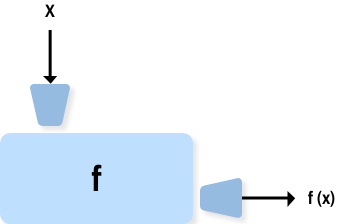
    We can restate our previous definition of a computer program colloquially:

    A computer program is a step-by-step set of instructions to tell a computer to do things to stuff.

    We will be spending the rest of this book deepening and refining our understanding of exactly what kinds of things a computer can do. Your ability to program a computer effectively will depend in large part on your ability to understand these things well, so that you can express what you want to accomplish in a language the computer can execute.

    Before we get to that, however, we need to talk about the stuff on which computers operate.

    Computer programs operate on dataarrow-up-right. A single piece of data can be called a datum, but we will use the related term, valuearrow-up-right.

    A value is one of the fundamental things — like a letter or a number — that a program manipulates. The values we have seen so far are 4 (the result when we added 2 + 2), and "Hello, World!".

    Values are grouped into different data typesarrow-up-right or classesarrow-up-right.

    Note

    At the level of the hardware of the machine, all values are stored as a sequence of bitsarrow-up-right, usually represented by the digits 0 and 1. All computer data types, whether they be numbers, text, images, sounds, or anything else, ultimately reduce to an interpretation of these bit patterns by the computer.

    Thankfully, high-level languages like Python give us flexible, high-level data types which abstract away the tedious details of all these bits and better fit our human brains.

    4 is an integer, and "Hello, World!" is a string, so-called because it contains a string of letters. You (and the interpreter) can identify strings because they are enclosed in quotation marks.

    If you are not sure what class a value falls into, Python has a function called type which can tell you.

    Not surprisingly, strings belong to the class str and integers belong to the class int. Less obviously, numbers with a point between their whole number and fractional parts belong to a class called float, because these numbers are represented in a format called floating-pointarrow-up-right. At this stage, you can treat the words class and type interchangeably. We’ll come back to a deeper understanding of what a class is in later chapters.

    What about values like "17" and "3.2"? They look like numbers, but they are in quotation marks like strings.

    They are strings!

    Don’t use commas in ints

    When you type a large integer, you might be tempted to use commas between groups of three digits, as in 42,000. This is not a legal integer in Python, but it does mean something else, which is legal:

    Well, that’s not what we expected at all! Because of the comma, Python treats this as a pair of values in a tuple. So, remember not to put commas or spaces in your integers. Also revisit what we said in the previous chapter: formal languages are strict, the notation is concise, and even the smallest change might mean something quite different from what you intended.

    hashtag
    2.2. Three ways to write strings

    Strings in Python can be enclosed in either single quotes (') or double quotes ("), or three of each (''' or """)

    Double quoted strings can contain single quotes inside them, as in "Bruce's beard", and single quoted strings can have double quotes inside them, as in 'The knights who say "Ni!"'.

    Strings enclosed with three occurrences of either quote symbol are called triple quoted strings. They can contain either single or double quotes:

    Triple quoted strings can even span multiple lines:

    Python doesn’t care whether you use single or double quotes or the three-of-a-kind quotes to surround your strings: once it has parsed the text of your program or command, the way it stores the value is identical in all cases, and the surrounding quotes are not part of the value. But when the interpreter wants to display a string, it has to decide which quotes to use to make it look like a string.

    So the Python language designers chose to usually surround their strings by single quotes. What do think would happen if the string already contained single quotes? Try it for yourself and see.

    hashtag
    2.3. String literals and escape sequences

    A literalarrow-up-right is a notation for representing a constant value of a built-in data type.

    In string literals, most characters represent themselves, so if we want the literal with letters s-t-r-i-n-g, we simply write 'string'.

    But what if we want to represent the literal for a linefeed (what you get when you press the <Enter> key on the keyboard), or a tab? These string literals are not printable the way an s or a t is. To solve this problem Python uses an escape sequencearrow-up-right to represent these string literals.

    There are several of these escape sequences that are helpful to know.

    Escape Sequence

    Meaning

    \\

    Backslash (\)

    \'

    Single quote (')

    \"

    Double quote (")

    \b

    Backspace

    \n

    Linefeed

    \n is the most frequently used of these. The following example will hopefully make what it does clear.

    hashtag
    2.4. Names and assignment statements

    In order to write programs that do things to the stuff we now call values, we need a way to store our values in the memory of the computer and to name them for later retrieval.

    We use Python’s assignment statementarrow-up-right for just this purpose:

    The example above makes three assignments. The first assigns the string value "What's up, Doc?" to the name message. The second gives the integer 17 the name n, and the third assigns the floating-point number 3.14159 the name pi.

    Assignment statements create names and associate these names with values. The values can then be retrieved from the computer’s memory by refering to the name associated with them.

    Names are also called variablesarrow-up-right, since the values to which they refer can change during the execution of the program. Variables also have types. Again, we can ask the interpreter what they are.

    The type of a variable is the type of the value it currently refers to.

    A common way to represent variables on paper is to write the name of the variable with a line connecting it with its current value. This kind of figure is called an object diagramarrow-up-right. It shows the state of the variables at a particular instant in time.

    This diagram shows the result of executing the previous assignment statements:

    hashtag
    2.5. Variables are variable

    We use variables in a program to “remember” things, like the current score at the football game. But variables are variable. This means they can change over time, just like the scoreboard at a football game. You can assign a value to a variable, and later assign a different value to the same variable.

    Note

    This is different from math. In math, if you give x the value 3, it cannot change to link to a different value half-way through your calculations!

    You’ll notice we changed the value of day three times, and on the third assignment we even gave it a value that was of a different type.

    Note

    A great deal of programming is about having the computer remember things, like assigning a variable to the number of missed calls on your phone, and then arranging to update the variable when you miss another call.

    In the Python shell, entering a name at the prompt causes the interpreter to look up the value associated with the name (or return an error message if the name is not defined), and to display it. In a script, a defined name not in a print function call does not display at all.

    hashtag
    2.6. The assignment operator is not an equal sign!

    The semantics of the assignment statement can be confusing to beginning programmers, especially since the assignment token, = can be easily confused with the with equals (Python uses the token == for equals, as we will see soon). It is not!

    The middle statement above would be impossible if = meant equals, since n could never be equal to n + 1. This statement is perfectly legal Python, however. The assignment statement links a name, on the left hand side of the operator, with a value, on the right hand side.

    The two ns in n = n + 1 have different meanings: the n on the right is a memory look-up that is replaced by a value when the right hand side is evaluated by the Python interpreter. It has to already exist or a name error will result. The right hand side of the assignment statement is evaluated first.

    The n on the left is the name given to the new value computed on the right hand side as it is stored in the computer’s memory. It does not have to exist previously, since it will be added to the running program’s available names if it isn’t there already.

    Note

    Names in Python exist within a context, called a namespacearrow-up-right, which we will discuss later in the book.

    The left hand side of the assignment statement does have to be a valid Python variable name. This is why you will get an error if you enter:

    Tip

    When reading or writing code, say to yourself “n is assigned 17” or “n gets the value 17”. Don’t say “n equals 17”.

    Note

    In case you are wondering, a tokenarrow-up-right is a character or string of characters that has syntactic meaning in a language. In Python operatorsarrow-up-right, keywordsarrow-up-right, literalsarrow-up-right, and white spacearrow-up-right all form tokens in the language.

    hashtag
    2.7. Variable names and keywords

    Valid variable names in Python must conform to the following three simple rules:

    1. They are an arbitrarily long sequence of letters and digits.

    2. The sequence must begin with a letter.

    3. In addtion to a..z, and A..Z, the underscore (_) is a letter.

    Although it is legal to use uppercase letters, by convention we don’t. If you do, remember that case matters. day and Day would be different variables.

    The underscore character ( _) can appear in a name. It is often used in names with multiple words, such as my_name or price_of_tea_in_china.

    There are some situations in which names beginning with an underscore have special meaning, so a safe rule for beginners is to start all names with a letter other than the underscore.

    If you give a variable an illegal name, you get a syntax error:

    76trombones is illegal because it does not begin with a letter. more$ is illegal because it contains an illegal character, the dollar sign. But what’s wrong with class?

    It turns out that class is one of the Python keywords. Keywords define the language’s syntax rules and structure, and they cannot be used as variable names.

    Python 3 has thirty-three keywords (and every now and again improvements to Python introduce or eliminate one or two):

    and

    as

    assert

    break

    class

    continue

    def

    del

    elif

    else

    except

    finally

    for

    from

    You might want to keep this list handy. Actually, as will often be the case when learning to program with Python, when you aren’t sure about something, you can ask Python:

    The list of keywords, keyword.kwlist, comes to us, appropriately, in a Python list.

    If the interpreter complains about one of your variable names and you don’t know why, see if it is on this list.

    Programmers generally choose names for their variables that are meaningful to the human readers of the program — they help the programmer document, or remember, what the variable is used for.

    Caution

    Beginners sometimes confuse meaningful to the human readers with meaningful to the computer. So they’ll wrongly think that because they’ve called some variable average or pi, it will somehow automatically calculate an average, or automatically associate the variable pi with the value 3.14159. No! The computer doesn’t attach semantic meaning to your variable names. It is up to you to do that.

    hashtag
    2.8. Statements and expressions

    A statementarrow-up-right is an instruction that the Python interpreter can execute. We have seen two so far, the assignment statement and the import statement. Some other kinds of statements that we’ll see shortly are if statements, while statements, and for statements. (There are other kinds too!)

    When you type a statement on the command line, Python executes it. The interpreter does not display any results.

    An expressionarrow-up-right is a combination of values, variables, operators, and calls to functions. If you type an expression at the Python prompt, the interpreter evaluates it and displays the result, which is always a value:

    In this example len is a built-in Python function that returns the number of characters in a string. We’ve previously seen the print and the type functions, so this is our third example of a function.

    The evaluation of an expression produces a value, which is why expressions can appear on the right hand side of assignment statements. A value all by itself is a simple expression, and so is a variable.

    hashtag
    2.9. Operators and operands

    Operatorsarrow-up-right are special tokens that represent computations like addition, multiplication and division. The values the operator uses are called operandsarrow-up-right.

    The following are all legal Python expressions whose meaning is more or less clear:

    The tokens + and -, and the use of parenthesis for grouping, mean in Python what they mean in mathematics. The asterisk (*) is the token for multiplication, and ** is the token for exponentiation (raising a number to a power).

    When a variable name appears in the place of an operand, it is replaced with its value before the operation is performed.

    Addition, subtraction, multiplication, and exponentiation all do what you expect.

    Example: so let us convert 645 minutes into hours:

    Oops! In Python 3, the division operator / always yields a floating point result. What we might have wanted to know was how many whole hours there are, and how many minutes remain. Python gives us two different flavors of the division operator. The second, called integer division uses the token //. It always truncates its result down to the next smallest integer (to the left on the number line).

    Take care that you choose the correct division operator. If you’re working with expressions where you need floating point values, use the division operator that does the division appropriately.

    hashtag
    2.10. The modulus operator

    The modulus operator works on integers (and integer expressions) and gives the remainder when the first number is divided by the second. In Python, the modulus operator is a percent sign (%). The syntax is the same as for other operators:

    So 7 divided by 3 is 2 with a remainder of 1.

    The modulus operator turns out to be surprisingly useful. For example, you can check whether one number is divisible by another – if x % y is zero, then x is divisible by y.

    Also, you can extract the right-most digit or digits from a number. For example, x % 10 yields the right-most digit of x (in base 10). Similarly x % 100 yields the last two digits.

    It is also extremely useful for doing conversions, say from seconds, to hours, minutes and seconds. So let’s write a program to ask the user to enter some seconds, and we’ll convert them into hours, minutes, and remaining seconds.

    hashtag
    2.11. Order of operations

    When more than one operator appears in an expression, the order of evaluation depends on the rules of precedence. Python follows the same precedence rules for its mathematical operators that mathematics does. The acronym PEMDAS is a useful way to remember the order of operations:

    1. Parentheses have the highest precedence and can be used to force an expression to evaluate in the order you want. Since expressions in parentheses are evaluated first, 2 * (3-1) is 4, and (1+1)**(5-2) is 8. You can also use parentheses to make an expression easier to read, as in (minute * 100) / 60, even though it doesn’t change the result.

    2. Exponentiation has the next highest precedence, so 2**1+1 is 3 and not 4, and 3*1**3 is 3 and not 27.

    3. Multiplication and both Division operators have the same precedence, which is higher than Addition and Subtraction, which also have the same precedence. So 2*3-1 yields 5 rather than 4, and 5-2*2 is 1, not 6. #. Operators with the same precedence are evaluated from left-to-right. In algebra we say they are left-associative. So in the expression 6-3+2, the subtraction happens first, yielding 3. We then add 2 to get the result 5. If the operations had been evaluated from right to left, the result would have been 6-(3+2), which is 1. (The acronym PEDMAS could mislead you to thinking that division has higher precedence than multiplication, and addition is done ahead of subtraction - don’t be misled. Subtraction and addition are at the same precedence, and the left-to-right rule applies.)

    Note

    Due to some historical quirk, an exception to the left-to-right left-associative rule is the exponentiation operator **, so a useful hint is to always use parentheses to force exactly the order you want when exponentiation is involved:

    The immediate mode command prompt of Python is great for exploring and experimenting with expressions like this.

    hashtag
    2.12. Operations on strings

    In general, you cannot perform mathematical operations on strings, even if the strings look like numbers. The following are illegal (assuming that message has type string):

    Interestingly, the + operator does work with strings, but for strings, the + operator represents concatenation, not addition. Concatenation means joining the two operands by linking them end-to-end. For example:

    The output of this program is banana nut bread. The space before the word nut is part of the string, and is necessary to produce the space between the concatenated strings.

    The * operator also works on strings; it performs repetition. For example, 'Fun' * 3 is 'FunFunFun'. One of the operands has to be a string; the other has to be an integer.

    On one hand, this interpretation of + and * makes sense by analogy with addition and multiplication. Just as 4 * 3 is equivalent to 4 + 4 + 4, we expect "Fun" * 3 to be the same as "Fun" + "Fun" + "Fun", and it is. On the other hand, there is a significant way in which string concatenation and repetition are different from integer addition and multiplication. Can you think of a property that addition and multiplication have that string concatenation and repetition do not?

    hashtag
    2.13. Type converter functions

    Here we’ll look at three more Python functions, int, float and str, which will (attempt to) convert their arguments into types int, float and str respectively. We call these type converter functions.

    The int function can take a floating point number or a string, and turn it into an int. For floating point numbers, it discards the fractional portion of the number - a process we call truncation towards zero on the number line. Let us see this in action:

    The last case shows that a string has to be a syntactically legal number, otherwise you’ll get one of those pesky runtime errors.

    The type converter float can turn an integer, a float, or a syntactically legal string into a float.

    The type converter str turns its argument into a string:

    hashtag
    2.14. Input

    There is a built-in function in Python for getting input from the user:

    The user of the program can enter the name and press return. When this happens the text that has been entered is returned from the input function, and in this case assigned to the variable name.

    The string value inside the parentheses is called a prompt and contains a message which will be displayed to the user when the statement is executed to prompt their response.

    When a key is pressed on a keyboard a single character is sent to a keyboard bufferarrow-up-right inside the computer. When the enter keyarrow-up-right is pressed, the sequence of characters inside the keyboard buffer in the order in which they were received are returned by the input function as a single string value.

    Even if you asked the user to enter their age, you would get back a string like "17". It would be your job, as the programmer, to convert that string into a int or a float, using the int or float converter functions we saw in the previous section, which leads us to …

    hashtag
    2.15. Composition

    So far, we have looked at the elements of a program — variables, expressions, statements, and function calls — in isolation, without talking about how to combine them.

    One of the most useful features of programming languages is their ability to take small building blocks and compose them into larger chunks.

    For example, we know how to get the user to enter some input, we know how to convert the string we get into a float, we know how to write a complex expression, and we know how to print values. Let’s put these together in a small four-step program that asks the user to input a value for the radius of a circle, and then computes the area of the circle from the formula

    Firstly, we’ll do the four steps one at a time:

    Now let’s compose the first two lines into a single line of code, and compose the second two lines into another line of code.

    If we really wanted to be tricky, we could write it all in one statement:

    Such compact code may not be most understandable for humans, but it does illustrate how we can compose bigger chunks from our building blocks.

    If you’re ever in doubt about whether to compose code or fragment it into smaller steps, try to make it as simple as you can for the human reader to follow.

    hashtag
    2.16. More about the print function

    At the end of the previous chapter, you learned that the print function can take a series of arguments, seperated by commas, and that it prints a string with each argument in order seperated by a space.

    In the example in the previous section of this chapter, you may have noticed that the arguments don’t have to be strings.

    By default, print uses a single space as a seperator and a \n as a terminator (at the end of the string). Both of these defaults can be overridden.

    You will explore these new features of the print function in the exercises.

    hashtag
    2.17. Glossary

    assignment statement

    A statement that assigns a value to a name (variable). To the left of the assignment operator, =, is a name. To the right of the assignment token is an expression which is evaluated by the Python interpreter and then assigned to the name. The difference between the left and right hand sides of the assignment statement is often confusing to new programmers. In the following assignment:

    n plays a very different role on each side of the =. On the right it is a value and makes up part of the expression which will be evaluated by the Python interpreter before assigning it to the name on the left.assignment token

    = is Python’s assignment token, which should not be confused with the mathematical comparison operator using the same symbol.composition

    The ability to combine simple expressions and statements into compound statements and expressions in order to represent complex computations concisely.concatenate

    To join two strings end-to-end.data type

    A set of values. The type of a value determines how it can be used in expressions. So far, the types you have seen are integers (int), floating-point numbers (float), and strings (str).escape sequence

    A sequence of characters starting with the escape character (\) used to represent string literals such as linefeeds and tabs.evaluate

    To simplify an expression by performing the operations in order to yield a single value.expression

    A combination of variables, operators, and values that represents a single result value.float

    A Python data type which stores floating-point numbers. Floating-point numbers are stored internally in two parts: a base and an exponent. When printed in the standard format, they look like decimal numbers. Beware of rounding errors when you use floats, and remember that they are only approximate values.int

    A Python data type that holds positive and negative whole numbers.integer division

    An operation that divides one integer by another and yields an integer. Integer division yields only the whole number of times that the numerator is divisible by the denominator and discards any remainder.keyword

    A reserved word that is used by the compiler to parse program; you cannot use keywords like if, def, and while as variable names.literal

    A notation for representing for representing a constant value of one of Python’s built-in types. \n, for example, is a literal representing the newline character.modulus operator

    An operator, denoted with a percent sign ( %), that works on integers and yields the remainder when one number is divided by another.object diagram

    A graphical representation of a set of variables (objects) and the values to which they refer, taken at a particular instant during the program’s execution.operand

    One of the values on which an operator operates.operator

    A special symbol that represents a simple computation like addition, multiplication, or string concatenation.rules of precedence

    The set of rules governing the order in which expressions involving multiple operators and operands are evaluated.statement

    An instruction that the Python interpreter can execute. So far we have only seen the assignment statement, but we will soon meet the import statement and the for statement.str

    A Python data type that holds a string of characters.tripple quoted strings

    A string enclosed by either """ or '''. Tripple quoted strings can span several lines.value

    A number, string, or any of the other things that can be stored in a variable or computed in an expression.variable

    A name that refers to a value.variable name

    A name given to a variable. Variable names in Python consist of a sequence of letters (a..z, A..Z, and _) and digits (0..9) that begins with a letter. In best programming practice, variable names should be chosen so that they describe their use in the program, making the program self documenting.

    , and may be freely distributed. The same site also contains distributions of and pointers to many free third party Python modules, programs and tools, and additional documentation.

    The Python interpreter is easily extended with new functions and data types implemented in C or C++ (or other languages callable from C). Python is also suitable as an extension language for customizable applications.

    This tutorial introduces the reader informally to the basic concepts and features of the Python language and system. It helps to have a Python interpreter handy for hands-on experience, but all examples are self-contained, so the tutorial can be read off-line as well.

    For a description of standard objects and modules, see The Python Standard Libraryarrow-up-right. The Python Language Referencearrow-up-right gives a more formal definition of the language. To write extensions in C or C++, read Extending and Embedding the Python Interpreterarrow-up-right and Python/C API Reference Manualarrow-up-right. There are also several books covering Python in depth.

    This tutorial does not attempt to be comprehensive and cover every single feature, or even every commonly used feature. Instead, it introduces many of Python’s most noteworthy features, and will give you a good idea of the language’s flavor and style. After reading it, you will be able to read and write Python modules and programs, and you will be ready to learn more about the various Python library modules described in The Python Standard Libraryarrow-up-right.

    The Glossaryarrow-up-right is also worth going through.

    • 1. Whetting Your Appetitearrow-up-right

    • 2. Using the Python Interpreterarrow-up-right

      • 2.1. Invoking the Interpreterarrow-up-right

    General Docs:

    https://codesandbox.io/s/ds-algo-forked-lfujh?from-embedarrow-up-right

    Basic Syntaxchevron-right
    Functionschevron-right
    Built In Functionschevron-right
    https://www.python.org/arrow-up-right
    id() functionarrow-up-right
  • map() functionarrow-up-right

  • zip() functionarrow-up-right

  • filter() functionarrow-up-right

  • reduce() functionarrow-up-right

  • sorted() functionarrow-up-right

  • enumerate() functionarrow-up-right

  • reversed() functionarrow-up-right

  • range() functionarrow-up-right

  • sum() functionarrow-up-right

  • max() functionarrow-up-right

  • min() functionarrow-up-right

  • eval() functionarrow-up-right

  • len() functionarrow-up-right

  • ord() functionarrow-up-right

  • chr() functionarrow-up-right

  • any() functionarrow-up-right

  • all() functionarrow-up-right

  • globals() functionarrow-up-right

  • locals() functionarrow-up-right

  • hashtag
    Built-in Functions:

    ​Built-in Functions — Python 3.9.7 documentationdocs.python.orgarrow-up-right

    ​‌

    The Python interpreter has a number of functions and types built into it that are always available. They are listed here in alphabetical order.

    ​Title

    ​Title

    Built-in Functions

    ​Title

    ​Title

    ​​

    ​​

    ​​

    ​​

    ​​

    ​​

    ​​

    ​​

    ​​

    abs() functionarrow-up-right
    bin() functionarrow-up-right
    Stack 2 diagram
    Function machine
    >>> type("Hello, World!")
    <class 'str'>
    >>> type(17)
    <class 'int'>
    >>> type(3.2)
    <class 'float'>
    >>> type("17")
    <class 'str'>
    >>> type("3.2")
    <class 'str'>
    >>> 42000
    42000
    >>> 42,000
    (42, 0)
    >>> type('This is a string.')
    <class 'str'>
    >>> type("And so is this.")
    <class 'str'>
    >>> type("""and this.""")
    <class 'str'>
    >>> type('''and even this...''')
    <class 'str'>
    >>> print('''"Oh no," she exclaimed, "Ben's bike is broken!"''')
    "Oh no," she exclaimed, "Ben's bike is broken!"
    >>>
    >>> message = """This message will
    ... span several
    ... lines."""
    >>> print(message)
    This message will
    span several
    lines.
    >>>
    >>> 'This is a string.'
    'This is a string.'
    >>> """And so is this."""
    'And so is this.'
    >>> print("Line 1\n\n\nLine 5")
    Line 1
    
    
    Line 5
    >>>
    >>> message = "What's up, Doc?"
    >>> n = 17
    >>> pi = 3.14159
    >>> message
    "What's up, Doc?"
    >>> pi
    3.14159
    >>> n
    17
    >>> print(message)
    What's up, Doc?
    >>> type(message)
    <class 'str'>
    >>> type(n)
    <class 'int'>
    >>> type(pi)
    <class 'float'>
    >>> day = "Thursday"
    >>> day
    'Thursday'
    >>> day = "Friday"
    >>> day
    'Friday'
    >>> day = 21
    >>> day
    21
    >>> n = 17
    >>> n = n + 1
    >>> n
    18
    >>> 17 = n
    >>> 76trombones = "big parade"
    SyntaxError: invalid syntax
    >>> more$ = 1000000
    SyntaxError: invalid syntax
    >>> class = "Computer Science 101"
    SyntaxError: invalid syntax
    >>> import keyword
    >>> keyword.kwlist
    ['False', 'None', 'True', 'and', 'as', 'assert', 'break', 'class',
    'continue', 'def', 'del', 'elif', 'else', 'except', 'finally', 'for',
    'from', 'global', 'if', 'import', 'in', 'is', 'lambda', 'nonlocal', 'not',
    'or', 'pass', 'raise', 'return', 'try', 'while', 'with', 'yield']
    >>> 1 + 1
    2
    >>> len('hello')
    5
    >>> 17
    17
    >>> y = 3.14
    >>> x = len('hello')
    >>> x
    5
    >>> y
    3.14
    20 + 32   hour - 1   hour * 60 + minute   minute / 60   5 ** 2
    (5 + 9) * (15 - 7)
    >>> 2 ** 3
    8
    >>> 3 ** 2
    9
    >>> minutes = 645
    >>> hours = minutes / 60
    >>> hours
    10.75
    >>> 7 / 4
    1.75
    >>> 7 // 4
    1
    >>> minutes = 645
    >>> hours = minutes // 60
    >>> hours
    10
    >>> 7 // 3        # integer division operator
    2
    >>> 7 % 3
    1
    total_secs = int(input("How many seconds, in total? "))
    hours = total_secs // 3600
    secs_still_remaining = total_secs % 3600
    minutes =  secs_still_remaining // 60
    secs_finally_remaining = secs_still_remaining % 60
    
    print(hours, ' hrs ', minutes, ' mins ', secs_finally_remaining, ' secs')
    >>> 2 ** 3 ** 2     # the right-most ** operator gets done first!
    512
    >>> (2 ** 3) ** 2   # use parentheses to force the order you want!
    64
    message - 1   "Hello" / 123   message * "Hello"   "15" + 2
    fruit = "banana"
    baked_good = " nut bread"
    print(fruit + baked_good)
    >>> int(3.14)
    3
    >>> int(3.9999)        # This doesn't round to the closest int!
    3
    >>> int(3.0)
    3
    >>> int(-3.999)        # Note that the result is closer to zero
    -3
    >>> int(minutes/60)
    10
    >>> int("2345")        # parse a string to produce an int
    2345
    >>> int(17)            # int even works if its argument is already an int
    17
    >>> int("23 bottles")
    Traceback (most recent call last):
    File "<interactive input>", line 1, in <module>
    ValueError: invalid literal for int() with base 10: '23 bottles'
    >>> float(17)
    17.0
    >>> float("123.45")
    123.45
    >>> str(17)
    '17'
    >>> str(123.45)
    '123.45'
    name = input("Please enter your name: ")
    response = input("What is your radius? ")
    r = float(response)
    area = 3.14159 * r ** 2
    print("The area is ", area)
    r = float(input("What is your radius? "))
    print("The area is ", 3.14159 * r ** 2)
    print("The area is ", 3.14159 * float(input("What is your radius? ")) ** 2)
    >>> print("I am", 12 + 9, "years old.")
    I am 21 years old.
    >>>
    >>> print('a', 'b', 'c', 'd')
    a b c d
    >>> print('a', 'b', 'c', 'd', sep='##', end='!!')
    a##b##c##d!!>>>
    n = n + 1

    ​setattr()arrow-up-right​

    ​any()arrow-up-right​

    ​dir()arrow-up-right​

    ​hex()arrow-up-right​

    ​next()arrow-up-right​

    ​slice()arrow-up-right​

    ​ascii()arrow-up-right​

    ​divmod()arrow-up-right​

    ​id()arrow-up-right​

    ​object()arrow-up-right​

    ​sorted()arrow-up-right​

    ​bin()arrow-up-right​

    ​enumerate()arrow-up-right​

    ​input()arrow-up-right​

    ​oct()arrow-up-right​

    ​staticmethod()arrow-up-right​

    ​bool()arrow-up-right​

    ​eval()arrow-up-right​

    ​int()arrow-up-right​

    ​open()arrow-up-right​

    ​str()arrow-up-right​

    ​breakpoint()arrow-up-right​

    ​exec()arrow-up-right​

    ​isinstance()arrow-up-right​

    ​ord()arrow-up-right​

    ​sum()arrow-up-right​

    ​bytearray()arrow-up-right​

    ​filter()arrow-up-right​

    ​issubclass()arrow-up-right​

    ​pow()arrow-up-right​

    ​super()arrow-up-right​

    ​bytes()arrow-up-right​

    ​float()arrow-up-right​

    ​iter()arrow-up-right​

    ​print()arrow-up-right​

    ​tuple()arrow-up-right​

    ​callable()arrow-up-right​

    ​format()arrow-up-right​

    ​len()arrow-up-right​

    ​property()arrow-up-right​

    ​type()arrow-up-right​

    ​chr()arrow-up-right​

    ​frozenset()arrow-up-right​

    ​list()arrow-up-right​

    ​range()arrow-up-right​

    ​vars()arrow-up-right​

    ​classmethod()arrow-up-right​

    ​getattr()arrow-up-right​

    ​locals()arrow-up-right​

    ​repr()arrow-up-right​

    ​zip()arrow-up-right​

    ​compile()arrow-up-right​

    ​globals()arrow-up-right​

    ​map()arrow-up-right​

    ​reversed()arrow-up-right​

    ​__import__()arrow-up-right​

    ​complex()arrow-up-right​

    ​hasattr()arrow-up-right​

    ​max()arrow-up-right​

    ​round()arrow-up-right​

    ​Content

    abs()arrow-up-right
    delattr()arrow-up-right
    hash()arrow-up-right
    memoryview()arrow-up-right
    set()arrow-up-right
    all()arrow-up-right
    dict()arrow-up-right
    help()arrow-up-right
    min()arrow-up-right
    State diagram for multiple references to a list as a parameter

    3.1.2. Stringsarrow-up-right

  • 3.1.3. Listsarrow-up-right

  • 3.2. First Steps Towards Programmingarrow-up-right

  • 4.3. The range() Functionarrow-up-right

  • 4.4. break and continue Statements, and else Clauses on Loopsarrow-up-right

  • 4.5. pass Statementsarrow-up-right

  • 4.6. Defining Functionsarrow-up-right

  • 4.7. More on Defining Functionsarrow-up-right

    • 4.7.1. Default Argument Valuesarrow-up-right

    • 4.7.2. Keyword Argumentsarrow-up-right

  • 4.8. Intermezzo: Coding Stylearrow-up-right

  • 5.1.2. Using Lists as Queuesarrow-up-right

  • 5.1.3. List Comprehensionsarrow-up-right

  • 5.1.4. Nested List Comprehensionsarrow-up-right

  • 5.2. The del statementarrow-up-right

  • 5.3. Tuples and Sequencesarrow-up-right

  • 5.4. Setsarrow-up-right

  • 5.5. Dictionariesarrow-up-right

  • 5.6. Looping Techniquesarrow-up-right

  • 5.7. More on Conditionsarrow-up-right

  • 5.8. Comparing Sequences and Other Typesarrow-up-right

  • 6.1.2. The Module Search Patharrow-up-right

  • 6.1.3. “Compiled” Python filesarrow-up-right

  • 6.2. Standard Modulesarrow-up-right

  • 6.3. The dir() Functionarrow-up-right

  • 6.4. Packagesarrow-up-right

    • 6.4.1. Importing * From a Packagearrow-up-right

    • 6.4.2. Intra-package Referencesarrow-up-right

  • 7.1.2. The String format() Methodarrow-up-right

  • 7.1.3. Manual String Formattingarrow-up-right

  • 7.1.4. Old string formattingarrow-up-right

  • 7.2. Reading and Writing Filesarrow-up-right

    • 7.2.1. Methods of File Objectsarrow-up-right

    • 7.2.2. Saving structured data with jsonarrow-up-right

  • 8.3. Handling Exceptionsarrow-up-right

  • 8.4. Raising Exceptionsarrow-up-right

  • 8.5. Exception Chainingarrow-up-right

  • 8.6. User-defined Exceptionsarrow-up-right

  • 8.7. Defining Clean-up Actionsarrow-up-right

  • 8.8. Predefined Clean-up Actionsarrow-up-right

  • 9.2.1. Scopes and Namespaces Examplearrow-up-right

  • 9.3. A First Look at Classesarrow-up-right

    • 9.3.1. Class Definition Syntaxarrow-up-right

    • 9.3.2. Class Objectsarrow-up-right

  • 9.4. Random Remarksarrow-up-right

  • 9.5. Inheritancearrow-up-right

    • 9.5.1. Multiple Inheritancearrow-up-right

  • 9.6. Private Variablesarrow-up-right

  • 9.7. Odds and Endsarrow-up-right

  • 9.8. Iteratorsarrow-up-right

  • 9.9. Generatorsarrow-up-right

  • 9.10. Generator Expressionsarrow-up-right

  • 10.3. Command Line Argumentsarrow-up-right

  • 10.4. Error Output Redirection and Program Terminationarrow-up-right

  • 10.5. String Pattern Matchingarrow-up-right

  • 10.6. Mathematicsarrow-up-right

  • 10.7. Internet Accessarrow-up-right

  • 10.8. Dates and Timesarrow-up-right

  • 10.9. Data Compressionarrow-up-right

  • 10.10. Performance Measurementarrow-up-right

  • 10.11. Quality Controlarrow-up-right

  • 10.12. Batteries Includedarrow-up-right

  • 11.3. Working with Binary Data Record Layoutsarrow-up-right

  • 11.4. Multi-threadingarrow-up-right

  • 11.5. Loggingarrow-up-right

  • 11.6. Weak Referencesarrow-up-right

  • 11.7. Tools for Working with Listsarrow-up-right

  • 11.8. Decimal Floating Point Arithmeticarrow-up-right

  • 12.3. Managing Packages with piparrow-up-right

    16.1.2. Executable Python Scriptsarrow-up-right

  • 16.1.3. The Interactive Startup Filearrow-up-right

  • 16.1.4. The Customization Modulesarrow-up-right

  • 2.1.1. Argument Passingarrow-up-right
    2.1.2. Interactive Modearrow-up-right
    2.2. The Interpreter and Its Environmentarrow-up-right
    2.2.1. Source Code Encodingarrow-up-right
    3. An Informal Introduction to Pythonarrow-up-right
    3.1. Using Python as a Calculatorarrow-up-right
    3.1.1. Numbersarrow-up-right
    4. More Control Flow Toolsarrow-up-right
    4.1. if Statementsarrow-up-right
    4.2. for Statementsarrow-up-right
    5. Data Structuresarrow-up-right
    5.1. More on Listsarrow-up-right
    5.1.1. Using Lists as Stacksarrow-up-right
    6. Modulesarrow-up-right
    6.1. More on Modulesarrow-up-right
    6.1.1. Executing modules as scriptsarrow-up-right
    7. Input and Outputarrow-up-right
    7.1. Fancier Output Formattingarrow-up-right
    7.1.1. Formatted String Literalsarrow-up-right
    8. Errors and Exceptionsarrow-up-right
    8.1. Syntax Errorsarrow-up-right
    8.2. Exceptionsarrow-up-right
    9. Classesarrow-up-right
    9.1. A Word About Names and Objectsarrow-up-right
    9.2. Python Scopes and Namespacesarrow-up-right
    10. Brief Tour of the Standard Libraryarrow-up-right
    10.1. Operating System Interfacearrow-up-right
    10.2. File Wildcardsarrow-up-right
    11. Brief Tour of the Standard Library — Part IIarrow-up-right
    11.1. Output Formattingarrow-up-right
    11.2. Templatingarrow-up-right
    12. Virtual Environments and Packagesarrow-up-right
    12.1. Introductionarrow-up-right
    12.2. Creating Virtual Environmentsarrow-up-right
    13. What Now?arrow-up-right
    14. Interactive Input Editing and History Substitutionarrow-up-right
    14.1. Tab Completion and History Editingarrow-up-right
    14.2. Alternatives to the Interactive Interpreterarrow-up-right
    15. Floating Point Arithmetic: Issues and Limitationsarrow-up-right
    15.1. Representation Errorarrow-up-right
    16. Appendixarrow-up-right
    16.1. Interactive Modearrow-up-right
    16.1.1. Error Handlingarrow-up-right

    \t

    Tab

    global

    if

    import

    in

    is

    lambda

    nonlocal

    not

    or

    pass

    raise

    return

    try

    while

    with

    yield

    True

    False

    None

  • 4.7.3. Special parametersarrow-up-right
    4.7.3.1. Positional-or-Keyword Argumentsarrow-up-right
    4.7.3.2. Positional-Only Parametersarrow-up-right
    4.7.3.3. Keyword-Only Argumentsarrow-up-right
    4.7.4. Arbitrary Argument Listsarrow-up-right
    4.7.5. Unpacking Argument Listsarrow-up-right
    4.7.6. Lambda Expressionsarrow-up-right
    4.7.7. Documentation Stringsarrow-up-right
    4.7.8. Function Annotationsarrow-up-right
    6.4.3. Packages in Multiple Directoriesarrow-up-right
    9.3.3. Instance Objectsarrow-up-right
    9.3.4. Method Objectsarrow-up-right
    9.3.5. Class and Instance Variablesarrow-up-right
    4.7.3.4. Function Examplesarrow-up-right
    4.7.3.5. Recaparrow-up-right

    Dictionaries, sets, files, and modules

    hashtag
    6. Dictionaries, sets, files, and modules

    hashtag
    Dictionaries

    Dictionaries are a compound type different from the sequence types we studied in the chapter. They are Python’s built-in mapping type. They map keys, which can be any immutable type, to values, which can be any type, just like the values of a list or tuple.

    Note

    Other names for dictionaries in computer science include maps, symbol tables, and . The pairs of values are referred to as name-value, key-value, field-value, or pairs.

    As an example, we will create a dictionary to translate English words into Spanish. For this dictionary, the keys are strings.

    One way to create a dictionary is to start with the empty dictionary and add key-value pairs. The empty dictionary is denoted with a pair of curly braces, {}:

    The first assignment creates a dictionary named eng2sp; the other assignments add new key-value pairs to the dictionary. We can print the current value of the dictionary in the usual way:

    The key-value pairs of the dictionary are seperated by commas. Each pair contains a key and a value separated by a colon.

    The order of the pairs may not be what you expected. Python uses complex algorithms to determine where the key-value pairs are stored in a dictionary. For our purposes we can think of this ordering as unpredicatable, so you should not try to rely on it. Instead, look up values by using a known key.

    Another way to create a dictionary is to provide a list of key-value pairs using the same syntax as the previous output:

    It doesn’t matter what order we write the pairs. The values in a dictionary are accessed with keys, not with indices, so ordering is unimportant.

    Here is how we use a key to look up the corresponding value:

    The key 'two' yields the value 'dos'.

    hashtag
    6.2. Dictionary operations

    The del statement removes a key-value pair from a dictionary. For example, the following dictionary contains the names of various fruits and the number of each fruit in stock:

    If someone buys all of the pears, we can remove the entry from the dictionary:

    Or if we’re expecting more pears soon, we might just change the value associated with pears:

    The len function also works on dictionaries; it returns the number of key-value pairs:

    The in operator returns True if the key appears in the dictionary and False otherwise:

    This operator can be very useful, since looking up a non-existant key in a dictionary causes a runtime error:

    To address this problem, the built-in get method provides a default value that is returned when a key is not found:

    Python’s built-in sorted function returns a list of a dictionaries keys in sorted order:

    hashtag
    6.3. Aliasing and copying

    Because dictionaries are mutable, you need to be aware of aliasing. Whenever two variables refer to the same object, changes to one affect the other.

    If you want to modify a dictionary and keep a copy of the original, use the copy method. For example, opposites is a dictionary that contains pairs of opposites:

    an_alias and opposites refer to the same object; a_copy refers to a fresh copy of the same dictionary. If we modify alias, opposites is also changed:

    If we modify a_copy, opposites is unchanged:

    hashtag
    6.4. Sets

    A set is a Python data type that holds an unordered collection of unique elements. It implements the which is in turn based on the mathematical concept of a finite . As with dictionaries, Python uses curly braces to indicate a set, but with elements instead of key-value pairs:

    To create an empty set, you can not use empty curly braces.

    Instead, use the set type converter function without an argument.

    Sets contain a unique collection of elements of any type. You can add to a set using its add method, and test for membership with the in operator.

    Since sets hold unique collections of elements, you can use the set type conversion function to remove duplicates from a list.

    hashtag
    6.5. Formatting Strings

    This book is aimed at aspiring , so much of our focus will be on creating dynamic using Python. Web pages are stored in , which are essentially files containing a string of text. The ability to process and format text is quite important to us. That’s what this section is about.

    hashtag
    6.6. The format method for strings

    The easiest and most powerful way to format a string in Python 3 is to use the format method.

    The key idea is that one provides a formatter string which contains placeholder fields, ... {0} ... {1} ... {2} ... etc. The format method of a string uses the numbers as indexes into its arguments, and substitutes the appropriate argument into each placeholder field.

    Each of the placeholders can also contain a format specification — it is always introduced by the : symbol. This can control things like

    • whether the field is aligned left <, centered ^, or right >

    • the width allocated to the field within the result string (a number like 10)

    You can have multiple placeholders indexing the same argument, or perhaps even have extra arguments that are not referenced at all:

    This produces the following:

    As you might expect, you’ll get an index error if your placeholders refer to arguments that you do not provide:

    In addition to positional arguments in format strings, named arguments are also supported:

    Notice that the order of the arguments to the format method example doesn’t correspond with the order they appear in the format string. These are keywords, as with dictionaries, so their order is not relevant.

    Old style format strings

    Earlier versions of Python used a cryptic way to format strings. It is considered deprecated and will eventually disappear from the language.

    While we won’t use it in this book, you will still see it around in lots of existing Python code, so it is good to be aware of it.

    The syntax for the old string formatting operation looks like this:

    To see how this works, here are a few examples:

    hashtag
    6.7. Files

    hashtag
    6.7.1. About files

    While a program is running, its data is stored in (RAM). RAM is extremely fast, but it is also volatile, which means that when the program ends, or the computer shuts down, data in RAM disappears. To make data available the next time you turn on your computer and start your program, you have to write it to a non-volatile storage medium, such a hard drive, usb drive, or CD-RW.

    Data on non-volatile storage media is stored in named locations on the media called . By reading and writing files, programs can save information between program runs. A file is a block of data stored in the of the computer’s .

    To use a file, you have to open it. When you’re done, you have to close it. When you open the file, you have to decide ahead of time whether you want to read data from the file or write data to it. If you plan to write data to the file you have to choose between starting a new version of the file or writing data at the end of what was already there. This second option for writing to the file is called appending. The first option destroys any previously existing data in the file.

    hashtag
    6.7.2. The open function

    The open function takes two arguments. The first is the name of the file, and the second is the mode. Mode 'w' means that we are opening the file for writing. Mode 'r' means reading, and mode 'a' means appending.

    Let’s begin with an example that shows these three modes in operation:

    Opening a file creates what we call a . In this example, the variable myfile refers to the new descriptor object. Our program calls methods on the descriptor, and this makes changes to the actual file which is located in non-volatile storage.

    The first line opens the test.txt for writing. If there is no file named test.txt on the disk, it will be created. If there already is one, it will be replaced by the file we are writing and any previous data in it will be lost.

    To put data in the file we invoke the write method on the file descriptor. We do this three times in the example above, but in bigger programs, the three separate calls to write will usually be replaced by a loop that writes many more lines into the file. The write method returns the number of (characters) written to the file.

    Closing the file handle tells the system that we are done writing and makes the disk file available for reading by other programs (or by our own program).

    We finish this example by openning test.txt for reading. We then call the read method, assigning the contents of the file, which is a string, to a variable named contents, and finally print contents to see that it is indeed what we wrote to the file previously.

    If we want to add to an already existing file, use the append mode.

    hashtag
    6.8. Opening a file that doesn’t exist

    If we try to open a file that doesn’t exist, we get an error:

    There is nothing wrong with the syntax of the line that resulted in the error. The error occurred because the file did not exist. Errors like these are called exceptions. Most modern programming languages provide support for dealing with situations like this. The process is called .

    In Python, exceptions are handled with the try ... except statement.

    In this example we try to open the data file for reading. If it succeeds, we use the read() method to read the file contents as a string into the variable mydata and close the file. If an IOError exception occurs, we still create mydata as an empty string and continue on with the program.

    hashtag
    6.9. Reading data from files

    Python file descriptors have three methods for reading in data from a file. We’ve already seen the read() method, which returns the entire contents of the file as a single string. For really big files this may not be what you want.

    The readline() method returns one of the file at a time. Each time you call it readline() returns the next line. Calls made to readline() after reaching the end of the file return an empty string ('').

    This is a handy pattern for our toolbox. In bigger programs, we’d squeeze more extensive logic into the body of the loop at line 8 — for example, if each line of the file contained the name and email address of one of our friends, perhaps we’d split the line into some pieces and call a function to send the friend a party invitation.

    On line 8 we suppress the newline character that print usually appends to our strings. Why? This is because the string already has its own newline: the readline method in line 3 returns everything up to and including the newline character. This also explains the end-of-file detection logic: when there are no more lines to be read from the file, readline returns an empty string — one that does not even have a newline at the end, hence it’s length is 0.

    hashtag
    6.9.1. Turning a file into a list of lines

    It is often useful to fetch data from a disk file and turn it into a list of lines. Suppose we have a file containing our friends and their email addresses, one per line in the file. But we’d like the lines sorted into alphabetical order. A good plan is to read everything into a list of lines, then sort the list, and then write the sorted list back to another file:

    The readlines method in line 2 reads all the lines and returns a list of the strings.

    We could have used the template from the previous section to read each line one-at-a-time, and to build up the list ourselves, but it is a lot easier to use the method that the Python implementors gave us!

    hashtag
    6.9.2. An example

    Many useful line-processing programs will read a text file line-at-a-time and do some minor processing as they write the lines to an output file. They might number the lines in the output file, or insert extra blank lines after every 60 lines to make it convenient for printing on sheets of paper, or extract some specific columns only from each line in the source file, or only print lines that contain a specific substring. We call this kind of program a filter.

    Here is a filter that copies one file to another, omitting any lines that begin with #:

    The continue statement at line 9 skips over the remaining lines in the current iteration of the loop, but the loop will still iterate. This style looks a bit contrived here, but it is often useful to say “get the lines we’re not concerned with out of the way early, so that we have cleaner more focussed logic in the meaty part of the loop that might be written around line 11.”

    Thus, if text is the empty string, the loop exits. If the first character of text is a hash mark, the flow of execution goes to the top of the loop, ready to start processing the next line. Only if both conditions fail do we fall through to do the processing at line 11, in this example, writing the line into the new file.

    Let’s consider one more case: suppose your original file contained empty lines. At line 6 above, would this program find the first empty line in the file, and terminate immediately? No! Recall that readline always includes the newline character in the string it returns. It is only when we try to read beyond the end of the file that we get back the empty string of length 0.

    hashtag
    6.10. repr() and eval() functions

    Python has a built-in function named repr that takes a Python object as an argument and returns a string representation of that object. For Python’s built-in types, the string representation of an object can be evaluated using the built-in eval function to recreate the object.

    The way this works is easiest to demonstrate by example.

    The list object, mylist is converted into a string representation using the repr function, and this string representation is than converted back into a Python list object using the eval function (which evaluates the string representation).

    While we will learn much better ways to achieve the goal of storing Python objects into data files later, repr and eval provide us with an easy to understand tool for writing and then reading back Python data to files that we can use now.

    hashtag
    6.11. Modules

    A module is a file containing Python definitions and statements intended for use in other Python programs. There are many Python modules that come with Python as part of the standard library. We have seen two of these already, the doctest module and the string module.

    hashtag
    6.12. Creating modules

    All we need to create a module is a text file with a .py extension on the filename:

    We can now use our module in both scripts and the Python shell. To do so, we must first import the module. There are two ways to do this:

    and:

    In the first example, remove_at is called just like the functions we have seen previously. In the second example the name of the module and a dot (.) are written before the function name.

    Notice that in either case we do not include the .py file extension when importing. Python expects the file names of Python modules to end in .py, so the file extention is not included in the import statement.

    The use of modules makes it possible to break up very large programs into manageable sized parts, and to keep related parts together.

    hashtag
    6.13. Namespaces

    A namespace is a syntactic container which permits the same name to be used in different modules or functions (and as we will see soon, in classes and methods).

    Each module determines its own namespace, so we can use the same name in multiple modules without causing an identification problem.

    We can now import both modules and access question and answer in each:

    If we had used from module1 import * and from module2 import * instead, we would have a naming collision and would not be able to access question and answer from module1.

    Functions also have their own namespace:

    Running this program produces the following output:

    The three n’s here do not collide since they are each in a different namespace.

    Namespaces permit several programmers to work on the same project without having naming collisions.

    hashtag
    6.14. Attributes and the dot operator

    Variables defined inside a module are called attributes of the module. They are accessed by using the dot operator ( .). The question attribute of module1 and module2 are accessed using module1.question and module2.question.

    Modules contain functions as well as attributes, and the dot operator is used to access them in the same way. seqtools.remove_at refers to the remove_at function in the seqtools module.

    In Chapter 7 we introduced the find function from the string module. The string module contains many other useful functions:

    You should use pydoc to browse the other functions and attributes in the string module.

    hashtag
    6.15. Glossary

    dictionary

    A collection of key-value pairs that maps from keys to values. The keys can be any immutable type, and the values can be any type.file

    A named entity, usually stored on a hard drive, floppy disk, or CD-ROM, that contains a stream of characters.file system

    A method for naming, accessing, and organizing files and the data they contain.fully qualified name

    A name that is prefixed by some namespace identifier and the dot operator, or by an instance object, e.g. math.sqrt or f.open('myfile.txt', 'r').handle

    An object in our program that is connected to an underlying resource (e.g. a file). The file handle lets our program manipulate / read/ write / close the actual file that is on our disk.import

    A statement which permits functions and variables defined in a Python script to be brought into the environment of another script or a running Python shell.For example, assume the following is in a script named tryme.py:

    Now begin a python shell from within the same directory where tryme.py is located:

    Three names are defined in tryme.py: print_thrice, n, and s. If we try to access any of these in the shell without first importing, we get an error:

    If we import everything from tryme.py, however, we can use everything defined in it:

    Note that you do not include the .py from the script name in the import statement.key

    A data item that is mapped to a value in a dictionary. Keys are used to look up values in a dictionary.key-value pair

    One of the pairs of items in a dictionary. Values are looked up in a dictionary by key.mapping type

    A mapping type is a data type comprised of a collection of keys and associated values. Python’s only built-in mapping type is the dictionary. Dictionaries implement the abstract data type.mode

    A distinct method of operation within a computer program. Files in Python can be openned in one of three modes: read ('r'), write ('w'), and append ('a').non-volatile memory

    Memory that can maintain its state without power. Hard drives, flash drives, and rewritable compact disks (CD-RW) are each examples of non-volatile memory.path

    A sequence of directory names that specifies the exact location of a file.set

    A collection of unique, unordered elements.text file

    A file that contains printable characters organized into lines separated by newline characters.volatile memory

    Memory which requires an electrical current to maintain state. The main memory or RAM of a computer is volatile. Information stored in RAM is lost when the computer is turned off.

    the type of conversion (we’ll initially only force conversion to float, f, as we did in line 11 of the code above, or perhaps we’ll ask integer numbers to be converted to hexadecimal using x)
  • if the type conversion is a float, you can also specify how many decimal places are wanted (typically, .2f is useful for working with currencies to two decimal places.)

  • Strings, lists, and tuplesarrow-up-right
    associative arraysarrow-up-right
    attribute-valuearrow-up-right
    set abstract data typearrow-up-right
    setarrow-up-right
    web developersarrow-up-right
    web pagesarrow-up-right
    text filesarrow-up-right
    random access memoryarrow-up-right
    filesarrow-up-right
    file systemarrow-up-right
    operating systemarrow-up-right
    file descriptorarrow-up-right
    bytesarrow-up-right
    exception handlingarrow-up-right
    linearrow-up-right
    associative arrayarrow-up-right
    >>> eng2sp = {}
    >>> type(eng2sp)
    <class 'dict'>
    >>> eng2sp['one'] = 'uno'
    >>> eng2sp['two'] = 'dos'
    >>> eng2sp['three'] = 'tres'
    >>> print(eng2sp)
    {'three': 'tres', 'one': 'uno', 'two': 'dos'}
    >>> eng2sp = {'one': 'uno', 'two': 'dos', 'three': 'tres'}
    >>> eng2sp['two']
    'dos'
    >>> inventory = {'apples': 430, 'bananas': 312, 'oranges': 525, 'pears': 217}
    >>> print(inventory)
    {'apples': 430, 'bananas': 312, 'pears': 217, 'oranges': 525}
    >>> del inventory['pears']
    >>> print(inventory)
    {'apples': 430, 'bananas': 312, 'oranges': 525}
    >>> inventory['pears'] = 0
    >>> print(inventory)
    {'apples': 430, 'bananas': 312, 'pears': 0, 'oranges': 525}
    >>> len(inventory)
    4
    >>> 'pears' in inventory
    True
    >>> 'blueberries' in inventory
    False
    >>> inventory['blueberries']
    Traceback (most recent call last):
      File "", line 1, in <module>
    KeyError: 'blueberries'
    >>>
    >>> inventory.get('blueberries', 0)
    0
    >>> inventory.get('bananas', 0)
    312
    >>> sorted(inventory)
    ['apples', 'bananas', 'oranges', 'pears']
    >>> opposites = {'up': 'down', 'right': 'wrong', 'true': 'false'}
    >>> an_alias = opposites
    >>> a_copy = opposites.copy()
    >>> an_alias['right'] = 'left'
    >>> opposites['right']
    'left'
    >>> a_copy['right'] = 'privilege'
    >>> opposites['right']
    'left'
    >>> what_am_i = {'apples': 32, 'bananas': 47, 'pears': 17}
    >>> type(what_am_i)
    <class 'dict'>
    >>> what_am_i = {'apples', 'bananas', 'pears'}
    >>> type(what_am_i)
    <class 'set'>
    >>> what_am_i = {}
    >>> type(what_am_i)
    <class 'dict'>
    >>> what_am_i = set()
    >>> type(what_am_i)
    <class 'set'>
    >>> what_am_i
    set()
    >>> set_of_numbers = {1, 2, 3, 4}
    >>> set_of_numbers
    {1, 2, 3, 4}
    >>> set_of_numbers.add(5)
    >>> set_of_numbers
    {1, 2, 3, 4, 5}
    >>> 3 in set_of_numbers
    True
    >>> 6 in set_of_numbers
    False
    >>> list_of_numbers = [1, 2, 1, 3, 4, 8, 11, 4, 5, 8]
    >>> set(list_of_numbers)
    {1, 2, 3, 4, 5, 8, 11}
    >>> "His name is {0}!".format("Arthur")
    'His name is Arthur!'
    >>> name = "Alice"
    >>> age = 10
    >>> "I am {0} and I am {1} years old.".format(name, age)
    'I am Alice and I am 10 years old.'
    >>> n1 = 4
    >>> n2 = 5
    >>> "2 ** 10 = {0} and {1} * {2} = {3:f}".format(2 ** 10, n1, n2, n1 * n2)
    '2 ** 10 = 1024 and 4 * 5 = 20.000000'
    letter = """
    Dear {0} {2},
    
    {0}, I have an interesting money-making proposition for you!
    If you deposit $10 million into my bank account, I can
    double your money ...
    """
    
    print(letter.format("Paris", "Whitney", "Hilton"))
    print(letter.format("Bill", "Henry", "Gates"))
    Dear Paris Hilton,
    
    Paris, I have an interesting money-making proposition for you!
    If you deposit $10 million into my bank account, I can
    double your money ...
    
    Dear Bill Gates,
    
    Bill, I have an interesting money-making proposition for you!
    If you deposit $10 million into my bank account I can,
    double your money ...
    >>> "hello {3}".format("Dave")
    Traceback (most recent call last):
      File "<stdin>", line 1, in <module>
    IndexError: tuple index out of range
    >>> s = "'{cat}'ll {verb1} me very much {time}, I should {verb2}!'"
    >>> s.format(verb1="miss", cat="Dinah", time="to-night", verb2="think")
    "'Dinah'll miss me very much to-night, I should think!'"
    "<FORMAT>" % (<VALUES>)
    >>> "His name is %s."  % "Arthur"
    'His name is Arthur.'
    >>> name = "Alice"
    >>> age = 10
    >>> "I am %s and I am %d years old." % (name, age)
    'I am Alice and I am 10 years old.'
    >>> n1 = 4
    >>> n2 = 5
    >>> "2**10 = %d and %d * %d = %f" % (2**10, n1, n2, n1 * n2)
    '2 ** 10 = 1024 and 4 * 5 = 20.000000'
    >>>
    >>> myfile = open('test.txt', 'w')
    >>> myfile.write('My first file written from Python\n')
    34
    >>> myfile.write('---------------------------------\n')
    34
    >>> myfile.write('Hello, world!')
    13
    >>> myfile.close()
    >>> myfile = open('test.txt', 'r')
    >>> contents = myfile.read()
    >>> myfile.close()
    >>> print(contents)
    My first file written from Python
    ---------------------------------
    Hello, world!
    >>> myfile = open('test.txt', 'a')
    >>> myfile.write('\nOoops, I forgot to add this line ;-)')
    37
    >>> myfile.close()
    >>> myfile = open('test.txt', 'r')
    >>> print(myfile.read())
    My first file written from Python
    ---------------------------------
    Hello, world!
    Ooops, I forgot to add this line ;-)
    >>>
    >>> f = open('wharrah.txt', 'r')
    Traceback (most recent call last):
      File "<stdin>", line 1, in <module>
    IOError: [Errno 2] No such file or directory: 'wharrah.txt'
    >>>
    try:
        f = open('thefile.txt', 'r')
        mydata = f.read()
        f.close()
    except IOError:
        mydata = ''
    f = open('test.txt', 'r')
    while True:                             # keep reading forever
        theline = f.readline()              # try to read next line
        if len(theline) == 0:               # if there are no more lines
            break                           # leave the loop
    
        # Now process the line we've just read
        print(theline, end='')
    
    f.close()
    f1 = open('friends.txt', 'r')
    friends_list = f.readlines()
    f1.close()
    
    friends_list.sort()
    
    f2 = open('sortedfriends.txt', 'w')
    for friend in friends_list:
        f2.write(v)
    f2.close()
    infile = open(oldfile, 'r')
    outfile = open(newfile, 'w')
    while True:
        text = infile.readline()
        if len(text) == 0:
            break
        if text[0] == '#':
            continue
    
        # put any more processing logic here
        outfile.write(text)
    
    infile.close()
    outfile.close()
    >>> mylist = [1, 2, 'buckle', 'my', 'shoe']
    >>> type(mylist)
    <class 'list'>
    >>> repr(mylist)
    "[1, 2, 'buckle', 'my', 'shoe']"
    >>> s = repr(mylist)
    >>> s
    "[1, 2, 'buckle', 'my', 'shoe']"
    >>> type(s)
    <class 'str'>
    >>> eval(s)
    [1, 2, 'buckle', 'my', 'shoe']
    >>> thing = eval(s)
    >>> thing
    [1, 2, 'buckle', 'my', 'shoe']
    >>> type(thing)
    <class 'list'>
    >>>
    #  seqtools.py
    #
    def remove_at(pos, seq):
        return seq[:pos] + seq[pos+1:]
    >>> from seqtools import remove_at
    >>> s = "A string!"
    >>> remove_at(4, s)
    'A sting!'
    >>> import seqtools
    >>> s = "A string!"
    >>> seqtools.remove_at(4, s)
    'A sting!'
    # module1.py
    
    question = "What is the meaning of life, the Universe, and everything?"
    answer = 42
    # module2.py
    
    question = "What is your quest?"
    answer = "To seek the holy grail."
    >>> import module1
    >>> import module2
    >>> print module1.question
    What is the meaning of life, the Universe, and everything?
    >>> print module2.question
    What is your quest?
    >>> print module1.answer
    42
    >>> print module2.answer
    To seek the holy grail.
    >>>
    def f():
        n = 7
        print("printing n inside of f: {0}".format(n))
    
    def g():
        n = 42
        print("printing n inside of g: {0}".format(n))
    
    n = 11
    print("printing n before calling f: {0}".format(n))
    f()
    print("printing n after calling f: {0}".format(n))
    g()
    print("printing n after calling g: {0}".format(n))
    printing n before calling f: 11
    printing n inside of f: 7
    printing n after calling f: 11
    printing n inside of g: 42
    printing n after calling g: 11
    >>> import string
    >>> string.capitalize('maryland')
    'Maryland'
    >>> string.capwords("what's all this, then, amen?")
    "What's All This, Then, Amen?"
    >>> string.center('How to Center Text Using Python', 70)
    '                   How to Center Text Using Python                    '
    >>> string.upper('angola')
    'ANGOLA'
    >>>
    def print_thrice(thing):
        print thing, thing, thing
    
    n = 42
    s = "And now for something completely different..."
    $ ls
    tryme.py
    $ python
    >>>
    >>> n
    Traceback (most recent call last):
      File "<stdin>", line 1, in <module>
    NameError: name 'n' is not defined
    >>> print_thrice("ouch!")
    Traceback (most recent call last):
      File "<stdin>", line 1, in <module>
    NameError: name 'print_thrice' is not defined
    >>> from tryme import *
    >>> n
    42
    >>> s
    'And now for something completely different...'
    >>> print_thrice("Yipee!")
    Yipee! Yipee! Yipee!
    >>>

    Modules

    hashtag
    Modules

    hashtag
    What is a Module

    A module is a file containing a set of codes or a set of functions which can be included to an application. A module could be a file containing a single variable, a function or a big code base.

    hashtag
    Creating a Module

    To create a module we write our codes in a python script and we save it as a .py file. Create a file named mymodule.py inside your project folder. Let us write some code in this file.

    Create main.py file in your project directory and import the mymodule.py file.

    hashtag
    Importing a Module

    To import the file we use the import keyword and the name of the file only.

    hashtag
    Import Functions from a Module

    We can have many functions in a file and we can import all the functions differently.

    hashtag
    Import Functions from a Module and Renaming

    During importing we can rename the name of the module.

    hashtag
    Import Built-in Modules

    Like other programming languages we can also import modules by importing the file/function using the key word import. Let's import the common module we will use most of the time. Some of the common built-in modules: math, datetime, os,sys, random, statistics, collections, json,re

    hashtag
    OS Module

    Using python os module it is possible to automatically perform many operating system tasks. The OS module in Python provides functions for creating, changing current working directory, and removing a directory (folder), fetching its contents, changing and identifying the current directory.

    hashtag
    Sys Module

    The sys module provides functions and variables used to manipulate different parts of the Python runtime environment. Function sys.argv returns a list of command line arguments passed to a Python script. The item at index 0 in this list is always the name of the script, at index 1 is the argument passed from the command line.

    Example of a script.py file:

    Now to check how this script works I wrote in command line:

    The result:

    Some useful sys commands:

    hashtag
    Statistics Module

    The statistics module provides functions for mathematical statistics of numeric data. The popular statistical functions which are defined in this module: mean, median, mode, stdev etc.

    hashtag
    Math Module

    Module containing many mathematical operations and constants.

    Now, we have imported the math module which contains lots of function which can help us to perform mathematical calculations. To check what functions the module has got, we can use help(math), or dir(math). This will display the available functions in the module. If we want to import only a specific function from the module we import it as follows:

    It is also possible to import multiple functions at once

    But if we want to import all the function in math module we can use * .

    When we import we can also rename the name of the function.

    hashtag
    String Module

    A string module is a useful module for many purposes. The example below shows some use of the string module.

    hashtag
    Random Module

    By now you are familiar with importing modules. Let us do one more import to get very familiar with it. Let us import random module which gives us a random number between 0 and 0.9999.... The random module has lots of functions but in this section we will only use random and randint.

    🌕 You are going far. Keep going! You have just completed day 12 challenges and you are 12 steps a head in to your way to greatness. Now do some exercises for your brain and muscles.

    hashtag
    💻 Exercises: Day 12

    hashtag
    Exercises: Level 1

    1. Writ a function which generates a six digit/character random_user_id.

    2. Modify the previous task. Declare a function named user_id_gen_by_user. It doesn’t take any parameters but it takes two inputs using input(). One of the inputs is the number of characters and the second input is the number of IDs which are supposed to be generated.

    1. Write a function named rgb_color_gen. It will generate rgb colors (3 values ranging from 0 to 255 each).

    hashtag
    Exercises: Level 2

    1. Write a function list_of_hexa_colors which returns any number of hexadecimal colors in an array (six hexadecimal numbers written after #. Hexadecimal numeral system is made out of 16 symbols, 0-9 and first 6 letters of the alphabet, a-f. Check the task 6 for output examples).

    2. Write a function list_of_rgb_colors which returns any number of RGB colors in an array.

    3. Write a function generate_colors which can generate any number of hexa or rgb colors.

    # mymodule.py file
    def generate_full_name(firstname, lastname):
        return firstname + ' ' + lastname
    # main.py file
    import mymodule
    print(mymodule.generate_full_name('Asabeneh', 'Yetayeh')) # Asabeneh Yetayeh
    # main.py file
    from mymodule import generate_full_name, sum_two_nums, person, gravity
    print(generate_full_name('Asabneh','Yetayeh'))
    print(sum_two_nums(1,9))
    mass = 100;
    weight = mass * gravity
    print(weight)
    print(person['firstname'])
    # main.py file
    from mymodule import generate_full_name as fullname, sum_two_nums as total, person as p, gravity as g
    print(fullname('Asabneh','Yetayeh'))
    print(total(1, 9))
    mass = 100;
    weight = mass * g
    print(weight)
    print(p)
    print(p['firstname'])
    # import the module
    import os
    # Creating a directory
    os.mkdir('directory_name')
    # Changing the current directory
    os.chdir('path')
    # Getting current working directory
    os.getcwd()
    # Removing directory
    os.rmdir()
    import sys
    #print(sys.argv[0], argv[1],sys.argv[2])  # this line would print out: filename argument1 argument2
    print('Welcome {}. Enjoy  {} challenge!'.format(sys.argv[1], sys.argv[2]))
    python script.py Asabeneh 30DaysOfPython
    Welcome Asabeneh. Enjoy  30DayOfPython challenge!
    # to exit sys
    sys.exit()
    # To know the largest integer variable it takes
    sys.maxsize
    # To know environment path
    sys.path
    # To know the version of python you are using
    sys.version
    from statistics import * # importing all the statistics modules
    ages = [20, 20, 4, 24, 25, 22, 26, 20, 23, 22, 26]
    print(mean(ages))       # ~22.9
    print(median(ages))     # 23
    print(mode(ages))       # 20
    print(stdev(ages))      # ~2.3
    import math
    print(math.pi)           # 3.141592653589793, pi constant
    print(math.sqrt(2))      # 1.4142135623730951, square root
    print(math.pow(2, 3))    # 8.0, exponential function
    print(math.floor(9.81))  # 9, rounding to the lowest
    print(math.ceil(9.81))   # 10, rounding to the highest
    print(math.log10(100))   # 2, logarithm with 10 as base
    from math import pi
    print(pi)
    from math import pi, sqrt, pow, floor, ceil, log10
    print(pi)                 # 3.141592653589793
    print(sqrt(2))            # 1.4142135623730951
    print(pow(2, 3))          # 8.0
    print(floor(9.81))        # 9
    print(ceil(9.81))         # 10
    print(math.log10(100))    # 2
    from math import *
    print(pi)                  # 3.141592653589793, pi constant
    print(sqrt(2))             # 1.4142135623730951, square root
    print(pow(2, 3))           # 8.0, exponential
    print(floor(9.81))         # 9, rounding to the lowest
    print(ceil(9.81))          # 10, rounding to the highest
    print(math.log10(100))     # 2
    from math import pi as  PI
    print(PI) # 3.141592653589793
    import string
    print(string.ascii_letters) # abcdefghijklmnopqrstuvwxyzABCDEFGHIJKLMNOPQRSTUVWXYZ
    print(string.digits)        # 0123456789
    print(string.punctuation)   # !"#$%&'()*+,-./:;<=>?@[\]^_`{|}~
    from random import random, randint
    print(random())   # it doesn't take any arguments; it returns a value between 0 and 0.9999
    print(randint(5, 20)) # it returns a random integer number between [5, 20] inclusive
      print(random_user_id());
      '1ee33d'
    print(user_id_gen_by_user()) # user input: 5 5
    #output:
    #kcsy2
    #SMFYb
    #bWmeq
    #ZXOYh
    #2Rgxf
    
    print(user_id_gen_by_user()) # 16 5
    #1GCSgPLMaBAVQZ26
    #YD7eFwNQKNs7qXaT
    #ycArC5yrRupyG00S
    #UbGxOFI7UXSWAyKN
    #dIV0SSUTgAdKwStr
    print(rgb_color_gen())
    # rgb(125,244,255) - the output should be in this form
       generate_colors('hexa', 3) # ['#a3e12f','#03ed55','#eb3d2b'] 
       generate_colors('hexa', 1) # ['#b334ef']
       generate_colors('rgb', 3)  # ['rgb(5, 55, 175','rgb(50, 105, 100','rgb(15, 26, 80'] 
       generate_colors('rgb', 1)  # ['rgb(33,79, 176)']

    Classes

    Python Classes and Interfaces

    As an object-oriented programming language, Python supports a full range of features, such as inheritance, polymorphism, and encapsulation. Getting things done in Python often requires writing new classes and defining how they interact through their interfaces and hierarchies.

    Python's classes and inheritance make it easy to express a program's intended behaviors with objects. They allow you to improve and expand functionality over time. They provide flexibility in an environment of changing requirements. Knowing how to use them well enables you to write maintainable code.

    hashtag
    Item 37: Compose Classes Instead of Nesting Many Levels of Built-in Types

    Python's built-in dictionary type is wonderful for maintaining dynamic internal state over the lifetime of an object. By dynamic, I mean situations in which you need to do bookkeeping for an unexpected set of identifiers. For example, say that I want to record the grades of a set of students whose names aren't known in advance. I can define a class to store the names in a dictionary instead of using a predefined attribute for each student:

    Dictionaries and their related built-in types are so easy to use that there's a danger of overextending them to write brittle code. For example, say that I want to extend the SimpleGradebook class to keep a list of grades by subject, not just overall. I can do this by changing the _grades dictionary to map student names (its keys) to yet another dictionary (its values). The innermost dictionary will map subjects (its keys) to a list of grades (its values). Here, I do this by using a defaultdict instance for the inner dictionary to handle missing subjects (see Item 17: "Prefer defaultdict Over setdefault to Handle Miss ing Items in Internal State" for background):

    Touple

    A tuple is an ordered collection of items. An ordered collection keeps the items in the order you insert or initialize them. In other words, the order is preserved. This is in contrast to dictionaries or sets, where the order is not preserved (unordered collections).

    Tuples are like lists but vary in the following aspects: They are immutable, (we cannot change them) unlike lists which are mutable (we can change them). Let us learn more about tuples and their related methods. We’ll also learn to effectively use them in Python.

    For more background on the different data structures in Python, check out the following articles:

    Note: Prerequisites – Make sure you have basic Python knowledge before diving into this article. It also might be a good idea to check out some linear data structures. (links are given above)

    hashtag
    Table of Contents

    hashtag
    Tuples: Let’s Code

    As we discussed, a Tuple is a collection of items that are immutable. Let’s start by creating a tuple.

    Creating a Tuple

    A tuple can be created in multiple ways. The simplest way of creating a tuple is by setting a variable to a pair of empty parantheses.

    The code above snippet gives an output of <class: 'tuple'>, which indicates that the tuple has been created successfully. We can also create a tuple by using the in-built tuple() method in Python.

    While initializing a tuple, we can also specify what data exists inside it.

    Accessing Items in a Tuple

    Tuples follow . In zero indexing, the first element of the tuple has the index ‘0’, the second element of the tuple has the index ‘1’, and so on.

    Positive Indexing

    For example, let’s create a tuple, tuple1. Tuple elements can be accessed the same way as a list element.

    This tuple follows zero indexing.

    Tuple Positive Indexing: Source –

    Negative Indexing

    Similar to lists, we can also use negative indexing on a tuple. Therefore, ‘-1’ refers to the Nth element of a tuple, -2 refers to the (N-1)th element, and so on (where N is the length of the tuple).

    Tuple Negative Indexing

    Slicing

    In Python, slicing is used to return a range of values. Like lists, tuples can also be sliced.

    As per the examples shown above, if we slice a range of [a : b), it would return from tuple index a to tuple index (b - 1). For more tricks on Python slicing, check out .

    Modifying Tuples

    Tuples are immutable.

    For example:

    If we execute the code above, the Python interpreter throws the following error:

    This is because a tuple is designed to be immutable. However, we can change a tuple that contains mutable objects.

    For example, let us take a tuple of lists.

    This works perfectly because we are modifying the list within a tuple (which is mutable). We can also create new tuples from existing ones.

    Tuple Methods

    Tuples have the following in-built methods that make them extremely powerful:

    • cmp(tuple1, tuple2)

    • len(tuple)

    cmp(tuple1, tuple2)

    Note: The cmp() method existed in python2. It wasn’t included in python3. Therefore we define our own compare method.

    The compare method analyses two tuples element by element.

    It compares them and returns the following:

    • If tuple1 > tuple2: the method returns 1.

    • If tuple2 > tuple1: the method returns -1.

    • If tuple1 == tuple2: the method returns 0.

    len(tuple)

    The length method returns the length of the tuple.

    min(tuple)

    The min method returns the smallest element in the tuple.

    max(tuple)

    The max method returns the largest element in the tuple.

    tuple(list)

    The tuple method converts the list that is passed as parameter into a tuple.

    t.count(el)

    The count method returns the count of the element passed as parameter.

    t.index(el)

    The index method returns the index of the first occurence of the element in a tuple.

    You can also return the index of the last occurence of the element by using this method.

    It’s also possible to specify a range to search.

    hashtag
    Applications of Tuples

    • Tuples are especially used as protection against modification. Since they are immutable, we can use tuples to write-protect data.

    • When iterating over a tuple, a considerable performance gain is observed when we compare it to lists. This is more evident when the size of the tuple is large. Using the timeit module in Python, we see that tuples are considerably faster to iterate when compared to lists.

    Note: For more in-depth analysis of why tuples perform better, check out StackOverflow thread.

    • The dictionary data structure has an immutable key. Therefore tuples can be used as a key in a dictionary.

    • Tuples can be used to group related data. For example, a row in a database table can be grouped together and stored in a tuple.

    Built-in Types

    hashtag
    Built-in Types

    The following sections describe the standard types that are built into the interpreter.

    The principal built-in types are numerics, sequences, mappings, classes, instances and exceptions.

    Some collection classes are mutable. The methods that add, subtract, or rearrange their members in place, and don’t return a specific item, never return the collection instance itself but None.

    Some operations are supported by several object types; in particular, practically all objects can be compared for equality, tested for truth value, and converted to a string (with the function or the slightly different function). The latter function is implicitly used when an object is written by the function.

    hashtag
    Truth Value Testing

    Any object can be tested for truth value, for use in an or condition or as operand of the Boolean operations below.

    By default, an object is considered true unless its class defines either a method that returns False or a method that returns zero, when called with the object. Here are most of the built-in objects considered false:

    • constants defined to be false: None and False.

    • zero of any numeric type: 0, 0.0, 0j, Decimal(0), Fraction(0, 1)

    Operations and built-in functions that have a Boolean result always return 0 or False for false and 1 or True for true, unless otherwise stated. (Important exception: the Boolean operations or and and always return one of their operands.)

    hashtag
    Boolean Operations — and, or, not

    These are the Boolean operations, ordered by ascending priority:

    Notes:

    1. This is a short-circuit operator, so it only evaluates the second argument if the first one is false.

    2. This is a short-circuit operator, so it only evaluates the second argument if the first one is true.

    3. not has a lower priority than non-Boolean operators, so not a == b is interpreted as

    hashtag
    Comparisons

    There are eight comparison operations in Python. They all have the same priority (which is higher than that of the Boolean operations). Comparisons can be chained arbitrarily; for example, x < y <= z is equivalent to x < y and y <= z, except that y is evaluated only once (but in both cases z is not evaluated at all when x < y is found to be false).

    This table summarizes the comparison operations:

    Objects of different types, except different numeric types, never compare equal. The == operator is always defined but for some object types (for example, class objects) is equivalent to . The <, <=, > and >= operators are only defined where they make sense; for example, they raise a exception when one of the arguments is a complex number.

    Non-identical instances of a class normally compare as non-equal unless the class defines the method.

    Instances of a class cannot be ordered with respect to other instances of the same class, or other types of object, unless the class defines enough of the methods , , , and (in general, and are sufficient, if you want the conventional meanings of the comparison operators).

    The behavior of the and operators cannot be customized; also they can be applied to any two objects and never raise an exception.

    Two more operations with the same syntactic priority, and , are supported by types that are or implement the method.

    hashtag
    Numeric Types — , ,

    There are three distinct numeric types: integers, floating point numbers, and complex numbers. In addition, Booleans are a subtype of integers. Integers have unlimited precision. Floating point numbers are usually implemented using double in C; information about the precision and internal representation of floating point numbers for the machine on which your program is running is available in . Complex numbers have a real and imaginary part, which are each a floating point number. To extract these parts from a complex number z, use z.real and z.imag. (The standard library includes the additional numeric types , for rationals, and , for floating-point numbers with user-definable precision.)

    Numbers are created by numeric literals or as the result of built-in functions and operators. Unadorned integer literals (including hex, octal and binary numbers) yield integers. Numeric literals containing a decimal point or an exponent sign yield floating point numbers. Appending 'j' or 'J' to a numeric literal yields an imaginary number (a complex number with a zero real part) which you can add to an integer or float to get a complex number with real and imaginary parts.

    Python fully supports mixed arithmetic: when a binary arithmetic operator has operands of different numeric types, the operand with the “narrower” type is widened to that of the other, where integer is narrower than floating point, which is narrower than complex. A comparison between numbers of different types behaves as though the exact values of those numbers were being compared.

    The constructors , , and can be used to produce numbers of a specific type.

    All numeric types (except complex) support the following operations (for priorities of the operations, see ):

    Notes:

    1. Also referred to as integer division. The resultant value is a whole integer, though the result’s type is not necessarily int. The result is always rounded towards minus infinity: 1//2 is 0, (-1)//2 is -1, 1//(-2) is -1, and (-1)//(-2) is 0.

    All types ( and ) also include the following operations:

    For additional numeric operations see the and modules.

    hashtag
    Bitwise Operations on Integer Types

    Bitwise operations only make sense for integers. The result of bitwise operations is calculated as though carried out in two’s complement with an infinite number of sign bits.

    The priorities of the binary bitwise operations are all lower than the numeric operations and higher than the comparisons; the unary operation ~ has the same priority as the other unary numeric operations (+ and -).

    This table lists the bitwise operations sorted in ascending priority:

    Notes:

    1. Negative shift counts are illegal and cause a to be raised.

    2. A left shift by n bits is equivalent to multiplication by pow(2, n).

    3. A right shift by n bits is equivalent to floor division by pow(2, n)

    hashtag
    Additional Methods on Integer Types

    The int type implements the . In addition, it provides a few more methods:int.bit_length()

    Return the number of bits necessary to represent an integer in binary, excluding the sign and leading zeros:>>>

    More precisely, if x is nonzero, then x.bit_length() is the unique positive integer k such that 2**(k-1) <= abs(x) < 2**k. Equivalently, when abs(x) is small enough to have a correctly rounded logarithm, then k = 1 + int(log(abs(x), 2)). If x is zero, then x.bit_length() returns 0.

    Equivalent to:

    New in version 3.1.int.to_bytes(length, byteorder, *, signed=False)

    Return an array of bytes representing an integer.>>>

    The integer is represented using length bytes. An is raised if the integer is not representable with the given number of bytes.

    The byteorder argument determines the byte order used to represent the integer. If byteorder is "big", the most significant byte is at the beginning of the byte array. If byteorder is "little", the most significant byte is at the end of the byte array. To request the native byte order of the host system, use as the byte order value.

    The signed argument determines whether two’s complement is used to represent the integer. If signed is False and a negative integer is given, an is raised. The default value for signed is False.

    New in version 3.2.classmethod int.from_bytes(bytes, byteorder, *, signed=False)

    Return the integer represented by the given array of bytes.>>>

    The argument bytes must either be a or an iterable producing bytes.

    The byteorder argument determines the byte order used to represent the integer. If byteorder is "big", the most significant byte is at the beginning of the byte array. If byteorder is "little", the most significant byte is at the end of the byte array. To request the native byte order of the host system, use as the byte order value.

    The signed argument indicates whether two’s complement is used to represent the integer.

    New in version 3.2.int.as_integer_ratio()

    Return a pair of integers whose ratio is exactly equal to the original integer and with a positive denominator. The integer ratio of integers (whole numbers) is always the integer as the numerator and 1 as the denominator.

    New in version 3.8.

    hashtag
    Additional Methods on Float

    The float type implements the . float also has the following additional methods.float.as_integer_ratio()

    Return a pair of integers whose ratio is exactly equal to the original float and with a positive denominator. Raises on infinities and a on NaNs.float.is_integer()

    Return True if the float instance is finite with integral value, and False otherwise:>>>

    Two methods support conversion to and from hexadecimal strings. Since Python’s floats are stored internally as binary numbers, converting a float to or from a decimal string usually involves a small rounding error. In contrast, hexadecimal strings allow exact representation and specification of floating-point numbers. This can be useful when debugging, and in numerical work.float.hex()

    Return a representation of a floating-point number as a hexadecimal string. For finite floating-point numbers, this representation will always include a leading 0x and a trailing p and exponent.classmethod float.fromhex(s)

    Class method to return the float represented by a hexadecimal string s. The string s may have leading and trailing whitespace.

    Note that is an instance method, while is a class method.

    A hexadecimal string takes the form:

    where the optional sign may by either + or -, integer and fraction are strings of hexadecimal digits, and exponent is a decimal integer with an optional leading sign. Case is not significant, and there must be at least one hexadecimal digit in either the integer or the fraction. This syntax is similar to the syntax specified in section 6.4.4.2 of the C99 standard, and also to the syntax used in Java 1.5 onwards. In particular, the output of is usable as a hexadecimal floating-point literal in C or Java code, and hexadecimal strings produced by C’s %a format character or Java’s Double.toHexString are accepted by .

    Note that the exponent is written in decimal rather than hexadecimal, and that it gives the power of 2 by which to multiply the coefficient. For example, the hexadecimal string 0x3.a7p10 represents the floating-point number (3 + 10./16 + 7./16**2) * 2.0**10, or 3740.0:>>>

    Applying the reverse conversion to 3740.0 gives a different hexadecimal string representing the same number:>>>

    hashtag
    Hashing of numeric types

    For numbers x and y, possibly of different types, it’s a requirement that hash(x) == hash(y) whenever x == y (see the method documentation for more details). For ease of implementation and efficiency across a variety of numeric types (including , , and ) Python’s hash for numeric types is based on a single mathematical function that’s defined for any rational number, and hence applies to all instances of and , and all finite instances of and . Essentially, this function is given by reduction modulo P for a fixed prime P. The value of P is made available to Python as the modulus attribute of .

    CPython implementation detail: Currently, the prime used is P = 2**31 - 1 on machines with 32-bit C longs and P = 2**61 - 1 on machines with 64-bit C longs.

    Here are the rules in detail:

    • If x = m / n is a nonnegative rational number and n is not divisible by P, define hash(x) as m * invmod(n, P) % P, where invmod(n, P) gives the inverse of n modulo P.

    To clarify the above rules, here’s some example Python code, equivalent to the built-in hash, for computing the hash of a rational number, , or :

    hashtag
    Iterator Types

    Python supports a concept of iteration over containers. This is implemented using two distinct methods; these are used to allow user-defined classes to support iteration. Sequences, described below in more detail, always support the iteration methods.

    One method needs to be defined for container objects to provide iteration support:container.__iter__()

    Return an iterator object. The object is required to support the iterator protocol described below. If a container supports different types of iteration, additional methods can be provided to specifically request iterators for those iteration types. (An example of an object supporting multiple forms of iteration would be a tree structure which supports both breadth-first and depth-first traversal.) This method corresponds to the slot of the type structure for Python objects in the Python/C API.

    The iterator objects themselves are required to support the following two methods, which together form the iterator protocol:iterator.__iter__()

    Return the iterator object itself. This is required to allow both containers and iterators to be used with the and statements. This method corresponds to the slot of the type structure for Python objects in the Python/C API.iterator.__next__()

    Return the next item from the container. If there are no further items, raise the exception. This method corresponds to the slot of the type structure for Python objects in the Python/C API.

    Python defines several iterator objects to support iteration over general and specific sequence types, dictionaries, and other more specialized forms. The specific types are not important beyond their implementation of the iterator protocol.

    Once an iterator’s method raises , it must continue to do so on subsequent calls. Implementations that do not obey this property are deemed broken.

    hashtag
    Generator Types

    Python’s s provide a convenient way to implement the iterator protocol. If a container object’s method is implemented as a generator, it will automatically return an iterator object (technically, a generator object) supplying the and methods. More information about generators can be found in .

    hashtag
    Sequence Types — , ,

    There are three basic sequence types: lists, tuples, and range objects. Additional sequence types tailored for processing of and are described in dedicated sections.

    hashtag
    Common Sequence Operations

    The operations in the following table are supported by most sequence types, both mutable and immutable. The ABC is provided to make it easier to correctly implement these operations on custom sequence types.

    This table lists the sequence operations sorted in ascending priority. In the table, s and t are sequences of the same type, n, i, j and k are integers and x is an arbitrary object that meets any type and value restrictions imposed by s.

    The in and not in operations have the same priorities as the comparison operations. The + (concatenation) and * (repetition) operations have the same priority as the corresponding numeric operations.

    Sequences of the same type also support comparisons. In particular, tuples and lists are compared lexicographically by comparing corresponding elements. This means that to compare equal, every element must compare equal and the two sequences must be of the same type and have the same length. (For full details see in the language reference.)

    Notes:

    1. While the in and not in operations are used only for simple containment testing in the general case, some specialised sequences (such as , and ) also use them for subsequence testing:>>>

    2. Values of n less than 0 are treated as 0 (which yields an empty sequence of the same type as s). Note that items in the sequence s

    hashtag
    Immutable Sequence Types

    The only operation that immutable sequence types generally implement that is not also implemented by mutable sequence types is support for the built-in.

    This support allows immutable sequences, such as instances, to be used as keys and stored in and instances.

    Attempting to hash an immutable sequence that contains unhashable values will result in .

    hashtag
    Mutable Sequence Types

    The operations in the following table are defined on mutable sequence types. The ABC is provided to make it easier to correctly implement these operations on custom sequence types.

    In the table s is an instance of a mutable sequence type, t is any iterable object and x is an arbitrary object that meets any type and value restrictions imposed by s (for example, only accepts integers that meet the value restriction 0 <= x <= 255).

    Notes:

    1. t must have the same length as the slice it is replacing.

    2. The optional argument i defaults to -1, so that by default the last item is removed and returned.

    3. remove()

    hashtag
    Lists

    Lists are mutable sequences, typically used to store collections of homogeneous items (where the precise degree of similarity will vary by application).class list([iterable])

    Lists may be constructed in several ways:

    • Using a pair of square brackets to denote the empty list: []

    • Using square brackets, separating items with commas: [a], [a, b, c]

    The constructor builds a list whose items are the same and in the same order as iterable’s items. iterable may be either a sequence, a container that supports iteration, or an iterator object. If iterable is already a list, a copy is made and returned, similar to iterable[:]. For example, list('abc') returns ['a', 'b', 'c'] and list( (1, 2, 3) ) returns [1, 2, 3]. If no argument is given, the constructor creates a new empty list, [].

    Many other operations also produce lists, including the built-in.

    Lists implement all of the and sequence operations. Lists also provide the following additional method:sort(*, key=None, reverse=False)

    This method sorts the list in place, using only < comparisons between items. Exceptions are not suppressed - if any comparison operations fail, the entire sort operation will fail (and the list will likely be left in a partially modified state).

    accepts two arguments that can only be passed by keyword ():

    key specifies a function of one argument that is used to extract a comparison key from each list element (for example, key=str.lower). The key corresponding to each item in the list is calculated once and then used for the entire sorting process. The default value of None means that list items are sorted directly without calculating a separate key value.

    The utility is available to convert a 2.x style cmp function to a key function.

    reverse is a boolean value. If set to True, then the list elements are sorted as if each comparison were reversed.

    This method modifies the sequence in place for economy of space when sorting a large sequence. To remind users that it operates by side effect, it does not return the sorted sequence (use to explicitly request a new sorted list instance).

    The method is guaranteed to be stable. A sort is stable if it guarantees not to change the relative order of elements that compare equal — this is helpful for sorting in multiple passes (for example, sort by department, then by salary grade).

    For sorting examples and a brief sorting tutorial, see .

    CPython implementation detail: While a list is being sorted, the effect of attempting to mutate, or even inspect, the list is undefined. The C implementation of Python makes the list appear empty for the duration, and raises if it can detect that the list has been mutated during a sort.

    hashtag
    Tuples

    Tuples are immutable sequences, typically used to store collections of heterogeneous data (such as the 2-tuples produced by the built-in). Tuples are also used for cases where an immutable sequence of homogeneous data is needed (such as allowing storage in a or instance).class tuple([iterable])

    Tuples may be constructed in a number of ways:

    • Using a pair of parentheses to denote the empty tuple: ()

    • Using a trailing comma for a singleton tuple: a, or (a,)

    The constructor builds a tuple whose items are the same and in the same order as iterable’s items. iterable may be either a sequence, a container that supports iteration, or an iterator object. If iterable is already a tuple, it is returned unchanged. For example, tuple('abc') returns ('a', 'b', 'c') and tuple( [1, 2, 3] ) returns (1, 2, 3). If no argument is given, the constructor creates a new empty tuple, ().

    Note that it is actually the comma which makes a tuple, not the parentheses. The parentheses are optional, except in the empty tuple case, or when they are needed to avoid syntactic ambiguity. For example, f(a, b, c) is a function call with three arguments, while f((a, b, c)) is a function call with a 3-tuple as the sole argument.

    Tuples implement all of the sequence operations.

    For heterogeneous collections of data where access by name is clearer than access by index, may be a more appropriate choice than a simple tuple object.

    hashtag
    Ranges

    The type represents an immutable sequence of numbers and is commonly used for looping a specific number of times in loops.class range(stop)class range(start, stop[, step])

    The arguments to the range constructor must be integers (either built-in or any object that implements the __index__ special method). If the step argument is omitted, it defaults to 1. If the start argument is omitted, it defaults to 0. If step is zero, is raised.

    For a positive step, the contents of a range r are determined by the formula r[i] = start + step*i where i >= 0 and r[i] < stop.

    For a negative step, the contents of the range are still determined by the formula r[i] = start + step*i, but the constraints are i >= 0 and r[i] > stop.

    A range object will be empty if r[0] does not meet the value constraint. Ranges do support negative indices, but these are interpreted as indexing from the end of the sequence determined by the positive indices.

    Ranges containing absolute values larger than are permitted but some features (such as ) may raise .

    Range examples:>>>

    Ranges implement all of the sequence operations except concatenation and repetition (due to the fact that range objects can only represent sequences that follow a strict pattern and repetition and concatenation will usually violate that pattern).start

    The value of the start parameter (or 0 if the parameter was not supplied)stop

    The value of the stop parameterstep

    The value of the step parameter (or 1 if the parameter was not supplied)

    The advantage of the type over a regular or is that a object will always take the same (small) amount of memory, no matter the size of the range it represents (as it only stores the start, stop and step values, calculating individual items and subranges as needed).

    Range objects implement the ABC, and provide features such as containment tests, element index lookup, slicing and support for negative indices (see ):>>>

    Testing range objects for equality with == and != compares them as sequences. That is, two range objects are considered equal if they represent the same sequence of values. (Note that two range objects that compare equal might have different , and attributes, for example range(0) == range(2, 1, 3) or range(0, 3, 2) == range(0, 4, 2).)

    Changed in version 3.2: Implement the Sequence ABC. Support slicing and negative indices. Test objects for membership in constant time instead of iterating through all items.

    Changed in version 3.3: Define ‘==’ and ‘!=’ to compare range objects based on the sequence of values they define (instead of comparing based on object identity).

    New in version 3.3: The , and attributes.

    See also

    • The shows how to implement a lazy version of range suitable for floating point applications.

    hashtag
    Text Sequence Type —

    Textual data in Python is handled with objects, or strings. Strings are immutable of Unicode code points. String literals are written in a variety of ways:

    • Single quotes: 'allows embedded "double" quotes'

    • Double quotes: "allows embedded 'single' quotes".

    • Triple quoted: '''Three single quotes'''

    Triple quoted strings may span multiple lines - all associated whitespace will be included in the string literal.

    String literals that are part of a single expression and have only whitespace between them will be implicitly converted to a single string literal. That is, ("spam " "eggs") == "spam eggs".

    See for more about the various forms of string literal, including supported escape sequences, and the r (“raw”) prefix that disables most escape sequence processing.

    Strings may also be created from other objects using the constructor.

    Since there is no separate “character” type, indexing a string produces strings of length 1. That is, for a non-empty string s, s[0] == s[0:1].

    There is also no mutable string type, but or can be used to efficiently construct strings from multiple fragments.

    Changed in version 3.3: For backwards compatibility with the Python 2 series, the u prefix is once again permitted on string literals. It has no effect on the meaning of string literals and cannot be combined with the r prefix.class str(object='')class str(object=b'', encoding='utf-8', errors='strict')

    Return a version of object. If object is not provided, returns the empty string. Otherwise, the behavior of str() depends on whether encoding or errors is given, as follows.

    If neither encoding nor errors is given, str(object) returns , which is the “informal” or nicely printable string representation of object. For string objects, this is the string itself. If object does not have a method, then falls back to returning .

    If at least one of encoding or errors is given, object should be a (e.g. or ). In this case, if object is a (or ) object, then str(bytes, encoding, errors) is equivalent to . Otherwise, the bytes object underlying the buffer object is obtained before calling . See and for information on buffer objects.

    Passing a object to without the encoding or errors arguments falls under the first case of returning the informal string representation (see also the command-line option to Python). For example:>>>

    For more information on the str class and its methods, see and the section below. To output formatted strings, see the and sections. In addition, see the section.

    hashtag
    String Methods

    Strings implement all of the sequence operations, along with the additional methods described below.

    Strings also support two styles of string formatting, one providing a large degree of flexibility and customization (see , and ) and the other based on C printf style formatting that handles a narrower range of types and is slightly harder to use correctly, but is often faster for the cases it can handle ().

    The section of the standard library covers a number of other modules that provide various text related utilities (including regular expression support in the module).str.capitalize()

    Return a copy of the string with its first character capitalized and the rest lowercased.

    Changed in version 3.8: The first character is now put into titlecase rather than uppercase. This means that characters like digraphs will only have their first letter capitalized, instead of the full character.str.casefold()

    Return a casefolded copy of the string. Casefolded strings may be used for caseless matching.

    Casefolding is similar to lowercasing but more aggressive because it is intended to remove all case distinctions in a string. For example, the German lowercase letter 'ß' is equivalent to "ss". Since it is already lowercase, would do nothing to 'ß'; converts it to "ss".

    The casefolding algorithm is described in section 3.13 of the Unicode Standard.

    New in version 3.3.str.center(width[, fillchar])

    Return centered in a string of length width. Padding is done using the specified fillchar (default is an ASCII space). The original string is returned if width is less than or equal to len(s).str.count(sub[, start[, end]])

    Return the number of non-overlapping occurrences of substring sub in the range [start, end]. Optional arguments start and end are interpreted as in slice notation.str.encode(encoding="utf-8", errors="strict")

    Return an encoded version of the string as a bytes object. Default encoding is 'utf-8'. errors may be given to set a different error handling scheme. The default for errors is 'strict', meaning that encoding errors raise a . Other possible values are 'ignore', 'replace', 'xmlcharrefreplace', 'backslashreplace' and any other name registered via , see section . For a list of possible encodings, see section .

    By default, the errors argument is not checked for best performances, but only used at the first encoding error. Enable the , or use a debug build to check errors.

    Changed in version 3.1: Support for keyword arguments added.

    Changed in version 3.9: The errors is now checked in development mode and in debug mode.str.endswith(suffix[, start[, end]])

    Return True if the string ends with the specified suffix, otherwise return False. suffix can also be a tuple of suffixes to look for. With optional start, test beginning at that position. With optional end, stop comparing at that position.str.expandtabs(tabsize=8)

    Return a copy of the string where all tab characters are replaced by one or more spaces, depending on the current column and the given tab size. Tab positions occur every tabsize characters (default is 8, giving tab positions at columns 0, 8, 16 and so on). To expand the string, the current column is set to zero and the string is examined character by character. If the character is a tab (\t), one or more space characters are inserted in the result until the current column is equal to the next tab position. (The tab character itself is not copied.) If the character is a newline (\n) or return (\r), it is copied and the current column is reset to zero. Any other character is copied unchanged and the current column is incremented by one regardless of how the character is represented when printed.>>>

    str.find(sub[, start[, end]])

    Return the lowest index in the string where substring sub is found within the slice s[start:end]. Optional arguments start and end are interpreted as in slice notation. Return -1 if sub is not found.

    Note

    The method should be used only if you need to know the position of sub. To check if sub is a substring or not, use the operator:>>>

    str.format(*args, **kwargs)

    Perform a string formatting operation. The string on which this method is called can contain literal text or replacement fields delimited by braces {}. Each replacement field contains either the numeric index of a positional argument, or the name of a keyword argument. Returns a copy of the string where each replacement field is replaced with the string value of the corresponding argument.>>>

    See for a description of the various formatting options that can be specified in format strings.

    Note

    When formatting a number (, , , and subclasses) with the n type (ex: '{:n}'.format(1234)), the function temporarily sets the LC_CTYPE locale to the LC_NUMERIC locale to decode decimal_point and thousands_sep fields of localeconv() if they are non-ASCII or longer than 1 byte, and the LC_NUMERIC locale is different than the LC_CTYPE locale. This temporary change affects other threads.

    Changed in version 3.7: When formatting a number with the n type, the function sets temporarily the LC_CTYPE locale to the LC_NUMERIC locale in some cases.str.format_map(mapping)

    Similar to str.format(**mapping), except that mapping is used directly and not copied to a . This is useful if for example mapping is a dict subclass:>>>

    New in version 3.2.str.index(sub[, start[, end]])

    Like , but raise when the substring is not found.str.isalnum()

    Return True if all characters in the string are alphanumeric and there is at least one character, False otherwise. A character c is alphanumeric if one of the following returns True: c.isalpha(), c.isdecimal(), c.isdigit(), or c.isnumeric().str.isalpha()

    Return True if all characters in the string are alphabetic and there is at least one character, False otherwise. Alphabetic characters are those characters defined in the Unicode character database as “Letter”, i.e., those with general category property being one of “Lm”, “Lt”, “Lu”, “Ll”, or “Lo”. Note that this is different from the “Alphabetic” property defined in the Unicode Standard.str.isascii()

    Return True if the string is empty or all characters in the string are ASCII, False otherwise. ASCII characters have code points in the range U+0000-U+007F.

    New in version 3.7.str.isdecimal()

    Return True if all characters in the string are decimal characters and there is at least one character, False otherwise. Decimal characters are those that can be used to form numbers in base 10, e.g. U+0660, ARABIC-INDIC DIGIT ZERO. Formally a decimal character is a character in the Unicode General Category “Nd”.str.isdigit()

    Return True if all characters in the string are digits and there is at least one character, False otherwise. Digits include decimal characters and digits that need special handling, such as the compatibility superscript digits. This covers digits which cannot be used to form numbers in base 10, like the Kharosthi numbers. Formally, a digit is a character that has the property value Numeric_Type=Digit or Numeric_Type=Decimal.str.isidentifier()

    Return True if the string is a valid identifier according to the language definition, section .

    Call to test whether string s is a reserved identifier, such as and .

    Example:>>>

    str.islower()

    Return True if all cased characters in the string are lowercase and there is at least one cased character, False otherwise.str.isnumeric()

    Return True if all characters in the string are numeric characters, and there is at least one character, False otherwise. Numeric characters include digit characters, and all characters that have the Unicode numeric value property, e.g. U+2155, VULGAR FRACTION ONE FIFTH. Formally, numeric characters are those with the property value Numeric_Type=Digit, Numeric_Type=Decimal or Numeric_Type=Numeric.str.isprintable()

    Return True if all characters in the string are printable or the string is empty, False otherwise. Nonprintable characters are those characters defined in the Unicode character database as “Other” or “Separator”, excepting the ASCII space (0x20) which is considered printable. (Note that printable characters in this context are those which should not be escaped when is invoked on a string. It has no bearing on the handling of strings written to or .)str.isspace()

    Return True if there are only whitespace characters in the string and there is at least one character, False otherwise.

    A character is whitespace if in the Unicode character database (see ), either its general category is Zs (“Separator, space”), or its bidirectional class is one of WS, B, or S.str.istitle()

    Return True if the string is a titlecased string and there is at least one character, for example uppercase characters may only follow uncased characters and lowercase characters only cased ones. Return False otherwise.str.isupper()

    Return True if all cased characters in the string are uppercase and there is at least one cased character, False otherwise.>>>

    str.join(iterable)

    Return a string which is the concatenation of the strings in iterable. A will be raised if there are any non-string values in iterable, including objects. The separator between elements is the string providing this method.str.ljust(width[, fillchar])

    Return the string left justified in a string of length width. Padding is done using the specified fillchar (default is an ASCII space). The original string is returned if width is less than or equal to len(s).str.lower()

    Return a copy of the string with all the cased characters converted to lowercase.

    The lowercasing algorithm used is described in section 3.13 of the Unicode Standard.str.lstrip([chars])

    Return a copy of the string with leading characters removed. The chars argument is a string specifying the set of characters to be removed. If omitted or None, the chars argument defaults to removing whitespace. The chars argument is not a prefix; rather, all combinations of its values are stripped:>>>

    See for a method that will remove a single prefix string rather than all of a set of characters. For example:>>>

    static str.maketrans(x[, y[, z]])

    This static method returns a translation table usable for .

    If there is only one argument, it must be a dictionary mapping Unicode ordinals (integers) or characters (strings of length 1) to Unicode ordinals, strings (of arbitrary lengths) or None. Character keys will then be converted to ordinals.

    If there are two arguments, they must be strings of equal length, and in the resulting dictionary, each character in x will be mapped to the character at the same position in y. If there is a third argument, it must be a string, whose characters will be mapped to None in the result.str.partition(sep)

    Split the string at the first occurrence of sep, and return a 3-tuple containing the part before the separator, the separator itself, and the part after the separator. If the separator is not found, return a 3-tuple containing the string itself, followed by two empty strings.str.removeprefix(prefix, /)

    If the string starts with the prefix string, return string[len(prefix):]. Otherwise, return a copy of the original string:>>>

    New in version 3.9.str.removesuffix(suffix, /)

    If the string ends with the suffix string and that suffix is not empty, return string[:-len(suffix)]. Otherwise, return a copy of the original string:>>>

    New in version 3.9.str.replace(old, new[, count])

    Return a copy of the string with all occurrences of substring old replaced by new. If the optional argument count is given, only the first count occurrences are replaced.str.rfind(sub[, start[, end]])

    Return the highest index in the string where substring sub is found, such that sub is contained within s[start:end]. Optional arguments start and end are interpreted as in slice notation. Return -1 on failure.str.rindex(sub[, start[, end]])

    Like but raises when the substring sub is not found.str.rjust(width[, fillchar])

    Return the string right justified in a string of length width. Padding is done using the specified fillchar (default is an ASCII space). The original string is returned if width is less than or equal to len(s).str.rpartition(sep)

    Split the string at the last occurrence of sep, and return a 3-tuple containing the part before the separator, the separator itself, and the part after the separator. If the separator is not found, return a 3-tuple containing two empty strings, followed by the string itself.str.rsplit(sep=None, maxsplit=-1)

    Return a list of the words in the string, using sep as the delimiter string. If maxsplit is given, at most maxsplit splits are done, the rightmost ones. If sep is not specified or None, any whitespace string is a separator. Except for splitting from the right, behaves like which is described in detail below.str.rstrip([chars])

    Return a copy of the string with trailing characters removed. The chars argument is a string specifying the set of characters to be removed. If omitted or None, the chars argument defaults to removing whitespace. The chars argument is not a suffix; rather, all combinations of its values are stripped:>>>

    See for a method that will remove a single suffix string rather than all of a set of characters. For example:>>>

    str.split(sep=None, maxsplit=-1)

    Return a list of the words in the string, using sep as the delimiter string. If maxsplit is given, at most maxsplit splits are done (thus, the list will have at most maxsplit+1 elements). If maxsplit is not specified or -1, then there is no limit on the number of splits (all possible splits are made).

    If sep is given, consecutive delimiters are not grouped together and are deemed to delimit empty strings (for example, '1,,2'.split(',') returns ['1', '', '2']). The sep argument may consist of multiple characters (for example, '1<>2<>3'.split('<>') returns ['1', '2', '3']). Splitting an empty string with a specified separator returns [''].

    For example:>>>

    If sep is not specified or is None, a different splitting algorithm is applied: runs of consecutive whitespace are regarded as a single separator, and the result will contain no empty strings at the start or end if the string has leading or trailing whitespace. Consequently, splitting an empty string or a string consisting of just whitespace with a None separator returns [].

    For example:>>>

    str.splitlines([keepends])

    Return a list of the lines in the string, breaking at line boundaries. Line breaks are not included in the resulting list unless keepends is given and true.

    This method splits on the following line boundaries. In particular, the boundaries are a superset of .

    Changed in version 3.2: \v and \f added to list of line boundaries.

    For example:>>>

    Unlike when a delimiter string sep is given, this method returns an empty list for the empty string, and a terminal line break does not result in an extra line:>>>

    For comparison, split('\n') gives:>>>

    str.startswith(prefix[, start[, end]])

    Return True if string starts with the prefix, otherwise return False. prefix can also be a tuple of prefixes to look for. With optional start, test string beginning at that position. With optional end, stop comparing string at that position.str.strip([chars])

    Return a copy of the string with the leading and trailing characters removed. The chars argument is a string specifying the set of characters to be removed. If omitted or None, the chars argument defaults to removing whitespace. The chars argument is not a prefix or suffix; rather, all combinations of its values are stripped:>>>

    The outermost leading and trailing chars argument values are stripped from the string. Characters are removed from the leading end until reaching a string character that is not contained in the set of characters in chars. A similar action takes place on the trailing end. For example:>>>

    str.swapcase()

    Return a copy of the string with uppercase characters converted to lowercase and vice versa. Note that it is not necessarily true that s.swapcase().swapcase() == s.str.title()

    Return a titlecased version of the string where words start with an uppercase character and the remaining characters are lowercase.

    For example:>>>

    The algorithm uses a simple language-independent definition of a word as groups of consecutive letters. The definition works in many contexts but it means that apostrophes in contractions and possessives form word boundaries, which may not be the desired result:>>>

    A workaround for apostrophes can be constructed using regular expressions:>>>

    str.translate(table)

    Return a copy of the string in which each character has been mapped through the given translation table. The table must be an object that implements indexing via , typically a or . When indexed by a Unicode ordinal (an integer), the table object can do any of the following: return a Unicode ordinal or a string, to map the character to one or more other characters; return None, to delete the character from the return string; or raise a exception, to map the character to itself.

    You can use to create a translation map from character-to-character mappings in different formats.

    See also the module for a more flexible approach to custom character mappings.str.upper()

    Return a copy of the string with all the cased characters converted to uppercase. Note that s.upper().isupper() might be False if s contains uncased characters or if the Unicode category of the resulting character(s) is not “Lu” (Letter, uppercase), but e.g. “Lt” (Letter, titlecase).

    The uppercasing algorithm used is described in section 3.13 of the Unicode Standard.str.zfill(width)

    Return a copy of the string left filled with ASCII '0' digits to make a string of length width. A leading sign prefix ('+'/'-') is handled by inserting the padding after the sign character rather than before. The original string is returned if width is less than or equal to len(s).

    For example:>>>

    hashtag
    printf-style String Formatting

    Note

    The formatting operations described here exhibit a variety of quirks that lead to a number of common errors (such as failing to display tuples and dictionaries correctly). Using the newer , the interface, or may help avoid these errors. Each of these alternatives provides their own trade-offs and benefits of simplicity, flexibility, and/or extensibility.

    String objects have one unique built-in operation: the % operator (modulo). This is also known as the string formatting or interpolation operator. Given format % values (where format is a string), % conversion specifications in format are replaced with zero or more elements of values. The effect is similar to using the sprintf() in the C language.

    If format requires a single argument, values may be a single non-tuple object. Otherwise, values must be a tuple with exactly the number of items specified by the format string, or a single mapping object (for example, a dictionary).

    A conversion specifier contains two or more characters and has the following components, which must occur in this order:

    1. The '%' character, which marks the start of the specifier.

    2. Mapping key (optional), consisting of a parenthesised sequence of characters (for example, (somename)).

    3. Conversion flags (optional), which affect the result of some conversion types.

    When the right argument is a dictionary (or other mapping type), then the formats in the string must include a parenthesised mapping key into that dictionary inserted immediately after the '%' character. The mapping key selects the value to be formatted from the mapping. For example:>>>

    In this case no * specifiers may occur in a format (since they require a sequential parameter list).

    The conversion flag characters are:

    A length modifier (h, l, or L) may be present, but is ignored as it is not necessary for Python – so e.g. %ld is identical to %d.

    The conversion types are:

    Notes:

    1. The alternate form causes a leading octal specifier ('0o') to be inserted before the first digit.

    2. The alternate form causes a leading '0x' or '0X' (depending on whether the 'x' or 'X' format was used) to be inserted before the first digit.

    Since Python strings have an explicit length, %s conversions do not assume that '\0' is the end of the string.

    Changed in version 3.1: %f conversions for numbers whose absolute value is over 1e50 are no longer replaced by %g conversions.

    hashtag
    Binary Sequence Types — , ,

    The core built-in types for manipulating binary data are and . They are supported by which uses the to access the memory of other binary objects without needing to make a copy.

    The module supports efficient storage of basic data types like 32-bit integers and IEEE754 double-precision floating values.

    hashtag
    Bytes Objects

    Bytes objects are immutable sequences of single bytes. Since many major binary protocols are based on the ASCII text encoding, bytes objects offer several methods that are only valid when working with ASCII compatible data and are closely related to string objects in a variety of other ways.class bytes([source[, encoding[, errors]]])

    Firstly, the syntax for bytes literals is largely the same as that for string literals, except that a b prefix is added:

    • Single quotes: b'still allows embedded "double" quotes'

    • Double quotes: b"still allows embedded 'single' quotes".

    • Triple quoted: b'''3 single quotes'''

    Only ASCII characters are permitted in bytes literals (regardless of the declared source code encoding). Any binary values over 127 must be entered into bytes literals using the appropriate escape sequence.

    As with string literals, bytes literals may also use a r prefix to disable processing of escape sequences. See for more about the various forms of bytes literal, including supported escape sequences.

    While bytes literals and representations are based on ASCII text, bytes objects actually behave like immutable sequences of integers, with each value in the sequence restricted such that 0 <= x < 256 (attempts to violate this restriction will trigger ). This is done deliberately to emphasise that while many binary formats include ASCII based elements and can be usefully manipulated with some text-oriented algorithms, this is not generally the case for arbitrary binary data (blindly applying text processing algorithms to binary data formats that are not ASCII compatible will usually lead to data corruption).

    In addition to the literal forms, bytes objects can be created in a number of other ways:

    • A zero-filled bytes object of a specified length: bytes(10)

    • From an iterable of integers: bytes(range(20))

    • Copying existing binary data via the buffer protocol: bytes(obj)

    Also see the built-in.

    Since 2 hexadecimal digits correspond precisely to a single byte, hexadecimal numbers are a commonly used format for describing binary data. Accordingly, the bytes type has an additional class method to read data in that format:classmethod fromhex(string)

    This class method returns a bytes object, decoding the given string object. The string must contain two hexadecimal digits per byte, with ASCII whitespace being ignored.>>>

    Changed in version 3.7: now skips all ASCII whitespace in the string, not just spaces.

    A reverse conversion function exists to transform a bytes object into its hexadecimal representation.hex([sep[, bytes_per_sep]])

    Return a string object containing two hexadecimal digits for each byte in the instance.>>>

    If you want to make the hex string easier to read, you can specify a single character separator sep parameter to include in the output. By default between each byte. A second optional bytes_per_sep parameter controls the spacing. Positive values calculate the separator position from the right, negative values from the left.>>>

    New in version 3.5.

    Changed in version 3.8: now supports optional sep and bytes_per_sep parameters to insert separators between bytes in the hex output.

    Since bytes objects are sequences of integers (akin to a tuple), for a bytes object b, b[0] will be an integer, while b[0:1] will be a bytes object of length 1. (This contrasts with text strings, where both indexing and slicing will produce a string of length 1)

    The representation of bytes objects uses the literal format (b'...') since it is often more useful than e.g. bytes([46, 46, 46]). You can always convert a bytes object into a list of integers using list(b).

    Note

    For Python 2.x users: In the Python 2.x series, a variety of implicit conversions between 8-bit strings (the closest thing 2.x offers to a built-in binary data type) and Unicode strings were permitted. This was a backwards compatibility workaround to account for the fact that Python originally only supported 8-bit text, and Unicode text was a later addition. In Python 3.x, those implicit conversions are gone - conversions between 8-bit binary data and Unicode text must be explicit, and bytes and string objects will always compare unequal.

    hashtag
    Bytearray Objects

    objects are a mutable counterpart to objects.class bytearray([source[, encoding[, errors]]])

    There is no dedicated literal syntax for bytearray objects, instead they are always created by calling the constructor:

    • Creating an empty instance: bytearray()

    • Creating a zero-filled instance with a given length: bytearray(10)

    • From an iterable of integers: bytearray(range(20))

    As bytearray objects are mutable, they support the sequence operations in addition to the common bytes and bytearray operations described in .

    Also see the built-in.

    Since 2 hexadecimal digits correspond precisely to a single byte, hexadecimal numbers are a commonly used format for describing binary data. Accordingly, the bytearray type has an additional class method to read data in that format:classmethod fromhex(string)

    This class method returns bytearray object, decoding the given string object. The string must contain two hexadecimal digits per byte, with ASCII whitespace being ignored.>>>

    Changed in version 3.7: now skips all ASCII whitespace in the string, not just spaces.

    A reverse conversion function exists to transform a bytearray object into its hexadecimal representation.hex([sep[, bytes_per_sep]])

    Return a string object containing two hexadecimal digits for each byte in the instance.>>>

    New in version 3.5.

    Changed in version 3.8: Similar to , now supports optional sep and bytes_per_sep parameters to insert separators between bytes in the hex output.

    Since bytearray objects are sequences of integers (akin to a list), for a bytearray object b, b[0] will be an integer, while b[0:1] will be a bytearray object of length 1. (This contrasts with text strings, where both indexing and slicing will produce a string of length 1)

    The representation of bytearray objects uses the bytes literal format (bytearray(b'...')) since it is often more useful than e.g. bytearray([46, 46, 46]). You can always convert a bytearray object into a list of integers using list(b).

    hashtag
    Bytes and Bytearray Operations

    Both bytes and bytearray objects support the sequence operations. They interoperate not just with operands of the same type, but with any . Due to this flexibility, they can be freely mixed in operations without causing errors. However, the return type of the result may depend on the order of operands.

    Note

    The methods on bytes and bytearray objects don’t accept strings as their arguments, just as the methods on strings don’t accept bytes as their arguments. For example, you have to write:

    and:

    Some bytes and bytearray operations assume the use of ASCII compatible binary formats, and hence should be avoided when working with arbitrary binary data. These restrictions are covered below.

    Note

    Using these ASCII based operations to manipulate binary data that is not stored in an ASCII based format may lead to data corruption.

    The following methods on bytes and bytearray objects can be used with arbitrary binary data.bytes.count(sub[, start[, end]])bytearray.count(sub[, start[, end]])

    Return the number of non-overlapping occurrences of subsequence sub in the range [start, end]. Optional arguments start and end are interpreted as in slice notation.

    The subsequence to search for may be any or an integer in the range 0 to 255.

    Changed in version 3.3: Also accept an integer in the range 0 to 255 as the subsequence.bytes.removeprefix(prefix, /)bytearray.removeprefix(prefix, /)

    If the binary data starts with the prefix string, return bytes[len(prefix):]. Otherwise, return a copy of the original binary data:>>>

    The prefix may be any .

    Note

    The bytearray version of this method does not operate in place - it always produces a new object, even if no changes were made.

    New in version 3.9.bytes.removesuffix(suffix, /)bytearray.removesuffix(suffix, /)

    If the binary data ends with the suffix string and that suffix is not empty, return bytes[:-len(suffix)]. Otherwise, return a copy of the original binary data:>>>

    The suffix may be any .

    Note

    The bytearray version of this method does not operate in place - it always produces a new object, even if no changes were made.

    New in version 3.9.bytes.decode(encoding="utf-8", errors="strict")bytearray.decode(encoding="utf-8", errors="strict")

    Return a string decoded from the given bytes. Default encoding is 'utf-8'. errors may be given to set a different error handling scheme. The default for errors is 'strict', meaning that encoding errors raise a . Other possible values are 'ignore', 'replace' and any other name registered via , see section . For a list of possible encodings, see section .

    By default, the errors argument is not checked for best performances, but only used at the first decoding error. Enable the , or use a debug build to check errors.

    Note

    Passing the encoding argument to allows decoding any directly, without needing to make a temporary bytes or bytearray object.

    Changed in version 3.1: Added support for keyword arguments.

    Changed in version 3.9: The errors is now checked in development mode and in debug mode.bytes.endswith(suffix[, start[, end]])bytearray.endswith(suffix[, start[, end]])

    Return True if the binary data ends with the specified suffix, otherwise return False. suffix can also be a tuple of suffixes to look for. With optional start, test beginning at that position. With optional end, stop comparing at that position.

    The suffix(es) to search for may be any .bytes.find(sub[, start[, end]])bytearray.find(sub[, start[, end]])

    Return the lowest index in the data where the subsequence sub is found, such that sub is contained in the slice s[start:end]. Optional arguments start and end are interpreted as in slice notation. Return -1 if sub is not found.

    The subsequence to search for may be any or an integer in the range 0 to 255.

    Note

    The method should be used only if you need to know the position of sub. To check if sub is a substring or not, use the operator:>>>

    Changed in version 3.3: Also accept an integer in the range 0 to 255 as the subsequence.bytes.index(sub[, start[, end]])bytearray.index(sub[, start[, end]])

    Like , but raise when the subsequence is not found.

    The subsequence to search for may be any or an integer in the range 0 to 255.

    Changed in version 3.3: Also accept an integer in the range 0 to 255 as the subsequence.bytes.join(iterable)bytearray.join(iterable)

    Return a bytes or bytearray object which is the concatenation of the binary data sequences in iterable. A will be raised if there are any values in iterable that are not , including objects. The separator between elements is the contents of the bytes or bytearray object providing this method.static bytes.maketrans(from, to)static bytearray.maketrans(from, to)

    This static method returns a translation table usable for that will map each character in from into the character at the same position in to; from and to must both be and have the same length.

    New in version 3.1.bytes.partition(sep)bytearray.partition(sep)

    Split the sequence at the first occurrence of sep, and return a 3-tuple containing the part before the separator, the separator itself or its bytearray copy, and the part after the separator. If the separator is not found, return a 3-tuple containing a copy of the original sequence, followed by two empty bytes or bytearray objects.

    The separator to search for may be any .bytes.replace(old, new[, count])bytearray.replace(old, new[, count])

    Return a copy of the sequence with all occurrences of subsequence old replaced by new. If the optional argument count is given, only the first count occurrences are replaced.

    The subsequence to search for and its replacement may be any .

    Note

    The bytearray version of this method does not operate in place - it always produces a new object, even if no changes were made.bytes.rfind(sub[, start[, end]])bytearray.rfind(sub[, start[, end]])

    Return the highest index in the sequence where the subsequence sub is found, such that sub is contained within s[start:end]. Optional arguments start and end are interpreted as in slice notation. Return -1 on failure.

    The subsequence to search for may be any or an integer in the range 0 to 255.

    Changed in version 3.3: Also accept an integer in the range 0 to 255 as the subsequence.bytes.rindex(sub[, start[, end]])bytearray.rindex(sub[, start[, end]])

    Like but raises when the subsequence sub is not found.

    The subsequence to search for may be any or an integer in the range 0 to 255.

    Changed in version 3.3: Also accept an integer in the range 0 to 255 as the subsequence.bytes.rpartition(sep)bytearray.rpartition(sep)

    Split the sequence at the last occurrence of sep, and return a 3-tuple containing the part before the separator, the separator itself or its bytearray copy, and the part after the separator. If the separator is not found, return a 3-tuple containing two empty bytes or bytearray objects, followed by a copy of the original sequence.

    The separator to search for may be any .bytes.startswith(prefix[, start[, end]])bytearray.startswith(prefix[, start[, end]])

    Return True if the binary data starts with the specified prefix, otherwise return False. prefix can also be a tuple of prefixes to look for. With optional start, test beginning at that position. With optional end, stop comparing at that position.

    The prefix(es) to search for may be any .bytes.translate(table, /, delete=b'')bytearray.translate(table, /, delete=b'')

    Return a copy of the bytes or bytearray object where all bytes occurring in the optional argument delete are removed, and the remaining bytes have been mapped through the given translation table, which must be a bytes object of length 256.

    You can use the method to create a translation table.

    Set the table argument to None for translations that only delete characters:>>>

    Changed in version 3.6: delete is now supported as a keyword argument.

    The following methods on bytes and bytearray objects have default behaviours that assume the use of ASCII compatible binary formats, but can still be used with arbitrary binary data by passing appropriate arguments. Note that all of the bytearray methods in this section do not operate in place, and instead produce new objects.bytes.center(width[, fillbyte])bytearray.center(width[, fillbyte])

    Return a copy of the object centered in a sequence of length width. Padding is done using the specified fillbyte (default is an ASCII space). For objects, the original sequence is returned if width is less than or equal to len(s).

    Note

    The bytearray version of this method does not operate in place - it always produces a new object, even if no changes were made.bytes.ljust(width[, fillbyte])bytearray.ljust(width[, fillbyte])

    Return a copy of the object left justified in a sequence of length width. Padding is done using the specified fillbyte (default is an ASCII space). For objects, the original sequence is returned if width is less than or equal to len(s).

    Note

    The bytearray version of this method does not operate in place - it always produces a new object, even if no changes were made.bytes.lstrip([chars])bytearray.lstrip([chars])

    Return a copy of the sequence with specified leading bytes removed. The chars argument is a binary sequence specifying the set of byte values to be removed - the name refers to the fact this method is usually used with ASCII characters. If omitted or None, the chars argument defaults to removing ASCII whitespace. The chars argument is not a prefix; rather, all combinations of its values are stripped:>>>

    The binary sequence of byte values to remove may be any . See for a method that will remove a single prefix string rather than all of a set of characters. For example:>>>

    Note

    The bytearray version of this method does not operate in place - it always produces a new object, even if no changes were made.bytes.rjust(width[, fillbyte])bytearray.rjust(width[, fillbyte])

    Return a copy of the object right justified in a sequence of length width. Padding is done using the specified fillbyte (default is an ASCII space). For objects, the original sequence is returned if width is less than or equal to len(s).

    Note

    The bytearray version of this method does not operate in place - it always produces a new object, even if no changes were made.bytes.rsplit(sep=None, maxsplit=-1)bytearray.rsplit(sep=None, maxsplit=-1)

    Split the binary sequence into subsequences of the same type, using sep as the delimiter string. If maxsplit is given, at most maxsplit splits are done, the rightmost ones. If sep is not specified or None, any subsequence consisting solely of ASCII whitespace is a separator. Except for splitting from the right, behaves like which is described in detail below.bytes.rstrip([chars])bytearray.rstrip([chars])

    Return a copy of the sequence with specified trailing bytes removed. The chars argument is a binary sequence specifying the set of byte values to be removed - the name refers to the fact this method is usually used with ASCII characters. If omitted or None, the chars argument defaults to removing ASCII whitespace. The chars argument is not a suffix; rather, all combinations of its values are stripped:>>>

    The binary sequence of byte values to remove may be any . See for a method that will remove a single suffix string rather than all of a set of characters. For example:>>>

    Note

    The bytearray version of this method does not operate in place - it always produces a new object, even if no changes were made.bytes.split(sep=None, maxsplit=-1)bytearray.split(sep=None, maxsplit=-1)

    Split the binary sequence into subsequences of the same type, using sep as the delimiter string. If maxsplit is given and non-negative, at most maxsplit splits are done (thus, the list will have at most maxsplit+1 elements). If maxsplit is not specified or is -1, then there is no limit on the number of splits (all possible splits are made).

    If sep is given, consecutive delimiters are not grouped together and are deemed to delimit empty subsequences (for example, b'1,,2'.split(b',') returns [b'1', b'', b'2']). The sep argument may consist of a multibyte sequence (for example, b'1<>2<>3'.split(b'<>') returns [b'1', b'2', b'3']). Splitting an empty sequence with a specified separator returns [b''] or [bytearray(b'')] depending on the type of object being split. The sep argument may be any .

    For example:>>>

    If sep is not specified or is None, a different splitting algorithm is applied: runs of consecutive ASCII whitespace are regarded as a single separator, and the result will contain no empty strings at the start or end if the sequence has leading or trailing whitespace. Consequently, splitting an empty sequence or a sequence consisting solely of ASCII whitespace without a specified separator returns [].

    For example:>>>

    bytes.strip([chars])bytearray.strip([chars])

    Return a copy of the sequence with specified leading and trailing bytes removed. The chars argument is a binary sequence specifying the set of byte values to be removed - the name refers to the fact this method is usually used with ASCII characters. If omitted or None, the chars argument defaults to removing ASCII whitespace. The chars argument is not a prefix or suffix; rather, all combinations of its values are stripped:>>>

    The binary sequence of byte values to remove may be any .

    Note

    The bytearray version of this method does not operate in place - it always produces a new object, even if no changes were made.

    The following methods on bytes and bytearray objects assume the use of ASCII compatible binary formats and should not be applied to arbitrary binary data. Note that all of the bytearray methods in this section do not operate in place, and instead produce new objects.bytes.capitalize()bytearray.capitalize()

    Return a copy of the sequence with each byte interpreted as an ASCII character, and the first byte capitalized and the rest lowercased. Non-ASCII byte values are passed through unchanged.

    Note

    The bytearray version of this method does not operate in place - it always produces a new object, even if no changes were made.bytes.expandtabs(tabsize=8)bytearray.expandtabs(tabsize=8)

    Return a copy of the sequence where all ASCII tab characters are replaced by one or more ASCII spaces, depending on the current column and the given tab size. Tab positions occur every tabsize bytes (default is 8, giving tab positions at columns 0, 8, 16 and so on). To expand the sequence, the current column is set to zero and the sequence is examined byte by byte. If the byte is an ASCII tab character (b'\t'), one or more space characters are inserted in the result until the current column is equal to the next tab position. (The tab character itself is not copied.) If the current byte is an ASCII newline (b'\n') or carriage return (b'\r'), it is copied and the current column is reset to zero. Any other byte value is copied unchanged and the current column is incremented by one regardless of how the byte value is represented when printed:>>>

    Note

    The bytearray version of this method does not operate in place - it always produces a new object, even if no changes were made.bytes.isalnum()bytearray.isalnum()

    Return True if all bytes in the sequence are alphabetical ASCII characters or ASCII decimal digits and the sequence is not empty, False otherwise. Alphabetic ASCII characters are those byte values in the sequence b'abcdefghijklmnopqrstuvwxyzABCDEFGHIJKLMNOPQRSTUVWXYZ'. ASCII decimal digits are those byte values in the sequence b'0123456789'.

    For example:>>>

    bytes.isalpha()bytearray.isalpha()

    Return True if all bytes in the sequence are alphabetic ASCII characters and the sequence is not empty, False otherwise. Alphabetic ASCII characters are those byte values in the sequence b'abcdefghijklmnopqrstuvwxyzABCDEFGHIJKLMNOPQRSTUVWXYZ'.

    For example:>>>

    bytes.isascii()bytearray.isascii()

    Return True if the sequence is empty or all bytes in the sequence are ASCII, False otherwise. ASCII bytes are in the range 0-0x7F.

    New in version 3.7.bytes.isdigit()bytearray.isdigit()

    Return True if all bytes in the sequence are ASCII decimal digits and the sequence is not empty, False otherwise. ASCII decimal digits are those byte values in the sequence b'0123456789'.

    For example:>>>

    bytes.islower()bytearray.islower()

    Return True if there is at least one lowercase ASCII character in the sequence and no uppercase ASCII characters, False otherwise.

    For example:>>>

    Lowercase ASCII characters are those byte values in the sequence b'abcdefghijklmnopqrstuvwxyz'. Uppercase ASCII characters are those byte values in the sequence b'ABCDEFGHIJKLMNOPQRSTUVWXYZ'.bytes.isspace()bytearray.isspace()

    Return True if all bytes in the sequence are ASCII whitespace and the sequence is not empty, False otherwise. ASCII whitespace characters are those byte values in the sequence b' \t\n\r\x0b\f' (space, tab, newline, carriage return, vertical tab, form feed).bytes.istitle()bytearray.istitle()

    Return True if the sequence is ASCII titlecase and the sequence is not empty, False otherwise. See for more details on the definition of “titlecase”.

    For example:>>>

    bytes.isupper()bytearray.isupper()

    Return True if there is at least one uppercase alphabetic ASCII character in the sequence and no lowercase ASCII characters, False otherwise.

    For example:>>>

    Lowercase ASCII characters are those byte values in the sequence b'abcdefghijklmnopqrstuvwxyz'. Uppercase ASCII characters are those byte values in the sequence b'ABCDEFGHIJKLMNOPQRSTUVWXYZ'.bytes.lower()bytearray.lower()

    Return a copy of the sequence with all the uppercase ASCII characters converted to their corresponding lowercase counterpart.

    For example:>>>

    Lowercase ASCII characters are those byte values in the sequence b'abcdefghijklmnopqrstuvwxyz'. Uppercase ASCII characters are those byte values in the sequence b'ABCDEFGHIJKLMNOPQRSTUVWXYZ'.

    Note

    The bytearray version of this method does not operate in place - it always produces a new object, even if no changes were made.bytes.splitlines(keepends=False)bytearray.splitlines(keepends=False)

    Return a list of the lines in the binary sequence, breaking at ASCII line boundaries. This method uses the approach to splitting lines. Line breaks are not included in the resulting list unless keepends is given and true.

    For example:>>>

    Unlike when a delimiter string sep is given, this method returns an empty list for the empty string, and a terminal line break does not result in an extra line:>>>

    bytes.swapcase()bytearray.swapcase()

    Return a copy of the sequence with all the lowercase ASCII characters converted to their corresponding uppercase counterpart and vice-versa.

    For example:>>>

    Lowercase ASCII characters are those byte values in the sequence b'abcdefghijklmnopqrstuvwxyz'. Uppercase ASCII characters are those byte values in the sequence b'ABCDEFGHIJKLMNOPQRSTUVWXYZ'.

    Unlike , it is always the case that bin.swapcase().swapcase() == bin for the binary versions. Case conversions are symmetrical in ASCII, even though that is not generally true for arbitrary Unicode code points.

    Note

    The bytearray version of this method does not operate in place - it always produces a new object, even if no changes were made.bytes.title()bytearray.title()

    Return a titlecased version of the binary sequence where words start with an uppercase ASCII character and the remaining characters are lowercase. Uncased byte values are left unmodified.

    For example:>>>

    Lowercase ASCII characters are those byte values in the sequence b'abcdefghijklmnopqrstuvwxyz'. Uppercase ASCII characters are those byte values in the sequence b'ABCDEFGHIJKLMNOPQRSTUVWXYZ'. All other byte values are uncased.

    The algorithm uses a simple language-independent definition of a word as groups of consecutive letters. The definition works in many contexts but it means that apostrophes in contractions and possessives form word boundaries, which may not be the desired result:>>>

    A workaround for apostrophes can be constructed using regular expressions:>>>

    Note

    The bytearray version of this method does not operate in place - it always produces a new object, even if no changes were made.bytes.upper()bytearray.upper()

    Return a copy of the sequence with all the lowercase ASCII characters converted to their corresponding uppercase counterpart.

    For example:>>>

    Lowercase ASCII characters are those byte values in the sequence b'abcdefghijklmnopqrstuvwxyz'. Uppercase ASCII characters are those byte values in the sequence b'ABCDEFGHIJKLMNOPQRSTUVWXYZ'.

    Note

    The bytearray version of this method does not operate in place - it always produces a new object, even if no changes were made.bytes.zfill(width)bytearray.zfill(width)

    Return a copy of the sequence left filled with ASCII b'0' digits to make a sequence of length width. A leading sign prefix (b'+'/ b'-') is handled by inserting the padding after the sign character rather than before. For objects, the original sequence is returned if width is less than or equal to len(seq).

    For example:>>>

    Note

    The bytearray version of this method does not operate in place - it always produces a new object, even if no changes were made.

    hashtag
    printf-style Bytes Formatting

    Note

    The formatting operations described here exhibit a variety of quirks that lead to a number of common errors (such as failing to display tuples and dictionaries correctly). If the value being printed may be a tuple or dictionary, wrap it in a tuple.

    Bytes objects (bytes/bytearray) have one unique built-in operation: the % operator (modulo). This is also known as the bytes formatting or interpolation operator. Given format % values (where format is a bytes object), % conversion specifications in format are replaced with zero or more elements of values. The effect is similar to using the sprintf() in the C language.

    If format requires a single argument, values may be a single non-tuple object. Otherwise, values must be a tuple with exactly the number of items specified by the format bytes object, or a single mapping object (for example, a dictionary).

    A conversion specifier contains two or more characters and has the following components, which must occur in this order:

    1. The '%' character, which marks the start of the specifier.

    2. Mapping key (optional), consisting of a parenthesised sequence of characters (for example, (somename)).

    3. Conversion flags (optional), which affect the result of some conversion types.

    When the right argument is a dictionary (or other mapping type), then the formats in the bytes object must include a parenthesised mapping key into that dictionary inserted immediately after the '%' character. The mapping key selects the value to be formatted from the mapping. For example:>>>

    In this case no * specifiers may occur in a format (since they require a sequential parameter list).

    The conversion flag characters are:

    A length modifier (h, l, or L) may be present, but is ignored as it is not necessary for Python – so e.g. %ld is identical to %d.

    The conversion types are:

    Notes:

    1. The alternate form causes a leading octal specifier ('0o') to be inserted before the first digit.

    2. The alternate form causes a leading '0x' or '0X' (depending on whether the 'x' or 'X' format was used) to be inserted before the first digit.

    Note

    The bytearray version of this method does not operate in place - it always produces a new object, even if no changes were made.

    See also

    - Adding % formatting to bytes and bytearray

    New in version 3.5.

    hashtag
    Memory Views

    objects allow Python code to access the internal data of an object that supports the without copying.class memoryview(object)

    Create a that references object. object must support the buffer protocol. Built-in objects that support the buffer protocol include and .

    A has the notion of an element, which is the atomic memory unit handled by the originating object. For many simple types such as and , an element is a single byte, but other types such as may have bigger elements.

    len(view) is equal to the length of . If view.ndim = 0, the length is 1. If view.ndim = 1, the length is equal to the number of elements in the view. For higher dimensions, the length is equal to the length of the nested list representation of the view. The attribute will give you the number of bytes in a single element.

    A supports slicing and indexing to expose its data. One-dimensional slicing will result in a subview:>>>

    If is one of the native format specifiers from the module, indexing with an integer or a tuple of integers is also supported and returns a single element with the correct type. One-dimensional memoryviews can be indexed with an integer or a one-integer tuple. Multi-dimensional memoryviews can be indexed with tuples of exactly ndim integers where ndim is the number of dimensions. Zero-dimensional memoryviews can be indexed with the empty tuple.

    Here is an example with a non-byte format:>>>

    If the underlying object is writable, the memoryview supports one-dimensional slice assignment. Resizing is not allowed:>>>

    One-dimensional memoryviews of hashable (read-only) types with formats ‘B’, ‘b’ or ‘c’ are also hashable. The hash is defined as hash(m) == hash(m.tobytes()):>>>

    Changed in version 3.3: One-dimensional memoryviews can now be sliced. One-dimensional memoryviews with formats ‘B’, ‘b’ or ‘c’ are now hashable.

    Changed in version 3.4: memoryview is now registered automatically with

    Changed in version 3.5: memoryviews can now be indexed with tuple of integers.

    has several methods:__eq__(exporter)

    A memoryview and a exporter are equal if their shapes are equivalent and if all corresponding values are equal when the operands’ respective format codes are interpreted using syntax.

    For the subset of format strings currently supported by , v and w are equal if v.tolist() == w.tolist():>>>

    If either format string is not supported by the module, then the objects will always compare as unequal (even if the format strings and buffer contents are identical):>>>

    Note that, as with floating point numbers, v is w does not imply v == w for memoryview objects.

    Changed in version 3.3: Previous versions compared the raw memory disregarding the item format and the logical array structure.tobytes(order=None)

    Return the data in the buffer as a bytestring. This is equivalent to calling the constructor on the memoryview.>>>

    For non-contiguous arrays the result is equal to the flattened list representation with all elements converted to bytes. supports all format strings, including those that are not in module syntax.

    New in version 3.8: order can be {‘C’, ‘F’, ‘A’}. When order is ‘C’ or ‘F’, the data of the original array is converted to C or Fortran order. For contiguous views, ‘A’ returns an exact copy of the physical memory. In particular, in-memory Fortran order is preserved. For non-contiguous views, the data is converted to C first. order=None is the same as order=’C’.hex([sep[, bytes_per_sep]])

    Return a string object containing two hexadecimal digits for each byte in the buffer.>>>

    New in version 3.5.

    Changed in version 3.8: Similar to , now supports optional sep and bytes_per_sep parameters to insert separators between bytes in the hex output.tolist()

    Return the data in the buffer as a list of elements.>>>

    Changed in version 3.3: now supports all single character native formats in module syntax as well as multi-dimensional representations.toreadonly()

    Return a readonly version of the memoryview object. The original memoryview object is unchanged.>>>

    New in version 3.8.release()

    Release the underlying buffer exposed by the memoryview object. Many objects take special actions when a view is held on them (for example, a would temporarily forbid resizing); therefore, calling release() is handy to remove these restrictions (and free any dangling resources) as soon as possible.

    After this method has been called, any further operation on the view raises a (except itself which can be called multiple times):>>>

    The context management protocol can be used for a similar effect, using the with statement:>>>

    New in version 3.2.cast(format[, shape])

    Cast a memoryview to a new format or shape. shape defaults to [byte_length//new_itemsize], which means that the result view will be one-dimensional. The return value is a new memoryview, but the buffer itself is not copied. Supported casts are 1D -> C- and C-contiguous -> 1D.

    The destination format is restricted to a single element native format in syntax. One of the formats must be a byte format (‘B’, ‘b’ or ‘c’). The byte length of the result must be the same as the original length.

    Cast 1D/long to 1D/unsigned bytes:>>>

    Cast 1D/unsigned bytes to 1D/char:>>>

    Cast 1D/bytes to 3D/ints to 1D/signed char:>>>

    Cast 1D/unsigned long to 2D/unsigned long:>>>

    New in version 3.3.

    Changed in version 3.5: The source format is no longer restricted when casting to a byte view.

    There are also several readonly attributes available:obj

    The underlying object of the memoryview:>>>

    New in version 3.3.nbytes

    nbytes == product(shape) * itemsize == len(m.tobytes()). This is the amount of space in bytes that the array would use in a contiguous representation. It is not necessarily equal to len(m):>>>

    Multi-dimensional arrays:>>>

    New in version 3.3.readonly

    A bool indicating whether the memory is read only.format

    A string containing the format (in module style) for each element in the view. A memoryview can be created from exporters with arbitrary format strings, but some methods (e.g. ) are restricted to native single element formats.

    Changed in version 3.3: format 'B' is now handled according to the struct module syntax. This means that memoryview(b'abc')[0] == b'abc'[0] == 97.itemsize

    The size in bytes of each element of the memoryview:>>>

    ndim

    An integer indicating how many dimensions of a multi-dimensional array the memory represents.shape

    A tuple of integers the length of giving the shape of the memory as an N-dimensional array.

    Changed in version 3.3: An empty tuple instead of None when ndim = 0.strides

    A tuple of integers the length of giving the size in bytes to access each element for each dimension of the array.

    Changed in version 3.3: An empty tuple instead of None when ndim = 0.suboffsets

    Used internally for PIL-style arrays. The value is informational only.c_contiguous

    A bool indicating whether the memory is C-.

    New in version 3.3.f_contiguous

    A bool indicating whether the memory is Fortran .

    New in version 3.3.contiguous

    A bool indicating whether the memory is .

    New in version 3.3.

    hashtag
    Set Types — ,

    A set object is an unordered collection of distinct objects. Common uses include membership testing, removing duplicates from a sequence, and computing mathematical operations such as intersection, union, difference, and symmetric difference. (For other containers see the built-in , , and classes, and the module.)

    Like other collections, sets support x in set, len(set), and for x in set. Being an unordered collection, sets do not record element position or order of insertion. Accordingly, sets do not support indexing, slicing, or other sequence-like behavior.

    There are currently two built-in set types, and . The type is mutable — the contents can be changed using methods like add() and remove(). Since it is mutable, it has no hash value and cannot be used as either a dictionary key or as an element of another set. The type is immutable and — its contents cannot be altered after it is created; it can therefore be used as a dictionary key or as an element of another set.

    Non-empty sets (not frozensets) can be created by placing a comma-separated list of elements within braces, for example: {'jack', 'sjoerd'}, in addition to the constructor.

    The constructors for both classes work the same:class set([iterable])class frozenset([iterable])

    Return a new set or frozenset object whose elements are taken from iterable. The elements of a set must be . To represent sets of sets, the inner sets must be objects. If iterable is not specified, a new empty set is returned.

    Sets can be created by several means:

    • Use a comma-separated list of elements within braces: {'jack', 'sjoerd'}

    • Use a set comprehension: {c for c in 'abracadabra' if c not in 'abc'}

    • Use the type constructor: set()

    Instances of and provide the following operations:len(s)

    Return the number of elements in set s (cardinality of s).x in s

    Test x for membership in s.x not in s

    Test x for non-membership in s.isdisjoint(other)

    Return True if the set has no elements in common with other. Sets are disjoint if and only if their intersection is the empty set.issubset(other)set <= other

    Test whether every element in the set is in other.set < other

    Test whether the set is a proper subset of other, that is, set <= other and set != other.issuperset(other)set >= other

    Test whether every element in other is in the set.set > other

    Test whether the set is a proper superset of other, that is, set >= other and set != other.union(*others)set | other | ...

    Return a new set with elements from the set and all others.intersection(*others)set & other & ...

    Return a new set with elements common to the set and all others.difference(*others)set - other - ...

    Return a new set with elements in the set that are not in the others.symmetric_difference(other)set ^ other

    Return a new set with elements in either the set or other but not both.copy()

    Return a shallow copy of the set.

    Note, the non-operator versions of , , , and , , and methods will accept any iterable as an argument. In contrast, their operator based counterparts require their arguments to be sets. This precludes error-prone constructions like set('abc') & 'cbs' in favor of the more readable set('abc').intersection('cbs').

    Both and support set to set comparisons. Two sets are equal if and only if every element of each set is contained in the other (each is a subset of the other). A set is less than another set if and only if the first set is a proper subset of the second set (is a subset, but is not equal). A set is greater than another set if and only if the first set is a proper superset of the second set (is a superset, but is not equal).

    Instances of are compared to instances of based on their members. For example, set('abc') == frozenset('abc') returns True and so does set('abc') in set([frozenset('abc')]).

    The subset and equality comparisons do not generalize to a total ordering function. For example, any two nonempty disjoint sets are not equal and are not subsets of each other, so all of the following return False: a<b, a==b, or a>b.

    Since sets only define partial ordering (subset relationships), the output of the method is undefined for lists of sets.

    Set elements, like dictionary keys, must be .

    Binary operations that mix instances with return the type of the first operand. For example: frozenset('ab') | set('bc') returns an instance of .

    The following table lists operations available for that do not apply to immutable instances of :update(*others)set |= other | ...

    Update the set, adding elements from all others.intersection_update(*others)set &= other & ...

    Update the set, keeping only elements found in it and all others.difference_update(*others)set -= other | ...

    Update the set, removing elements found in others.symmetric_difference_update(other)set ^= other

    Update the set, keeping only elements found in either set, but not in both.add(elem)

    Add element elem to the set.remove(elem)

    Remove element elem from the set. Raises if elem is not contained in the set.discard(elem)

    Remove element elem from the set if it is present.pop()

    Remove and return an arbitrary element from the set. Raises if the set is empty.clear()

    Remove all elements from the set.

    Note, the non-operator versions of the , , , and methods will accept any iterable as an argument.

    Note, the elem argument to the , , and methods may be a set. To support searching for an equivalent frozenset, a temporary one is created from elem.

    hashtag
    Mapping Types —

    A object maps values to arbitrary objects. Mappings are mutable objects. There is currently only one standard mapping type, the dictionary. (For other containers see the built-in , , and classes, and the module.)

    A dictionary’s keys are almost arbitrary values. Values that are not , that is, values containing lists, dictionaries or other mutable types (that are compared by value rather than by object identity) may not be used as keys. Numeric types used for keys obey the normal rules for numeric comparison: if two numbers compare equal (such as 1 and 1.0) then they can be used interchangeably to index the same dictionary entry. (Note however, that since computers store floating-point numbers as approximations it is usually unwise to use them as dictionary keys.)

    Dictionaries can be created by placing a comma-separated list of key: value pairs within braces, for example: {'jack': 4098, 'sjoerd': 4127} or {4098: 'jack', 4127: 'sjoerd'}, or by the constructor.class dict(**kwarg)class dict(mapping, **kwarg)class dict(iterable, **kwarg)

    Return a new dictionary initialized from an optional positional argument and a possibly empty set of keyword arguments.

    Dictionaries can be created by several means:

    • Use a comma-separated list of key: value pairs within braces: {'jack': 4098, 'sjoerd': 4127} or {4098: 'jack', 4127: 'sjoerd'}

    • Use a dict comprehension: {}, {x: x ** 2 for x in range(10)}

    If no positional argument is given, an empty dictionary is created. If a positional argument is given and it is a mapping object, a dictionary is created with the same key-value pairs as the mapping object. Otherwise, the positional argument must be an object. Each item in the iterable must itself be an iterable with exactly two objects. The first object of each item becomes a key in the new dictionary, and the second object the corresponding value. If a key occurs more than once, the last value for that key becomes the corresponding value in the new dictionary.

    If keyword arguments are given, the keyword arguments and their values are added to the dictionary created from the positional argument. If a key being added is already present, the value from the keyword argument replaces the value from the positional argument.

    To illustrate, the following examples all return a dictionary equal to {"one": 1, "two": 2, "three": 3}:>>>

    Providing keyword arguments as in the first example only works for keys that are valid Python identifiers. Otherwise, any valid keys can be used.

    These are the operations that dictionaries support (and therefore, custom mapping types should support too):list(d)

    Return a list of all the keys used in the dictionary d.len(d)

    Return the number of items in the dictionary d.d[key]

    Return the item of d with key key. Raises a if key is not in the map.

    If a subclass of dict defines a method and key is not present, the d[key] operation calls that method with the key key as argument. The d[key] operation then returns or raises whatever is returned or raised by the __missing__(key) call. No other operations or methods invoke . If is not defined, is raised. must be a method; it cannot be an instance variable:>>>

    The example above shows part of the implementation of . A different __missing__ method is used by .d[key] = value

    Set d[key] to value.del d[key]

    Remove d[key] from d. Raises a if key is not in the map.key in d

    Return True if d has a key key, else False.key not in d

    Equivalent to not key in d.iter(d)

    Return an iterator over the keys of the dictionary. This is a shortcut for iter(d.keys()).clear()

    Remove all items from the dictionary.copy()

    Return a shallow copy of the dictionary.classmethod fromkeys(iterable[, value])

    Create a new dictionary with keys from iterable and values set to value.

    is a class method that returns a new dictionary. value defaults to None. All of the values refer to just a single instance, so it generally doesn’t make sense for value to be a mutable object such as an empty list. To get distinct values, use a instead.get(key[, default])

    Return the value for key if key is in the dictionary, else default. If default is not given, it defaults to None, so that this method never raises a .items()

    Return a new view of the dictionary’s items ((key, value) pairs). See the .keys()

    Return a new view of the dictionary’s keys. See the .pop(key[, default])

    If key is in the dictionary, remove it and return its value, else return default. If default is not given and key is not in the dictionary, a is raised.popitem()

    Remove and return a (key, value) pair from the dictionary. Pairs are returned in LIFO order.

    is useful to destructively iterate over a dictionary, as often used in set algorithms. If the dictionary is empty, calling raises a .

    Changed in version 3.7: LIFO order is now guaranteed. In prior versions, would return an arbitrary key/value pair.reversed(d)

    Return a reverse iterator over the keys of the dictionary. This is a shortcut for reversed(d.keys()).

    New in version 3.8.setdefault(key[, default])

    If key is in the dictionary, return its value. If not, insert key with a value of default and return default. default defaults to None.update([other])

    Update the dictionary with the key/value pairs from other, overwriting existing keys. Return None.

    accepts either another dictionary object or an iterable of key/value pairs (as tuples or other iterables of length two). If keyword arguments are specified, the dictionary is then updated with those key/value pairs: d.update(red=1, blue=2).values()

    Return a new view of the dictionary’s values. See the .

    An equality comparison between one dict.values() view and another will always return False. This also applies when comparing dict.values() to itself:>>>

    d | other

    Create a new dictionary with the merged keys and values of d and other, which must both be dictionaries. The values of other take priority when d and other share keys.

    New in version 3.9.d |= other

    Update the dictionary d with keys and values from other, which may be either a or an of key/value pairs. The values of other take priority when d and other share keys.

    New in version 3.9.

    Dictionaries compare equal if and only if they have the same (key, value) pairs (regardless of ordering). Order comparisons (‘<’, ‘<=’, ‘>=’, ‘>’) raise .

    Dictionaries preserve insertion order. Note that updating a key does not affect the order. Keys added after deletion are inserted at the end.>>>

    Changed in version 3.7: Dictionary order is guaranteed to be insertion order. This behavior was an implementation detail of CPython from 3.6.

    Dictionaries and dictionary views are reversible.>>>

    Changed in version 3.8: Dictionaries are now reversible.

    See also

    can be used to create a read-only view of a .

    hashtag
    Dictionary view objects

    The objects returned by , and are view objects. They provide a dynamic view on the dictionary’s entries, which means that when the dictionary changes, the view reflects these changes.

    Dictionary views can be iterated over to yield their respective data, and support membership tests:len(dictview)

    Return the number of entries in the dictionary.iter(dictview)

    Return an iterator over the keys, values or items (represented as tuples of (key, value)) in the dictionary.

    Keys and values are iterated over in insertion order. This allows the creation of (value, key) pairs using : pairs = zip(d.values(), d.keys()). Another way to create the same list is pairs = [(v, k) for (k, v) in d.items()].

    Iterating views while adding or deleting entries in the dictionary may raise a or fail to iterate over all entries.

    Changed in version 3.7: Dictionary order is guaranteed to be insertion order.x in dictview

    Return True if x is in the underlying dictionary’s keys, values or items (in the latter case, x should be a (key, value) tuple).reversed(dictview)

    Return a reverse iterator over the keys, values or items of the dictionary. The view will be iterated in reverse order of the insertion.

    Changed in version 3.8: Dictionary views are now reversible.

    Keys views are set-like since their entries are unique and hashable. If all values are hashable, so that (key, value) pairs are unique and hashable, then the items view is also set-like. (Values views are not treated as set-like since the entries are generally not unique.) For set-like views, all of the operations defined for the abstract base class are available (for example, ==, <, or ^).

    An example of dictionary view usage:>>>

    hashtag
    Context Manager Types

    Python’s statement supports the concept of a runtime context defined by a context manager. This is implemented using a pair of methods that allow user-defined classes to define a runtime context that is entered before the statement body is executed and exited when the statement ends:contextmanager.__enter__()

    Enter the runtime context and return either this object or another object related to the runtime context. The value returned by this method is bound to the identifier in the as clause of statements using this context manager.

    An example of a context manager that returns itself is a . File objects return themselves from __enter__() to allow to be used as the context expression in a statement.

    An example of a context manager that returns a related object is the one returned by . These managers set the active decimal context to a copy of the original decimal context and then return the copy. This allows changes to be made to the current decimal context in the body of the statement without affecting code outside the with statement.contextmanager.__exit__(exc_type, exc_val, exc_tb)

    Exit the runtime context and return a Boolean flag indicating if any exception that occurred should be suppressed. If an exception occurred while executing the body of the statement, the arguments contain the exception type, value and traceback information. Otherwise, all three arguments are None.

    Returning a true value from this method will cause the statement to suppress the exception and continue execution with the statement immediately following the with statement. Otherwise the exception continues propagating after this method has finished executing. Exceptions that occur during execution of this method will replace any exception that occurred in the body of the with statement.

    The exception passed in should never be reraised explicitly - instead, this method should return a false value to indicate that the method completed successfully and does not want to suppress the raised exception. This allows context management code to easily detect whether or not an method has actually failed.

    Python defines several context managers to support easy thread synchronisation, prompt closure of files or other objects, and simpler manipulation of the active decimal arithmetic context. The specific types are not treated specially beyond their implementation of the context management protocol. See the module for some examples.

    Python’s s and the decorator provide a convenient way to implement these protocols. If a generator function is decorated with the decorator, it will return a context manager implementing the necessary and methods, rather than the iterator produced by an undecorated generator function.

    Note that there is no specific slot for any of these methods in the type structure for Python objects in the Python/C API. Extension types wanting to define these methods must provide them as a normal Python accessible method. Compared to the overhead of setting up the runtime context, the overhead of a single class dictionary lookup is negligible.

    hashtag
    Generic Alias Type

    GenericAlias objects are created by subscripting a class (usually a container), such as list[int]. They are intended primarily for .

    Usually, the of container objects calls the method of the object. However, the subscription of some containers’ classes may call the classmethod of the class instead. The classmethod should return a GenericAlias object.

    Note

    If the of the class’ metaclass is present, it will take precedence over the defined in the class (see for more details).

    The GenericAlias object acts as a proxy for , implementing parameterized generics - a specific instance of a generic which provides the types for container elements.

    The user-exposed type for the GenericAlias object can be accessed from and used for checks. It can also be used to create GenericAlias objects directly.T[X, Y, ...]

    Creates a GenericAlias representing a type T containing elements of types X, Y, and more depending on the T used. For example, a function expecting a containing elements:

    Another example for objects, using a , which is a generic type expecting two type parameters representing the key type and the value type. In this example, the function expects a dict with keys of type and values of type :

    The builtin functions and do not accept GenericAlias types for their second argument:>>>

    The Python runtime does not enforce . This extends to generic types and their type parameters. When creating an object from a GenericAlias, container elements are not checked against their type. For example, the following code is discouraged, but will run without errors:>>>

    Furthermore, parameterized generics erase type parameters during object creation:>>>

    Calling or on a generic shows the parameterized type:>>>

    The method of generics will raise an exception to disallow mistakes like dict[str][str]:>>>

    However, such expressions are valid when are used. The index must have as many elements as there are type variable items in the GenericAlias object’s .>>>

    hashtag
    Standard Generic Collections

    These standard library collections support parameterized generics.

    hashtag
    Special Attributes of Generic Alias

    All parameterized generics implement special read-only attributes.genericalias.__origin__

    This attribute points at the non-parameterized generic class:>>>

    genericalias.__args__

    This attribute is a (possibly of length 1) of generic types passed to the original of the generic container:>>>

    genericalias.__parameters__

    This attribute is a lazily computed tuple (possibly empty) of unique type variables found in __args__:>>>

    See also

    • – “Type Hinting Generics In Standard Collections”

    • – Used to implement parameterized generics.

    • – Generics in the module.

    New in version 3.9.

    hashtag
    Other Built-in Types

    The interpreter supports several other kinds of objects. Most of these support only one or two operations.

    hashtag
    Modules

    The only special operation on a module is attribute access: m.name, where m is a module and name accesses a name defined in m’s symbol table. Module attributes can be assigned to. (Note that the statement is not, strictly speaking, an operation on a module object; import foo does not require a module object named foo to exist, rather it requires an (external) definition for a module named foo somewhere.)

    A special attribute of every module is . This is the dictionary containing the module’s symbol table. Modifying this dictionary will actually change the module’s symbol table, but direct assignment to the attribute is not possible (you can write m.__dict__['a'] = 1, which defines m.a to be 1, but you can’t write m.__dict__ = {}). Modifying directly is not recommended.

    Modules built into the interpreter are written like this: <module 'sys' (built-in)>. If loaded from a file, they are written as <module 'os' from '/usr/local/lib/pythonX.Y/os.pyc'>.

    hashtag
    Classes and Class Instances

    See and for these.

    hashtag
    Functions

    Function objects are created by function definitions. The only operation on a function object is to call it: func(argument-list).

    There are really two flavors of function objects: built-in functions and user-defined functions. Both support the same operation (to call the function), but the implementation is different, hence the different object types.

    See for more information.

    hashtag
    Methods

    Methods are functions that are called using the attribute notation. There are two flavors: built-in methods (such as append() on lists) and class instance methods. Built-in methods are described with the types that support them.

    If you access a method (a function defined in a class namespace) through an instance, you get a special object: a bound method (also called instance method) object. When called, it will add the self argument to the argument list. Bound methods have two special read-only attributes: m.__self__ is the object on which the method operates, and m.__func__ is the function implementing the method. Calling m(arg-1, arg-2, ..., arg-n) is completely equivalent to calling m.__func__(m.__self__, arg-1, arg-2, ..., arg-n).

    Like function objects, bound method objects support getting arbitrary attributes. However, since method attributes are actually stored on the underlying function object (meth.__func__), setting method attributes on bound methods is disallowed. Attempting to set an attribute on a method results in an being raised. In order to set a method attribute, you need to explicitly set it on the underlying function object:>>>

    See for more information.

    hashtag
    Code Objects

    Code objects are used by the implementation to represent “pseudo-compiled” executable Python code such as a function body. They differ from function objects because they don’t contain a reference to their global execution environment. Code objects are returned by the built-in function and can be extracted from function objects through their __code__ attribute. See also the module.

    Accessing __code__ raises an object.__getattr__ with arguments obj and "__code__".

    A code object can be executed or evaluated by passing it (instead of a source string) to the or built-in functions.

    See for more information.

    hashtag
    Type Objects

    Type objects represent the various object types. An object’s type is accessed by the built-in function . There are no special operations on types. The standard module defines names for all standard built-in types.

    Types are written like this: <class 'int'>.

    hashtag
    The Null Object

    This object is returned by functions that don’t explicitly return a value. It supports no special operations. There is exactly one null object, named None (a built-in name). type(None)() produces the same singleton.

    It is written as None.

    hashtag
    The Ellipsis Object

    This object is commonly used by slicing (see ). It supports no special operations. There is exactly one ellipsis object, named (a built-in name). type(Ellipsis)() produces the singleton.

    It is written as Ellipsis or ....

    hashtag
    The NotImplemented Object

    This object is returned from comparisons and binary operations when they are asked to operate on types they don’t support. See for more information. There is exactly one NotImplemented object. type(NotImplemented)() produces the singleton instance.

    It is written as NotImplemented.

    hashtag
    Boolean Values

    Boolean values are the two constant objects False and True. They are used to represent truth values (although other values can also be considered false or true). In numeric contexts (for example when used as the argument to an arithmetic operator), they behave like the integers 0 and 1, respectively. The built-in function can be used to convert any value to a Boolean, if the value can be interpreted as a truth value (see section above).

    They are written as False and True, respectively.

    hashtag
    Internal Objects

    See for this information. It describes stack frame objects, traceback objects, and slice objects.

    hashtag
    Special Attributes

    The implementation adds a few special read-only attributes to several object types, where they are relevant. Some of these are not reported by the built-in function.object.__dict__

    A dictionary or other mapping object used to store an object’s (writable) attributes.instance.__class__

    The class to which a class instance belongs.class.__bases__

    The tuple of base classes of a class object.definition.__name__

    The name of the class, function, method, descriptor, or generator instance.definition.__qualname__

    The of the class, function, method, descriptor, or generator instance.

    New in version 3.3.class.__mro__

    This attribute is a tuple of classes that are considered when looking for base classes during method resolution.class.mro()

    This method can be overridden by a metaclass to customize the method resolution order for its instances. It is called at class instantiation, and its result is stored in .class.__subclasses__()

    Each class keeps a list of weak references to its immediate subclasses. This method returns a list of all those references still alive. The list is in definition order. Example:>>>

    Classes and objects

    hashtag

    hashtag
    Classes and Objects

    Python is an object oriented programming language. Everything in Python is an object, with its properties and methods. A number, string, list, dictionary, tuple, set etc. used in a program is an object of a corresponding built-in class. We create class to create an object. A class is like an object constructor, or a "blueprint" for creating objects. We instantiate a class to create an object. The class defines attributes and the behavior of the object, while the object, on the other hand, represents the class.

    We have been working with classes and objects right from the beginning of this challenge unknowingly. Every element in a Python program is an object of a class. Let us check if everything in python is a class:

    hashtag
    Creating a Class

    To create a class we need the key word class followed by the name and colon. Class name should be CamelCase.

    Example:

    hashtag
    Creating an Object

    We can create an object by calling the class.

    hashtag
    Class Constructor

    In the examples above, we have created an object from the Person class. However, a class without a constructor is not really useful in real applications. Let us use constructor function to make our class more useful. Like the constructor function in Java or JavaScript, Python has also a built-in init() constructor function. The init constructor function has self parameter which is a reference to the current instance of the class Examples:

    Let us add more parameters to the constructor function.

    hashtag
    Object Methods

    Objects can have methods. The methods are functions which belong to the object.

    Example:

    hashtag
    Object Default Methods

    Sometimes, you may want to have a default values for your object methods. If we give default values for the parameters in the constructor, we can avoid errors when we call or instantiate our class without parameters. Let's see how it looks:

    Example:

    hashtag
    Method to Modify Class Default Values

    In the example below, the person class, all the constructor parameters have default values. In addition to that, we have skills parameter, which we can access using a method. Let us create add_skill method to add skills to the skills list.

    hashtag
    Inheritance

    Using inheritance we can reuse parent class code. Inheritance allows us to define a class that inherits all the methods and properties from parent class. The parent class or super or base class is the class which gives all the methods and properties. Child class is the class that inherits from another or parent class. Let us create a student class by inheriting from person class.

    We did not call the init() constructor in the child class. If we didn't call it then we can still access all the properties from the parent. But if we do call the constructor we can access the parent properties by calling super. We can add a new method to the child or we can override the parent class methods by creating the same method name in the child class. When we add the init() function, the child class will no longer inherit the parent's init() function.

    hashtag
    Overriding parent method

    We can use super() built-in function or the parent name Person to automatically inherit the methods and properties from its parent. In the example above we override the parent method. The child method has a different feature, it can identify, if the gender is male or female and assign the proper pronoun(He/She).

    🌕 Now, you are fully charged with a super power of programming. Now do some exercises for your brain and muscles.

    hashtag
    💻 Exercises: Day 21

    hashtag
    Exercises: Level 1

    1. Python has the module called statistics and we can use this module to do all the statistical calculations. However, to learn how to make function and reuse function let us try to develop a program, which calculates the measure of central tendency of a sample (mean, median, mode) and measure of variability (range, variance, standard deviation). In addition to those measures, find the min, max, count, percentile, and frequency distribution of the sample. You can create a class called Statistics and create all the functions that do statistical calculations as methods for the Statistics class. Check the output below.

    hashtag
    7. Classes and objects

    hashtag
    7.1. Object-oriented programming

    Python is an object-oriented programming language, which means that it provides features that support ( OOP).

    Object-oriented programming has its roots in the 1960s, but it wasn’t until the mid 1980s that it became the main used in the creation of new software. It was developed as a way to handle the rapidly increasing size and complexity of software systems, and to make it easier to modify these large and complex systems over time.

    Up to now we have been writing programs using a paradigm. In procedural programming the focus is on writing functions or procedures which operate on data. In object-oriented programming the focus is on the creation of objects which contain both data and functionality together.

    hashtag
    7.2. User-defined compound types

    We will now introduce a new Python keyword, class, which in essence defines a new data type. We have been using several of Python’s built-in types throughout this book, we are now ready to create our own user-defined type: the Point.

    Consider the concept of a mathematical point. In two dimensions, a point is two numbers (coordinates) that are treated collectively as a single object. In mathematical notation, points are often written in parentheses with a comma separating the coordinates. For example, (0, 0) represents the origin, and (x, y) represents the point x units to the right and y units up from the origin.

    A natural way to represent a point in Python is with two numeric values. The question, then, is how to group these two values into a compound object. The quick and dirty solution is to use a list or tuple, and for some applications that might be the best choice.

    An alternative is to define a new user-defined compound type, called a class. This approach involves a bit more effort, but it has advantages that will be apparent soon.

    A class definition looks like this:

    Class definitions can appear anywhere in a program, but they are usually near the beginning (after the import statements). The syntax rules for a class definition are the same as for other compound statements. There is a header which begins with the keyword, class, followed by the name of the class, and ending with a colon.

    This definition creates a new class called Point. The pass statement has no effect; it is only necessary because a compound statement must have something in its body. A docstring could serve the same purpose:

    By creating the Point class, we created a new type, also called Point. The members of this type are called instances of the type or objects. Creating a new instance is called instantiation, and is accomplished by calling the class. Classes, like functions, are callable, and we instantiate a Point object by calling the Point class:

    The variable p is assigned a reference to a new Point object.

    It may be helpful to think of a class as a factory for making objects, so our Point class is a factory for making points. The class itself isn’t an instance of a point, but it contains the machinary to make point instances.

    hashtag
    7.3. Attributes

    Like real world objects, object instances have both form and function. The form consists of data elements contained within the instance.

    We can add new data elements to an instance using dot notation:

    This syntax is similar to the syntax for selecting a variable from a module, such as math.pi or string.uppercase. Both modules and instances create their own namespaces, and the syntax for accessing names contained in each, called attributes, is the same. In this case the attribute we are selecting is a data item from an instance.

    The following state diagram shows the result of these assignments:

    The variable p refers to a Point object, which contains two attributes. Each attribute refers to a number.

    We can read the value of an attribute using the same syntax:

    The expression p.x means, “Go to the object p refers to and get the value of x”. In this case, we assign that value to a variable named x. There is no conflict between the variable x and the attribute x. The purpose of dot notation is to identify which variable you are referring to unambiguously.

    You can use dot notation as part of any expression, so the following statements are legal:

    The first line outputs (3, 4); the second line calculates the value 25.

    hashtag
    7.4. The initialization method and self

    Since our Point class is intended to represent two dimensional mathematical points, all point instances ought to have x and y attributes, but that is not yet so with our Point objects.

    To solve this problem we add an initialization method to our class.

    A method behaves like a function but it is part of an object. Like a data attribute it is accessed using dot notation.

    The initialization method is a special method that is invoked automatically when an object is created by calling the class. The name of this method is __init__ (two underscore characters, followed by init, and then two more underscores). This name must be used to make a method an initialization method in Python.

    There is no conflict between the attribute self.x and the parameter x. Dot notation specifies which variable we are referring to.

    Let’s add another method, distance_from_origin, to see better how methods work:

    Let’s create a few point instances, look at their attributes, and call our new method on them:

    When defining a method, the first parameter refers to the instance being created. It is customary to name this parameter self. In the example session above, the self parameter refers to the instances p, q, and r respectively.

    hashtag
    7.5. Instances as parameters

    You can pass an instance as a parameter to a function in the usual way. For example:

    print_point takes a point as an argument and displays it in the standard format. If you call print_point(p) with point p as defined previously, the output is (3, 4).

    To convert print_point to a method, do the following:

    1. Indent the function definition so that it is inside the class definition.

    2. Rename the parameter to self.

    We can now invoke the method using dot notation.

    The object on which the method is invoked is assigned to the first parameter, so in this case p is assigned to the parameter self. By convention, the first parameter of a method is called self. The reason for this is a little convoluted, but it is based on a useful metaphor.

    The syntax for a function call, print_point(p), suggests that the function is the active agent. It says something like, Hey print_point! Here’s an object for you to print.

    In object-oriented programming, the objects are the active agents. An invocation like p.print_point() says Hey p! Please print yourself!

    This change in perspective might be more polite, but it is not obvious that it is useful. In the examples we have seen so far, it may not be. But sometimes shifting responsibility from the functions onto the objects makes it possible to write more versatile functions, and makes it easier to maintain and reuse code.

    hashtag
    7.6. Object-oriented features

    It is not easy to define object-oriented programming, but we have already seen some of its characteristics:

    1. Programs are made up of class definitions which contain attributes that can be data (instance variables) or behaviors (methods).

    2. Each object definition corresponds to some object or concept in the real world, and the functions that operate on that object correspond to the ways real-world objects interact.

    3. Most of the computation is expressed in terms of operations on objects.

    For example, the Point class corresponds to the mathematical concept of a point.

    hashtag
    7.7. Time

    As another example of a user-defined type, we’ll define a class called Time that records the time of day. Since times will need hours, minutes, and second attributes, we’ll start with an initialization method similar to the one we created for Points.

    The class definition looks like this:

    When we call the Time class, the arguments we provide are passed along to init:

    Here is a print_time method for our Time objects that uses string formating to display minutes and seconds with two digits.

    To save space, we will leave out the initialization method, but you should include it:

    which we can now invoke on time instances in the usual way:

    hashtag
    7.8. Optional arguments

    We have seen built-in functions that take a variable number of arguments. For example, string.find can take two, three, or four arguments.

    It is possible to write user-defined functions with optional argument lists. For example, we can upgrade our own version of find to do the same thing as string.find.

    This is the original version:

    This is the new and improved version:

    The third parameter, start, is optional because a default value, 0, is provided. If we invoke find with only two arguments, we use the default value and start from the beginning of the string:

    If we provide a third parameter, it overrides the default:

    We can rewrite our initialization method for the Time class so that hours, minutes, and seconds are each optional arguments.

    When we instantiate a Time object, we can pass in values for the three parameters, as we did with

    Because the parameters are now optional, however, we can omit them:

    Or provide only the first parameter:

    Or the first two parameters:

    Finally, we can provide a subset of the parameters by naming them explicitly:

    hashtag
    7.9. Another method

    Let’s add a method increment, which increments a time instance by a given number of seconds. To save space, we will continue to leave out previously defined methods, but you should always keep them in your version:

    Now we can invoke increment on a time instance.

    Again, the object on which the method is invoked gets assigned to the first parameter, self. The second parameter, seconds gets the value 125.

    hashtag
    7.10. An example with two Times

    Let’s add a boolen method, after, that takes two time instances and returns True when the first one is chronologically after the second.

    We can only convert one of the parameters to self; the other we will call other, and it will have to be a parameter of the method.

    We invoke this method on one object and pass the other as an argument:

    You can almost read the invocation like English: If time1 is after time2, then…

    hashtag
    7.10.1. Pure functions and modifiers (again)

    In the next few sections, we’ll write two versions of a function called add_time, which calculates the sum of two Times. They will demonstrate two kinds of functions: pure functions and modifiers, which we first encountered in the chapter.

    The following is a rough version of add_time:

    The function creates a new Time object, initializes its attributes, and returns a reference to the new object. This is called a pure function because it does not modify any of the objects passed to it as parameters and it has no side effects, such as displaying a value or getting user input.

    Here is an example of how to use this function. We’ll create two Time objects: current_time, which contains the current time; and bread_time, which contains the amount of time it takes for a breadmaker to make bread. Then we’ll use add_time to figure out when the bread will be done. If you haven’t finished writing print_time yet, take a look ahead to Section before you try this:

    The output of this program is 12:49:30, which is correct. On the other hand, there are cases where the result is not correct. Can you think of one?

    The problem is that this function does not deal with cases where the number of seconds or minutes adds up to more than sixty. When that happens, we have to carry the extra seconds into the minutes column or the extra minutes into the hours column.

    Here’s a second corrected version of the function:

    Although this function is correct, it is starting to get big. Later we will suggest an alternative approach that yields shorter code.

    hashtag
    7.10.2. Modifiers

    There are times when it is useful for a function to modify one or more of the objects it gets as parameters. Usually, the caller keeps a reference to the objects it passes, so any changes the function makes are visible to the caller. Functions that work this way are called modifiers.

    increment, which adds a given number of seconds to a Time object, would be written most naturally as a modifier. A rough draft of the function looks like this:

    The first line performs the basic operation; the remainder deals with the special cases we saw before.

    Is this function correct? What happens if the parameter seconds is much greater than sixty? In that case, it is not enough to carry once; we have to keep doing it until seconds is less than sixty. One solution is to replace the if statements with while statements:

    This function is now correct, but it is not the most efficient solution.

    hashtag
    7.11. Prototype development versus planning

    So far in this chapter, we’ve used an approach to program development that we’ll call prototype development. We wrote a rough draft (or prototype) that performed the basic calculation and then tested it on a few cases, correcting flaws as we found them.

    Although this approach can be effective, it can lead to code that is unnecessarily complicated – since it deals with many special cases – and unreliable – since it is hard to know if we’ve found all the errors.

    An alternative is planned development, in which high-level insight into the problem can make the programming much easier. In this case, the insight is that a Time object is really a three-digit number in base 60! The second component is the ones column, the minute component is the sixties column, and the hour component is the thirty-six hundreds column.

    When we wrote add_time and increment, we were effectively doing addition in base 60, which is why we had to carry from one column to the next.

    This observation suggests another approach to the whole problem – we can convert a Time object into a single number and take advantage of the fact that the computer knows how to do arithmetic with numbers. The following function converts a Time object into an integer:

    Now, all we need is a way to convert from an integer to a Time object:

    You might have to think a bit to convince yourself that this technique to convert from one base to another is correct. Assuming you are convinced, you can use these functions to rewrite add_time:

    This version is much shorter than the original, and it is much easier to demonstrate that it is correct (assuming, as usual, that the functions it calls are correct).

    hashtag
    7.12. Generalization

    In some ways, converting from base 60 to base 10 and back is harder than just dealing with times. Base conversion is more abstract; our intuition for dealing with times is better.

    But if we have the insight to treat times as base 60 numbers and make the investment of writing the conversion functions (convert_to_seconds and make_time), we get a program that is shorter, easier to read and debug, and more reliable.

    It is also easier to add features later. For example, imagine subtracting two Times to find the duration between them. The naive approach would be to implement subtraction with borrowing. Using the conversion functions would be easier and more likely to be correct.

    Ironically, sometimes making a problem harder (or more general) makes it easier (because there are fewer special cases and fewer opportunities for error).

    hashtag
    7.13. Algorithms

    When you write a general solution for a class of problems, as opposed to a specific solution to a single problem, you have written an algorithm. We mentioned this word before but did not define it carefully. It is not easy to define, so we will try a couple of approaches.

    First, consider something that is not an algorithm. When you learned to multiply single-digit numbers, you probably memorized the multiplication table. In effect, you memorized 100 specific solutions. That kind of knowledge is not algorithmic.

    But if you were lazy, you probably cheated by learning a few tricks. For example, to find the product of n and 9, you can write n-1 as the first digit and 10-n as the second digit. This trick is a general solution for multiplying any single-digit number by 9. That’s an algorithm!

    Similarly, the techniques you learned for addition with carrying, subtraction with borrowing, and long division are all algorithms. One of the characteristics of algorithms is that they do not require any intelligence to carry out. They are mechanical processes in which each step follows from the last according to a simple set of rules.

    In my opinion, it is embarrassing that humans spend so much time in school learning to execute algorithms that, quite literally, require no intelligence.

    On the other hand, the process of designing algorithms is interesting, intellectually challenging, and a central part of what we call programming.

    Some of the things that people do naturally, without difficulty or conscious thought, are the hardest to express algorithmically. Understanding natural language is a good example. We all do it, but so far no one has been able to explain how we do it, at least not in the form of an algorithm.

    hashtag
    7.14. Points revisited

    Let’s rewrite the Point class in a more object- oriented style:

    The next method, __str__, returns a string representation of a Point object. If a class provides a method named __str__, it overrides the default behavior of the Python built-in str function.

    Printing a Point object implicitly invokes __str__ on the object, so defining __str__ also changes the behavior of print:

    When we write a new class, we almost always start by writing __init__, which makes it easier to instantiate objects, and __str__, which is almost always useful for debugging.

    hashtag
    7.15. Operator overloading

    Some languages make it possible to change the definition of the built-in operators when they are applied to user-defined types. This feature is called operator overloading. It is especially useful when defining new mathematical types.

    For example, to override the addition operator +, we provide a method named __add__:

    As usual, the first parameter is the object on which the method is invoked. The second parameter is conveniently named other to distinguish it from self. To add two Points, we create and return a new Point that contains the sum of the x coordinates and the sum of the y coordinates.

    Now, when we apply the + operator to Point objects, Python invokes __add__:

    The expression p1 + p2 is equivalent to p1.__add__(p2), but obviously more elegant. As an exercise, add a method __sub__(self, other) that overloads the subtraction operator, and try it out. There are several ways to override the behavior of the multiplication operator: by defining a method named __mul__, or __rmul__, or both.

    If the left operand of * is a Point, Python invokes __mul__, which assumes that the other operand is also a Point. It computes the dot product of the two points, defined according to the rules of linear algebra:

    If the left operand of * is a primitive type and the right operand is a Point, Python invokes __rmul__, which performs scalar multiplication:

    The result is a new Point whose coordinates are a multiple of the original coordinates. If other is a type that cannot be multiplied by a floating-point number, then __rmul__ will yield an error.

    This example demonstrates both kinds of multiplication:

    What happens if we try to evaluate p2 * 2? Since the first parameter is a Point, Python invokes __mul__ with 2 as the second argument. Inside __mul__, the program tries to access the x coordinate of other, which fails because an integer has no attributes:

    Unfortunately, the error message is a bit opaque. This example demonstrates some of the difficulties of object-oriented programming. Sometimes it is hard enough just to figure out what code is running.

    For a more complete example of operator overloading, see Appendix (reference overloading).

    hashtag
    7.16. Polymorphism

    Most of the methods we have written only work for a specific type. When you create a new object, you write methods that operate on that type.

    But there are certain operations that you will want to apply to many types, such as the arithmetic operations in the previous sections. If many types support the same set of operations, you can write functions that work on any of those types.

    For example, the multadd operation (which is common in linear algebra) takes three parameters; it multiplies the first two and then adds the third. We can write it in Python like this:

    This method will work for any values of x and y that can be multiplied and for any value of z that can be added to the product.

    We can invoke it with numeric values:

    Or with Points:

    In the first case, the Point is multiplied by a scalar and then added to another Point. In the second case, the dot product yields a numeric value, so the third parameter also has to be a numeric value.

    A function like this that can take parameters with different types is called polymorphic.

    As another example, consider the method front_and_back, which prints a list twice, forward and backward:

    Because the reverse method is a modifier, we make a copy of the list before reversing it. That way, this method doesn’t modify the list it gets as a parameter.

    Here’s an example that applies front_and_back to a list:

    Of course, we intended to apply this function to lists, so it is not surprising that it works. What would be surprising is if we could apply it to a Point.

    To determine whether a function can be applied to a new type, we apply the fundamental rule of polymorphism: If all of the operations inside the function can be applied to the type, the function can be applied to the type. The operations in the method include copy, reverse, and print.

    copy works on any object, and we have already written a __str__ method for Points, so all we need is a reverse method in the Point class:

    Then we can pass Points to front_and_back:

    The best kind of polymorphism is the unintentional kind, where you discover that a function you have already written can be applied to a type for which you never planned.

    hashtag
    7.17. Glossary

    class

    A user-defined compound type. A class can also be thought of as a template for the objects that are instances of it.instantiate

    To create an instance of a class.instance

    An object that belongs to a class.object

    A compound data type that is often used to model a thing or concept in the real world.attribute

    One of the named data items that makes up an instance.pure function

    A function that does not modify any of the objects it receives as parameters. Most pure functions are fruitful.modifier

    A function that changes one or more of the objects it receives as parameters. Most modifiers are void.functional programming style

    A style of program design in which the majority of functions are pure.prototype development

    A way of developing programs starting with a prototype and gradually testing and improving it.planned development

    A way of developing programs that involves high-level insight into the problem and more planning than incremental development or prototype development.object-oriented language

    A language that provides features, such as user-defined classes and inheritance, that facilitate object-oriented programming.object-oriented programming

    A style of programming in which data and the operations that manipulate it are organized into classes and methods.method

    A function that is defined inside a class definition and is invoked on instances of that class. :override:: To replace a default. Examples include replacing a default parameter with a particular argument and replacing a default method by providing a new method with the same name.initialization method

    A special method that is invoked automatically when a new object is created and that initializes the object’s attributes.operator overloading

    Extending built-in operators ( +, -, *, >, <, etc.) so that they work with user-defined types.dot product

    An operation defined in linear algebra that multiplies two Points and yields a numeric value.scalar multiplication

    An operation defined in linear algebra that multiplies each of the coordinates of a Point by a numeric value.polymorphic

    A function that can operate on more than one type. If all the operations in a function can be applied to a type, then the function can be applied to a type.

    index

    Creating object and classes # Python is an object-oriented language. In python everything is object i.e int, str, bool even modules, functions are al…

    Python Data Structures

    hashtag
    Data Structures

    This chapter describes some things you’ve learned about already in more detail, and adds some new things as well.

    hashtag

    Python Object and Classes

    (Sponsors) Get started learning Python with DataCamp'sarrow-up-right free Intro to Python tutorialarrow-up-right. Learn Data Science by completing interactive coding challenges and watching videos by expert instructors. Start Now!arrow-up-right

    Updated on Jan 07, 2020

    hashtag
    Creating object and classes #

    Python is an object-oriented language. In python everything is object i.e int, str, bool even modules, functions are also objects.

    Object oriented programming use objects to create programs, and these objects stores data and behaviours.

    hashtag
    Defining class #

    Class name in python is preceded with class keyword followed by a colon (:). Classes commonly contains data field to store the data and methods for defining behaviors. Also every class in python contains a special method called initializer (also commonly known as constructors), which get invoked automatically every time new object is created.

    Let's see an example.

    Here we have created a class called Person which contains one data field called name and method whoami().

    hashtag
    What is self? #

    All methods in python including some special methods like initializer have first parameter self. This parameter refers to the object which invokes the method. When you create new object the self parameter in the __init__ method is automatically set to reference the object you have just created.

    hashtag
    Creating object from class #

    Expected Output:

    note:

    When you call a method you don't need to pass anything to self parameter, python automatically does that for you behind the scenes.

    You can also change the name data field.

    Expected Output:

    Although it is a bad practice to give access to your data fields outside the class. We will discuss how to prevent this next.

    hashtag
    Hiding data fields #

    To hide data fields you need to define private data fields. In python you can create private data field using two leading underscores. You can also define a private method using two leading underscores.

    Let's see an example

    Expected Output:

    Let's try to access __balance data field outside of class.

    Expected Output:

    AttributeError: 'BankAccount' object has no attribute '__balance'

    As you can see, now the __balance field is not accessible outside the class.

    In next chapter we will learn about operator overloadingarrow-up-right.

    Other Tutorials (Sponsors)

    This site generously supported by DataCamparrow-up-right. DataCamp offers online interactive Python Tutorialsarrow-up-right for Data Science. Join over a million other learners and get started learning Python for data science today!

    Sourcearrow-up-right

    Homearrow-up-right
    Blogarrow-up-right
    class SimpleGradebook:
        def __init__(self):
            self._grades = {}
        def add_student(self, name):
            self._grades[name] = []
        def report_grade(self, name, score):
            self._grades[name].append(score)
    
       def average_grade(self, name):
            grades = self._grades[name]
            return sum(grades) / len(grades)
    5.1. More on Lists

    The list data type has some more methods. Here are all of the methods of list objects:list.append(x)

    Add an item to the end of the list. Equivalent to a[len(a):] = [x].list.extend(iterable)

    Extend the list by appending all the items from the iterable. Equivalent to a[len(a):] = iterable.list.insert(i, x)

    Insert an item at a given position. The first argument is the index of the element before which to insert, so a.insert(0, x) inserts at the front of the list, and a.insert(len(a), x) is equivalent to a.append(x).list.remove(x)

    Remove the first item from the list whose value is equal to x. It raises a ValueErrorarrow-up-right if there is no such item.list.pop([i])

    Remove the item at the given position in the list, and return it. If no index is specified, a.pop() removes and returns the last item in the list. (The square brackets around the i in the method signature denote that the parameter is optional, not that you should type square brackets at that position. You will see this notation frequently in the Python Library Reference.)list.clear()

    Remove all items from the list. Equivalent to del a[:].list.index(x[, start[, end]])

    Return zero-based index in the list of the first item whose value is equal to x. Raises a ValueErrorarrow-up-right if there is no such item.

    The optional arguments start and end are interpreted as in the slice notation and are used to limit the search to a particular subsequence of the list. The returned index is computed relative to the beginning of the full sequence rather than the start argument.list.count(x)

    Return the number of times x appears in the list.list.sort(*, key=None, reverse=False)

    Sort the items of the list in place (the arguments can be used for sort customization, see sorted()arrow-up-right for their explanation).list.reverse()

    Reverse the elements of the list in place.list.copy()

    Return a shallow copy of the list. Equivalent to a[:].

    An example that uses most of the list methods:>>>

    You might have noticed that methods like insert, remove or sort that only modify the list have no return value printed – they return the default None. 1arrow-up-right This is a design principle for all mutable data structures in Python.

    Another thing you might notice is that not all data can be sorted or compared. For instance, [None, 'hello', 10] doesn’t sort because integers can’t be compared to strings and None can’t be compared to other types. Also, there are some types that don’t have a defined ordering relation. For example, 3+4j < 5+7j isn’t a valid comparison.

    hashtag
    5.1.1. Using Lists as Stacks

    The list methods make it very easy to use a list as a stack, where the last element added is the first element retrieved (“last-in, first-out”). To add an item to the top of the stack, use append(). To retrieve an item from the top of the stack, use pop() without an explicit index. For example:>>>

    hashtag
    5.1.2. Using Lists as Queues

    It is also possible to use a list as a queue, where the first element added is the first element retrieved (“first-in, first-out”); however, lists are not efficient for this purpose. While appends and pops from the end of list are fast, doing inserts or pops from the beginning of a list is slow (because all of the other elements have to be shifted by one).

    To implement a queue, use collections.dequearrow-up-right which was designed to have fast appends and pops from both ends. For example:>>>

    hashtag
    5.1.3. List Comprehensions

    List comprehensions provide a concise way to create lists. Common applications are to make new lists where each element is the result of some operations applied to each member of another sequence or iterable, or to create a subsequence of those elements that satisfy a certain condition.

    For example, assume we want to create a list of squares, like:>>>

    Note that this creates (or overwrites) a variable named x that still exists after the loop completes. We can calculate the list of squares without any side effects using:

    or, equivalently:

    which is more concise and readable.

    A list comprehension consists of brackets containing an expression followed by a for clause, then zero or more for or if clauses. The result will be a new list resulting from evaluating the expression in the context of the for and if clauses which follow it. For example, this listcomp combines the elements of two lists if they are not equal:>>>

    and it’s equivalent to:>>>

    Note how the order of the forarrow-up-right and ifarrow-up-right statements is the same in both these snippets.

    If the expression is a tuple (e.g. the (x, y) in the previous example), it must be parenthesized.>>>

    List comprehensions can contain complex expressions and nested functions:>>>

    hashtag
    5.1.4. Nested List Comprehensions

    The initial expression in a list comprehension can be any arbitrary expression, including another list comprehension.

    Consider the following example of a 3x4 matrix implemented as a list of 3 lists of length 4:>>>

    The following list comprehension will transpose rows and columns:>>>

    As we saw in the previous section, the nested listcomp is evaluated in the context of the forarrow-up-right that follows it, so this example is equivalent to:>>>

    which, in turn, is the same as:>>>

    In the real world, you should prefer built-in functions to complex flow statements. The zip()arrow-up-right function would do a great job for this use case:>>>

    See Unpacking Argument Listsarrow-up-right for details on the asterisk in this line.

    hashtag
    5.2. The del statement

    There is a way to remove an item from a list given its index instead of its value: the delarrow-up-right statement. This differs from the pop() method which returns a value. The del statement can also be used to remove slices from a list or clear the entire list (which we did earlier by assignment of an empty list to the slice). For example:>>>

    delarrow-up-right can also be used to delete entire variables:>>>

    Referencing the name a hereafter is an error (at least until another value is assigned to it). We’ll find other uses for delarrow-up-right later.

    hashtag
    5.3. Tuples and Sequences

    We saw that lists and strings have many common properties, such as indexing and slicing operations. They are two examples of sequence data types (see Sequence Types — list, tuple, rangearrow-up-right). Since Python is an evolving language, other sequence data types may be added. There is also another standard sequence data type: the tuple.

    A tuple consists of a number of values separated by commas, for instance:>>>

    As you see, on output tuples are always enclosed in parentheses, so that nested tuples are interpreted correctly; they may be input with or without surrounding parentheses, although often parentheses are necessary anyway (if the tuple is part of a larger expression). It is not possible to assign to the individual items of a tuple, however it is possible to create tuples which contain mutable objects, such as lists.

    Though tuples may seem similar to lists, they are often used in different situations and for different purposes. Tuples are immutablearrow-up-right, and usually contain a heterogeneous sequence of elements that are accessed via unpacking (see later in this section) or indexing (or even by attribute in the case of namedtuplesarrow-up-right). Lists are mutablearrow-up-right, and their elements are usually homogeneous and are accessed by iterating over the list.

    A special problem is the construction of tuples containing 0 or 1 items: the syntax has some extra quirks to accommodate these. Empty tuples are constructed by an empty pair of parentheses; a tuple with one item is constructed by following a value with a comma (it is not sufficient to enclose a single value in parentheses). Ugly, but effective. For example:>>>

    The statement t = 12345, 54321, 'hello!' is an example of tuple packing: the values 12345, 54321 and 'hello!' are packed together in a tuple. The reverse operation is also possible:>>>

    This is called, appropriately enough, sequence unpacking and works for any sequence on the right-hand side. Sequence unpacking requires that there are as many variables on the left side of the equals sign as there are elements in the sequence. Note that multiple assignment is really just a combination of tuple packing and sequence unpacking.

    hashtag
    5.4. Sets

    Python also includes a data type for sets. A set is an unordered collection with no duplicate elements. Basic uses include membership testing and eliminating duplicate entries. Set objects also support mathematical operations like union, intersection, difference, and symmetric difference.

    Curly braces or the set()arrow-up-right function can be used to create sets. Note: to create an empty set you have to use set(), not {}; the latter creates an empty dictionary, a data structure that we discuss in the next section.

    Here is a brief demonstration:>>>

    Similarly to list comprehensionsarrow-up-right, set comprehensions are also supported:>>>

    hashtag
    5.5. Dictionaries

    Another useful data type built into Python is the dictionary (see Mapping Types — dictarrow-up-right). Dictionaries are sometimes found in other languages as “associative memories” or “associative arrays”. Unlike sequences, which are indexed by a range of numbers, dictionaries are indexed by keys, which can be any immutable type; strings and numbers can always be keys. Tuples can be used as keys if they contain only strings, numbers, or tuples; if a tuple contains any mutable object either directly or indirectly, it cannot be used as a key. You can’t use lists as keys, since lists can be modified in place using index assignments, slice assignments, or methods like append() and extend().

    It is best to think of a dictionary as a set of key: value pairs, with the requirement that the keys are unique (within one dictionary). A pair of braces creates an empty dictionary: {}. Placing a comma-separated list of key:value pairs within the braces adds initial key:value pairs to the dictionary; this is also the way dictionaries are written on output.

    The main operations on a dictionary are storing a value with some key and extracting the value given the key. It is also possible to delete a key:value pair with del. If you store using a key that is already in use, the old value associated with that key is forgotten. It is an error to extract a value using a non-existent key.

    Performing list(d) on a dictionary returns a list of all the keys used in the dictionary, in insertion order (if you want it sorted, just use sorted(d) instead). To check whether a single key is in the dictionary, use the inarrow-up-right keyword.

    Here is a small example using a dictionary:>>>

    The dict()arrow-up-right constructor builds dictionaries directly from sequences of key-value pairs:>>>

    In addition, dict comprehensions can be used to create dictionaries from arbitrary key and value expressions:>>>

    When the keys are simple strings, it is sometimes easier to specify pairs using keyword arguments:>>>

    hashtag
    5.6. Looping Techniques

    When looping through dictionaries, the key and corresponding value can be retrieved at the same time using the items() method.>>>

    When looping through a sequence, the position index and corresponding value can be retrieved at the same time using the enumerate()arrow-up-right function.>>>

    To loop over two or more sequences at the same time, the entries can be paired with the zip()arrow-up-right function.>>>

    To loop over a sequence in reverse, first specify the sequence in a forward direction and then call the reversed()arrow-up-right function.>>>

    To loop over a sequence in sorted order, use the sorted()arrow-up-right function which returns a new sorted list while leaving the source unaltered.>>>

    Using set()arrow-up-right on a sequence eliminates duplicate elements. The use of sorted()arrow-up-right in combination with set()arrow-up-right over a sequence is an idiomatic way to loop over unique elements of the sequence in sorted order.>>>

    It is sometimes tempting to change a list while you are looping over it; however, it is often simpler and safer to create a new list instead.>>>

    hashtag
    5.7. More on Conditions

    The conditions used in while and if statements can contain any operators, not just comparisons.

    The comparison operators in and not in check whether a value occurs (does not occur) in a sequence. The operators is and is not compare whether two objects are really the same object. All comparison operators have the same priority, which is lower than that of all numerical operators.

    Comparisons can be chained. For example, a < b == c tests whether a is less than b and moreover b equals c.

    Comparisons may be combined using the Boolean operators and and or, and the outcome of a comparison (or of any other Boolean expression) may be negated with not. These have lower priorities than comparison operators; between them, not has the highest priority and or the lowest, so that A and not B or C is equivalent to (A and (not B)) or C. As always, parentheses can be used to express the desired composition.

    The Boolean operators and and or are so-called short-circuit operators: their arguments are evaluated from left to right, and evaluation stops as soon as the outcome is determined. For example, if A and C are true but B is false, A and B and C does not evaluate the expression C. When used as a general value and not as a Boolean, the return value of a short-circuit operator is the last evaluated argument.

    It is possible to assign the result of a comparison or other Boolean expression to a variable. For example,>>>

    Note that in Python, unlike C, assignment inside expressions must be done explicitly with the walrus operatorarrow-up-right :=. This avoids a common class of problems encountered in C programs: typing = in an expression when == was intended.

    hashtag
    5.8. Comparing Sequences and Other Types

    Sequence objects typically may be compared to other objects with the same sequence type. The comparison uses lexicographical ordering: first the first two items are compared, and if they differ this determines the outcome of the comparison; if they are equal, the next two items are compared, and so on, until either sequence is exhausted. If two items to be compared are themselves sequences of the same type, the lexicographical comparison is carried out recursively. If all items of two sequences compare equal, the sequences are considered equal. If one sequence is an initial sub-sequence of the other, the shorter sequence is the smaller (lesser) one. Lexicographical ordering for strings uses the Unicode code point number to order individual characters. Some examples of comparisons between sequences of the same type:

    Note that comparing objects of different types with < or > is legal provided that the objects have appropriate comparison methods. For example, mixed numeric types are compared according to their numeric value, so 0 equals 0.0, etc. Otherwise, rather than providing an arbitrary ordering, the interpreter will raise a TypeErrorarrow-up-right exception.

    book = SimpleGradebook()
    book.add_student('Isaac Newton')
    book.report_grade('Isaac Newton', 90)
    book.report_grade('Isaac Newton', 95)
    book.report_grade('Isaac Newton', 85)
    print(book.average_grade('Isaac Newton'))
    >>>
    90.0
    >>> fruits = ['orange', 'apple', 'pear', 'banana', 'kiwi', 'apple', 'banana']
    >>> fruits.count('apple')
    2
    >>> fruits.count('tangerine')
    0
    >>> fruits.index('banana')
    3
    >>> fruits.index('banana', 4)  # Find next banana starting a position 4
    6
    >>> fruits.reverse()
    >>> fruits
    ['banana', 'apple', 'kiwi', 'banana', 'pear', 'apple', 'orange']
    >>> fruits.append('grape')
    >>> fruits
    ['banana', 'apple', 'kiwi', 'banana', 'pear', 'apple', 'orange', 'grape']
    >>> fruits.sort()
    >>> fruits
    ['apple', 'apple', 'banana', 'banana', 'grape', 'kiwi', 'orange', 'pear']
    >>> fruits.pop()
    'pear'
    >>> stack = [3, 4, 5]
    >>> stack.append(6)
    >>> stack.append(7)
    >>> stack
    [3, 4, 5, 6, 7]
    >>> stack.pop()
    7
    >>> stack
    [3, 4, 5, 6]
    >>> stack.pop()
    6
    >>> stack.pop()
    5
    >>> stack
    [3, 4]
    >>> from collections import deque
    >>> queue = deque(["Eric", "John", "Michael"])
    >>> queue.append("Terry")           # Terry arrives
    >>> queue.append("Graham")          # Graham arrives
    >>> queue.popleft()                 # The first to arrive now leaves
    'Eric'
    >>> queue.popleft()                 # The second to arrive now leaves
    'John'
    >>> queue                           # Remaining queue in order of arrival
    deque(['Michael', 'Terry', 'Graham'])
    >>> squares = []
    >>> for x in range(10):
    ...     squares.append(x**2)
    ...
    >>> squares
    [0, 1, 4, 9, 16, 25, 36, 49, 64, 81]
    squares = list(map(lambda x: x**2, range(10)))
    squares = [x**2 for x in range(10)]
    >>> [(x, y) for x in [1,2,3] for y in [3,1,4] if x != y]
    [(1, 3), (1, 4), (2, 3), (2, 1), (2, 4), (3, 1), (3, 4)]
    >>> combs = []
    >>> for x in [1,2,3]:
    ...     for y in [3,1,4]:
    ...         if x != y:
    ...             combs.append((x, y))
    ...
    >>> combs
    [(1, 3), (1, 4), (2, 3), (2, 1), (2, 4), (3, 1), (3, 4)]
    >>> vec = [-4, -2, 0, 2, 4]
    >>> # create a new list with the values doubled
    >>> [x*2 for x in vec]
    [-8, -4, 0, 4, 8]
    >>> # filter the list to exclude negative numbers
    >>> [x for x in vec if x >= 0]
    [0, 2, 4]
    >>> # apply a function to all the elements
    >>> [abs(x) for x in vec]
    [4, 2, 0, 2, 4]
    >>> # call a method on each element
    >>> freshfruit = ['  banana', '  loganberry ', 'passion fruit  ']
    >>> [weapon.strip() for weapon in freshfruit]
    ['banana', 'loganberry', 'passion fruit']
    >>> # create a list of 2-tuples like (number, square)
    >>> [(x, x**2) for x in range(6)]
    [(0, 0), (1, 1), (2, 4), (3, 9), (4, 16), (5, 25)]
    >>> # the tuple must be parenthesized, otherwise an error is raised
    >>> [x, x**2 for x in range(6)]
      File "<stdin>", line 1, in <module>
        [x, x**2 for x in range(6)]
                   ^
    SyntaxError: invalid syntax
    >>> # flatten a list using a listcomp with two 'for'
    >>> vec = [[1,2,3], [4,5,6], [7,8,9]]
    >>> [num for elem in vec for num in elem]
    [1, 2, 3, 4, 5, 6, 7, 8, 9]
    >>> from math import pi
    >>> [str(round(pi, i)) for i in range(1, 6)]
    ['3.1', '3.14', '3.142', '3.1416', '3.14159']
    >>> matrix = [
    ...     [1, 2, 3, 4],
    ...     [5, 6, 7, 8],
    ...     [9, 10, 11, 12],
    ... ]
    >>> [[row[i] for row in matrix] for i in range(4)]
    [[1, 5, 9], [2, 6, 10], [3, 7, 11], [4, 8, 12]]
    >>> transposed = []
    >>> for i in range(4):
    ...     transposed.append([row[i] for row in matrix])
    ...
    >>> transposed
    [[1, 5, 9], [2, 6, 10], [3, 7, 11], [4, 8, 12]]
    >>> transposed = []
    >>> for i in range(4):
    ...     # the following 3 lines implement the nested listcomp
    ...     transposed_row = []
    ...     for row in matrix:
    ...         transposed_row.append(row[i])
    ...     transposed.append(transposed_row)
    ...
    >>> transposed
    [[1, 5, 9], [2, 6, 10], [3, 7, 11], [4, 8, 12]]
    >>> list(zip(*matrix))
    [(1, 5, 9), (2, 6, 10), (3, 7, 11), (4, 8, 12)]
    >>> a = [-1, 1, 66.25, 333, 333, 1234.5]
    >>> del a[0]
    >>> a
    [1, 66.25, 333, 333, 1234.5]
    >>> del a[2:4]
    >>> a
    [1, 66.25, 1234.5]
    >>> del a[:]
    >>> a
    []
    >>> del a
    >>> t = 12345, 54321, 'hello!'
    >>> t[0]
    12345
    >>> t
    (12345, 54321, 'hello!')
    >>> # Tuples may be nested:
    ... u = t, (1, 2, 3, 4, 5)
    >>> u
    ((12345, 54321, 'hello!'), (1, 2, 3, 4, 5))
    >>> # Tuples are immutable:
    ... t[0] = 88888
    Traceback (most recent call last):
      File "<stdin>", line 1, in <module>
    TypeError: 'tuple' object does not support item assignment
    >>> # but they can contain mutable objects:
    ... v = ([1, 2, 3], [3, 2, 1])
    >>> v
    ([1, 2, 3], [3, 2, 1])
    >>> empty = ()
    >>> singleton = 'hello',    # <-- note trailing comma
    >>> len(empty)
    0
    >>> len(singleton)
    1
    >>> singleton
    ('hello',)
    >>> x, y, z = t
    >>> basket = {'apple', 'orange', 'apple', 'pear', 'orange', 'banana'}
    >>> print(basket)                      # show that duplicates have been removed
    {'orange', 'banana', 'pear', 'apple'}
    >>> 'orange' in basket                 # fast membership testing
    True
    >>> 'crabgrass' in basket
    False
    
    >>> # Demonstrate set operations on unique letters from two words
    ...
    >>> a = set('abracadabra')
    >>> b = set('alacazam')
    >>> a                                  # unique letters in a
    {'a', 'r', 'b', 'c', 'd'}
    >>> a - b                              # letters in a but not in b
    {'r', 'd', 'b'}
    >>> a | b                              # letters in a or b or both
    {'a', 'c', 'r', 'd', 'b', 'm', 'z', 'l'}
    >>> a & b                              # letters in both a and b
    {'a', 'c'}
    >>> a ^ b                              # letters in a or b but not both
    {'r', 'd', 'b', 'm', 'z', 'l'}
    >>> a = {x for x in 'abracadabra' if x not in 'abc'}
    >>> a
    {'r', 'd'}
    >>> tel = {'jack': 4098, 'sape': 4139}
    >>> tel['guido'] = 4127
    >>> tel
    {'jack': 4098, 'sape': 4139, 'guido': 4127}
    >>> tel['jack']
    4098
    >>> del tel['sape']
    >>> tel['irv'] = 4127
    >>> tel
    {'jack': 4098, 'guido': 4127, 'irv': 4127}
    >>> list(tel)
    ['jack', 'guido', 'irv']
    >>> sorted(tel)
    ['guido', 'irv', 'jack']
    >>> 'guido' in tel
    True
    >>> 'jack' not in tel
    False
    >>> dict([('sape', 4139), ('guido', 4127), ('jack', 4098)])
    {'sape': 4139, 'guido': 4127, 'jack': 4098}
    >>> {x: x**2 for x in (2, 4, 6)}
    {2: 4, 4: 16, 6: 36}
    >>> dict(sape=4139, guido=4127, jack=4098)
    {'sape': 4139, 'guido': 4127, 'jack': 4098}
    >>> knights = {'gallahad': 'the pure', 'robin': 'the brave'}
    >>> for k, v in knights.items():
    ...     print(k, v)
    ...
    gallahad the pure
    robin the brave
    >>> for i, v in enumerate(['tic', 'tac', 'toe']):
    ...     print(i, v)
    ...
    0 tic
    1 tac
    2 toe
    >>> questions = ['name', 'quest', 'favorite color']
    >>> answers = ['lancelot', 'the holy grail', 'blue']
    >>> for q, a in zip(questions, answers):
    ...     print('What is your {0}?  It is {1}.'.format(q, a))
    ...
    What is your name?  It is lancelot.
    What is your quest?  It is the holy grail.
    What is your favorite color?  It is blue.
    >>> for i in reversed(range(1, 10, 2)):
    ...     print(i)
    ...
    9
    7
    5
    3
    1
    >>> basket = ['apple', 'orange', 'apple', 'pear', 'orange', 'banana']
    >>> for i in sorted(basket):
    ...     print(i)
    ...
    apple
    apple
    banana
    orange
    orange
    pear
    >>> basket = ['apple', 'orange', 'apple', 'pear', 'orange', 'banana']
    >>> for f in sorted(set(basket)):
    ...     print(f)
    ...
    apple
    banana
    orange
    pear
    >>> import math
    >>> raw_data = [56.2, float('NaN'), 51.7, 55.3, 52.5, float('NaN'), 47.8]
    >>> filtered_data = []
    >>> for value in raw_data:
    ...     if not math.isnan(value):
    ...         filtered_data.append(value)
    ...
    >>> filtered_data
    [56.2, 51.7, 55.3, 52.5, 47.8]
    >>> string1, string2, string3 = '', 'Trondheim', 'Hammer Dance'
    >>> non_null = string1 or string2 or string3
    >>> non_null
    'Trondheim'
    (1, 2, 3)              < (1, 2, 4)
    [1, 2, 3]              < [1, 2, 4]
    'ABC' < 'C' < 'Pascal' < 'Python'
    (1, 2, 3, 4)           < (1, 2, 4)
    (1, 2)                 < (1, 2, -1)
    (1, 2, 3)             == (1.0, 2.0, 3.0)
    (1, 2, ('aa', 'ab'))   < (1, 2, ('abc', 'a'), 4)

    Modifying Tuplesarrow-up-right

  • Tuple Methodsarrow-up-right

  • Applications of Tuplesarrow-up-right

  • Further Readingarrow-up-right

  • min(tuple)
  • max(tuple)

  • tuple(list)

  • t.count(el)

  • t.index(el)

  • Introduction to Data Structuresarrow-up-right
    Listarrow-up-right
    Stackarrow-up-right
    Queuearrow-up-right
    Linked Listsarrow-up-right
    Binary Treesarrow-up-right
    Heapsarrow-up-right
    Graphsarrow-up-right
    Tuples: Let’s Codearrow-up-right
    Creating a Tuplearrow-up-right
    Accessing Items in a Tuplearrow-up-right
    zero indexingarrow-up-right
    GeeksforGeeksarrow-up-right
    this pagearrow-up-right
    thisarrow-up-right
    Tuple Positive Indexing
    Tuple Negative Indexing
    Tuple Performance
  • empty sequences and collections: '', (), [], {}, set(), range(0)

  • not (a == b)
    , and
    a == not b
    is a syntax error.

    not equal

    is

    object identity

    is not

    negated object identity

    x / y

    quotient of x and y

    x // y

    floored quotient of x and y

    (1)

    x % y

    remainder of x / y

    (2)

    -x

    x negated

    +x

    x unchanged

    abs(x)

    absolute value or magnitude of x

    int(x)

    x converted to integer

    (3)(6)

    float(x)

    x converted to floating point

    (4)(6)

    complex(re, im)

    a complex number with real part re, imaginary part im. im defaults to zero.

    (6)

    c.conjugate()

    conjugate of the complex number c

    divmod(x, y)

    the pair (x // y, x % y)

    (2)

    pow(x, y)

    x to the power y

    (5)

    x ** y

    x to the power y

    (5)

    Not for complex numbers. Instead convert to floats using abs()arrow-up-right if appropriate.

  • Conversion from floating point to integer may round or truncate as in C; see functions math.floor()arrow-up-right and math.ceil()arrow-up-right for well-defined conversions.

  • float also accepts the strings “nan” and “inf” with an optional prefix “+” or “-” for Not a Number (NaN) and positive or negative infinity.

  • Python defines pow(0, 0) and 0 ** 0 to be 1, as is common for programming languages.

  • The numeric literals accepted include the digits 0 to 9 or any Unicode equivalent (code points with the Nd property).

    See https://www.unicode.org/Public/13.0.0/ucd/extracted/DerivedNumericType.txtarrow-up-right for a complete list of code points with the Nd property.

  • (1)(2)

    x >> n

    x shifted right by n bits

    (1)(3)

    ~x

    the bits of x inverted

    .
  • Performing these calculations with at least one extra sign extension bit in a finite two’s complement representation (a working bit-width of 1 + max(x.bit_length(), y.bit_length()) or more) is sufficient to get the same result as if there were an infinite number of sign bits.

  • If x = m / n is a nonnegative rational number and n is divisible by P (but m is not) then n has no inverse modulo P and the rule above doesn’t apply; in this case define hash(x) to be the constant value sys.hash_info.inf.
  • If x = m / n is a negative rational number define hash(x) as -hash(-x). If the resulting hash is -1, replace it with -2.

  • The particular values sys.hash_info.inf, -sys.hash_info.inf and sys.hash_info.nan are used as hash values for positive infinity, negative infinity, or nans (respectively). (All hashable nans have the same hash value.)

  • For a complexarrow-up-right number z, the hash values of the real and imaginary parts are combined by computing hash(z.real) + sys.hash_info.imag * hash(z.imag), reduced modulo 2**sys.hash_info.width so that it lies in range(-2**(sys.hash_info.width - 1), 2**(sys.hash_info.width - 1)). Again, if the result is -1, it’s replaced with -2.

  • (2)(7)

    s[i]

    ith item of s, origin 0

    (3)

    s[i:j]

    slice of s from i to j

    (3)(4)

    s[i:j:k]

    slice of s from i to j with step k

    (3)(5)

    len(s)

    length of s

    min(s)

    smallest item of s

    max(s)

    largest item of s

    s.index(x[, i[, j]])

    index of the first occurrence of x in s (at or after index i and before index j)

    (8)

    s.count(x)

    total number of occurrences of x in s

    are not copied; they are referenced multiple times. This often haunts new Python programmers; consider:>>>

    What has happened is that [[]] is a one-element list containing an empty list, so all three elements of [[]] * 3 are references to this single empty list. Modifying any of the elements of lists modifies this single list. You can create a list of different lists this way:>>>

    Further explanation is available in the FAQ entry How do I create a multidimensional list?arrow-up-right.

  • If i or j is negative, the index is relative to the end of sequence s: len(s) + i or len(s) + j is substituted. But note that -0 is still 0.

  • The slice of s from i to j is defined as the sequence of items with index k such that i <= k < j. If i or j is greater than len(s), use len(s). If i is omitted or None, use 0. If j is omitted or None, use len(s). If i is greater than or equal to j, the slice is empty.

  • The slice of s from i to j with step k is defined as the sequence of items with index x = i + n*k such that 0 <= n < (j-i)/k. In other words, the indices are i, i+k, i+2*k, i+3*k and so on, stopping when j is reached (but never including j). When k is positive, i and j are reduced to len(s) if they are greater. When k is negative, i and j are reduced to len(s) - 1 if they are greater. If i or j are omitted or None, they become “end” values (which end depends on the sign of k). Note, k cannot be zero. If k is None, it is treated like 1.

  • Concatenating immutable sequences always results in a new object. This means that building up a sequence by repeated concatenation will have a quadratic runtime cost in the total sequence length. To get a linear runtime cost, you must switch to one of the alternatives below:

    • if concatenating strarrow-up-right objects, you can build a list and use str.join()arrow-up-right at the end or else write to an io.StringIOarrow-up-right instance and retrieve its value when complete

    • if concatenating objects, you can similarly use or , or you can do in-place concatenation with a object. objects are mutable and have an efficient overallocation mechanism

    • if concatenating objects, extend a instead

    • for other types, investigate the relevant class documentation

  • Some sequence types (such as rangearrow-up-right) only support item sequences that follow specific patterns, and hence don’t support sequence concatenation or repetition.

  • index raises ValueErrorarrow-up-right when x is not found in s. Not all implementations support passing the additional arguments i and j. These arguments allow efficient searching of subsections of the sequence. Passing the extra arguments is roughly equivalent to using s[i:j].index(x), only without copying any data and with the returned index being relative to the start of the sequence rather than the start of the slice.

  • (1)

    del s[i:j:k]

    removes the elements of s[i:j:k] from the list

    s.append(x)

    appends x to the end of the sequence (same as s[len(s):len(s)] = [x])

    s.clear()

    removes all items from s (same as del s[:])

    (5)

    s.copy()

    creates a shallow copy of s (same as s[:])

    (5)

    s.extend(t) or s += t

    extends s with the contents of t (for the most part the same as s[len(s):len(s)] = t)

    s *= n

    updates s with its contents repeated n times

    (6)

    s.insert(i, x)

    inserts x into s at the index given by i (same as s[i:i] = [x])

    s.pop() or s.pop(i)

    retrieves the item at i and also removes it from s

    (2)

    s.remove(x)

    remove the first item from s where s[i] is equal to x

    (3)

    s.reverse()

    reverses the items of s in place

    (4)

    raises
    when x is not found in s.
  • The reverse() method modifies the sequence in place for economy of space when reversing a large sequence. To remind users that it operates by side effect, it does not return the reversed sequence.

  • clear() and copy() are included for consistency with the interfaces of mutable containers that don’t support slicing operations (such as dictarrow-up-right and setarrow-up-right). copy() is not part of the collections.abc.MutableSequencearrow-up-right ABC, but most concrete mutable sequence classes provide it.

    New in version 3.3: clear() and copy() methods.

  • The value n is an integer, or an object implementing __index__()arrow-up-right. Zero and negative values of n clear the sequence. Items in the sequence are not copied; they are referenced multiple times, as explained for s * n under Common Sequence Operationsarrow-up-right.

  • Using a list comprehension: [x for x in iterable]
  • Using the type constructor: list() or list(iterable)

  • Separating items with commas: a, b, c or (a, b, c)
  • Using the tuple()arrow-up-right built-in: tuple() or tuple(iterable)

  • ,
    """Three double quotes"""

    File Separator

    \x1d

    Group Separator

    \x1e

    Record Separator

    \x85

    Next Line (C1 Control Code)

    \u2028

    Line Separator

    \u2029

    Paragraph Separator

    Minimum field width (optional). If specified as an '*' (asterisk), the actual width is read from the next element of the tuple in values, and the object to convert comes after the minimum field width and optional precision.

  • Precision (optional), given as a '.' (dot) followed by the precision. If specified as '*' (an asterisk), the actual precision is read from the next element of the tuple in values, and the value to convert comes after the precision.

  • Length modifier (optional).

  • Conversion type.

  • (6)

    'x'

    Signed hexadecimal (lowercase).

    (2)

    'X'

    Signed hexadecimal (uppercase).

    (2)

    'e'

    Floating point exponential format (lowercase).

    (3)

    'E'

    Floating point exponential format (uppercase).

    (3)

    'f'

    Floating point decimal format.

    (3)

    'F'

    Floating point decimal format.

    (3)

    'g'

    Floating point format. Uses lowercase exponential format if exponent is less than -4 or not less than precision, decimal format otherwise.

    (4)

    'G'

    Floating point format. Uses uppercase exponential format if exponent is less than -4 or not less than precision, decimal format otherwise.

    (4)

    'c'

    Single character (accepts integer or single character string).

    'r'

    String (converts any Python object using ).

    (5)

    's'

    String (converts any Python object using ).

    (5)

    'a'

    String (converts any Python object using ).

    (5)

    '%'

    No argument is converted, results in a '%' character in the result.

    The alternate form causes the result to always contain a decimal point, even if no digits follow it.

    The precision determines the number of digits after the decimal point and defaults to 6.

  • The alternate form causes the result to always contain a decimal point, and trailing zeroes are not removed as they would otherwise be.

    The precision determines the number of significant digits before and after the decimal point and defaults to 6.

  • If precision is N, the output is truncated to N characters.

  • See PEP 237arrow-up-right.

  • ,
    b"""3 double quotes"""
  • Copying existing binary data via the buffer protocol: bytearray(b'Hi!')

  • Minimum field width (optional). If specified as an '*' (asterisk), the actual width is read from the next element of the tuple in values, and the object to convert comes after the minimum field width and optional precision.

  • Precision (optional), given as a '.' (dot) followed by the precision. If specified as '*' (an asterisk), the actual precision is read from the next element of the tuple in values, and the value to convert comes after the precision.

  • Length modifier (optional).

  • Conversion type.

  • (8)

    'x'

    Signed hexadecimal (lowercase).

    (2)

    'X'

    Signed hexadecimal (uppercase).

    (2)

    'e'

    Floating point exponential format (lowercase).

    (3)

    'E'

    Floating point exponential format (uppercase).

    (3)

    'f'

    Floating point decimal format.

    (3)

    'F'

    Floating point decimal format.

    (3)

    'g'

    Floating point format. Uses lowercase exponential format if exponent is less than -4 or not less than precision, decimal format otherwise.

    (4)

    'G'

    Floating point format. Uses uppercase exponential format if exponent is less than -4 or not less than precision, decimal format otherwise.

    (4)

    'c'

    Single byte (accepts integer or single byte objects).

    'b'

    Bytes (any object that follows the or has ).

    (5)

    's'

    's' is an alias for 'b' and should only be used for Python2/3 code bases.

    (6)

    'a'

    Bytes (converts any Python object using repr(obj).encode('ascii','backslashreplace)).

    (5)

    'r'

    'r' is an alias for 'a' and should only be used for Python2/3 code bases.

    (7)

    '%'

    No argument is converted, results in a '%' character in the result.

    The alternate form causes the result to always contain a decimal point, even if no digits follow it.

    The precision determines the number of digits after the decimal point and defaults to 6.

  • The alternate form causes the result to always contain a decimal point, and trailing zeroes are not removed as they would otherwise be.

    The precision determines the number of significant digits before and after the decimal point and defaults to 6.

  • If precision is N, the output is truncated to N characters.

  • b'%s' is deprecated, but will not be removed during the 3.x series.

  • b'%r' is deprecated, but will not be removed during the 3.x series.

  • See PEP 237arrow-up-right.

  • ,
    set('foobar')
    ,
    set(['a', 'b', 'foo'])

    Use the type constructor: dict(), dict([('foo', 100), ('bar', 200)]), dict(foo=100, bar=200)

    setarrow-up-right
  • frozensetarrow-up-right

  • typearrow-up-right

  • collections.dequearrow-up-right

  • collections.defaultdictarrow-up-right

  • collections.OrderedDictarrow-up-right

  • collections.Counterarrow-up-right

  • collections.ChainMaparrow-up-right

  • collections.abc.Awaitablearrow-up-right

  • collections.abc.Coroutinearrow-up-right

  • collections.abc.AsyncIterablearrow-up-right

  • collections.abc.AsyncIteratorarrow-up-right

  • collections.abc.AsyncGeneratorarrow-up-right

  • collections.abc.Iterablearrow-up-right

  • collections.abc.Iteratorarrow-up-right

  • collections.abc.Generatorarrow-up-right

  • collections.abc.Reversiblearrow-up-right

  • collections.abc.Containerarrow-up-right

  • collections.abc.Collectionarrow-up-right

  • collections.abc.Callablearrow-up-right

  • collections.abc.Setarrow-up-right

  • collections.abc.MutableSetarrow-up-right

  • collections.abc.Mappingarrow-up-right

  • collections.abc.MutableMappingarrow-up-right

  • collections.abc.Sequencearrow-up-right

  • collections.abc.MutableSequencearrow-up-right

  • collections.abc.ByteStringarrow-up-right

  • collections.abc.MappingViewarrow-up-right

  • collections.abc.KeysViewarrow-up-right

  • collections.abc.ItemsViewarrow-up-right

  • collections.abc.ValuesViewarrow-up-right

  • contextlib.AbstractContextManagerarrow-up-right

  • contextlib.AbstractAsyncContextManagerarrow-up-right

  • re.Patternarrow-up-right

  • re.Matcharrow-up-right

  • Operation

    Result

    Notes

    x or y

    if x is false, then y, else x

    (1)

    x and y

    if x is false, then x, else y

    (2)

    not x

    if x is false, then True, else False

    (3)

    Operation

    Meaning

    <

    strictly less than

    <=

    less than or equal

    >

    strictly greater than

    >=

    greater than or equal

    ==

    equal

    Operation

    Result

    Notes

    Full documentation

    x + y

    sum of x and y

    x - y

    difference of x and y

    x * y

    Operation

    Result

    math.trunc(x)arrow-up-right

    x truncated to Integralarrow-up-right

    round(x[, n])arrow-up-right

    x rounded to n digits, rounding half to even. If n is omitted, it defaults to 0.

    math.floor(x)arrow-up-right

    the greatest Integralarrow-up-right <= x

    math.ceil(x)arrow-up-right

    the least Integralarrow-up-right >= x

    Operation

    Result

    Notes

    x | y

    bitwise or of x and y

    (4)

    x ^ y

    bitwise exclusive or of x and y

    (4)

    x & y

    bitwise and of x and y

    (4)

    x << n

    Operation

    Result

    Notes

    x in s

    True if an item of s is equal to x, else False

    (1)

    x not in s

    False if an item of s is equal to x, else True

    (1)

    s + t

    the concatenation of s and t

    (6)(7)

    s * n or n * s

    Operation

    Result

    Notes

    s[i] = x

    item i of s is replaced by x

    s[i:j] = t

    slice of s from i to j is replaced by the contents of the iterable t

    del s[i:j]

    same as s[i:j] = []

    s[i:j:k] = t

    Representation

    Description

    \n

    Line Feed

    \r

    Carriage Return

    \r\n

    Carriage Return + Line Feed

    \v or \x0b

    Line Tabulation

    \f or \x0c

    Form Feed

    Flag

    Meaning

    '#'

    The value conversion will use the “alternate form” (where defined below).

    '0'

    The conversion will be zero padded for numeric values.

    '-'

    The converted value is left adjusted (overrides the '0' conversion if both are given).

    ' '

    (a space) A blank should be left before a positive number (or empty string) produced by a signed conversion.

    '+'

    A sign character ('+' or '-') will precede the conversion (overrides a “space” flag).

    Conversion

    Meaning

    Notes

    'd'

    Signed integer decimal.

    'i'

    Signed integer decimal.

    'o'

    Signed octal value.

    (1)

    'u'

    Flag

    Meaning

    '#'

    The value conversion will use the “alternate form” (where defined below).

    '0'

    The conversion will be zero padded for numeric values.

    '-'

    The converted value is left adjusted (overrides the '0' conversion if both are given).

    ' '

    (a space) A blank should be left before a positive number (or empty string) produced by a signed conversion.

    '+'

    A sign character ('+' or '-') will precede the conversion (overrides a “space” flag).

    Conversion

    Meaning

    Notes

    'd'

    Signed integer decimal.

    'i'

    Signed integer decimal.

    'o'

    Signed octal value.

    (1)

    'u'

    repr()arrow-up-right
    str()arrow-up-right
    print()arrow-up-right
    ifarrow-up-right
    whilearrow-up-right
    __bool__()arrow-up-right
    __len__()arrow-up-right
    1arrow-up-right
    isarrow-up-right
    TypeErrorarrow-up-right
    __eq__()arrow-up-right
    __lt__()arrow-up-right
    __le__()arrow-up-right
    __gt__()arrow-up-right
    __ge__()arrow-up-right
    __lt__()arrow-up-right
    __eq__()arrow-up-right
    isarrow-up-right
    is notarrow-up-right
    inarrow-up-right
    not inarrow-up-right
    iterablearrow-up-right
    __contains__()arrow-up-right
    intarrow-up-right
    floatarrow-up-right
    complexarrow-up-right
    sys.float_infoarrow-up-right
    fractions.Fractionarrow-up-right
    decimal.Decimalarrow-up-right
    2arrow-up-right
    int()arrow-up-right
    float()arrow-up-right
    complex()arrow-up-right
    Operator precedencearrow-up-right
    numbers.Realarrow-up-right
    intarrow-up-right
    floatarrow-up-right
    matharrow-up-right
    cmatharrow-up-right
    ValueErrorarrow-up-right
    numbers.Integralarrow-up-right
    abstract base classarrow-up-right
    OverflowErrorarrow-up-right
    sys.byteorderarrow-up-right
    OverflowErrorarrow-up-right
    bytes-like objectarrow-up-right
    sys.byteorderarrow-up-right
    numbers.Realarrow-up-right
    abstract base classarrow-up-right
    OverflowErrorarrow-up-right
    ValueErrorarrow-up-right
    float.hex()arrow-up-right
    float.fromhex()arrow-up-right
    float.hex()arrow-up-right
    float.fromhex()arrow-up-right
    __hash__()arrow-up-right
    intarrow-up-right
    floatarrow-up-right
    decimal.Decimalarrow-up-right
    fractions.Fractionarrow-up-right
    intarrow-up-right
    fractions.Fractionarrow-up-right
    floatarrow-up-right
    decimal.Decimalarrow-up-right
    sys.hash_infoarrow-up-right
    floatarrow-up-right
    complexarrow-up-right
    tp_iterarrow-up-right
    forarrow-up-right
    inarrow-up-right
    tp_iterarrow-up-right
    StopIterationarrow-up-right
    tp_iternextarrow-up-right
    __next__()arrow-up-right
    StopIterationarrow-up-right
    generatorarrow-up-right
    __iter__()arrow-up-right
    __iter__()arrow-up-right
    __next__()arrow-up-right
    the documentation for the yield expressionarrow-up-right
    listarrow-up-right
    tuplearrow-up-right
    rangearrow-up-right
    binary dataarrow-up-right
    text stringsarrow-up-right
    collections.abc.Sequencearrow-up-right
    3arrow-up-right
    Comparisonsarrow-up-right
    strarrow-up-right
    bytesarrow-up-right
    bytearrayarrow-up-right
    hash()arrow-up-right
    tuplearrow-up-right
    dictarrow-up-right
    setarrow-up-right
    frozensetarrow-up-right
    TypeErrorarrow-up-right
    collections.abc.MutableSequencearrow-up-right
    bytearrayarrow-up-right
    sorted()arrow-up-right
    commonarrow-up-right
    mutablearrow-up-right
    sort()arrow-up-right
    keyword-only argumentsarrow-up-right
    functools.cmp_to_key()arrow-up-right
    sorted()arrow-up-right
    sort()arrow-up-right
    Sorting HOW TOarrow-up-right
    ValueErrorarrow-up-right
    enumerate()arrow-up-right
    setarrow-up-right
    dictarrow-up-right
    commonarrow-up-right
    collections.namedtuple()arrow-up-right
    rangearrow-up-right
    forarrow-up-right
    intarrow-up-right
    ValueErrorarrow-up-right
    sys.maxsizearrow-up-right
    len()arrow-up-right
    OverflowErrorarrow-up-right
    commonarrow-up-right
    rangearrow-up-right
    listarrow-up-right
    tuplearrow-up-right
    rangearrow-up-right
    collections.abc.Sequencearrow-up-right
    Sequence Types — list, tuple, rangearrow-up-right
    startarrow-up-right
    stoparrow-up-right
    steparrow-up-right
    intarrow-up-right
    startarrow-up-right
    stoparrow-up-right
    steparrow-up-right
    linspace recipearrow-up-right
    strarrow-up-right
    strarrow-up-right
    sequencesarrow-up-right
    String and Bytes literalsarrow-up-right
    strarrow-up-right
    str.join()arrow-up-right
    io.StringIOarrow-up-right
    stringarrow-up-right
    object.__str__()arrow-up-right
    __str__()arrow-up-right
    str()arrow-up-right
    repr(object)arrow-up-right
    bytes-like objectarrow-up-right
    bytesarrow-up-right
    bytearrayarrow-up-right
    bytesarrow-up-right
    bytearrayarrow-up-right
    bytes.decode(encoding, errors)arrow-up-right
    bytes.decode()arrow-up-right
    Binary Sequence Types — bytes, bytearray, memoryviewarrow-up-right
    Buffer Protocolarrow-up-right
    bytesarrow-up-right
    str()arrow-up-right
    -barrow-up-right
    Text Sequence Type — strarrow-up-right
    String Methodsarrow-up-right
    Formatted string literalsarrow-up-right
    Format String Syntaxarrow-up-right
    Text Processing Servicesarrow-up-right
    commonarrow-up-right
    str.format()arrow-up-right
    Format String Syntaxarrow-up-right
    Custom String Formattingarrow-up-right
    printf-style String Formattingarrow-up-right
    Text Processing Servicesarrow-up-right
    rearrow-up-right
    lower()arrow-up-right
    casefold()arrow-up-right
    UnicodeErrorarrow-up-right
    codecs.register_error()arrow-up-right
    Error Handlersarrow-up-right
    Standard Encodingsarrow-up-right
    Python Development Modearrow-up-right
    find()arrow-up-right
    inarrow-up-right
    Format String Syntaxarrow-up-right
    intarrow-up-right
    floatarrow-up-right
    complexarrow-up-right
    decimal.Decimalarrow-up-right
    dictarrow-up-right
    find()arrow-up-right
    ValueErrorarrow-up-right
    Identifiers and keywordsarrow-up-right
    keyword.iskeyword()arrow-up-right
    defarrow-up-right
    classarrow-up-right
    4arrow-up-right
    repr()arrow-up-right
    sys.stdoutarrow-up-right
    sys.stderrarrow-up-right
    unicodedataarrow-up-right
    4arrow-up-right
    TypeErrorarrow-up-right
    bytesarrow-up-right
    4arrow-up-right
    str.removeprefix()arrow-up-right
    str.translate()arrow-up-right
    rfind()arrow-up-right
    ValueErrorarrow-up-right
    rsplit()arrow-up-right
    split()arrow-up-right
    str.removesuffix()arrow-up-right
    universal newlinesarrow-up-right
    split()arrow-up-right
    __getitem__()arrow-up-right
    mappingarrow-up-right
    sequencearrow-up-right
    LookupErrorarrow-up-right
    str.maketrans()arrow-up-right
    codecsarrow-up-right
    4arrow-up-right
    formatted string literalsarrow-up-right
    str.format()arrow-up-right
    template stringsarrow-up-right
    5arrow-up-right
    bytesarrow-up-right
    bytearrayarrow-up-right
    memoryviewarrow-up-right
    bytesarrow-up-right
    bytearrayarrow-up-right
    memoryviewarrow-up-right
    buffer protocolarrow-up-right
    arrayarrow-up-right
    String and Bytes literalsarrow-up-right
    ValueErrorarrow-up-right
    bytesarrow-up-right
    bytesarrow-up-right
    bytes.fromhex()arrow-up-right
    bytes.hex()arrow-up-right
    bytearrayarrow-up-right
    bytesarrow-up-right
    mutablearrow-up-right
    Bytes and Bytearray Operationsarrow-up-right
    bytearrayarrow-up-right
    bytearrayarrow-up-right
    bytearray.fromhex()arrow-up-right
    bytes.hex()arrow-up-right
    bytearray.hex()arrow-up-right
    commonarrow-up-right
    bytes-like objectarrow-up-right
    bytes-like objectarrow-up-right
    bytes-like objectarrow-up-right
    bytes-like objectarrow-up-right
    UnicodeErrorarrow-up-right
    codecs.register_error()arrow-up-right
    Error Handlersarrow-up-right
    Standard Encodingsarrow-up-right
    Python Development Modearrow-up-right
    strarrow-up-right
    bytes-like objectarrow-up-right
    bytes-like objectarrow-up-right
    bytes-like objectarrow-up-right
    find()arrow-up-right
    inarrow-up-right
    find()arrow-up-right
    ValueErrorarrow-up-right
    bytes-like objectarrow-up-right
    TypeErrorarrow-up-right
    bytes-like objectsarrow-up-right
    strarrow-up-right
    bytes.translate()arrow-up-right
    bytes-like objectsarrow-up-right
    bytes-like objectarrow-up-right
    bytes-like objectarrow-up-right
    bytes-like objectarrow-up-right
    rfind()arrow-up-right
    ValueErrorarrow-up-right
    bytes-like objectarrow-up-right
    bytes-like objectarrow-up-right
    bytes-like objectarrow-up-right
    bytes.maketrans()arrow-up-right
    bytesarrow-up-right
    bytesarrow-up-right
    bytes-like objectarrow-up-right
    removeprefix()arrow-up-right
    bytesarrow-up-right
    rsplit()arrow-up-right
    split()arrow-up-right
    bytes-like objectarrow-up-right
    removesuffix()arrow-up-right
    bytes-like objectarrow-up-right
    bytes-like objectarrow-up-right
    bytes.title()arrow-up-right
    universal newlinesarrow-up-right
    split()arrow-up-right
    str.swapcase()arrow-up-right
    bytesarrow-up-right
    5arrow-up-right
    PEP 461arrow-up-right
    memoryviewarrow-up-right
    buffer protocolarrow-up-right
    memoryviewarrow-up-right
    bytesarrow-up-right
    bytearrayarrow-up-right
    memoryviewarrow-up-right
    bytesarrow-up-right
    bytearrayarrow-up-right
    array.arrayarrow-up-right
    tolistarrow-up-right
    itemsizearrow-up-right
    memoryviewarrow-up-right
    formatarrow-up-right
    structarrow-up-right
    collections.abc.Sequencearrow-up-right
    memoryviewarrow-up-right
    PEP 3118arrow-up-right
    structarrow-up-right
    structarrow-up-right
    tolist()arrow-up-right
    structarrow-up-right
    bytesarrow-up-right
    tobytes()arrow-up-right
    structarrow-up-right
    bytes.hex()arrow-up-right
    memoryview.hex()arrow-up-right
    tolist()arrow-up-right
    structarrow-up-right
    bytearrayarrow-up-right
    ValueErrorarrow-up-right
    release()arrow-up-right
    contiguousarrow-up-right
    structarrow-up-right
    structarrow-up-right
    tolist()arrow-up-right
    ndimarrow-up-right
    ndimarrow-up-right
    contiguousarrow-up-right
    contiguousarrow-up-right
    contiguousarrow-up-right
    setarrow-up-right
    frozensetarrow-up-right
    hashablearrow-up-right
    dictarrow-up-right
    listarrow-up-right
    tuplearrow-up-right
    collectionsarrow-up-right
    setarrow-up-right
    frozensetarrow-up-right
    setarrow-up-right
    frozensetarrow-up-right
    hashablearrow-up-right
    setarrow-up-right
    hashablearrow-up-right
    frozensetarrow-up-right
    setarrow-up-right
    frozensetarrow-up-right
    union()arrow-up-right
    intersection()arrow-up-right
    difference()arrow-up-right
    symmetric_difference()arrow-up-right
    issubset()arrow-up-right
    issuperset()arrow-up-right
    setarrow-up-right
    frozensetarrow-up-right
    setarrow-up-right
    frozensetarrow-up-right
    list.sort()arrow-up-right
    hashablearrow-up-right
    setarrow-up-right
    frozensetarrow-up-right
    frozensetarrow-up-right
    setarrow-up-right
    frozensetarrow-up-right
    KeyErrorarrow-up-right
    KeyErrorarrow-up-right
    update()arrow-up-right
    intersection_update()arrow-up-right
    difference_update()arrow-up-right
    symmetric_difference_update()arrow-up-right
    __contains__()arrow-up-right
    remove()arrow-up-right
    discard()arrow-up-right
    dictarrow-up-right
    mappingarrow-up-right
    hashablearrow-up-right
    listarrow-up-right
    setarrow-up-right
    tuplearrow-up-right
    collectionsarrow-up-right
    hashablearrow-up-right
    dictarrow-up-right
    iterablearrow-up-right
    KeyErrorarrow-up-right
    __missing__()arrow-up-right
    __missing__()arrow-up-right
    __missing__()arrow-up-right
    KeyErrorarrow-up-right
    __missing__()arrow-up-right
    collections.Counterarrow-up-right
    collections.defaultdictarrow-up-right
    KeyErrorarrow-up-right
    fromkeys()arrow-up-right
    dict comprehensionarrow-up-right
    KeyErrorarrow-up-right
    documentation of view objectsarrow-up-right
    documentation of view objectsarrow-up-right
    KeyErrorarrow-up-right
    popitem()arrow-up-right
    popitem()arrow-up-right
    KeyErrorarrow-up-right
    popitem()arrow-up-right
    update()arrow-up-right
    documentation of view objectsarrow-up-right
    mappingarrow-up-right
    iterablearrow-up-right
    TypeErrorarrow-up-right
    types.MappingProxyTypearrow-up-right
    dictarrow-up-right
    dict.keys()arrow-up-right
    dict.values()arrow-up-right
    dict.items()arrow-up-right
    zip()arrow-up-right
    RuntimeErrorarrow-up-right
    collections.abc.Setarrow-up-right
    witharrow-up-right
    witharrow-up-right
    file objectarrow-up-right
    open()arrow-up-right
    witharrow-up-right
    decimal.localcontext()arrow-up-right
    witharrow-up-right
    witharrow-up-right
    witharrow-up-right
    __exit__()arrow-up-right
    contextlibarrow-up-right
    generatorarrow-up-right
    contextlib.contextmanagerarrow-up-right
    contextlib.contextmanagerarrow-up-right
    __enter__()arrow-up-right
    __exit__()arrow-up-right
    type annotationsarrow-up-right
    subscriptionarrow-up-right
    __getitem__()arrow-up-right
    __class_getitem__()arrow-up-right
    __class_getitem__()arrow-up-right
    __getitem__()arrow-up-right
    __class_getitem__()arrow-up-right
    PEP 560arrow-up-right
    generic typesarrow-up-right
    types.GenericAliasarrow-up-right
    isinstance()arrow-up-right
    listarrow-up-right
    floatarrow-up-right
    mappingarrow-up-right
    dictarrow-up-right
    strarrow-up-right
    intarrow-up-right
    isinstance()arrow-up-right
    issubclass()arrow-up-right
    type annotationsarrow-up-right
    repr()arrow-up-right
    str()arrow-up-right
    __getitem__()arrow-up-right
    type variablesarrow-up-right
    __args__arrow-up-right
    tuplearrow-up-right
    listarrow-up-right
    dictarrow-up-right
    tuplearrow-up-right
    __class_getitem__()arrow-up-right
    PEP 585arrow-up-right
    __class_getitem__()arrow-up-right
    Genericsarrow-up-right
    typingarrow-up-right
    importarrow-up-right
    __dict__arrow-up-right
    __dict__arrow-up-right
    __dict__arrow-up-right
    Objects, values and typesarrow-up-right
    Class definitionsarrow-up-right
    Function definitionsarrow-up-right
    AttributeErrorarrow-up-right
    The standard type hierarchyarrow-up-right
    compile()arrow-up-right
    codearrow-up-right
    auditing eventarrow-up-right
    exec()arrow-up-right
    eval()arrow-up-right
    The standard type hierarchyarrow-up-right
    type()arrow-up-right
    typesarrow-up-right
    Slicingsarrow-up-right
    Ellipsisarrow-up-right
    Ellipsisarrow-up-right
    Comparisonsarrow-up-right
    bool()arrow-up-right
    Truth Value Testingarrow-up-right
    The standard type hierarchyarrow-up-right
    dir()arrow-up-right
    qualified namearrow-up-right
    __mro__arrow-up-right

    !=

    product of x and y

    x shifted left by n bits

    equivalent to adding s to itself n times

    the elements of s[i:j:k] are replaced by those of t

    \x1c

    Obsolete type – it is identical to 'd'.

    Obsolete type – it is identical to 'd'.

    ValueErrorarrow-up-right
    object-oriented programmingarrow-up-right
    programming paradigmarrow-up-right
    procedural programmingarrow-up-right
    Functionsarrow-up-right

    Python Objects & Classes

    hashtag
    Creating object and classes #

    Python is an object-oriented language. In python everything is object i.e int, str, bool even modules, functions are also objects.

    Object oriented programming use objects to create programs, and these objects stores data and behaviours.

    hashtag
    Defining class #

    Class name in python is preceded with class keyword followed by a colon (:). Classes commonly contains data field to store the data and methods for defining behaviors. Also every class in python contains a special method called initializer (also commonly known as constructors), which get invoked automatically every time new object is created.

    Let's see an example.

    Here we have created a class called Person which contains one data field called name and method whoami().

    hashtag
    What is self? #

    All methods in python including some special methods like initializer have first parameter self. This parameter refers to the object which invokes the method. When you create new object the self parameter in the __init__ method is automatically set to reference the object you have just created.

    hashtag
    Creating object from class #

    Expected Output:

    note:

    When you call a method you don't need to pass anything to self parameter, python automatically does that for you behind the scenes.

    You can also change the name data field.

    Expected Output:

    Although it is a bad practice to give access to your data fields outside the class. We will discuss how to prevent this next.

    hashtag
    Hiding data fields #

    To hide data fields you need to define private data fields. In python you can create private data field using two leading underscores. You can also define a private method using two leading underscores.

    Let's see an example

    Expected Output:

    Let's try to access __balance data field outside of class.

    Expected Output:

    AttributeError: 'BankAccount' object has no attribute '__balance'

    As you can see, now the __balance field is not accessible outside the class.

    In next chapter we will learn about .

    Other Tutorials (Sponsors)

    This site generously supported by . DataCamp offers online interactive for Data Science. Join over a million other learners and get started learning Python for data science today!

    Lists

    List type is another sequence type defined by the list class of python. List allows you add, delete or process elements in very simple ways. List is very similar to arrays.

    You can create list using the following syntax.

    here each elements in the list is separated by comma and enclosed by a pair of square brackets ([]). Elements in the list can be of same type or different type. For e.g:

    Other ways of creating list.

    You can use index operator (

    Reverse A List

    hashtag
    Introduction

    Python is a flexible language, and there's typically several ways to perform the same, menial task. Choosing an approach can depend on the time or space complexity, or simply on your personal preference.

    Python's data structures are quite handy and intuitive, and their built-in functionalities are easy to work with. In this article, we'll be looking at how to reverse a list in Python. A Python List is a heterogenous (can contain differing types) array-like structure that stores references to objects in memory.

    Dictionaries

    hashtag
    Dictionaries

    A dictionary is a collection of unordered, modifiable(mutable) paired (key: value) data type.

    Examples

    Conditionals and loops

    hashtag
    Conditional execution

    hashtag
    4.1.1. The if statement

    Inheritance

    hashtag
    8. Inheritance

    In this chapter we look at a larger example using object oriented programming and learn about the very useful OOP feature of .

    # Set the tuple1 variable to an empty tuple
    tuple1 = ()
    
    # Check if the tuple is initialized properly
    print(type(tuple1))
    
    # Output : <class 'tuple'>
    # Set the tuple2 variable to an empty tuple by using the tuple() method
    tuple2 = tuple()
    
    # Check if the tuple is initialized properly
    print(type(tuple2))
    
    # Output : <class 'tuple'>
    # tuple3 consists of values 40, 50, 60
    tuple3 = (40, 50, 60)
    
    # tuples can also consist of different datatypes
    tuple4 = (45, "55", "Hello World", True, 42.6)
    
    # we can also create a tuple of lists
    tuple5 = ([10, 20], [30, 40], [50, 60])
    tuple1 = (0, 1, 2, 3)
    
    print(tuple1[0]) # Output: 0
    
    print(tuple1[1]) # Output: 1
    tuple1 = (30, 40, 50, 60)
    
    print(tuple1[-1]) # Output: 60
    
    print(tuple1[-3]) # Output: 40
    tuple1 = (1, 2, 3, 5, 8, 13)
    
    print(tuple1[0:3]) # Output: (1, 2, 3)
    
    print(tuple1[4:]) # Output: (8, 13)
    tuple1 = (2000, 3000, 4000)
    
    tuple1[1] = 1000
    Traceback (most recent call last):
        File "main.py", line 3 in <module>
            tuple1[1] = 1000
    TypeError: 'tuple' object does not support item assignment
    tuple1 = ([10, 20], [30, 40], [50, 60])
    
    tuple1[1][0] = 70
    
    print(tuple1) # Output: ([10, 20], [70, 40], [50, 60])
    tuple1 = ([10, 20], [30, 40], [50, 60])
    tuple2 = ([100, 200], [300, 400])
    
    # Creating a new tuple from tuple1 and tuple2
    tuple3 = tuple1 + tuple2
    
    print(tuple3) # Output: ([10, 20], [30, 40], [50, 60], [100, 200], [300, 400])
    def cmp(t1, t2):
        return bool(t1 > t2) - bool(t1 < t2)
        """
        When both tuples are equal,
            bool(t1 > t2) = 0
            bool(t1 < t2) = 0
            Therefore, 0 - 0 = 0
    
        When both tuple1 > tuple2,
            bool(t1 > t2) = 1
            bool(t1 < t2) = 0
            Therefore, 1 - 0 = 1
    
        When both tuple2 > tuple1,
            bool(t1 > t2) = 0
            bool(t1 < t2) = 1
            Therefore, 0 - 1 = -1
        """
    tuple1 = (100, 200)
    tuple2 = (300, 400)
    
    print(cmp(tuple1, tuple2))
    # Output: -1
    
    print(cmp(tuple2, tuple1))
    # Output: 1
    
    tuple1 = (100, 200)
    tuple2 = (100, 200)
    
    print(cmp(tuple2, tuple1))
    # Output: 0
    
    tuple1 = (100, 300)
    tuple2 = (200, 100)
    
    print(cmp(tuple2, tuple1))
    # Output: 1
    # This is because the tuple comparison is done left to right. When tuple2[0] > tuple1[0], no further comparisons are made and the output is returned as zero. This is how the cmp() method works in Python.
    tuple1 = (10, 20, 30, 40, 50)
    
    print(len(tuple1))
    # Output: 5
    tuple1 = (3, 9, 1, 90, 200)
    
    print(min(tuple1))
    # Output: 1
    tuple1 = (3, 9, 1, 90, 200)
    
    print(max(tuple1))
    # Output: 200
    list1 = [23, 34, 45, 56]
    
    print(tuple(list1))
    # Output: (23, 34, 45, 56)
    tuple1 = (1, 24, 45, 54, 6, 34, 24)
    
    print(tuple1.count(24))
    # Output: 2
    tuple1 = (1, 24, 45, 54, 6, 34, 24)
    
    print(tuple1.index(1))
    # Output: 0
    tuple1 = (1, 24, 45, 54, 6, 34, 24)
    
    print(tuple1.index(24, -1))
    # Output: 6
    # The second parameter specifies which index to start the search from
    # -1 refers to the last element in the tuple, so it searches in reverse
    tuple1 = (1, 24, 45, 54, 24, 6, 34, 24)
    
    print(tuple1.index(24, 2, 5))
    # Output: 4
    # The second paramter is the starting index, third parameter is the ending index
    >>> n = -37
    >>> bin(n)
    '-0b100101'
    >>> n.bit_length()
    6
    def bit_length(self):
        s = bin(self)       # binary representation:  bin(-37) --> '-0b100101'
        s = s.lstrip('-0b') # remove leading zeros and minus sign
        return len(s)       # len('100101') --> 6
    >>> (1024).to_bytes(2, byteorder='big')
    b'\x04\x00'
    >>> (1024).to_bytes(10, byteorder='big')
    b'\x00\x00\x00\x00\x00\x00\x00\x00\x04\x00'
    >>> (-1024).to_bytes(10, byteorder='big', signed=True)
    b'\xff\xff\xff\xff\xff\xff\xff\xff\xfc\x00'
    >>> x = 1000
    >>> x.to_bytes((x.bit_length() + 7) // 8, byteorder='little')
    b'\xe8\x03'
    >>> int.from_bytes(b'\x00\x10', byteorder='big')
    16
    >>> int.from_bytes(b'\x00\x10', byteorder='little')
    4096
    >>> int.from_bytes(b'\xfc\x00', byteorder='big', signed=True)
    -1024
    >>> int.from_bytes(b'\xfc\x00', byteorder='big', signed=False)
    64512
    >>> int.from_bytes([255, 0, 0], byteorder='big')
    16711680
    >>> (-2.0).is_integer()
    True
    >>> (3.2).is_integer()
    False
    [sign] ['0x'] integer ['.' fraction] ['p' exponent]
    >>> float.fromhex('0x3.a7p10')
    3740.0
    >>> float.hex(3740.0)
    '0x1.d380000000000p+11'
    import sys, math
    
    def hash_fraction(m, n):
        """Compute the hash of a rational number m / n.
    
        Assumes m and n are integers, with n positive.
        Equivalent to hash(fractions.Fraction(m, n)).
    
        """
        P = sys.hash_info.modulus
        # Remove common factors of P.  (Unnecessary if m and n already coprime.)
        while m % P == n % P == 0:
            m, n = m // P, n // P
    
        if n % P == 0:
            hash_value = sys.hash_info.inf
        else:
            # Fermat's Little Theorem: pow(n, P-1, P) is 1, so
            # pow(n, P-2, P) gives the inverse of n modulo P.
            hash_value = (abs(m) % P) * pow(n, P - 2, P) % P
        if m < 0:
            hash_value = -hash_value
        if hash_value == -1:
            hash_value = -2
        return hash_value
    
    def hash_float(x):
        """Compute the hash of a float x."""
    
        if math.isnan(x):
            return sys.hash_info.nan
        elif math.isinf(x):
            return sys.hash_info.inf if x > 0 else -sys.hash_info.inf
        else:
            return hash_fraction(*x.as_integer_ratio())
    
    def hash_complex(z):
        """Compute the hash of a complex number z."""
    
        hash_value = hash_float(z.real) + sys.hash_info.imag * hash_float(z.imag)
        # do a signed reduction modulo 2**sys.hash_info.width
        M = 2**(sys.hash_info.width - 1)
        hash_value = (hash_value & (M - 1)) - (hash_value & M)
        if hash_value == -1:
            hash_value = -2
        return hash_value
    >>> "gg" in "eggs"
    True
    >>> list(range(10))
    [0, 1, 2, 3, 4, 5, 6, 7, 8, 9]
    >>> list(range(1, 11))
    [1, 2, 3, 4, 5, 6, 7, 8, 9, 10]
    >>> list(range(0, 30, 5))
    [0, 5, 10, 15, 20, 25]
    >>> list(range(0, 10, 3))
    [0, 3, 6, 9]
    >>> list(range(0, -10, -1))
    [0, -1, -2, -3, -4, -5, -6, -7, -8, -9]
    >>> list(range(0))
    []
    >>> list(range(1, 0))
    []
    >>> r = range(0, 20, 2)
    >>> r
    range(0, 20, 2)
    >>> 11 in r
    False
    >>> 10 in r
    True
    >>> r.index(10)
    5
    >>> r[5]
    10
    >>> r[:5]
    range(0, 10, 2)
    >>> r[-1]
    18
    >>> str(b'Zoot!')
    "b'Zoot!'"
    >>> '01\t012\t0123\t01234'.expandtabs()
    '01      012     0123    01234'
    >>> '01\t012\t0123\t01234'.expandtabs(4)
    '01  012 0123    01234'
    >>> 'Py' in 'Python'
    True
    >>> "The sum of 1 + 2 is {0}".format(1+2)
    'The sum of 1 + 2 is 3'
    >>> class Default(dict):
    ...     def __missing__(self, key):
    ...         return key
    ...
    >>> '{name} was born in {country}'.format_map(Default(name='Guido'))
    'Guido was born in country'
    >>> from keyword import iskeyword
    
    >>> 'hello'.isidentifier(), iskeyword('hello')
    True, False
    >>> 'def'.isidentifier(), iskeyword('def')
    True, True
    >>> 'BANANA'.isupper()
    True
    >>> 'banana'.isupper()
    False
    >>> 'baNana'.isupper()
    False
    >>> ' '.isupper()
    False
    >>> '   spacious   '.lstrip()
    'spacious   '
    >>> 'www.example.com'.lstrip('cmowz.')
    'example.com'
    >>> 'Arthur: three!'.lstrip('Arthur: ')
    'ee!'
    >>> 'Arthur: three!'.removeprefix('Arthur: ')
    'three!'
    >>> 'TestHook'.removeprefix('Test')
    'Hook'
    >>> 'BaseTestCase'.removeprefix('Test')
    'BaseTestCase'
    >>> 'MiscTests'.removesuffix('Tests')
    'Misc'
    >>> 'TmpDirMixin'.removesuffix('Tests')
    'TmpDirMixin'
    >>> '   spacious   '.rstrip()
    '   spacious'
    >>> 'mississippi'.rstrip('ipz')
    'mississ'
    >>> 'Monty Python'.rstrip(' Python')
    'M'
    >>> 'Monty Python'.removesuffix(' Python')
    'Monty'
    >>> '1,2,3'.split(',')
    ['1', '2', '3']
    >>> '1,2,3'.split(',', maxsplit=1)
    ['1', '2,3']
    >>> '1,2,,3,'.split(',')
    ['1', '2', '', '3', '']
    >>> '1 2 3'.split()
    ['1', '2', '3']
    >>> '1 2 3'.split(maxsplit=1)
    ['1', '2 3']
    >>> '   1   2   3   '.split()
    ['1', '2', '3']
    >>> 'ab c\n\nde fg\rkl\r\n'.splitlines()
    ['ab c', '', 'de fg', 'kl']
    >>> 'ab c\n\nde fg\rkl\r\n'.splitlines(keepends=True)
    ['ab c\n', '\n', 'de fg\r', 'kl\r\n']
    >>> "".splitlines()
    []
    >>> "One line\n".splitlines()
    ['One line']
    >>> ''.split('\n')
    ['']
    >>> 'Two lines\n'.split('\n')
    ['Two lines', '']
    >>> '   spacious   '.strip()
    'spacious'
    >>> 'www.example.com'.strip('cmowz.')
    'example'
    >>> comment_string = '#....... Section 3.2.1 Issue #32 .......'
    >>> comment_string.strip('.#! ')
    'Section 3.2.1 Issue #32'
    >>> 'Hello world'.title()
    'Hello World'
    >>> "they're bill's friends from the UK".title()
    "They'Re Bill'S Friends From The Uk"
    >>> import re
    >>> def titlecase(s):
    ...     return re.sub(r"[A-Za-z]+('[A-Za-z]+)?",
    ...                   lambda mo: mo.group(0).capitalize(),
    ...                   s)
    ...
    >>> titlecase("they're bill's friends.")
    "They're Bill's Friends."
    >>> "42".zfill(5)
    '00042'
    >>> "-42".zfill(5)
    '-0042'
    >>> print('%(language)s has %(number)03d quote types.' %
    ...       {'language': "Python", "number": 2})
    Python has 002 quote types.
    >>> bytes.fromhex('2Ef0 F1f2  ')
    b'.\xf0\xf1\xf2'
    >>> b'\xf0\xf1\xf2'.hex()
    'f0f1f2'
    >>> value = b'\xf0\xf1\xf2'
    >>> value.hex('-')
    'f0-f1-f2'
    >>> value.hex('_', 2)
    'f0_f1f2'
    >>> b'UUDDLRLRAB'.hex(' ', -4)
    '55554444 4c524c52 4142'
    >>> bytearray.fromhex('2Ef0 F1f2  ')
    bytearray(b'.\xf0\xf1\xf2')
    >>> bytearray(b'\xf0\xf1\xf2').hex()
    'f0f1f2'
    a = "abc"
    b = a.replace("a", "f")
    a = b"abc"
    b = a.replace(b"a", b"f")
    >>> b'TestHook'.removeprefix(b'Test')
    b'Hook'
    >>> b'BaseTestCase'.removeprefix(b'Test')
    b'BaseTestCase'
    >>> b'MiscTests'.removesuffix(b'Tests')
    b'Misc'
    >>> b'TmpDirMixin'.removesuffix(b'Tests')
    b'TmpDirMixin'
    >>> b'Py' in b'Python'
    True
    >>> b'read this short text'.translate(None, b'aeiou')
    b'rd ths shrt txt'
    >>> b'   spacious   '.lstrip()
    b'spacious   '
    >>> b'www.example.com'.lstrip(b'cmowz.')
    b'example.com'
    >>> b'Arthur: three!'.lstrip(b'Arthur: ')
    b'ee!'
    >>> b'Arthur: three!'.removeprefix(b'Arthur: ')
    b'three!'
    >>> b'   spacious   '.rstrip()
    b'   spacious'
    >>> b'mississippi'.rstrip(b'ipz')
    b'mississ'
    >>> b'Monty Python'.rstrip(b' Python')
    b'M'
    >>> b'Monty Python'.removesuffix(b' Python')
    b'Monty'
    >>> b'1,2,3'.split(b',')
    [b'1', b'2', b'3']
    >>> b'1,2,3'.split(b',', maxsplit=1)
    [b'1', b'2,3']
    >>> b'1,2,,3,'.split(b',')
    [b'1', b'2', b'', b'3', b'']
    >>> b'1 2 3'.split()
    [b'1', b'2', b'3']
    >>> b'1 2 3'.split(maxsplit=1)
    [b'1', b'2 3']
    >>> b'   1   2   3   '.split()
    [b'1', b'2', b'3']
    >>> b'   spacious   '.strip()
    b'spacious'
    >>> b'www.example.com'.strip(b'cmowz.')
    b'example'
    >>> b'01\t012\t0123\t01234'.expandtabs()
    b'01      012     0123    01234'
    >>> b'01\t012\t0123\t01234'.expandtabs(4)
    b'01  012 0123    01234'
    >>> b'ABCabc1'.isalnum()
    True
    >>> b'ABC abc1'.isalnum()
    False
    >>> b'ABCabc'.isalpha()
    True
    >>> b'ABCabc1'.isalpha()
    False
    >>> b'1234'.isdigit()
    True
    >>> b'1.23'.isdigit()
    False
    >>> b'hello world'.islower()
    True
    >>> b'Hello world'.islower()
    False
    >>> b'Hello World'.istitle()
    True
    >>> b'Hello world'.istitle()
    False
    >>> b'HELLO WORLD'.isupper()
    True
    >>> b'Hello world'.isupper()
    False
    >>> b'Hello World'.lower()
    b'hello world'
    >>> b'ab c\n\nde fg\rkl\r\n'.splitlines()
    [b'ab c', b'', b'de fg', b'kl']
    >>> b'ab c\n\nde fg\rkl\r\n'.splitlines(keepends=True)
    [b'ab c\n', b'\n', b'de fg\r', b'kl\r\n']
    >>> b"".split(b'\n'), b"Two lines\n".split(b'\n')
    ([b''], [b'Two lines', b''])
    >>> b"".splitlines(), b"One line\n".splitlines()
    ([], [b'One line'])
    >>> b'Hello World'.swapcase()
    b'hELLO wORLD'
    >>> b'Hello world'.title()
    b'Hello World'
    >>> b"they're bill's friends from the UK".title()
    b"They'Re Bill'S Friends From The Uk"
    >>> import re
    >>> def titlecase(s):
    ...     return re.sub(rb"[A-Za-z]+('[A-Za-z]+)?",
    ...                   lambda mo: mo.group(0)[0:1].upper() +
    ...                              mo.group(0)[1:].lower(),
    ...                   s)
    ...
    >>> titlecase(b"they're bill's friends.")
    b"They're Bill's Friends."
    >>> b'Hello World'.upper()
    b'HELLO WORLD'
    >>> b"42".zfill(5)
    b'00042'
    >>> b"-42".zfill(5)
    b'-0042'
    >>> print(b'%(language)s has %(number)03d quote types.' %
    ...       {b'language': b"Python", b"number": 2})
    b'Python has 002 quote types.'
    >>> v = memoryview(b'abcefg')
    >>> v[1]
    98
    >>> v[-1]
    103
    >>> v[1:4]
    <memory at 0x7f3ddc9f4350>
    >>> bytes(v[1:4])
    b'bce'
    >>> import array
    >>> a = array.array('l', [-11111111, 22222222, -33333333, 44444444])
    >>> m = memoryview(a)
    >>> m[0]
    -11111111
    >>> m[-1]
    44444444
    >>> m[::2].tolist()
    [-11111111, -33333333]
    >>> data = bytearray(b'abcefg')
    >>> v = memoryview(data)
    >>> v.readonly
    False
    >>> v[0] = ord(b'z')
    >>> data
    bytearray(b'zbcefg')
    >>> v[1:4] = b'123'
    >>> data
    bytearray(b'z123fg')
    >>> v[2:3] = b'spam'
    Traceback (most recent call last):
      File "<stdin>", line 1, in <module>
    ValueError: memoryview assignment: lvalue and rvalue have different structures
    >>> v[2:6] = b'spam'
    >>> data
    bytearray(b'z1spam')
    >>> v = memoryview(b'abcefg')
    >>> hash(v) == hash(b'abcefg')
    True
    >>> hash(v[2:4]) == hash(b'ce')
    True
    >>> hash(v[::-2]) == hash(b'abcefg'[::-2])
    True
    >>> import array
    >>> a = array.array('I', [1, 2, 3, 4, 5])
    >>> b = array.array('d', [1.0, 2.0, 3.0, 4.0, 5.0])
    >>> c = array.array('b', [5, 3, 1])
    >>> x = memoryview(a)
    >>> y = memoryview(b)
    >>> x == a == y == b
    True
    >>> x.tolist() == a.tolist() == y.tolist() == b.tolist()
    True
    >>> z = y[::-2]
    >>> z == c
    True
    >>> z.tolist() == c.tolist()
    True
    >>> from ctypes import BigEndianStructure, c_long
    >>> class BEPoint(BigEndianStructure):
    ...     _fields_ = [("x", c_long), ("y", c_long)]
    ...
    >>> point = BEPoint(100, 200)
    >>> a = memoryview(point)
    >>> b = memoryview(point)
    >>> a == point
    False
    >>> a == b
    False
    >>> m = memoryview(b"abc")
    >>> m.tobytes()
    b'abc'
    >>> bytes(m)
    b'abc'
    >>> m = memoryview(b"abc")
    >>> m.hex()
    '616263'
    >>> memoryview(b'abc').tolist()
    [97, 98, 99]
    >>> import array
    >>> a = array.array('d', [1.1, 2.2, 3.3])
    >>> m = memoryview(a)
    >>> m.tolist()
    [1.1, 2.2, 3.3]
    >>> m = memoryview(bytearray(b'abc'))
    >>> mm = m.toreadonly()
    >>> mm.tolist()
    [89, 98, 99]
    >>> mm[0] = 42
    Traceback (most recent call last):
      File "<stdin>", line 1, in <module>
    TypeError: cannot modify read-only memory
    >>> m[0] = 43
    >>> mm.tolist()
    [43, 98, 99]
    >>> m = memoryview(b'abc')
    >>> m.release()
    >>> m[0]
    Traceback (most recent call last):
      File "<stdin>", line 1, in <module>
    ValueError: operation forbidden on released memoryview object
    >>> with memoryview(b'abc') as m:
    ...     m[0]
    ...
    97
    >>> m[0]
    Traceback (most recent call last):
      File "<stdin>", line 1, in <module>
    ValueError: operation forbidden on released memoryview object
    >>> import array
    >>> a = array.array('l', [1,2,3])
    >>> x = memoryview(a)
    >>> x.format
    'l'
    >>> x.itemsize
    8
    >>> len(x)
    3
    >>> x.nbytes
    24
    >>> y = x.cast('B')
    >>> y.format
    'B'
    >>> y.itemsize
    1
    >>> len(y)
    24
    >>> y.nbytes
    24
    >>> b = bytearray(b'zyz')
    >>> x = memoryview(b)
    >>> x[0] = b'a'
    Traceback (most recent call last):
      File "<stdin>", line 1, in <module>
    ValueError: memoryview: invalid value for format "B"
    >>> y = x.cast('c')
    >>> y[0] = b'a'
    >>> b
    bytearray(b'ayz')
    >>> import struct
    >>> buf = struct.pack("i"*12, *list(range(12)))
    >>> x = memoryview(buf)
    >>> y = x.cast('i', shape=[2,2,3])
    >>> y.tolist()
    [[[0, 1, 2], [3, 4, 5]], [[6, 7, 8], [9, 10, 11]]]
    >>> y.format
    'i'
    >>> y.itemsize
    4
    >>> len(y)
    2
    >>> y.nbytes
    48
    >>> z = y.cast('b')
    >>> z.format
    'b'
    >>> z.itemsize
    1
    >>> len(z)
    48
    >>> z.nbytes
    48
    >>> buf = struct.pack("L"*6, *list(range(6)))
    >>> x = memoryview(buf)
    >>> y = x.cast('L', shape=[2,3])
    >>> len(y)
    2
    >>> y.nbytes
    48
    >>> y.tolist()
    [[0, 1, 2], [3, 4, 5]]
    >>> b  = bytearray(b'xyz')
    >>> m = memoryview(b)
    >>> m.obj is b
    True
    >>> import array
    >>> a = array.array('i', [1,2,3,4,5])
    >>> m = memoryview(a)
    >>> len(m)
    5
    >>> m.nbytes
    20
    >>> y = m[::2]
    >>> len(y)
    3
    >>> y.nbytes
    12
    >>> len(y.tobytes())
    12
    >>> import struct
    >>> buf = struct.pack("d"*12, *[1.5*x for x in range(12)])
    >>> x = memoryview(buf)
    >>> y = x.cast('d', shape=[3,4])
    >>> y.tolist()
    [[0.0, 1.5, 3.0, 4.5], [6.0, 7.5, 9.0, 10.5], [12.0, 13.5, 15.0, 16.5]]
    >>> len(y)
    3
    >>> y.nbytes
    96
    >>> import array, struct
    >>> m = memoryview(array.array('H', [32000, 32001, 32002]))
    >>> m.itemsize
    2
    >>> m[0]
    32000
    >>> struct.calcsize('H') == m.itemsize
    True
    >>> a = dict(one=1, two=2, three=3)
    >>> b = {'one': 1, 'two': 2, 'three': 3}
    >>> c = dict(zip(['one', 'two', 'three'], [1, 2, 3]))
    >>> d = dict([('two', 2), ('one', 1), ('three', 3)])
    >>> e = dict({'three': 3, 'one': 1, 'two': 2})
    >>> f = dict({'one': 1, 'three': 3}, two=2)
    >>> a == b == c == d == e == f
    True
    >>> class Counter(dict):
    ...     def __missing__(self, key):
    ...         return 0
    >>> c = Counter()
    >>> c['red']
    0
    >>> c['red'] += 1
    >>> c['red']
    1
    >>> d = {'a': 1}
    >>> d.values() == d.values()
    False
    >>> d = {"one": 1, "two": 2, "three": 3, "four": 4}
    >>> d
    {'one': 1, 'two': 2, 'three': 3, 'four': 4}
    >>> list(d)
    ['one', 'two', 'three', 'four']
    >>> list(d.values())
    [1, 2, 3, 4]
    >>> d["one"] = 42
    >>> d
    {'one': 42, 'two': 2, 'three': 3, 'four': 4}
    >>> del d["two"]
    >>> d["two"] = None
    >>> d
    {'one': 42, 'three': 3, 'four': 4, 'two': None}
    >>> d = {"one": 1, "two": 2, "three": 3, "four": 4}
    >>> d
    {'one': 1, 'two': 2, 'three': 3, 'four': 4}
    >>> list(reversed(d))
    ['four', 'three', 'two', 'one']
    >>> list(reversed(d.values()))
    [4, 3, 2, 1]
    >>> list(reversed(d.items()))
    [('four', 4), ('three', 3), ('two', 2), ('one', 1)]
    >>> dishes = {'eggs': 2, 'sausage': 1, 'bacon': 1, 'spam': 500}
    >>> keys = dishes.keys()
    >>> values = dishes.values()
    
    >>> # iteration
    >>> n = 0
    >>> for val in values:
    ...     n += val
    >>> print(n)
    504
    
    >>> # keys and values are iterated over in the same order (insertion order)
    >>> list(keys)
    ['eggs', 'sausage', 'bacon', 'spam']
    >>> list(values)
    [2, 1, 1, 500]
    
    >>> # view objects are dynamic and reflect dict changes
    >>> del dishes['eggs']
    >>> del dishes['sausage']
    >>> list(keys)
    ['bacon', 'spam']
    
    >>> # set operations
    >>> keys & {'eggs', 'bacon', 'salad'}
    {'bacon'}
    >>> keys ^ {'sausage', 'juice'}
    {'juice', 'sausage', 'bacon', 'spam'}
    def average(values: list[float]) -> float:
        return sum(values) / len(values)
    def send_post_request(url: str, body: dict[str, int]) -> None:
        ...
    >>> isinstance([1, 2], list[str])
    Traceback (most recent call last):
      File "<stdin>", line 1, in <module>
    TypeError: isinstance() argument 2 cannot be a parameterized generic
    >>> t = list[str]
    >>> t([1, 2, 3])
    [1, 2, 3]
    >>> t = list[str]
    >>> type(t)
    <class 'types.GenericAlias'>
    
    >>> l = t()
    >>> type(l)
    <class 'list'>
    >>> repr(list[int])
    'list[int]'
    
    >>> str(list[int])
    'list[int]'
    >>> dict[str][str]
    Traceback (most recent call last):
      File "<stdin>", line 1, in <module>
    TypeError: There are no type variables left in dict[str]
    >>> from typing import TypeVar
    >>> Y = TypeVar('Y')
    >>> dict[str, Y][int]
    dict[str, int]
    >>> list[int].__origin__
    <class 'list'>
    >>> dict[str, list[int]].__args__
    (<class 'str'>, list[int])
    >>> from typing import TypeVar
    
    >>> T = TypeVar('T')
    >>> list[T].__parameters__
    (~T,)
    >>> class C:
    ...     def method(self):
    ...         pass
    ...
    >>> c = C()
    >>> c.method.whoami = 'my name is method'  # can't set on the method
    Traceback (most recent call last):
      File "<stdin>", line 1, in <module>
    AttributeError: 'method' object has no attribute 'whoami'
    >>> c.method.__func__.whoami = 'my name is method'
    >>> c.method.whoami
    'my name is method'
    >>> int.__subclasses__()
    [<class 'bool'>]
    >>> lists = [[]] * 3
    >>> lists
    [[], [], []]
    >>> lists[0].append(3)
    >>> lists
    [[3], [3], [3]]
    >>> lists = [[] for i in range(3)]
    >>> lists[0].append(3)
    >>> lists[1].append(5)
    >>> lists[2].append(7)
    >>> lists
    [[3], [5], [7]]
    asabeneh@Asabeneh:~$ python
    Python 3.9.6 (default, Jun 28 2021, 15:26:21)
    [Clang 11.0.0 (clang-1100.0.33.8)] on darwin
    Type "help", "copyright", "credits" or "license" for more information.
    >>> num = 10
    >>> type(num)
    <class 'int'>
    >>> string = 'string'
    >>> type(string)
    <class 'str'>
    >>> boolean = True
    >>> type(boolean)
    <class 'bool'>
    >>> lst = []
    >>> type(lst)
    <class 'list'>
    >>> tpl = ()
    >>> type(tpl)
    <class 'tuple'>
    >>> set1 = set()
    >>> type(set1)
    <class 'set'>
    >>> dct = {}
    >>> type(dct)
    <class 'dict'>
    # syntax
    class ClassName:
      code goes here
    class Person:
      pass
    print(Person)
    <__main__.Person object at 0x10804e510>
    p = Person()
    print(p)
    class Person:
          def __init__ (self, name):
            # self allows to attach parameter to the class
              self.name =name
    
    p = Person('Asabeneh')
    print(p.name)
    print(p)
    # output
    Asabeneh
    <__main__.Person object at 0x2abf46907e80>
    class Person:
          def __init__(self, firstname, lastname, age, country, city):
              self.firstname = firstname
              self.lastname = lastname
              self.age = age
              self.country = country
              self.city = city
    
    
    p = Person('Asabeneh', 'Yetayeh', 250, 'Finland', 'Helsinki')
    print(p.firstname)
    print(p.lastname)
    print(p.age)
    print(p.country)
    print(p.city)
    # output
    Asabeneh
    Yetayeh
    250
    Finland
    Helsinki
    class Person:
          def __init__(self, firstname, lastname, age, country, city):
              self.firstname = firstname
              self.lastname = lastname
              self.age = age
              self.country = country
              self.city = city
          def person_info(self):
            return f'{self.firstname} {self.lastname} is {self.age} years old. He lives in {self.city}, {self.country}'
    
    p = Person('Asabeneh', 'Yetayeh', 250, 'Finland', 'Helsinki')
    print(p.person_info())
    # output
    Asabeneh Yetayeh is 250 years old. He lives in Helsinki, Finland
    class Person:
          def __init__(self, firstname='Asabeneh', lastname='Yetayeh', age=250, country='Finland', city='Helsinki'):
              self.firstname = firstname
              self.lastname = lastname
              self.age = age
              self.country = country
              self.city = city
    
          def person_info(self):
            return f'{self.firstname} {self.lastname} is {self.age} years old. He lives in {self.city}, {self.country}.'
    
    p1 = Person()
    print(p1.person_info())
    p2 = Person('John', 'Doe', 30, 'Nomanland', 'Noman city')
    print(p2.person_info())
    # output
    Asabeneh Yetayeh is 250 years old. He lives in Helsinki, Finland.
    John Doe is 30 years old. He lives in Noman city, Nomanland.
    class Person:
          def __init__(self, firstname='Asabeneh', lastname='Yetayeh', age=250, country='Finland', city='Helsinki'):
              self.firstname = firstname
              self.lastname = lastname
              self.age = age
              self.country = country
              self.city = city
              self.skills = []
    
          def person_info(self):
            return f'{self.firstname} {self.lastname} is {self.age} years old. He lives in {self.city}, {self.country}.'
          def add_skill(self, skill):
              self.skills.append(skill)
    
    p1 = Person()
    print(p1.person_info())
    p1.add_skill('HTML')
    p1.add_skill('CSS')
    p1.add_skill('JavaScript')
    p2 = Person('John', 'Doe', 30, 'Nomanland', 'Noman city')
    print(p2.person_info())
    print(p1.skills)
    print(p2.skills)
    # output
    Asabeneh Yetayeh is 250 years old. He lives in Helsinki, Finland.
    John Doe is 30 years old. He lives in Noman city, Nomanland.
    ['HTML', 'CSS', 'JavaScript']
    []
    class Student(Person):
        pass
    
    
    s1 = Student('Eyob', 'Yetayeh', 30, 'Finland', 'Helsinki')
    s2 = Student('Lidiya', 'Teklemariam', 28, 'Finland', 'Espoo')
    print(s1.person_info())
    s1.add_skill('JavaScript')
    s1.add_skill('React')
    s1.add_skill('Python')
    print(s1.skills)
    
    print(s2.person_info())
    s2.add_skill('Organizing')
    s2.add_skill('Marketing')
    s2.add_skill('Digital Marketing')
    print(s2.skills)
    output
    Eyob Yetayeh is 30 years old. He lives in Helsinki, Finland.
    ['JavaScript', 'React', 'Python']
    Lidiya Teklemariam is 28 years old. He lives in Espoo, Finland.
    ['Organizing', 'Marketing', 'Digital Marketing']
    class Student(Person):
        def __init__ (self, firstname='Asabeneh', lastname='Yetayeh',age=250, country='Finland', city='Helsinki', gender='male'):
            self.gender = gender
            super().__init__(firstname, lastname,age, country, city)
        def person_info(self):
            gender = 'He' if self.gender =='male' else 'She'
            return f'{self.firstname} {self.lastname} is {self.age} years old. {gender} lives in {self.city}, {self.country}.'
    
    s1 = Student('Eyob', 'Yetayeh', 30, 'Finland', 'Helsinki','male')
    s2 = Student('Lidiya', 'Teklemariam', 28, 'Finland', 'Espoo', 'female')
    print(s1.person_info())
    s1.add_skill('JavaScript')
    s1.add_skill('React')
    s1.add_skill('Python')
    print(s1.skills)
    
    print(s2.person_info())
    s2.add_skill('Organizing')
    s2.add_skill('Marketing')
    s2.add_skill('Digital Marketing')
    print(s2.skills)
    Eyob Yetayeh is 30 years old. He lives in Helsinki, Finland.
    ['JavaScript', 'React', 'Python']
    Lidiya Teklemariam is 28 years old. She lives in Espoo, Finland.
    ['Organizing', 'Marketing', 'Digital Marketing']
    ages = [31, 26, 34, 37, 27, 26, 32, 32, 26, 27, 27, 24, 32, 33, 27, 25, 26, 38, 37, 31, 34, 24, 33, 29, 26]
    
    print('Count:', data.count()) # 25
    print('Sum: ', data.sum()) # 744
    print('Min: ', data.min()) # 24
    print('Max: ', data.max()) # 38
    print('Range: ', data.range() # 14
    print('Mean: ', data.mean()) # 30
    print('Median: ', data.median()) # 29
    print('Mode: ', data.mode()) # {'mode': 26, 'count': 5}
    print('Standard Deviation: ', data.std()) # 4.2
    print('Variance: ', data.var()) # 17.5
    print('Frequency Distribution: ', data.freq_dist()) # [(20.0, 26), (16.0, 27), (12.0, 32), (8.0, 37), (8.0, 34), (8.0, 33), (8.0, 31), (8.0, 24), (4.0, 38), (4.0, 29), (4.0, 25)]
    # you output should look like this
    print(data.describe())
    Count: 25
    Sum:  744
    Min:  24
    Max:  38
    Range:  14
    Mean:  30
    Median:  29
    Mode:  (26, 5)
    Variance:  17.5
    Standard Deviation:  4.2
    Frequency Distribution: [(20.0, 26), (16.0, 27), (12.0, 32), (8.0, 37), (8.0, 34), (8.0, 33), (8.0, 31), (8.0, 24), (4.0, 38), (4.0, 29), (4.0, 25)]
    """
    Abstract class is an extension of a basic class. Like a basic class, an
    abstract class has methods and state. Unlike a basic class, it inherits
    the `ABC` class and has at least one `abstractmethod`. That means we
    cannot create an instance directly from its constructor. In this module,
    we will create an abstract class and two concrete classes.
    
    For more about abstract classes, click the link below:
    
    https://www.python.org/dev/peps/pep-3119/
    """
    from abc import ABC, abstractmethod
    
    
    class Employee(ABC):
        """Abstract definition of an employee.
    
        Any employee can work and relax. The way that one type of employee
        can work and relax is different from another type of employee.
        """
    
        def __init__(self, name, title):
            self.name = name
            self.title = title
    
        def __str__(self):
            return self.name
    
        @abstractmethod
        def do_work(self):
            """Do something for work."""
            raise NotImplementedError
    
        @abstractmethod
        def do_relax(self):
            """Do something to relax."""
            raise NotImplementedError
    
    
    class Engineer(Employee):
        """Concrete definition of an engineer.
    
        The Engineer class is concrete because it implements every
        `abstractmethod` that was not implemented above.
    
        Notice that we leverage the parent's constructor when creating
        this object. We also define `do_refactor` for an engineer, which
        is something that a manager prefers not to do.
        """
    
        def __init__(self, name, title, skill):
            super().__init__(name, title)
            self.skill = skill
    
        def do_work(self):
            return f"{self} is coding in {self.skill}"
    
        def do_relax(self):
            return f"{self} is watching YouTube"
    
        def do_refactor(self):
            """Do the hard work of refactoring code, unlike managers."""
            return f"{self} is refactoring code"
    
    
    class Manager(Employee):
        """Concrete definition of a manager.
    
        The Manager class is concrete for the same reasons as the Engineer
        class is concrete. Notice that a manager has direct reports and
        has the responsibility of hiring people on the team, unlike an
        engineer.
        """
    
        def __init__(self, name, title, direct_reports):
            super().__init__(name, title)
            self.direct_reports = direct_reports
    
        def do_work(self):
            return f"{self} is meeting up with {len(self.direct_reports)} reports"
    
        def do_relax(self):
            return f"{self} is taking a trip to the Bahamas"
    
        def do_hire(self):
            """Do the hard work of hiring employees, unlike engineers."""
            return f"{self} is hiring employees"
    
    
    def main():
        # Declare two engineers
        engineer_john = Engineer("John Doe", "Software Engineer", "Android")
        engineer_jane = Engineer("Jane Doe", "Software Engineer", "iOS")
        engineers = [engineer_john, engineer_jane]
    
        # These engineers are employees but not managers
        assert all(isinstance(engineer, Employee) for engineer in engineers)
        assert all(not isinstance(engineer, Manager) for engineer in engineers)
    
        # Engineers can work, relax and refactor
        assert engineer_john.do_work() == "John Doe is coding in Android"
        assert engineer_john.do_relax() == "John Doe is watching YouTube"
        assert engineer_john.do_refactor() == "John Doe is refactoring code"
    
        # Declare manager with engineers as direct reports
        manager_max = Manager("Max Doe", "Engineering Manager", engineers)
    
        # Managers are employees but not engineers
        assert isinstance(manager_max, Employee)
        assert not isinstance(manager_max, Engineer)
    
        # Managers can work, relax and hire
        assert manager_max.do_work() == "Max Doe is meeting up with 2 reports"
        assert manager_max.do_relax() == "Max Doe is taking a trip to the Bahamas"
        assert manager_max.do_hire() == "Max Doe is hiring employees"
    
    
    if __name__ == "__main__":
        main()
    
    
    """
    A class is made up of methods and state. This allows code and data to be
    combined as one logical entity. This module defines a basic car class,
    creates a car instance and uses it for demonstration purposes.
    """
    from inspect import isfunction, ismethod, signature
    
    
    class Car:
        """Basic definition of a car.
    
        We begin with a simple mental model of what a car is. That way, we
        can start exploring the core concepts that are associated with a
        class definition.
        """
    
        def __init__(self, make, model, year, miles):
            """Constructor logic."""
            self.make = make
            self.model = model
            self.year = year
            self.miles = miles
    
        def __repr__(self):
            """Formal representation for developers."""
            return f"<Car make={self.make} model={self.model} year={self.year}>"
    
        def __str__(self):
            """Informal representation for users."""
            return f"{self.make} {self.model} ({self.year})"
    
        def drive(self, rate_in_mph):
            """Drive car at a certain rate in MPH."""
            return f"{self} is driving at {rate_in_mph} MPH"
    
    
    def main():
        # Create a car with the provided class constructor
        car = Car("Bumble", "Bee", 2000, 200000.0)
    
        # Formal representation is good for debugging issues
        assert repr(car) == "<Car make=Bumble model=Bee year=2000>"
    
        # Informal representation is good for user output
        assert str(car) == "Bumble Bee (2000)"
    
        # Call a method on the class constructor
        assert car.drive(75) == "Bumble Bee (2000) is driving at 75 MPH"
    
        # As a reminder: everything in Python is an object! And that applies
        # to classes in the most interesting way - because they're not only
        # subclasses of object - they are also instances of object. This
        # means that we can modify the `Car` class at runtime, just like any
        # other piece of data we define in Python
        assert issubclass(Car, object) and isinstance(Car, object)
    
        # To emphasize the idea that everything is an object, let's look at
        # the `drive` method in more detail
        driving = getattr(car, "drive")
    
        # The variable method is the same as the instance method
        assert driving == car.drive
    
        # The variable method is bound to the instance
        assert driving.__self__ == car
    
        # That is why `driving` is considered a method and not a function
        assert ismethod(driving) and not isfunction(driving)
    
        # And there is only one parameter for `driving` because `__self__`
        # binding is implicit
        driving_params = signature(driving).parameters
        assert len(driving_params) == 1
        assert "rate_in_mph" in driving_params
    
    
    if __name__ == "__main__":
        main()
    
    class Point:
        pass
    class Point:
        "Point class for storing mathematical points."
    >>> type(Point)
    <class 'type'>
    >>> p = Point()
    >>> type(p)
    <class '__main__.Point'>
    >>> p.x = 3
    >>> p.y = 4
    >>> print(p.y)
    4
    >>> x = p.x
    >>> print(x)
    3
    print('({0}, {1})'.format(p.x, p.y))
    distance_squared = p.x * p.x + p.y * p.y
    >>> p2 = Point()
    >>> p2.x
    Traceback (most recent call last):
      File "<stdin>", line 1, in <module>
    AttributeError: 'Point' object has no attribute 'x'
    >>>
    class Point:
        def __init__(self, x, y):
            self.x = x
            self.y = y
    class Point:
        def __init__(self, x, y):
            self.x = x
            self.y = y
    
        def distance_from_origin(self):
            return ((self.x ** 2) + (self.y ** 2)) ** 0.5
    >>> p = Point(3, 4)
    >>> p.x
    3
    >>> p.y
    4
    >>> p.distance_from_origin()
    5.0
    >>> q = Point(5, 12)
    >>> q.x
    5
    >>> q.y
    12
    >>> q.distance_from_origin()
    13.0
    >>> r = Point(0, 0)
    >>> r.x
    0
    >>> r.y
    0
    >>> r.distance_from_origin()
    0.0
    def print_point(p):
        print('({0}, {1})'.format(p.x, p.y))
    class Point:
        def __init__(self, x=0, y=0):
            self.x = x
            self.y = y
    
        def distance_from_origin(self):
            return ((self.x ** 2) + (self.y ** 2)) ** 0.5
    
        def print_point(self):
            print('({0}, {1})'.format(self.x, self.y))
    >>> p = Point(3, 4)
    >>> p.print_point()
    (3, 4)
    class Time:
        def __init__(self, hours, minutes, seconds):
            self.hours = hours
            self.minutes = minutes
            self.seconds = seconds
    >>> current_time = Time(9, 14, 30)
    >>> current_time.hours
    9
    >>> current_time.minutes
    14
    >>> current_time.seconds
    30
    class Time:
        # previous method definitions here...
    
        def print_time(self):
            s = "{0}:{1:02d}:{2:02d}"
            print(s.format(self.hours, self.minutes, self.seconds)
    >>> t1 = Time(9, 14, 30)
    >>> t1.print_time()
    9:14:30
    >>> t2 = Time(7, 4, 0)
    >>> t2.print_time()
    7:04:00
    def find(str, ch):
        index = 0
        while index < len(str):
            if str[index] == ch:
                return index
            index = index + 1
        return -1
    def find(str, ch, start=0):
        index = start
        while index < len(str):
            if str[index] == ch:
                return index
            index = index + 1
        return -1
    >>> find("apple", "p")
    1
    >>> find("apple", "p", 2)
    2
    >>> find("apple", "p", 3)
    -1
    class Time:
        def __init__(self, hours=0, minutes=0, seconds=0):
            self.hours = hours
            self.minutes = minutes
            self.seconds = seconds
    >>> current_time = Time(9, 14, 30)
    >>> current_time = Time()
    >>> current_time.print_time()
    0:00:00
    >>> current_time = Time(9)
    >>> current_time.print_time()
    9:00:00
    >>> current_time = Time (9, 14)
    >>> current_time.print_time()
    9:14:00
    >>> current_time = Time(seconds = 30, hours = 9)
    >>> current_time.print_time()
    9:00:30
    class Time:
        # previous method definitions here...
    
        def increment(self, seconds):
            self.seconds = seconds + self.seconds
    
            while self.seconds >= 60:
                self.seconds = self.seconds - 60
                self.minutes = self.minutes + 1
    
            while self.minutes >= 60:
                self.minutes = self.minutes - 60
                self.hours = self.hours + 1
    >>> current_time = Time(9, 14, 30)
    >>> current_time.increment(125)
    >>> current_time.print_time()
    9:16:35
    class Time:
        # previous method definitions here...
    
        def after(self, other):
            if self.hours > other.hours:
                return True
            if self.hours < other.hours:
                return False
    
            if self.minutes > other.minutes:
                return True
            if self.minutes < other.minutes:
                return False
    
            if self.seconds > other.seconds:
                return True
            return False
    if time1.after(time2):
        print("It's later than you think.")
    def add_time(t1, t2):
        sum = Time()
        sum.hours = t1.hours + t2.hours
        sum.minutes = t1.minutes + t2.minutes
        sum.seconds = t1.seconds + t2.seconds
        return sum
    >>> current_time = Time(9, 14, 30)
    >>> bread_time = Time(3, 35, 0)
    >>> done_time = add_time(current_time, bread_time)
    >>> print_time(done_time)
    12:49:30
    def add_time(t1, t2):
        sum = Time()
        sum.hours = t1.hours + t2.hours
        sum.minutes = t1.minutes + t2.minutes
        sum.seconds = t1.seconds + t2.seconds
    
        if sum.seconds >= 60:
            sum.seconds = sum.seconds - 60
            sum.minutes = sum.minutes + 1
    
        if sum.minutes >= 60:
            sum.minutes = sum.minutes - 60
            sum.hours = sum.hours + 1
    
        return sum
    def increment(time, seconds):
        time.seconds = time.seconds + seconds
    
        if time.seconds >= 60:
            time.seconds = time.seconds - 60
            time.minutes = time.minutes + 1
    
        if time.minutes >= 60:
            time.minutes = time.minutes - 60
            time.hours = time.hours + 1
    def increment(time, seconds):
        time.seconds = time.seconds + seconds
    
        while time.seconds >= 60:
            time.seconds = time.seconds - 60
            time.minutes = time.minutes + 1
    
        while time.minutes >= 60:
            time.minutes = time.minutes - 60
            time.hours = time.hours + 1
    def convert_to_seconds(time):
        minutes = time.hours * 60 + time.minutes
        seconds = minutes * 60 + time.seconds
        return seconds
    def make_time(seconds):
        time = Time()
        time.hours = seconds // 3600
        seconds = seconds - time.hours * 3600
        time.minutes = seconds // 60
        seconds = seconds - time.minutes * 60
        time.seconds = seconds
        return time
    def add_time(t1, t2):
        seconds = convert_to_seconds(t1) + convert_to_seconds(t2)
        return make_time(seconds)
    class Point:
        def __init__(self, x=0, y=0):
            self.x = x
            self.y = y
    
        def __str__(self):
            return '({0}, {1})'.format(self.x, self.y)
    >>> p = Point(3, 4)
    >>> str(p)
    '(3, 4)'
    >>> p = Point(3, 4)
    >>> print(p)
    (3, 4)
    class Point:
        # previously defined methods here...
    
        def __add__(self, other):
            return Point(self.x + other.x, self.y + other.y)
    >>>  p1 = Point(3, 4)
    >>>  p2 = Point(5, 7)
    >>>  p3 = p1 + p2
    >>>  print(p3)
    (8, 11)
    def __mul__(self, other):
        return self.x * other.x + self.y * other.y
    def __rmul__(self, other):
        return Point(other * self.x,  other * self.y)
    >>> p1 = Point(3, 4)
    >>> p2 = Point(5, 7)
    >>> print(p1 * p2)
    43
    >>> print(2 * p2)
    (10, 14)
    >>> print(p2 * 2)
    AttributeError: 'int' object has no attribute 'x'
    def multadd(x, y, z):
        return x * y + z
    >>> multadd(3, 2, 1)
    7
    >>> p1 = Point(3, 4)
    >>> p2 = Point(5, 7)
    >>> print(multadd(2, p1, p2))
    (11, 15)
    >>> print(multadd(p1, p2, 1))
    44
    def front_and_back(front):
        import copy
        back = copy.copy(front)
        back.reverse()
        print(str(front) + str(back))
    >>>   myList = [1, 2, 3, 4]
    >>>   front_and_back(myList)
    [1, 2, 3, 4][4, 3, 2, 1]
    def reverse(self):
        self.x , self.y = self.y, self.x
    >>>   p = Point(3, 4)
    >>>   front_and_back(p)
    (3, 4)(4, 3)
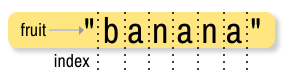
    operator overloadingarrow-up-right
    DataCamparrow-up-right
    Python Tutorialsarrow-up-right
    Sourcearrow-up-right
    bytesarrow-up-right
    bytes.join()arrow-up-right
    io.BytesIOarrow-up-right
    bytearrayarrow-up-right
    bytearrayarrow-up-right
    tuplearrow-up-right
    listarrow-up-right
    abs()arrow-up-right
    int()arrow-up-right
    float()arrow-up-right
    complex()arrow-up-right
    divmod()arrow-up-right
    pow()arrow-up-right
    repr()arrow-up-right
    str()arrow-up-right
    ascii()arrow-up-right
    buffer protocolarrow-up-right
    __bytes__()arrow-up-right
    'banana' string
    State diagram for multiple references with lists
    State diagrams for aliasing multiple references with lists
    image
    image
    image
    image
    image
    image
    image
    image
    formula for area of a circle
    Object diagram 1

    String-Methods

    def initials(phrase):
        words = phrase.split()
        result = ""
        for word in words:
            result += word[0].upper()
        return result
    
    print(initials("Universal Serial Bus")) # Should be: USB
    print(initials("local area network")) # Should be: LAN
    print(initials("Operating system")) # Should be: OS
    @bgoonz
     

    List Compehensions

    """
    This module shows one-liner comprehensions where we make lists, tuples,
    sets and dictionaries by looping through iterators.
    """
    
    
    def main():
        # One interesting fact about data structures is that we can build
        # them with comprehensions. Let's explain how the first one works:
        # we just want to create zeros so our expression is set to `0`
        # since no computing is required; because `0` is a constant value,
        # we can set the item that we compute with to `_`; and we want to
        # create five zeros so we set the iterator as `range(5)`
        assert [0 for _ in range(5)] == [0] * 5 == [0, 0, 0, 0, 0]
    
        # For the next comprehension operations, let's see what we can do
        # with a list of 3-5 letter words
        words = ["cat", "mice", "horse", "bat"]
    
        # Tuple comprehension can find the length for each word
        tuple_comp = tuple(len(word) for word in words)
        assert tuple_comp == (3, 4, 5, 3)
    
        # Set comprehension can find the unique word lengths
        set_comp = {len(word) for word in words}
        assert len(set_comp) < len(words)
        assert set_comp == {3, 4, 5}
    
        # Dictionary comprehension can map each word to its length
        dict_comp = {word: len(word) for word in words}
        assert len(dict_comp) == len(words)
        assert dict_comp == {"cat": 3, "mice": 4, "horse": 5, "bat": 3}
    
    
    if __name__ == "__main__":
        main()
    
    When manipulating a list, we can either create a new, changed list, or change the original list in-place. We'll see the differences in these as we proceed through the article.

    hashtag
    Reverse a List Using the reverse() Method

    Python has a powerful built-in library of methods when it comes to manipulating data in data structures. For the purposes of reversing a list, we can utilize the built-in reverse() method.

    Note: The reverse() method reverses the list in-place. Reversing a list in-place means that the original list is changed, instead of creating a new, reversed list.

    Due to this, we can't assign the resulting object to a new variable, and if you want to keep the original list in memory, you'll have to copy it before reversing:

    There's no return value - the list is reversed in-place. However, we can copy() it before reversing:

    This results in

    hashtag
    Reverse a List Using Slice Notation

    The slice notation allows us to slice and reproduce parts of various collections or collection-based objects in Python, such as Listsarrow-up-right, Stringsarrow-up-right, Tuplesarrow-up-right and NumPy Arraysarrow-up-right.

    When you slice a list, a portion is returned from that list, and every stepth element is included:

    This results in:

    By omitting the start and end arguments, you can include the entire collection. And by setting the step to a negative number, you iterate through the collection in reverse. Naturally, if you pair these together:

    This results in:

    The Slice Notation doesn't affect the original list at all, so the original_list stays the same even after the operation.

    hashtag
    Reverse a List Using slice() Method

    The slice() method accepts the very same parameters - start, end and step, and performs much the same operation as the Slice Notation. Though, instead of omitting the start and end arguments, you can pass in None.

    Its return type is a Slice object, which can be then be used to slice a collection according to its contents. It's not called on the collection you're slicing - you're passing in the Slice object after creation, allowing you to create a single reusable and callable object for many different collections.

    It's internally transpiled into Slice Notation, so the end result is the same:

    This results in:

    hashtag
    Reverse a List Using a For Loop

    Depending on whether we want to keep the original list intact or not, we can pop() elements from the original list and add them to a new one, or we can just append them in reverse order.

    pop() removes the last element from a collection and returns it. We can combine the append() method with this to directly append the removed element to a new list, effectively resulting in a reversed list:

    hashtag

    Alternatively, we can iterate through the list backwards, until the -1th index (non-inclusive) and add each element we see along that list. The range() method accepts 3 arguments - start, end and step, which can again be used in much the same way as before:

    hashtag
    Reversing a List Using the reversed() Method

    Since iterating with a negative step and then accessing each element in the original list is a bit verbose, the reversed() method was added, which makes it much easier to manually implement the reversal logic, in case you want to add your own twist on it.

    The reversed() method returns an iterator, iterating over the collection in a reversed order - and we can easily add these elements into a new list:

    hashtag
    Conclusion

    Depending on whether you need a new reversed list, an in-place reversed list, as well as whether you want the logic to be taken care of for you, or if you'd like to have the flexibility of adding additional operations or twists during the reversal - there are several ways to reverse a list in Python.

    In this tutorial, we've gone over these scenarios, highlighting the difference between each.

    my_list = [1, 2, 3, 4]
    my_list.reverse()
    print(my_list) # Output: [4, 3, 2, 1]
    
    new_list = my_list.reverse()
    print(new_list) # Output: None
    list_1 = [1, 2, 3, 4]
    list_2 = list_1.copy()
    
    list_1.reverse()
    
    print('Reversed list: ', list_1)
    print('Saved original list: ', list_2)
    Reversed list:  [4, 3, 2, 1]
    Saved original list:  [1, 2, 3, 4]
    my_list = [1, 2, 3, 4, 5, 6]
    
    # list[start:end:step]
    segment_1 = my_list[1:5:1]
    segment_2 = my_list[1:5:2]
    
    print(segment_1)
    print(segment_2)
    [2, 3, 4, 5]
    [2, 4]
    original_list = [1, 2, 3, 4, 5, 6]
    
    reversed_list = original_list[::-1]
    print('Original list: ', original_list)
    print('Reversed list: ', reversed_list)
    Original list:  [1, 2, 3, 4, 5, 6]
    Reversed list:  [6, 5, 4, 3, 2, 1]
    original_list = [1, 2, 3, 4, 5, 6]
    
    slice_obj = slice(None, None, -1)
    
    print('slice_obj type:', type(slice_obj))
    print('Reversed list:', original_list[slice_obj])
    slice_obj type: <class 'slice'>
    Reversed list: [6, 5, 4, 3, 2, 1]
    original_list = [1, 2, 3, 4] 
    reversed_list = []
    
    for i in range(len(original_list)):
        reversed_list.append(original_list.pop())
    
    print(reversed_list) # Output: [4, 3, 2, 1]
    original_list = [1, 2, 3, 4]
    reversed_list = []
    
    for i in range(len(original_list)-1, -1, -1):
        reversed_list.append(original_list[i])
    
    print(reversed_list) # Output: [4, 3, 2, 1]
    original_list = [1, 2, 3, 4]
    new_list = []
    
    for i in reversed(original_list):
    	new_list.append(i)
        
    print(new_list) # Output: [4, 3, 2, 1]
    print(original_list) # Output: [1, 2, 3, 4] --> Original hasn't changed
    []
    ) to access individual elements in the list. List index starts from
    0
    .

    Slice operator ([start:end]) allows to fetch sublist from the list. It works similar to string.

    Similar to string start index is optional, if omitted it will be 0.

    The end index is also optional, if omitted it will be set to the last index of the list.

    note:

    If start >= end, list[start : end] will return an empty list. If end specifies a position which is beyond the end of the list, Python will use the length of the list for end instead.

    The + operator joins the two list.

    The * operator replicates the elements in the list.

    The in operator is used to determine whether the elements exists in the list. On success it returns True on failure it returns False.

    Similarly not in is the opposite of in operator.

    As already discussed list is a sequence and also iterable. Means you can use for loop to loop through all the elements of the list.

    1 2 3 4 5 6 7 8 9 10 11 12 13 14 15 16 17 18 19 20 21 22 23 24 25 26 27 28 29 30 31 32 33 34 35

    >>> list1 \= [2, 3, 4, 1, 32, 4] >>> list1.append(19) >>> list1 [2, 3, 4, 1, 32, 4, 19] >>> list1.count(4) # Return the count for number 4 2 >>> list2 \= [99, 54] >>> list1.extend(list2) >>> list1 [2, 3, 4, 1, 32, 4, 19, 99, 54] >>> list1.index(4) # Return the index of number 4 2 >>> list1.insert(1, 25) # Insert 25 at position index 1 >>> list1 [2, 25, 3, 4, 1, 32, 4, 19, 99, 54] >>> >>> list1 \= [2, 25, 3, 4, 1, 32, 4, 19, 99, 54] >>> list1.pop(2) 3 >>> list1 [2, 25, 4, 1, 32, 4, 19, 99, 54] >>> list1.pop() 54 >>> list1 [2, 25, 4, 1, 32, 4, 19, 99] >>> list1.remove(32) # Remove number 32 >>> list1 [2, 25, 4, 1, 4, 19, 99] >>> list1.reverse() # Reverse the list >>> list1 [99, 19, 4, 1, 4, 25, 2] >>> list1.sort() # Sort the list >>> list1 [1, 2, 4, 4, 19, 25, 99] >>>

    List comprehension provides a concise way to create list. It consists of square brackets containing expression followed by for clause then zero or more for or if clauses.

    hashtag
    Creating a Dictionary

    To create a dictionary we use curly brackets, {} or the dict() built-in function.

    Example:

    The dictionary above shows that a value could be any data types:string, boolean, list, tuple, set or a dictionary.

    hashtag
    Dictionary Length

    It checks the number of 'key: value' pairs in the dictionary.

    Example:

    hashtag
    Accessing Dictionary Items

    We can access Dictionary items by referring to its key name.

    Example:

    Accessing an item by key name raises an error if the key does not exist. To avoid this error first we have to check if a key exist or we can use the get method. The get method returns None, which is a NoneType object data type, if the key does not exist.

    hashtag
    Adding Items to a Dictionary

    We can add new key and value pairs to a dictionary

    Example:

    hashtag
    Modifying Items in a Dictionary

    We can modify items in a dictionary

    Example:

    hashtag
    Checking Keys in a Dictionary

    We use the in operator to check if a key exist in a dictionary

    hashtag
    Removing Key and Value Pairs from a Dictionary

    • pop(key): removes the item with the specified key name:

    • popitem(): removes the last item

    • del: removes an item with specified key name

    Example:

    hashtag
    Changing Dictionary to a List of Items

    The items() method changes dictionary to a list of tuples.

    hashtag
    Clearing a Dictionary

    If we don't want the items in a dictionary we can clear them using clear() method

    hashtag
    Deleting a Dictionary

    If we do not use the dictionary we can delete it completely

    hashtag
    Copy a Dictionary

    We can copy a dictionary using a copy() method. Using copy we can avoid mutation of the original dictionary.

    hashtag
    Getting Dictionary Keys as a List

    The keys() method gives us all the keys of a a dictionary as a list.

    hashtag
    Getting Dictionary Values as a List

    The values method gives us all the values of a a dictionary as a list.

    file-pdf
    356KB
    PythonDictMethods.pdf
    PDF
    arrow-up-right-from-squareOpen
    In order to write useful programs, we almost always need the ability to check conditions and change the behavior of the program accordingly. Conditional statementsarrow-up-right give us this ability. The simplest form is the if statement, which has the genaral form:

    A few important things to note about if statements:

    1. The colon (:) is significant and required. It separates the header of the compound statement from the body.

    2. The line after the colon must be indented. It is standard in Python to use four spaces for indenting.

    3. All lines indented the same amount after the colon will be executed whenever the BOOLEAN_EXPRESSION is true.

    Here is an example:

    The boolean expression after the if statement is called the condition. If it is true, then all the indented statements get executed. What happens if the condition is false, and food is not equal to 'spam'? In a simple if statement like this, nothing happens, and the program continues on to the next statement.

    Run this example code and see what happens. Then change the value of food to something other than 'spam' and run it again, confirming that you don’t get any output.

    Flowchart of an if statement

    As with the for statement from the last chapter, the if statement is a compound statement. Compound statements consist of a header line and a body. The header line of the if statement begins with the keyword if followed by a boolean expression and ends with a colon (:).

    The indented statements that follow are called a block. The first unindented statement marks the end of the block. Each statement inside the block must have the same indentation.

    Indentation and the PEP 8 Python Style Guide

    The Python community has developed a Style Guide for Python Codearrow-up-right, usually referred to simply as “PEP 8”. The Python Enhancement Proposals, or PEPs, are part of the process the Python community uses to discuss and adopt changes to the language.

    PEP 8 recommends the use of 4 spaces per indentation level. We will follow this (and the other PEP 8 recommendations) in this book.

    To help us learn to write well styled Python code, there is a program called pep8arrow-up-right that works as an automatic style guide checker for Python source code. pep8 is installable as a package on Debianarrow-up-right based GNU/Linuxarrow-up-right systems like Ubuntu.

    In the Vimarrow-up-right section of the appendix, Configuring Ubuntu for Python Web Developmentarrow-up-right, there is instruction on configuring vim to run pep8 on your source code with the push of a button.

    hashtag
    4.1.2. The if else statement

    It is frequently the case that you want one thing to happen when a condition it true, and something else to happen when it is false. For that we have the if else statement.

    Here, the first print statement will execute if food is equal to 'spam', and the print statement indented under the else clause will get executed when it is not.

    Flowchart of a if else statement

    The syntax for an if else statement looks like this:

    Each statement inside the if block of an if else statement is executed in order if the boolean expression evaluates to True. The entire block of statements is skipped if the boolean expression evaluates to False, and instead all the statements under the else clause are executed.

    There is no limit on the number of statements that can appear under the two clauses of an if else statement, but there has to be at least one statement in each block. Occasionally, it is useful to have a section with no statements (usually as a place keeper, or scaffolding, for code you haven’t written yet). In that case, you can use the pass statement, which does nothing except act as a placeholder.

    Python terminology

    Python documentation sometimes uses the term suite of statements to mean what we have called a block here. They mean the same thing, and since most other languages and computer scientists use the word block, we’ll stick with that.

    Notice too that else is not a statement. The if statement has two clauses, one of which is the (optional) else clause. The Python documentation calls both forms, together with the next form we are about to meet, the if statement.

    hashtag
    4.2. Chained conditionals

    Sometimes there are more than two possibilities and we need more than two branches. One way to express a computation like that is a chained conditional:

    Flowchart of this chained conditional

    elif is an abbreviation of else if. Again, exactly one branch will be executed. There is no limit of the number of elif statements but only a single (and optional) final else statement is allowed and it must be the last branch in the statement:

    Each condition is checked in order. If the first is false, the next is checked, and so on. If one of them is true, the corresponding branch executes, and the statement ends. Even if more than one condition is true, only the first true branch executes.

    hashtag
    4.3. Nested conditionals

    One conditional can also be nested within another. (It is the same theme of composibility, again!) We could have written the previous example as follows:

    Flowchart of this nested conditional

    The outer conditional contains two branches. The second branch contains another if statement, which has two branches of its own. Those two branches could contain conditional statements as well.

    Although the indentation of the statements makes the structure apparent, nested conditionals very quickly become difficult to read. In general, it is a good idea to avoid them when you can.

    Logical operators often provide a way to simplify nested conditional statements. For example, we can rewrite the following code using a single conditional:

    The print function is called only if we make it past both the conditionals, so we can use the and operator:

    Note

    Python actually allows a short hand form for this, so the following will also work:

    hashtag
    4.4. Iteration

    Computers are often used to automate repetitive tasks. Repeating identical or similar tasks without making errors is something that computers do well and people do poorly.

    Repeated execution of a set of statements is called iterationarrow-up-right. Python has two statements for iteration – the for statement, which we met last chapter, and the while statement.

    Before we look at those, we need to review a few ideas.

    hashtag
    4.4.1. Reassignmnent

    As we saw back in the Variables are variablearrow-up-right section, it is legal to make more than one assignment to the same variable. A new assignment makes an existing variable refer to a new value (and stop referring to the old value).

    The output of this program is

    because the first time bruce is printed, its value is 5, and the second time, its value is 7.

    Here is what reassignment looks like in a state snapshot:

    With reassignment it is especially important to distinguish between an assignment statement and a boolean expression that tests for equality. Because Python uses the equal token (=) for assignment, it is tempting to interpret a statement like a = b as a boolean test. Unlike mathematics, it is not! Remember that the Python token for the equality operator is ==.

    Note too that an equality test is symmetric, but assignment is not. For example, if a == 7 then 7 == a. But in Python, the statement a = 7 is legal and 7 = a is not.

    Furthermore, in mathematics, a statement of equality is always true. If a == b now, then a will always equal b. In Python, an assignment statement can make two variables equal, but because of the possibility of reassignment, they don’t have to stay that way:

    The third line changes the value of a but does not change the value of b, so they are no longer equal.

    Note

    In some programming languages, a different symbol is used for assignment, such as <- or :=, to avoid confusion. Python chose to use the tokens = for assignment, and == for equality. This is a common choice, also found in languages like C, C++, Java, JavaScript, and PHP, though it does make things a bit confusing for new programmers.

    hashtag
    4.4.2. Updating variables

    When an assignment statement is executed, the right-hand-side expression (i.e. the expression that comes after the assignment token) is evaluated first. Then the result of that evaluation is written into the variable on the left hand side, thereby changing it.

    One of the most common forms of reassignment is an update, where the new value of the variable depends on its old value.

    The second line means “get the current value of n, multiply it by three and add one, and put the answer back into n as its new value”. So after executing the two lines above, n will have the value 16.

    If you try to get the value of a variable that doesn’t exist yet, you’ll get an error:

    Before you can update a variable, you have to initialize it, usually with a simple assignment:

    This second statement — updating a variable by adding 1 to it — is very common. It is called an increment of the variable; subtracting 1 is called a decrement.

    hashtag
    4.5. The for loop

    The for loop processes each item in a sequence, so it is used with Python’s sequence data types - strings, lists, and tuples.

    Each item in turn is (re-)assigned to the loop variable, and the body of the loop is executed.

    The general form of a for loop is:

    This is another example of a compound statement in Python, and like the branching statements, it has a header terminated by a colon (:) and a body consisting of a sequence of one or more statements indented the same amount from the header.

    The loop variable is created when the for statement runs, so you do not need to create the variable before then. Each iteration assigns the the loop variable to the next element in the sequence, and then executes the statements in the body. The statement finishes when the last element in the sequence is reached.

    This type of flow is called a loop because it loops back around to the top after each iteration.

    Running through all the items in a sequence is called traversing the sequence, or traversal.

    You should run this example to see what it does.

    Tip

    As with all the examples you see in this book, you should try this code out yourself and see what it does. You should also try to anticipate the results before you do, and create your own related examples and try them out as well.

    If you get the results you expected, pat yourself on the back and move on. If you don’t, try to figure out why. This is the essence of the scientific method, and is essential if you want to think like a computer programmer.

    Often times you will want a loop that iterates a given number of times, or that iterates over a given sequence of numbers. The range function come in handy for that.

    hashtag
    4.6. Tables

    One of the things loops are good for is generating tables. Before computers were readily available, people had to calculate logarithms, sines and cosines, and other mathematical functions by hand. To make that easier, mathematics books contained long tables listing the values of these functions. Creating the tables was slow and boring, and they tended to be full of errors.

    When computers appeared on the scene, one of the initial reactions was, “This is great! We can use the computers to generate the tables, so there will be no errors.” That turned out to be true (mostly) but shortsighted. Soon thereafter, computers and calculators were so pervasive that the tables became obsolete.

    Well, almost. For some operations, computers use tables of values to get an approximate answer and then perform computations to improve the approximation. In some cases, there have been errors in the underlying tables, most famously in the table the Intel Pentium processor chip used to perform floating-point division.

    Although a log table is not as useful as it once was, it still makes a good example. The following program outputs a sequence of values in the left column and 2 raised to the power of that value in the right column:

    Using the tab character ('\t') makes the output align nicely.

    hashtag
    4.7. The while statement

    The general syntax for the while statement looks like this:

    Like the branching statements and the for loop, the while statement is a compound statement consisting of a header and a body. A while loop executes an unknown number of times, as long at the BOOLEAN EXPRESSION is true.

    Here is a simple example:

    Notice that if number is set to 42 on the first line, the body of the while statement will not execute at all.

    Here is a more elaborate example program demonstrating the use of the while statement

    The flow of execution for a while statement works like this:

    1. Evaluate the condition (BOOLEAN EXPRESSION), yielding False or True.

    2. If the condition is false, exit the while statement and continue execution at the next statement.

    3. If the condition is true, execute each of the STATEMENTS in the body and then go back to step 1.

    The body consists of all of the statements below the header with the same indentation.

    The body of the loop should change the value of one or more variables so that eventually the condition becomes false and the loop terminates. Otherwise the loop will repeat forever, which is called an infinite loop.

    An endless source of amusement for computer programmers is the observation that the directions on shampoo, lather, rinse, repeat, are an infinite loop.

    In the case here, we can prove that the loop terminates because we know that the value of len(name) is finite, and we can see that the value of pos increments each time through the loop, so eventually it will have to equal len(name). In other cases, it is not so easy to tell.

    What you will notice here is that the while loop is more work for you — the programmer — than the equivalent for loop. When using a while loop one has to control the loop variable yourself: give it an initial value, test for completion, and then make sure you change something in the body so that the loop terminates.

    hashtag
    4.8. Choosing between for and while

    So why have two kinds of loop if for looks easier? This next example shows a case where we need the extra power that we get from the while loop.

    Use a for loop if you know, before you start looping, the maximum number of times that you’ll need to execute the body. For example, if you’re traversing a list of elements, you know that the maximum number of loop iterations you can possibly need is “all the elements in the list”. Or if you need to print the 12 times table, we know right away how many times the loop will need to run.

    So any problem like “iterate this weather model for 1000 cycles”, or “search this list of words”, “find all prime numbers up to 10000” suggest that a for loop is best.

    By contrast, if you are required to repeat some computation until some condition is met, and you cannot calculate in advance when this will happen, as we did in the “greatest name” program, you’ll need a while loop.

    We call the first case definite iteration — we have some definite bounds for what is needed. The latter case is called indefinite iteration — we’re not sure how many iterations we’ll need — we cannot even establish an upper bound!

    hashtag
    4.9. Tracing a program

    To write effective computer programs a programmer needs to develop the ability to trace the execution of a computer program. Tracing involves “becoming the computer” and following the flow of execution through a sample program run, recording the state of all variables and any output the program generates after each instruction is executed.

    To understand this process, let’s trace the execution of the program from The while statementarrow-up-right section.

    At the start of the trace, we have a local variable, name with an initial value of 'Harrison'. The user will enter a string that is stored in the variable, guess. Let’s assume they enter 'Maribel'. The next line creates a variable named pos and gives it an intial value of 0.

    To keep track of all this as you hand trace a program, make a column heading on a piece of paper for each variable created as the program runs and another one for output. Our trace so far would look something like this:

    Since guess != name and pos < len(name) evaluates to True (take a minute to convince yourself of this), the loop body is executed.

    The user will now see

    Assuming the user enters Karen this time, pos will be incremented, guess != name and pos < len(name) again evaluates to True, and our trace will now look like this:

    A full trace of the program might produce something like this:

    Tracing can be a bit tedious and error prone (that’s why we get computers to do this stuff in the first place!), but it is an essential skill for a programmer to have. From a trace we can learn a lot about the way our code works.

    hashtag
    4.10. Abbreviated assignment

    Incrementing a variable is so common that Python provides an abbreviated syntax for it:

    count += 1 is an abreviation for count = count + 1 . We pronouce the operator as “plus-equals”. The increment value does not have to be 1:

    There are similar abbreviations for -=, *=, /=, //= and %=:

    hashtag
    4.11. Another while example: Guessing game

    The following program implements a simple guessing game:

    This program makes use of the mathematical law of trichotomy (given real numbers a and b, exactly one of these three must be true: a > b, a < b, or a == b).

    hashtag
    4.12. The break statement

    The break statement is used to immediately leave the body of its loop. The next statement to be executed is the first one after the body:

    This prints:

    hashtag
    4.13. The continue statement

    This is a control flow statement that causes the program to immediately skip the processing of the rest of the body of the loop, for the current iteration. But the loop still carries on running for its remaining iterations:

    This prints:

    hashtag
    4.14. Another for example

    Here is an example that combines several of the things we have learned:

    Trace this program and make sure you feel confident you understand how it works.

    hashtag
    4.15. Nested Loops for Nested Data

    Now we’ll come up with an even more adventurous list of structured data. In this case, we have a list of students. Each student has a name which is paired up with another list of subjects that they are enrolled for:

    Here we’ve assigned a list of five elements to the variable students. Let’s print out each student name, and the number of subjects they are enrolled for:

    Python agreeably responds with the following output:

    Now we’d like to ask how many students are taking CompSci. This needs a counter, and for each student we need a second loop that tests each of the subjects in turn:

    You should set up a list of your own data that interests you — perhaps a list of your CDs, each containing a list of song titles on the CD, or a list of movie titles, each with a list of movie stars who acted in the movie. You could then ask questions like “Which movies starred Angelina Jolie?”

    hashtag
    4.16. List comprehensions

    A list comprehension is a syntactic construct that enables lists to be created from other lists using a compact, mathematical syntax:

    The general syntax for a list comprehension expression is:

    This list expression has the same effect as:

    As you can see, the list comprehension is much more compact.

    hashtag
    4.17. Glossary

    append

    To add new data to the end of a file or other data object.block

    A group of consecutive statements with the same indentation.body

    The block of statements in a compound statement that follows the header.branch

    One of the possible paths of the flow of execution determined by conditional execution.chained conditional

    A conditional branch with more than two possible flows of execution. In Python chained conditionals are written with if ... elif ... else statements.compound statement

    A Python statement that has two parts: a header and a body. The header begins with a keyword and ends with a colon (:). The body contains a series of other Python statements, all indented the same amount.

    Note

    We will use the Python standard of 4 spaces for each level of indentation.condition

    The boolean expression in a conditional statement that determines which branch is executed.conditional statement

    A statement that controls the flow of execution depending on some condition. In Python the keywords if, elif, and else are used for conditional statements.counter

    A variable used to count something, usually initialized to zero and incremented in the body of a loop.cursor

    An invisible marker that keeps track of where the next character will be printed.decrement

    Decrease by 1.definite iteration

    A loop where we have an upper bound on the number of times the body will be executed. Definite iteration is usually best coded as a for loop.delimiter

    A sequence of one or more characters used to specify the boundary between separate parts of text.increment

    Both as a noun and as a verb, increment means to increase by 1.infinite loop

    A loop in which the terminating condition is never satisfied.indefinite iteration

    A loop where we just need to keep going until some condition is met. A while statement is used for this case.initialization (of a variable)

    To initialize a variable is to give it an initial value. Since in Python variables don’t exist until they are assigned values, they are initialized when they are created. In other programming languages this is not the case, and variables can be created without being initialized, in which case they have either default or garbage values.iteration

    Repeated execution of a set of programming statements.loop

    A statement or group of statements that execute repeatedly until a terminating condition is satisfied.loop variable

    A variable used as part of the terminating condition of a loop.nested loop

    A loop inside the body of another loop.nesting

    One program structure within another, such as a conditional statement inside a branch of another conditional statement.newline

    A special character that causes the cursor to move to the beginning of the next line.prompt

    A visual cue that tells the user to input data.reassignment

    Making more than one assignment to the same variable during the execution of a program.tab

    A special character that causes the cursor to move to the next tab stop on the current line.trichotomy

    Given any real numbers a and b, exactly one of the following relations holds: a < b, a > b, or a == b. Thus when you can establish that two of the relations are false, you can assume the remaining one is true.trace

    To follow the flow of execution of a program by hand, recording the change of state of the variables and any output produced.

    hashtag
    8.1. Composition

    By now, you have seen several examples of composition. One of the first examples was using a method invocation as part of an expression. Another example is the nested structure of statements; you can put an if statement within a while loop, within another if statement, and so on.

    Having seen this pattern, and having learned about lists and objects, you should not be surprised to learn that you can create lists of objects. You can also create objects that contain lists (as attributes); you can create lists that contain lists; you can create objects that contain objects; and so on.

    In this chapter we will look at some examples of these combinations, using Card objects as an example.

    hashtag
    8.2. Card objects

    If you are not familiar with common playing cards, now would be a good time to get a deck, or else this chapter might not make much sense. There are fifty-two cards in a deck, each of which belongs to one of four suits and one of thirteen ranks. The suits are Spades, Hearts, Diamonds, and Clubs (in descending order in bridge). The ranks are Ace, 2, 3, 4, 5, 6, 7, 8, 9, 10, Jack, Queen, and King. Depending on the game that you are playing, the rank of Ace may be higher than King or lower than 2.

    If we want to define a new object to represent a playing card, it is obvious what the attributes should be: rank and suit. It is not as obvious what type the attributes should be. One possibility is to use strings containing words like "Spade" for suits and "Queen" for ranks. One problem with this implementation is that it would not be easy to compare cards to see which had a higher rank or suit.

    An alternative is to use integers to encode the ranks and suits. By encode, we do not mean what some people think, which is to encrypt or translate into a secret code. What a computer scientist means by encode is to define a mapping between a sequence of numbers and the items I want to represent. For example:

    An obvious feature of this mapping is that the suits map to integers in order, so we can compare suits by comparing integers. The mapping for ranks is fairly obvious; each of the numerical ranks maps to the corresponding integer, and for face cards:

    The reason we are using mathematical notation for these mappings is that they are not part of the Python program. They are part of the program design, but they never appear explicitly in the code. The class definition for the Card type looks like this:

    As usual, we provide an initialization method that takes an optional parameter for each attribute.

    To create an object that represents the 3 of Clubs, use this command:

    The first argument, 0, represents the suit Clubs.

    hashtag
    8.3. Class attributes and the __str__ method

    In order to print Card objects in a way that people can easily read, we want to map the integer codes onto words. A natural way to do that is with lists of strings. We assign these lists to class attributes at the top of the class definition:

    Class attributes like Card.SUITS and Card.RANKS are defined outside of any method, and can be accessed from any of the methods in the class.

    Inside __str__, we can use SUITS and RANKS to map the numerical values of suit and rank to strings. For example, the expression Card.SUITS[self.suit] means use the attribute suit from the object self as an index into the class attribute named SUITS, and select the appropriate string.

    The reason for the "narf" in the first element in ranks is to act as a place keeper for the zero-eth element of the list, which will never be used. The only valid ranks are 1 to 13. This wasted item is not entirely necessary. We could have started at 0, as usual, but it is less confusing to encode 2 as 2, 3 as 3, and so on.

    We have a doctest in the __str__ method to confirm that Card(2, 11) will display as “Queen of Hearts”.

    hashtag
    8.4. Comparing cards

    For primitive types, there are conditional operators ( <, >, ==, etc.) that compare values and determine when one is greater than, less than, or equal to another. For user-defined types, we can override the behavior of the built-in operators by providing a method named __cmp__. By convention, __cmp__ takes two parameters, self and other, and returns 1 if the first object is greater, -1 if the second object is greater, and 0 if they are equal to each other.

    Some types are completely ordered, which means that you can compare any two elements and tell which is bigger. For example, the integers and the floating-point numbers are completely ordered. Some sets are unordered, which means that there is no meaningful way to say that one element is bigger than another. For example, the fruits are unordered, which is why you cannot compare apples and oranges.

    The set of playing cards is partially ordered, which means that sometimes you can compare cards and sometimes not. For example, you know that the 3 of Clubs is higher than the 2 of Clubs, and the 3 of Diamonds is higher than the 3 of Clubs. But which is better, the 3 of Clubs or the 2 of Diamonds? One has a higher rank, but the other has a higher suit.

    In order to make cards comparable, you have to decide which is more important, rank or suit. To be honest, the choice is arbitrary. For the sake of choosing, we will say that suit is more important, because a new deck of cards comes sorted with all the Clubs together, followed by all the Diamonds, and so on.

    With that decided, we can write __cmp__:

    In this ordering, Aces appear lower than Deuces (2s).

    hashtag
    8.5. Decks

    Now that we have objects to represent Cards, the next logical step is to define a class to represent a Deck. Of course, a deck is made up of cards, so each Deck object will contain a list of cards as an attribute.

    The following is a class definition for the Deck class. The initialization method creates the attribute cards and generates the standard set of fifty-two cards:

    The easiest way to populate the deck is with a nested loop. The outer loop enumerates the suits from 0 to 3. The inner loop enumerates the ranks from 1 to 13. Since the outer loop iterates four times, and the inner loop iterates thirteen times, the total number of times the body is executed is fifty-two (thirteen times four). Each iteration creates a new instance of Card with the current suit and rank, and appends that card to the cards list.

    The append method works on lists but not, of course, tuples.

    hashtag
    8.6. Printing the deck

    As usual, when we define a new type of object we want a method that prints the contents of an object. To print a Deck, we traverse the list and print each Card:

    Here, and from now on, the ellipsis ( ...) indicates that we have omitted the other methods in the class.

    As an alternative to print_deck, we could write a __str__ method for the Deck class. The advantage of __str__ is that it is more flexible. Rather than just printing the contents of the object, it generates a string representation that other parts of the program can manipulate before printing, or store for later use.

    Here is a version of __str__ that returns a string representation of a Deck. To add a bit of pizzazz, it arranges the cards in a cascade where each card is indented one space more than the previous card:

    This example demonstrates several features. First, instead of traversing self.cards and assigning each card to a variable, we are using i as a loop variable and an index into the list of cards.

    Second, we are using the string multiplication operator to indent each card by one more space than the last. The expression " " * i yields a number of spaces equal to the current value of i.

    Third, instead of using the print function to print the cards, we use the str function. Passing an object as an argument to str is equivalent to invoking the __str__ method on the object.

    Finally, we are using the variable s as an accumulator. Initially, s is the empty string. Each time through the loop, a new string is generated and concatenated with the old value of s to get the new value. When the loop ends, s contains the complete string representation of the Deck, which looks like this:

    And so on. Even though the result appears on 52 lines, it is one long string that contains newlines.

    hashtag
    8.7. Shuffling the deck

    If a deck is perfectly shuffled, then any card is equally likely to appear anywhere in the deck, and any location in the deck is equally likely to contain any card.

    To shuffle the deck, we will use the randrange function from the random module. With two integer arguments, a and b, randrange chooses a random integer in the range a <= x < b. Since the upper bound is strictly less than b, we can use the length of a list as the second parameter, and we are guaranteed to get a legal index. For example, this expression chooses the index of a random card in a deck:

    An easy way to shuffle the deck is by traversing the cards and swapping each card with a randomly chosen one. It is possible that the card will be swapped with itself, but that is fine. In fact, if we precluded that possibility, the order of the cards would be less than entirely random:

    Rather than assume that there are fifty-two cards in the deck, we get the actual length of the list and store it in num_cards.

    For each card in the deck, we choose a random card from among the cards that haven’t been shuffled yet. Then we swap the current card ( i) with the selected card ( j). To swap the cards we use a tuple assignment:

    hashtag
    8.8. Removing and dealing cards

    Another method that would be useful for the Deck class is remove, which takes a card as a parameter, removes it, and returns True if the card was in the deck and False otherwise:

    The in operator returns True if the first operand is in the second, which must be a list or a tuple. If the first operand is an object, Python uses the object’s __cmp__ method to determine equality with items in the list. Since the __cmp__ in the Card class checks for deep equality, the remove method checks for deep equality.

    To deal cards, we want to remove and return the top card. The list method pop provides a convenient way to do that:

    Actually, pop removes the last card in the list, so we are in effect dealing from the bottom of the deck.

    One more operation that we are likely to want is the boolean function is_empty, which returns true if the deck contains no cards:

    hashtag
    8.9. Inheritance

    The language feature most often associated with object-oriented programming is inheritance. Inheritance is the ability to define a new class that is a modified version of an existing class.

    The primary advantage of this feature is that you can add new methods to a class without modifying the existing class. It is called inheritance because the new class inherits all of the methods of the existing class. Extending this metaphor, the existing class is sometimes called the parent class. The new class may be called the child class or sometimes subclass.

    Inheritance is a powerful feature. Some programs that would be complicated without inheritance can be written concisely and simply with it. Also, inheritance can facilitate code reuse, since you can customize the behavior of parent classes without having to modify them. In some cases, the inheritance structure reflects the natural structure of the problem, which makes the program easier to understand.

    On the other hand, inheritance can make programs difficult to read. When a method is invoked, it is sometimes not clear where to find its definition. The relevant code may be scattered among several modules. Also, many of the things that can be done using inheritance can be done as elegantly (or more so) without it. If the natural structure of the problem does not lend itself to inheritance, this style of programming can do more harm than good.

    In this chapter we will demonstrate the use of inheritance as part of a program that plays the card game Old Maid. One of our goals is to write code that could be reused to implement other card games.

    hashtag
    8.10. A hand of cards

    For almost any card game, we need to represent a hand of cards. A hand is similar to a deck, of course. Both are made up of a set of cards, and both require operations like adding and removing cards. Also, we might like the ability to shuffle both decks and hands.

    A hand is also different from a deck. Depending on the game being played, we might want to perform some operations on hands that don’t make sense for a deck. For example, in poker we might classify a hand (straight, flush, etc.) or compare it with another hand. In bridge, we might want to compute a score for a hand in order to make a bid.

    This situation suggests the use of inheritance. If Hand is a subclass of Deck, it will have all the methods of Deck, and new methods can be added.

    In the class definition, the name of the parent class appears in parentheses:

    This statement indicates that the new Hand class inherits from the existing Deck class.

    The Hand constructor initializes the attributes for the hand, which are name and cards. The string name identifies this hand, probably by the name of the player that holds it. The name is an optional parameter with the empty string as a default value. cards is the list of cards in the hand, initialized to the empty list:

    For just about any card game, it is necessary to add and remove cards from the deck. Removing cards is already taken care of, since Hand inherits remove from Deck. But we have to write add:

    Again, the ellipsis indicates that we have omitted other methods. The list append method adds the new card to the end of the list of cards.

    hashtag
    8.11. Dealing cards

    Now that we have a Hand class, we want to deal cards from the Deck into hands. It is not immediately obvious whether this method should go in the Hand class or in the Deck class, but since it operates on a single deck and (possibly) several hands, it is more natural to put it in Deck.

    deal should be fairly general, since different games will have different requirements. We may want to deal out the entire deck at once or add one card to each hand.

    deal takes two parameters, a list (or tuple) of hands and the total number of cards to deal. If there are not enough cards in the deck, the method deals out all of the cards and stops:

    The second parameter, num_cards, is optional; the default is a large number, which effectively means that all of the cards in the deck will get dealt.

    The loop variable i goes from 0 to nCards-1. Each time through the loop, a card is removed from the deck using the list method pop, which removes and returns the last item in the list.

    The modulus operator ( %) allows us to deal cards in a round robin (one card at a time to each hand). When i is equal to the number of hands in the list, the expression i % nHands wraps around to the beginning of the list (index 0).

    hashtag
    8.12. Printing a Hand

    To print the contents of a hand, we can take advantage of the printDeck and __str__ methods inherited from Deck. For example:

    It’s not a great hand, but it has the makings of a straight flush.

    Although it is convenient to inherit the existing methods, there is additional information in a Hand object we might want to include when we print one. To do that, we can provide a __str__ method in the Hand class that overrides the one in the Deck class:

    Initially, s is a string that identifies the hand. If the hand is empty, the program appends the words is empty and returns s.

    Otherwise, the program appends the word contains and the string representation of the Deck, computed by invoking the __str__ method in the Deck class on self.

    It may seem odd to send self, which refers to the current Hand, to a Deck method, until you remember that a Hand is a kind of Deck. Hand objects can do everything Deck objects can, so it is legal to send a Hand to a Deck method.

    In general, it is always legal to use an instance of a subclass in place of an instance of a parent class.

    hashtag
    8.13. The CardGame class

    The CardGame class takes care of some basic chores common to all games, such as creating the deck and shuffling it:

    This is the first case we have seen where the initialization method performs a significant computation, beyond initializing attributes.

    To implement specific games, we can inherit from CardGame and add features for the new game. As an example, we’ll write a simulation of Old Maid.

    The object of Old Maid is to get rid of cards in your hand. You do this by matching cards by rank and color. For example, the 4 of Clubs matches the 4 of Spades since both suits are black. The Jack of Hearts matches the Jack of Diamonds since both are red.

    To begin the game, the Queen of Clubs is removed from the deck so that the Queen of Spades has no match. The fifty-one remaining cards are dealt to the players in a round robin. After the deal, all players match and discard as many cards as possible.

    When no more matches can be made, play begins. In turn, each player picks a card (without looking) from the closest neighbor to the left who still has cards. If the chosen card matches a card in the player’s hand, the pair is removed. Otherwise, the card is added to the player’s hand. Eventually all possible matches are made, leaving only the Queen of Spades in the loser’s hand.

    In our computer simulation of the game, the computer plays all hands. Unfortunately, some nuances of the real game are lost. In a real game, the player with the Old Maid goes to some effort to get their neighbor to pick that card, by displaying it a little more prominently, or perhaps failing to display it more prominently, or even failing to fail to display that card more prominently. The computer simply picks a neighbor’s card at random.

    hashtag
    8.14. OldMaidHand class

    A hand for playing Old Maid requires some abilities beyond the general abilities of a Hand. We will define a new class, OldMaidHand, that inherits from Hand and provides an additional method called remove_matches:

    We start by making a copy of the list of cards, so that we can traverse the copy while removing cards from the original. Since self.cards is modified in the loop, we don’t want to use it to control the traversal. Python can get quite confused if it is traversing a list that is changing!

    For each card in the hand, we figure out what the matching card is and go looking for it. The match card has the same rank and the other suit of the same color. The expression 3 - card.suit turns a Club (suit 0) into a Spade (suit 3) and a Diamond (suit 1) into a Heart (suit 2). You should satisfy yourself that the opposite operations also work. If the match card is also in the hand, both cards are removed.

    The following example demonstrates how to use remove_matches:

    Notice that there is no __init__ method for the OldMaidHand class. We inherit it from Hand.

    hashtag
    8.15. OldMaidGame class

    Now we can turn our attention to the game itself. OldMaidGame is a subclass of CardGame with a new method called play that takes a list of players as a parameter.

    Since __init__ is inherited from CardGame, a new OldMaidGame object contains a new shuffled deck:

    The writing of printHands() is left as an exercise.

    Some of the steps of the game have been separated into methods. remove_all_matches traverses the list of hands and invokes remove_matches on each:

    count is an accumulator that adds up the number of matches in each hand and returns the total.

    When the total number of matches reaches twenty-five, fifty cards have been removed from the hands, which means that only one card is left and the game is over.

    The variable turn keeps track of which player’s turn it is. It starts at 0 and increases by one each time; when it reaches numHands, the modulus operator wraps it back around to 0.

    The method playOneTurn takes a parameter that indicates whose turn it is. The return value is the number of matches made during this turn:

    If a player’s hand is empty, that player is out of the game, so he or she does nothing and returns 0.

    Otherwise, a turn consists of finding the first player on the left that has cards, taking one card from the neighbor, and checking for matches. Before returning, the cards in the hand are shuffled so that the next player’s choice is random.

    The method find_neighbor starts with the player to the immediate left and continues around the circle until it finds a player that still has cards:

    If find_neighbor ever went all the way around the circle without finding cards, it would return None and cause an error elsewhere in the program. Fortunately, we can prove that that will never happen (as long as the end of the game is detected correctly).

    We have omitted the print_hands method. You can write that one yourself.

    The following output is from a truncated form of the game where only the top fifteen cards (tens and higher) were dealt to three players. With this small deck, play stops after seven matches instead of twenty-five.

    So Jeff loses.

    hashtag
    8.16. Glossary

    encode

    To represent one set of values using another set of values by constructing a mapping between them.class attribute

    A variable that is defined inside a class definition but outside any method. Class attributes are accessible from any method in the class and are shared by all instances of the class.accumulator

    A variable used in a loop to accumulate a series of values, such as by concatenating them onto a string or adding them to a running sum.inheritance

    The ability to define a new class that is a modified version of a previously defined class.parent class

    The class from which a child class inherits.child class

    A new class created by inheriting from an existing class; also called a subclass.

    inheritancearrow-up-right
    # -*- coding: utf-8 -*-
    """Copy of Linked Lists.ipynb
    
    Automatically generated by Colaboratory.
    
    Original file is located at
        https://colab.research.google.com/gist/bgoonz/73035b719d10a753a44089b41eacf6ca/copy-of-linked-lists.ipynb
    
    # Linked Lists
    - Non Contiguous abstract Data Structure
    - Value (can be any value for our use we will just use numbers)
    - Next (A pointer or reference to the next node in the list)
    
    ```
    L1 = Node(34)
    L1.next = Node(45)
    L1.next.next = Node(90)
    
    # while the current node is not none
      # do something with the data
      # traverse to next node
    
    L1 = [34]-> [45]-> [90] -> None
    
    Node(45)
    Node(90)
    
    ```
    """
    
    
    class LinkedListNode:
      """
        Simple Singly Linked List Node Class
        value -> int
        next -> LinkedListNode
      """
    
      def __init__(self, value):
        self.value = value
        self.next = None
    
      def add_node(self, value):
        # set current as a ref to self
        current = self
        # thile there is still more nodes
        while current.next is not None:
          # traverse to the next node
          current = current.next
        # create a new node and set the ref from current.next to the new node
        current.next = LinkedListNode(value)
    
      def insert_node(self, value, target):
        # create a new node with the value provided
        new_node = LinkedListNode(value)
        # set a ref to the current node
        current = self
        # while the current nodes value is not the target
        while current.value != target:
          # traverse to the next node
          current = current.next
        # set the new nodes next pointer to point toward the current nodes next pointer
        new_node.next = current.next
        # set the current nodes next to point to the new node
        current.next = new_node
    
    
    ll_storage = []
    L1 = LinkedListNode(34)
    L1.next = LinkedListNode(45)
    L1.next.next = LinkedListNode(90)
    
    
    def print_ll(linked_list_node):
      current = linked_list_node
      while current is not None:
        print(current.value)
        current = current.next
    
    
    def add_to_ll_storage(linked_list_node):
      current = linked_list_node
      while current is not None:
        ll_storage.append(current)
        current = current.next
    
    
    L1.add_node(12)
    print_ll(L1)
    L1.add_node(24)
    print()
    print_ll(L1)
    print()
    L1.add_node(102)
    print_ll(L1)
    L1.insert_node(123, 90)
    print()
    print_ll(L1)
    L1.insert_node(678, 34)
    print()
    print_ll(L1)
    L1.insert_node(999, 102)
    print()
    print_ll(L1)
    
    """# CODE 9571"""
    
    
    class LinkedListNode:
      """
        Simple Doubly Linked List Node Class
        value -> int
        next -> LinkedListNode
        prev -> LinkedListNode
      """
    
      def __init__(self, value):
        self.value = value
        self.next = None
        self.prev = None
    
    
    """
    Given a reference to the head node of a singly-linked list, write a function
    that reverses the linked list in place. The function should return the new head
    of the reversed list.
    In order to do this in O(1) space (in-place), you cannot make a new list, you
    need to use the existing nodes.
    In order to do this in O(n) time, you should only have to traverse the list
    once.
    *Note: If you get stuck, try drawing a picture of a small linked list and
    running your function by hand. Does it actually work? Also, don't forget to
    consider edge cases (like a list with only 1 or 0 elements).*
              cn         p
            None        [1] -> [2] ->[3] -> None
    
    
    - setup a current variable pointing to the head of the list
    - set up a prev variable pointing to None
    - set up a next variable pointing to None
    
    - while the current ref is not none
      - set next to the current.next
      - set the current.next to prev
      - set prev to current
      - set current to next
    
    - return prev
    
    """
    
    
    class LinkedListNode():
        def __init__(self, value):
            self.value = value
            self.next = None
    
    
    def reverse(head_of_list):
      current = head_of_list
      prev = None
      next = None
    
      while current:
        next = current.next
        current.next = prev
        prev = current
        current = next
    
      return prev
    
    
    class HashTableEntry:
        """
        Linked List hash table key/value pair
        """
    
        def __init__(self, key, value):
            self.key = key
            self.value = value
            self.next = None
    
    
    # Hash table can't have fewer than this many slots
    MIN_CAPACITY = 8
    
    [
     0["Lou", 41] -> ["Bob", 41] 
     1["Steve", 41] -> None,
     2["Jen", 41] -> None,
     3["Dave", 41] -> None,
     4None,
     5["Hector", 34] -> None,
     6["Lisa", 41] -> None,
     7None,
     8None,
     9None
    ]
    
    
    class HashTable:
        """
        A hash table that with `capacity` buckets
        that accepts string keys
        Implement this.
        """
    
        def __init__(self, capacity):
                    self.capacity = capacity  # Number of buckets in the hash table
            self.storage = [None] * capacity
            self.item_count = 0
    
    
        def get_num_slots(self):
            """
            Return the length of the list you're using to hold the hash
            table data. (Not the number of items stored in the hash table,
            but the number of slots in the main list.)
            One of the tests relies on this.
            Implement this.
            """
            # Your code here
    
    
        def get_load_factor(self):
            """
            Return the load factor for this hash table.
            Implement this.
            """
            return len(self.storage)
    
    
        def djb2(self, key):
            """
            DJB2 hash, 32-bit
            Implement this, and/or FNV-1.
            """
            str_key = str(key).encode()
    
            hash = FNV_offset_basis_64
    
            for b in str_key:
                hash *= FNV_prime_64
                hash ^= b
                hash &= 0xffffffffffffffff  # 64-bit hash
    
            return hash
    
    
        def hash_index(self, key):
            """
            Take an arbitrary key and return a valid integer index
            between within the storage capacity of the hash table.
            """
            return self.djb2(key) % self.capacity
    
        def put(self, key, value):
            """
            Store the value with the given key.
            Hash collisions should be handled with Linked List Chaining.
            Implement this.
            """
            index = self.hash_index(key)
    
            current_entry = self.storage[index]
    
            while current_entry is not None and current_entry.key != key:
                current_entry = current_entry.next
    
            if current_entry is not None:
                current_entry.value = value
            else:
                new_entry = HashTableEntry(key, value)
                new_entry.next = self.storage[index]
                self.storage[index] = new_entry
    
    
        def delete(self, key):
            """
            Remove the value stored with the given key.
            Print a warning if the key is not found.
            Implement this.
            """
            # Your code here
    
    
        def get(self, key):
            """
            Retrieve the value stored with the given key.
            Returns None if the key is not found.
            Implement this.
            """
            # Your code here
    

    Basic Syntax

    hashtag
    Whitespace and indentation

    If you’ve been working in other programming languages such as Java, C#, or C/C++, you know that these languages use semicolons (;) to separate the statements.

    Python, however, uses whitespace and indentation to construct the code structure.

    The following shows a snippet of Python code:

    The meaning of the code isn’t important to you now. Please pay attention to the code structure instead.

    At the end of each line, you don’t see any semicolon to terminate the statement. And the code uses indentation to format the code.

    By using indentation and whitespace to organize the code, Python code gains the following advantages:

    • First, you’ll never miss the beginning or ending code of a block like in other programming languages such as Java or C#.

    • Second, the coding style is essentially uniform. If you have to maintain another developer’s code, that code looks the same as yours.

    • Third, the code is more readable and clear in comparison with other programming languages.

    hashtag
    Comments

    The comments are as important as the code because they describe why a piece of code was written.

    When the Python interpreter executes the code, it ignores the comments.

    In Python, a single line comment begins with a hash (#) symbol followed by the comment. For example:

    And Python also support other kinds of .

    hashtag
    Continuation of statements

    Python uses a newline character to separate statements. It places each statement on one line.

    However, a long statement can span multiple lines by using the backslash (\) character.

    The following example illustrates how to use the backslash (\) character to continue a statement in the second line:

    hashtag
    Identifiers

    Identifiers are names that identify , , , , and other objects in Python.

    The name of an identifier needs to be a letter or underscore (_). The following characters can be alphanumeric or underscore.

    Python identifiers are case-sensitive. For example, the counter and Counter are different identifiers.

    In addition, you cannot use Python keywords for naming identifiers.

    hashtag
    Keywords

    Some words have special meanings in Python. They are called keywords.

    The following shows the list of keywords in Python:

    Python is a growing and evolving language. So its keywords will keep increasing and changing.

    Python provides a special module for listing its keywords called keyword.

    To find the current keyword list, you use the following code:

    hashtag
    String literals

    Python uses single quotes ('), double quotes ("), triple single quotes (''') and triple-double quotes (""") to denote a string literal.

    The string literal need to be sourounding with the same type of quotes. For eample, if you use a single quote to start a string literal, you need to use the same single quote to end it.

    The following shows some examples of string literals:

    hashtag
    Summary

    • A Python statement ends with a newline character.

    • Python uses spaces and identation to organize its code structure.

    • Identifiers are names that identify variables, functions, modules, classes, etc. in Python.

    # syntax
    empty_dict = {}
    # Dictionary with data values
    dct = {'key1':'value1', 'key2':'value2', 'key3':'value3', 'key4':'value4'}
    person = {
        'first_name':'Asabeneh',
        'last_name':'Yetayeh',
        'age':250,
        'country':'Finland',
        'is_marred':True,
        'skills':['JavaScript', 'React', 'Node', 'MongoDB', 'Python'],
        'address':{
            'street':'Space street',
            'zipcode':'02210'
        }
        }
    # syntax
    dct = {'key1':'value1', 'key2':'value2', 'key3':'value3', 'key4':'value4'}
    print(len(dct)) # 4
    person = {
        'first_name':'Asabeneh',
        'last_name':'Yetayeh',
        'age':250,
        'country':'Finland',
        'is_marred':True,
        'skills':['JavaScript', 'React', 'Node', 'MongoDB', 'Python'],
        'address':{
            'street':'Space street',
            'zipcode':'02210'
        }
        }
    print(len(person)) # 7
    # syntax
    dct = {'key1':'value1', 'key2':'value2', 'key3':'value3', 'key4':'value4'}
    print(dct['key1']) # value1
    print(dct['key4']) # value4
    person = {
        'first_name':'Asabeneh',
        'last_name':'Yetayeh',
        'age':250,
        'country':'Finland',
        'is_marred':True,
        'skills':['JavaScript', 'React', 'Node', 'MongoDB', 'Python'],
        'address':{
            'street':'Space street',
            'zipcode':'02210'
        }
        }
    print(person['first_name']) # Asabeneh
    print(person['country'])    # Finland
    print(person['skills'])     # ['JavaScript', 'React', 'Node', 'MongoDB', 'Python']
    print(person['skills'][0])  # JavaScript
    print(person['address']['street']) # Space street
    print(person['city'])       # Error
    person = {
        'first_name':'Asabeneh',
        'last_name':'Yetayeh',
        'age':250,
        'country':'Finland',
        'is_marred':True,
        'skills':['JavaScript', 'React', 'Node', 'MongoDB', 'Python'],
        'address':{
            'street':'Space street',
            'zipcode':'02210'
        }
        }
    print(person.get('first_name')) # Asabeneh
    print(person.get('country'))    # Finland
    print(person.get('skills')) #['HTML','CSS','JavaScript', 'React', 'Node', 'MongoDB', 'Python']
    print(person.get('city'))   # None
    # syntax
    dct = {'key1':'value1', 'key2':'value2', 'key3':'value3', 'key4':'value4'}
    dct['key5'] = 'value5'
    person = {
        'first_name':'Asabeneh',
        'last_name':'Yetayeh',
        'age':250,
        'country':'Finland',
        'is_marred':True,
        'skills':['JavaScript', 'React', 'Node', 'MongoDB', 'Python'],
        'address':{
            'street':'Space street',
            'zipcode':'02210'
            }
    }
    person['job_title'] = 'Instructor'
    person['skills'].append('HTML')
    print(person)
    # syntax
    dct = {'key1':'value1', 'key2':'value2', 'key3':'value3', 'key4':'value4'}
    dct['key1'] = 'value-one'
    person = {
        'first_name':'Asabeneh',
        'last_name':'Yetayeh',
        'age':250,
        'country':'Finland',
        'is_marred':True,
        'skills':['JavaScript', 'React', 'Node', 'MongoDB', 'Python'],
        'address':{
            'street':'Space street',
            'zipcode':'02210'
        }
        }
    person['first_name'] = 'Eyob'
    person['age'] = 252
    # syntax
    dct = {'key1':'value1', 'key2':'value2', 'key3':'value3', 'key4':'value4'}
    print('key2' in dct) # True
    print('key5' in dct) # False
    # syntax
    dct = {'key1':'value1', 'key2':'value2', 'key3':'value3', 'key4':'value4'}
    dct.pop('key1') # removes key1 item
    dct = {'key1':'value1', 'key2':'value2', 'key3':'value3', 'key4':'value4'}
    dct.popitem() # removes the last item
    del dct['key2'] # removes key2 item
    person = {
        'first_name':'Asabeneh',
        'last_name':'Yetayeh',
        'age':250,
        'country':'Finland',
        'is_marred':True,
        'skills':['JavaScript', 'React', 'Node', 'MongoDB', 'Python'],
        'address':{
            'street':'Space street',
            'zipcode':'02210'
        }
        }
    person.pop('first_name')        # Removes the firstname item
    person.popitem()                # Removes the address item
    del person['is_married']        # Removes the is_married item
    # syntax
    dct = {'key1':'value1', 'key2':'value2', 'key3':'value3', 'key4':'value4'}
    print(dct.items()) # dict_items([('key1', 'value1'), ('key2', 'value2'), ('key3', 'value3'), ('key4', 'value4')])
    # syntax
    dct = {'key1':'value1', 'key2':'value2', 'key3':'value3', 'key4':'value4'}
    print(dct.clear()) # None
    # syntax
    dct = {'key1':'value1', 'key2':'value2', 'key3':'value3', 'key4':'value4'}
    del dct
    # syntax
    dct = {'key1':'value1', 'key2':'value2', 'key3':'value3', 'key4':'value4'}
    dct_copy = dct.copy() # {'key1':'value1', 'key2':'value2', 'key3':'value3', 'key4':'value4'}
    # syntax
    dct = {'key1':'value1', 'key2':'value2', 'key3':'value3', 'key4':'value4'}
    keys = dct.keys()
    print(keys)     # dict_keys(['key1', 'key2', 'key3', 'key4'])
    # syntax
    dct = {'key1':'value1', 'key2':'value2', 'key3':'value3', 'key4':'value4'}
    values = dct.values()
    print(values)     # dict_values(['value1', 'value2', 'value3', 'value4'])
    import itertools
    
    # Given an array of coins and an array of quantities for each coin with the
    # same index, determine how many distinct sums can be made from non-zero
    # sets of the coins
    
    # Note: This problem took a little more working-through, with a failed brute-
    # force attempt that consisted of finding every combination of coins and
    # adding them, which failed when I needed to consider >50k coins
    # the overall number of coins was guaranteed to be less than about 1 million,
    # so the solution appeared to be a form of divide-and-conquer where each
    # possible sum for each coin was put into a set at that coin's index in the
    # original coins array, and then the sums were repeatedly combined into an
    # aggregate set until every coin possible coin value (given by the coins
    # array) had been added into the set of sums
    
    # problem considered "hard," asked by Google
    
    
    def possibleSums(coins, quantity):
        # sum_map = set()
        # start with brute force
        # total_arr = [coins[i] for i, q in enumerate(quantity) for l in range(q)]
    
        # for i in range(1, len(total_arr)+1):
        #     combos = itertools.combinations(total_arr, i)
        #     print(combos)
        #     for combo in combos:
        #         sum_map.add(sum(combo))
    
        # return len(sum_map)
    
        # faster?
        comb_indices = [i for i in range(len(coins))]
        possible_sums = []
        for i, c in enumerate(coins):
            this_set = set()
            for q in range(1, 1 + quantity[i]):
                this_set.add(c * q)
            possible_sums.append(this_set)
        # print(possible_sums)
    
        while len(possible_sums) > 1:
            possible_sums[0] = combine_sets(possible_sums[0], possible_sums[1])
            possible_sums.pop(1)
    
        return len(possible_sums[0])
    
    
    def combine_sets(set1, set2):
        together_set = set()
        for item1 in set1:
            for item2 in set2:
                together_set.add(item1 + item2)
            together_set.add(item1)
    
        for item2 in set2:
            together_set.add(item2)
        return together_set
    # need strings[i] = strings[j] for all patterns[i] = patterns[j] to be true -
    # give false if strings[i] != strings[j] and patterns[i] = patterns[j] or
    # strings[i] = strings[j] and patterns[j] != patterns[j] - this last condition
    # threw me for a bit as an edge case! Need to ensure that each string is unique
    # to each key, not just that each key corresponds to the given string!
    
    # from a google interview set, apparently
    def areFollowingPatterns(strings, patterns):
        pattern_to_string = {}
        string_to_pattern = {}
        for i in range(len(patterns)):
            # first, check condition that strings are equal for patterns[i]=patterns[j]
            this_pattern = patterns[i]
            if patterns[i] in pattern_to_string:
                if strings[i] != pattern_to_string[this_pattern]:
                    return False
            else:
                pattern_to_string[this_pattern] = strings[i]
    
        # now check condition that patterns are equal for strings[i]=strings[j]
        # if there are more keys than values, then there is not 1:1 correspondence
        if len(pattern_to_string.keys()) != len(set(pattern_to_string.values())):
            return False
    
        return True
    # gives True if two duplicate numbers in the nums array are within k distance
    # (inclusive) of one another, measuring by absolute difference in index
    
    # did relatively well on this one, made a greater-than/less-than flip error on
    # the conditional for the true case and needed to rewrite my code to remove
    # keys from the dictionary without editing it while looping over it, but
    # otherwise went well!
    
    # problem considered medium difficulty, from Palantir
    
    
    def containsCloseNums(nums, k):
        num_dict = {}
        # setup keys for each number seen, then list their indices
        for i, item in enumerate(nums):
            if item in num_dict:
                num_dict[item].append(i)
            else:
                num_dict[item] = [i]
    
        # remove all nums that are not repeated
        # first make a set of keys to remove to prevent editing the dictionary size while iterating over it
        removals = set()
        for key in num_dict.keys():
            if len(num_dict[key]) < 2:
                removals.add(key)
    
        # now remove each key from the num_dict that has fewer than two values
        for key in removals:
            num_dict.pop(key)
    
        # now check remaining numbers to see if they fall within the desired range
        for key in num_dict.keys():
            last_ind = num_dict[key][0]
            for next_ind in num_dict[key][1:]:
                if next_ind - last_ind <= k:
                    return True
                last_ind = next_ind
    
        return False
    if BOOLEAN EXPRESSION:
        STATEMENTS
    food = 'spam'
    
    if food == 'spam':
        print('Ummmm, my favorite!')
        print('I feel like saying it 100 times...')
        print(100 * (food + '! '))
    if food == 'spam':
        print('Ummmm, my favorite!')
    else:
        print("No, I won't have it. I want spam!")
    if BOOLEAN EXPRESSION:
        STATEMENTS_1        # executed if condition evaluates to True
    else:
        STATEMENTS_2        # executed if condition evaluates to False
    if True:          # This is always true
        pass          # so this is always executed, but it does nothing
    else:
        pass
    if x < y:
        STATEMENTS_A
    elif x > y:
        STATEMENTS_B
    else:
        STATEMENTS_C
    if choice == 'a':
        print("You chose 'a'.")
    elif choice == 'b':
        print("You chose 'b'.")
    elif choice == 'c':
        print("You chose 'c'.")
    else:
        print("Invalid choice.")
    if x < y:
        STATEMENTS_A
    else:
        if x > y:
            STATEMENTS_B
        else:
            STATEMENTS_C
    if 0 < x:            # assume x is an int here
        if x < 10:
            print("x is a positive single digit.")
    if 0 < x and x < 10:
        print("x is a positive single digit.")
    if 0 < x < 10:
        print("x is a positive single digit.")
    bruce = 5
    print(bruce)
    bruce = 7
    print(bruce)
    5
    7
    a = 5
    b = a    # after executing this line, a and b are now equal
    a = 3    # after executing this line, a and b are no longer equal
    n = 5
    n = 3 * n + 1
    >>> w = x + 1
    Traceback (most recent call last):
      File "<interactive input>", line 1, in
    NameError: name 'x' is not defined
    >>> x = 0
    >>> x = x + 1
    for LOOP_VARIABLE in SEQUENCE:
        STATEMENTS
    for friend in ['Margot', 'Kathryn', 'Prisila']:
        invitation = "Hi " + friend + ".  Please come to my party on Saturday!"
        print(invitation)
    >>> for i in range(5):
    ...     print('i is now:', i)
    ...
    i is now 0
    i is now 1
    i is now 2
    i is now 3
    i is now 4
    >>>
    for x in range(13):   # Generate numbers 0 to 12
        print(x, '\t', 2**x)
    0       1
    1       2
    2       4
    3       8
    4       16
    5       32
    6       64
    7       128
    8       256
    9       512
    10      1024
    11      2048
    12      4096
    while BOOLEAN_EXPRESSION:
        STATEMENTS
    number = 0
    prompt = "What is the meaning of life, the universe, and everything? "
    
    while number != "42":
        number =  input(prompt)
    name = 'Harrison'
    guess = input("So I'm thinking of person's name. Try to guess it: ")
    pos = 0
    
    while guess != name and pos < len(name):
        print("Nope, that's not it! Hint: letter ", end='')
        print(pos + 1, "is", name[pos] + ". ", end='')
        guess = input("Guess again: ")
        pos = pos + 1
    
    if pos == len(name) and name != guess:
        print("Too bad, you couldn't get it.  The name was", name + ".")
    else:
        print("\nGreat, you got it in", pos + 1,  "guesses!")
    name       guess      pos  output
    ----       -----      ---  ------
    'Harrison' 'Maribel'  0
    Nope, that's not it! Hint: letter 1 is 'H'. Guess again:
    name       guess      pos  output
    ----       -----      ---  ------
    'Harrison' 'Maribel'  0    Nope, that's not it! Hint: letter 1 is 'H'. Guess again:
    'Harrison' 'Henry'    1    Nope, that's not it! Hint: letter 2 is 'a'. Guess again:
    name       guess      pos  output
    ----       -----      ---  ------
    'Harrison' 'Maribel'  0    Nope, that's not it! Hint: letter 1 is 'H'. Guess again:
    'Harrison' 'Henry'    1    Nope, that's not it! Hint: letter 2 is 'a'. Guess again:
    'Harrison' 'Hakeem'   2    Nope, that's not it! Hint: letter 3 is 'r'. Guess again:
    'Harrison' 'Harold'   3    Nope, that's not it! Hint: letter 4 is 'r'. Guess again:
    'Harrison' 'Harry'    4    Nope, that's not it! Hint: letter 5 is 'i'. Guess again:
    'Harrison' 'Harrison' 5    Great, you got it in 6 guesses!
    >>> count = 0
    >>> count += 1
    >>> count
    1
    >>> count += 1
    >>> count
    2
    >>> n = 2
    >>> n += 5
    >>> n
    7
    >>> n = 2
    >>> n *= 5
    >>> n
    10
    >>> n -= 4
    >>> n
    6
    >>> n //= 2
    >>> n
    3
    >>> n %= 2
    >>> n
    1
    import random                      # Import the random module 
    
    number = random.randrange(1, 1000) # Get random number between [1 and 1000)
    guesses = 0
    guess = int(input("Guess my number between 1 and 1000: "))
    
    while guess != number:
        guesses += 1
        if guess > number:
            print(guess, "is too high.") 
        elif guess < number:
            print(guess, " is too low.")
        guess = int(input("Guess again: "))
    
    print("\n\nGreat, you got it in", guesses,  "guesses!")
    for i in [12, 16, 17, 24, 29]:
        if i % 2 == 1:  # if the number is odd
            break        # immediately exit the loop
        print(i)
    print("done")
    12
    16
    done
    for i in [12, 16, 17, 24, 29, 30]:
        if i % 2 == 1:      # if the number is odd
            continue        # don't process it
        print(i)
    print("done")
    12
    16
    24
    30
    done
    sentence = input('Please enter a sentence: ')
    no_spaces = ''
    
    for letter in sentence:
        if letter != ' ':
            no_spaces += letter
    
    print("You sentence with spaces removed:")
    print(no_spaces)
    students = [("Alejandro", ["CompSci", "Physics"]),
                ("Justin", ["Math", "CompSci", "Stats"]),
                ("Ed", ["CompSci", "Accounting", "Economics"]),
                ("Margot", ["InfSys", "Accounting", "Economics", "CommLaw"]),
                ("Peter", ["Sociology", "Economics", "Law", "Stats", "Music"])]
    # print all students with a count of their courses.
    for (name, subjects) in students:
        print(name, "takes", len(subjects), "courses")
    Aljandro takes 2 courses
    Justin takes 3 courses
    Ed takes 4 courses
    Margot takes 4 courses
    Peter takes 5 courses
    # Count how many students are taking CompSci
    counter = 0
    for (name, subjects) in students:
        for s in subjects:                 # a nested loop!
            if s == "CompSci":
                counter += 1
    
    print("The number of students taking CompSci is", counter)
    The number of students taking CompSci is 3
    >>> numbers = [1, 2, 3, 4]
    >>> [x**2 for x in numbers]
    [1, 4, 9, 16]
    >>> [x**2 for x in numbers if x**2 > 8]
    [9, 16]
    >>> [(x, x**2, x**3) for x in numbers]
    [(1, 1, 1), (2, 4, 8), (3, 9, 27), (4, 16, 64)]
    >>> files = ['bin', 'Data', 'Desktop', '.bashrc', '.ssh', '.vimrc']
    >>> [name for name in files if name[0] != '.']
    ['bin', 'Data', 'Desktop']
    >>> letters = ['a', 'b', 'c']
    >>> [n * letter for n in numbers for letter in letters]
    ['a', 'b', 'c', 'aa', 'bb', 'cc', 'aaa', 'bbb', 'ccc', 'aaaa', 'bbbb', 'cccc']
    >>>
    [expr for  item1 in  seq1 for item2 in seq2 ... for itemx in seqx if condition]
    output_sequence = []
    for item1 in seq1:
        for item2 in seq2:
            ...
                for itemx in seqx:
                    if condition:
                        output_sequence.append(expr)
    Spades   -->  3
    Hearts   -->  2
    Diamonds -->  1
    Clubs    -->  0
    Jack   -->  11
    Queen  -->  12
    King   -->  13
    class Card:
        def __init__(self, suit=0, rank=0):
            self.suit = suit
            self.rank = rank
    three_of_clubs = Card(0, 3)
    class Card:
        SUITS = ('Clubs', 'Diamonds', 'Hearts', 'Spades')
        RANKS = ('narf', 'Ace', '2', '3', '4', '5', '6', '7',
                 '8', '9', '10', 'Jack', 'Queen', 'King']
    
        def __init__(self, suit=0, rank=0):
            self.suit = suit
            self.rank = rank
    
        def __str__(self):
            """
              >>> print(Card(2, 11))
              Queen of Hearts
            """
            return '{0} of {1}'.format(Card.RANKS[self.rank],
                                       Card.SUITS[self.suit])
    
    
    if __name__ == '__main__':
        import doctest
        doctest.testmod()
    def __cmp__(self, other):
        # check the suits
        if self.suit > other.suit: return 1
        if self.suit < other.suit: return -1
        # suits are the same... check ranks
        if self.rank > other.rank: return 1
        if self.rank < other.rank: return -1
        # ranks are the same... it's a tie
        return 0
    class Deck:
        def __init__(self):
            self.cards = []
            for suit in range(4):
                for rank in range(1, 14):
                    self.cards.append(Card(suit, rank))
    class Deck:
        ...
        def print_deck(self):
            for card in self.cards:
                print(card)
    class Deck:
        ...
        def __str__(self):
            s = ""
            for i in range(len(self.cards)):
                s += " " * i + str(self.cards[i]) + "\n"
            return s
    >>> deck = Deck()
    >>> print(deck)
    Ace of Clubs
     2 of Clubs
      3 of Clubs
       4 of Clubs
         5 of Clubs
           6 of Clubs
            7 of Clubs
             8 of Clubs
              9 of Clubs
               10 of Clubs
                Jack of Clubs
                 Queen of Clubs
                  King of Clubs
                   Ace of Diamonds
    random.randrange(0, len(self.cards))
    class Deck:
        ...
        def shuffle(self):
            import random
            num_cards = len(self.cards)
            for i in range(num_cards):
                j = random.randrange(i, num_cards)
                self.cards[i], self.cards[j] = self.cards[j], self.cards[i]
    self.cards[i], self.cards[j] = self.cards[j], self.cards[i]
    class Deck:
        ...
        def remove(self, card):
            if card in self.cards:
                self.cards.remove(card)
                return True
            else:
                return False
    class Deck:
        ...
        def pop(self):
            return self.cards.pop()
    class Deck:
        ...
        def is_empty(self):
            return (len(self.cards) == 0)
    class Hand(Deck):
        pass
    class Hand(Deck):
        def __init__(self, name=""):
           self.cards = []
           self.name = name
    class Hand(Deck):
        ...
        def add(self,card):
            self.cards.append(card)
    class Deck :
        ...
        def deal(self, hands, num_cards=999):
            num_hands = len(hands)
            for i in range(num_cards):
                if self.is_empty(): break   # break if out of cards
                card = self.pop()           # take the top card
                hand = hands[i % num_hands] # whose turn is next?
                hand.add(card)              # add the card to the hand
    >>> deck = Deck()
    >>> deck.shuffle()
    >>> hand = Hand("frank")
    >>> deck.deal([hand], 5)
    >>> print(hand)
    Hand frank contains
    2 of Spades
     3 of Spades
      4 of Spades
       Ace of Hearts
        9 of Clubs
    class Hand(Deck)
        ...
        def __str__(self):
            s = "Hand " + self.name
            if self.is_empty():
                s = s + " is empty\n"
            else:
                s = s + " contains\n"
            return s + Deck.__str__(self)
    class CardGame:
        def __init__(self):
            self.deck = Deck()
            self.deck.shuffle()
    class OldMaidHand(Hand):
        def remove_matches(self):
            count = 0
            original_cards = self.cards[:]
            for card in original_cards:
                match = Card(3 - card.suit, card.rank)
                if match in self.cards:
                    self.cards.remove(card)
                    self.cards.remove(match)
                    print("Hand {0}: {1} matches {2}".format(self.name, card, match)
                    count = count + 1
            return count
    >>> game = CardGame()
    >>> hand = OldMaidHand("frank")
    >>> game.deck.deal([hand], 13)
    >>> print(hand)
    Hand frank contains
    Ace of Spades
     2 of Diamonds
      7 of Spades
       8 of Clubs
        6 of Hearts
         8 of Spades
          7 of Clubs
           Queen of Clubs
            7 of Diamonds
             5 of Clubs
              Jack of Diamonds
               10 of Diamonds
                10 of Hearts
    >>> hand.remove_matches()
    Hand frank: 7 of Spades matches 7 of Clubs
    Hand frank: 8 of Spades matches 8 of Clubs
    Hand frank: 10 of Diamonds matches 10 of Hearts
    >>> print(hand)
    Hand frank contains
    Ace of Spades
     2 of Diamonds
      6 of Hearts
       Queen of Clubs
        7 of Diamonds
         5 of Clubs
          Jack of Diamonds
    class OldMaidGame(CardGame):
        def play(self, names):
            # remove Queen of Clubs
            self.deck.remove(Card(0,12))
    
            # make a hand for each player
            self.hands = []
            for name in names:
                self.hands.append(OldMaidHand(name))
    
            # deal the cards
            self.deck.deal(self.hands)
            print("---------- Cards have been dealt")
            self.printHands()
    
            # remove initial matches
            matches = self.removeAllMatches()
            print("---------- Matches discarded, play begins")
            self.printHands()
    
            # play until all 50 cards are matched
            turn = 0
            numHands = len(self.hands)
            while matches < 25:
                matches = matches + self.playOneTurn(turn)
                turn = (turn + 1) % numHands
    
            print("---------- Game is Over")
            self.printHands()
    class OldMaidGame(CardGame):
        ...
        def remove_all_matches(self):
            count = 0
            for hand in self.hands:
                count = count + hand.remove_matches()
            return count
    class OldMaidGame(CardGame):
        ...
        def play_one_turn(self, i):
            if self.hands[i].is_empty():
                return 0
            neighbor = self.find_neighbor(i)
            pickedCard = self.hands[neighbor].popCard()
            self.hands[i].add(pickedCard)
            print("Hand", self.hands[i].name, "picked", pickedCard)
            count = self.hands[i].remove_matches()
            self.hands[i].shuffle()
            return count
    class OldMaidGame(CardGame):
        ...
        def find_neighbor(self, i):
            numHands = len(self.hands)
            for next in range(1,numHands):
                neighbor = (i + next) % numHands
                if not self.hands[neighbor].is_empty():
                    return neighbor
    >>> import cards
    >>> game = cards.OldMaidGame()
    >>> game.play(["Allen","Jeff","Chris"])
    ---------- Cards have been dealt
    Hand Allen contains
    King of Hearts
     Jack of Clubs
      Queen of Spades
       King of Spades
        10 of Diamonds
    
    Hand Jeff contains
    Queen of Hearts
     Jack of Spades
      Jack of Hearts
       King of Diamonds
        Queen of Diamonds
    
    Hand Chris contains
    Jack of Diamonds
     King of Clubs
      10 of Spades
       10 of Hearts
        10 of Clubs
    
    Hand Jeff: Queen of Hearts matches Queen of Diamonds
    Hand Chris: 10 of Spades matches 10 of Clubs
    ---------- Matches discarded, play begins
    Hand Allen contains
    King of Hearts
     Jack of Clubs
      Queen of Spades
       King of Spades
        10 of Diamonds
    
    Hand Jeff contains
    Jack of Spades
     Jack of Hearts
      King of Diamonds
    
    Hand Chris contains
    Jack of Diamonds
     King of Clubs
      10 of Hearts
    
    Hand Allen picked King of Diamonds
    Hand Allen: King of Hearts matches King of Diamonds
    Hand Jeff picked 10 of Hearts
    Hand Chris picked Jack of Clubs
    Hand Allen picked Jack of Hearts
    Hand Jeff picked Jack of Diamonds
    Hand Chris picked Queen of Spades
    Hand Allen picked Jack of Diamonds
    Hand Allen: Jack of Hearts matches Jack of Diamonds
    Hand Jeff picked King of Clubs
    Hand Chris picked King of Spades
    Hand Allen picked 10 of Hearts
    Hand Allen: 10 of Diamonds matches 10 of Hearts
    Hand Jeff picked Queen of Spades
    Hand Chris picked Jack of Spades
    Hand Chris: Jack of Clubs matches Jack of Spades
    Hand Jeff picked King of Spades
    Hand Jeff: King of Clubs matches King of Spades
    ---------- Game is Over
    Hand Allen is empty
    
    Hand Jeff contains
    Queen of Spades
    
    Hand Chris is empty
    ->
    None
    ,
    Point state diagram
    Comments describe why the code works. They are ingored by the Python interpreter.
  • Use the single quote, double-quotes, tripple-quotes, or tripple double-quotes to denote

  • commentsarrow-up-right
    variablesarrow-up-right
    functionsarrow-up-right
    modulesarrow-up-right
    classesarrow-up-right
    # define main function to print out something
    def main():
        i = 1
        max = 10
        while (i < max):
            print(i)
            i = i + 1
    
    # call function main 
    main()Code language: Python (python)
    # This is a single line comment in PythonCode language: Python (python)
    if (a == True) and (b == False) and \
       (c == True):
        print("Continuation of statements")Code language: Python (python)
    False      class      finally    is         return
    None       continue   for        lambda     try
    True       def        from       nonlocal   while
    and        del        global     not        with
    as         elif       if         or         yield
    assert     else       import     pass
    break      except     in         raiseCode language: Python (python)
    import keyword
    
    print(keyword.kwlist) Code language: Python (python)
    s = 'This is a string'
    print(s)
    s = "Another string using double quotes"
    print(s)
    s = ''' string can span
            multiple line '''
    print(s)Code language: Python (python)
    Python 3.14 documentationPython documentationchevron-right
    Logo
    _images/flowchart_chained_conditional.png
    _images/flowchart_if_only.png
    _images/flowchart_if_else.png
    _images/flowchart_nested_conditional.png
    reassignment